
Scaling Social Media Campaigns with Proxies Safely
TL;DR: Scale authorized social media campaigns by assigning each account one persistent proxy session, browser profile, credential set, and legitimate operating region. Process work through a central queue with one active job per account, two bounded retries for transient failures, and immediate stops for HTTP 403 responses, login challenges, or verification prompts. EProxies provides 72M+ residential IPs across 195+ countries, HTTP(S) and SOCKS5, 98.2% published uptime backed by a 99.9% uptime SLA, and residential, ISP, and unlimited plans.
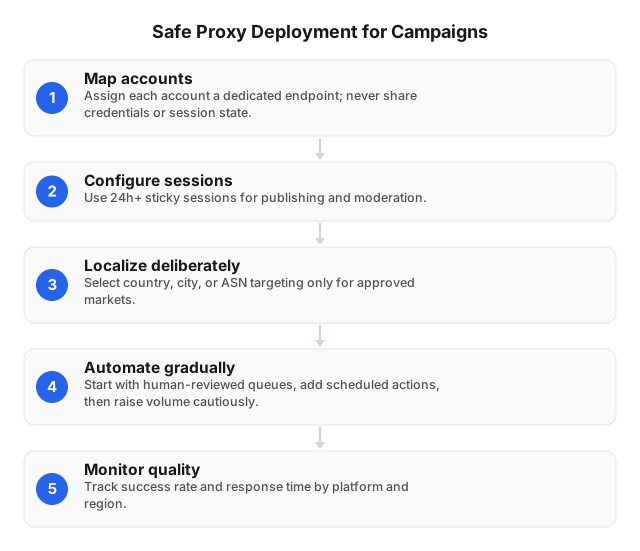
Where Proxies Add Campaign Capacity
A proxy gives a campaign worker a controlled public IP and network route. Agencies use this separation to keep authorized accounts in stable regional environments, validate country-specific customer journeys, and prevent every client account from sharing one office IP.
For example, an agency managing 30 client accounts across Canada, the United Kingdom, and Germany can assign each account:
- One sticky proxy session in the account’s legitimate market
- One browser profile with matching language and time zone
- One credential record stored in a secrets manager
- One queue slot that blocks overlapping authenticated jobs
- One audit trail recording the operator, action, session, and result
The proxy does not increase platform permissions. If an official API allows 100 requests per minute, using 20 IPs does not authorize 2,000 requests per minute. Rate limits, account permissions, advertising policies, and automation rules still apply.
Estimate capacity from observed results:
successful actions/hour = active accounts × allowed actions/account/hour × success rate
With 20 accounts, six permitted actions per hour, and a 95% pilot success rate, expected throughput is 114 successful actions per hour. Increase only one variable—accounts, countries, workers, or frequency—per release so failures remain attributable.
What Proxies Do—and Do Not Change
A proxy changes the destination-visible IP address and route. It does not change cookies, GPS data, browser fingerprints, account history, device settings, permissions, or user behavior.
A Canadian IP combined with an Asia/Singapore time zone, GBP landing-page prices, and concurrent German logins creates contradictory signals. Rotating the IP cannot repair that setup; align the browser profile, schedule, regional settings, recovery ownership, and network location.
| Proxy type | Best-fit campaign task | Operational trade-off |
|---|---|---|
| Residential | Localized page checks and authorized accounts needing consumer-network routing | Video, image feeds, and repeated page loads increase per-GB costs |
| ISP | Long-lived account sessions requiring a consistent endpoint | Country, city, and carrier inventory may be narrower |
| Datacenter | Approved API calls and infrastructure tasks | Hosting-network IPs may receive different treatment from consumer IPs |
| Rotating residential | Permitted unauthenticated localization tests or public-data collection | IP changes can interrupt authenticated sessions |
No proxy guarantees account acceptance or prevents enforcement.
Production Deployment in Five Steps
1. Create an account registry
Document every account before connecting it to a proxy.
| Field | Example |
|---|---|
| Account owner | Canadian client marketing team |
| Legitimate market | Canada |
| Proxy session | CA-Brand-03 |
| Browser profile | Browser-CA-03 |
| Time zone | America/Toronto |
| Permitted tasks | Publishing, moderation, reporting |
| Authorized operators | Operator A, Operator B |
| Recovery owner | Client administrator |
Store passwords, proxy credentials, tokens, and recovery codes in a secrets manager—not spreadsheets, chat messages, or task tickets.
2. Bind the account to one environment
Keep the same proxy session from login through logout. All authorized operators should enter through the account’s assigned environment rather than alternating among office, home, mobile, and proxy connections.
HTTP(S) works for most browsers, web tools, and APIs. SOCKS5 supports applications requiring broader traffic routing. Verify that the sticky-session duration exceeds the longest task: a 10-minute session is unsuitable for a 45-minute moderation shift.
3. Match the legitimate campaign region
Select the country before opening an authenticated session. Match the profile’s time zone, language, currency, publishing schedule, landing page, and required disclosures to that market.
EProxies offers 72M+ residential IPs across 195+ countries, but network-wide coverage does not imply equal city, carrier, or concurrent-session capacity everywhere. Test every priority market using the workflow in How to Set Up Geo-Targeted Ad Campaigns with Proxies.
4. Run a seven-day pilot
Start with three accounts in one country at their normal posting frequency. Record:
- Login, publishing, and reporting success rates
- Median and 95th-percentile latency
- HTTP status codes and application errors
- Returned proxy country
- IP changes during authenticated sessions
- Verification prompts or account challenges
- Data transferred per completed workflow
Each event should include the account ID, operator or worker, proxy session, region, action, timestamp, duration, and result. This data separates proxy timeouts from expired tokens, platform outages, account restrictions, and publishing-tool defects.
Set launch gates before testing. Stop expansion if an authenticated session changes IP unexpectedly, location checks fail, or the same publishing error survives a full diagnostic cycle.
5. Expand one dimension at a time
Use a controlled sequence:
- Pilot three accounts in one country.
- Expand to ten accounts without increasing frequency.
- Add a second country after the first cohort remains stable.
- Add workers while retaining one active job per account.
- Raise scheduled volume only within documented platform limits.
Changing countries, tools, account count, and posting volume in one release destroys useful failure attribution.
Queue, Retry, and Stop Controls
Assign proxies through a central queue instead of embedding endpoint credentials in scripts. A worker loads the account’s fixed session, executes one authorized job, records the response, and releases the account after completion.
Apply these controls:
- Permit one active authenticated job per account.
- Set separate concurrency caps by platform, account group, and region.
- Use exponential backoff with jitter for timeouts and temporary 5xx errors.
- Allow no more than two retries after the initial attempt.
- Honor HTTP 429 responses and official rate-limit headers.
- Never auto-retry invalid credentials, HTTP 403 responses, or verification prompts.
- Route recovery and security notices to a human operator.
- Prefer official APIs for publishing, analytics, and moderation.
If a publishing job fails ten times in one minute, changing IPs after every failure removes diagnostic continuity and may increase scrutiny. Preserve the first and final responses, pause the account, and test the platform, tool, worker, and proxy separately. Apply the same controls to integrations described in Proxies for Scaling Secure API Calls: 2026 Guide.
Validate Geo-Targeted Campaigns
Geo-targeting uses location criteria—such as country, city, or radius—to control campaign delivery or localized content. The advertising platform selects the audience; a proxy only helps an authorized operator inspect the experience from a chosen network region.
For three European and North American campaigns:
| Campaign | Proxy region | Profile time zone | Pre-launch checks |
|---|---|---|---|
| UK | United Kingdom | Europe/London | GBP price, UK inventory, local terms, redirect |
| Canada | Canada | America/Toronto | CAD price, local inventory, bilingual requirements |
| Germany | Germany | Europe/Berlin | EUR price, consent flow, German disclosures |
Verify the returned country before login, then inspect currency, inventory, redirects, scheduled publishing time, UTM parameters, consent notices, and landing-page availability. Use official ad libraries or authorized analytics for competitor and market research; a proxy should not bypass authentication, access controls, or collection restrictions.
A regional proxy is one observation point, not proof of universal delivery. Mobile carrier routing, language settings, audience attributes, cached content, and advertising-platform decisions can produce different results within the same country.
Evaluate Provider Reliability and Cost
Test the countries, protocols, applications, and session lengths required in production. A large global pool has little value if the two cities central to a campaign cannot sustain stable sessions.
| Criterion | Practical test | EProxies specification |
|---|---|---|
| Coverage | Confirm successful sessions in every campaign country | 72M+ residential IPs across 195+ countries |
| Protocol support | Connect each browser, API client, and publishing tool | HTTP(S) and SOCKS5 |
| Session stability | Run a task longer than the expected moderation or publishing shift | Sticky routing subject to plan terms |
| Reliability | Measure availability and p95 latency from each worker region | 98.2% published uptime; 99.9% uptime SLA |
| Residential cost | Calculate GB per completed workflow, including media | Pay-as-you-go from $0.25/GB; tiered pricing around $0.73/GB at 300GB |
| ISP cost | Compare monthly endpoint cost with residential traffic use | ISP SOCKS5 from $0.95/IP |
| Fixed-budget use | Check concurrency and fair-use terms | Unlimited plans from $79/month |
| Support | Submit a routing and authentication test ticket | Verify response quality before launch |
The 98.2% figure is a published operating metric, while the 99.9% SLA is a contractual commitment with defined measurement windows, exclusions, and remedies. Review both rather than treating them as interchangeable.
Measure cost per completed workflow, not headline price per GB. If a media-heavy review consumes 250 MB, four runs use roughly 1 GB; an ISP endpoint may cost less for an account used daily, while residential traffic can suit intermittent country checks. Use the procurement tests in Guide to Choosing the Best Proxy for Your Needs: 2026.
Failure Triage
| Symptom | Likely layer | First action |
|---|---|---|
| Proxy authentication fails | Credentials, endpoint, or subscription | Test the proxy outside the campaign tool |
| Returned country is wrong | Targeting configuration or inventory | Stop before account login |
| Login prompts increase | Account, device, operator, or IP change | Pause work and compare recent changes |
| Publishing times out | Platform, tool, worker, or route | Compare platform status with proxy latency |
| HTTP 429 | Platform or API rate limit | Reduce frequency; do not rotate around it |
| Repeated HTTP 403 | Permission, policy, or account state | Stop retries and review authorization |
| One account repeatedly fails | Account-specific state | Isolate it and inspect its audit trail |
| One region fails across accounts | Regional route or destination issue | Pause the region and test a known-good endpoint |
Do not replace an IP automatically after an account restriction. That action can erase evidence needed for incident analysis and may conflict with platform rules. Additional safeguards appear in Best Practices for Using Proxies in Social Media 2026.
FAQ
What are the risks of using proxies for social media?
Risks include account challenges, credential exposure, region mismatches, interrupted sessions, unexpected bandwidth charges, and violations of platform terms or privacy law. Use authorized accounts, encrypted protocols, stable per-account sessions, bounded retries, and audited operator access. Never use a proxy to bypass bans, access controls, or rate limits.
How do proxies help in scaling social media campaigns?
Proxies assign stable regional routes to authorized accounts and let controlled workers validate localized prices, redirects, inventory, and disclosures in parallel. A central queue preserves a 1:1 mapping among each account, browser profile, credential set, and proxy session. This increases operational capacity, not the action volume permitted by the platform.
How can I automate social media tasks with proxies?
Map each authorized account to a persistent proxy session and process approved actions through a queue with one active authenticated job per account. Use official APIs where available, apply exponential backoff only to transient failures, and stop on authentication challenges, HTTP 403 responses, or verification prompts.
What is geo-targeting in social media campaigns?
Geo-targeting configures campaign delivery, content, or testing for a defined location such as a country, city, postal area, or radius. A proxy can help verify localized landing pages, currencies, inventory, consent flows, and redirects from a selected network region. The social platform—not the proxy—still determines which audience receives the advertisement.
How to choose a reliable proxy provider?
Test the provider in every required country for returned-location accuracy, session stability, p95 latency, protocol compatibility, concurrency, support response, and cost per completed workflow. Review IP sourcing, authentication controls, data-retention terms, SLA exclusions, and refund or service-credit remedies before connecting production accounts. Follow the Guide to Choosing the Best Proxy for Your Needs: 2026 and run a seven-day pilot.
Should social media accounts use rotating or sticky proxies?
Use sticky sessions for login, publishing, moderation, reporting, and inbox work because these tasks require network continuity. Reserve rotation for permitted, unauthenticated localization checks or public-data collection that does not depend on account state.
Can a proxy prevent account bans?
No. A proxy changes the visible IP address and route but cannot override platform policies, permissions, device signals, rate limits, or account history. Stable routing reduces accidental network changes; it does not guarantee account safety.
Is proxy-based social media automation legal?
Legality depends on jurisdiction, authorization, personal-data handling, and the automation or collection method. Platform terms may prohibit conduct that is not otherwise unlawful, so obtain client permission, minimize personal-data processing, protect credentials, and prefer official APIs. Review the Legal Boundaries of Proxy Server Usage in 2026 before deployment.
This article was written by the EProxies team and reviewed against our editorial quality standards before publishing.