
How to Set Up Mobile Proxies for Localized Marketing
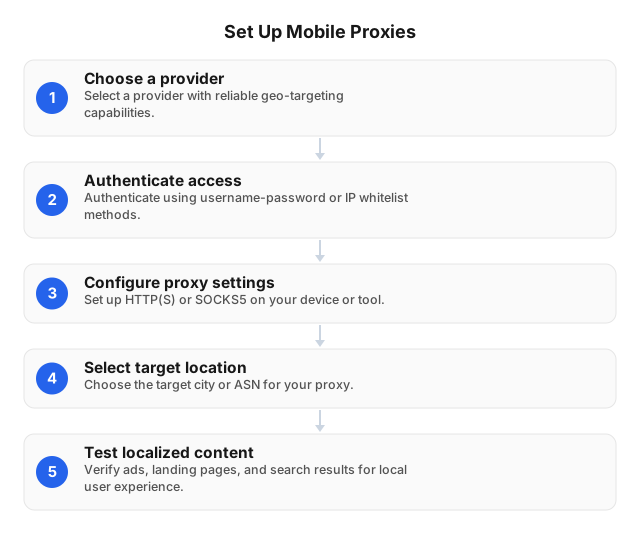
TL;DR: To set up mobile proxies for localized marketing, choose a provider with reliable geo-targeting, authenticate via username-password or IP whitelist, configure HTTP(S) or SOCKS5 on your device or tool, select the target city/ASN, and test that ads, landing pages, and search results appear as they would for local users.
Mobile proxies route your traffic through IPs associated with real mobile networks, helping marketing teams validate local ad delivery, regional pricing, landing page localization, and campaign visibility across markets. For compliant localized marketing workflows, the goal is not to evade rules—it is to see user experiences accurately by geography, carrier, and device context while respecting platform terms, privacy laws, and applicable regulations. This guide explains the practical setup process, where mobile proxies fit compared with other proxy types, and how to troubleshoot common configuration issues.
Introduction to Mobile Proxies for Localized Marketing
Mobile proxies route your traffic through IP addresses associated with real mobile networks, which often makes them high-trust IPs for testing how campaigns appear to users in specific locations. For localized marketing, that matters: ad copy, landing pages, prices, SERP layouts, app experiences, and carrier-specific placements can all change by city, region, network, or device context.
What marketers use them for
- Local ad verification: Check whether ads display correctly in target regions and across mobile environments.
- Geo-specific content review: Access permitted local versions of pages, offers, and search results without relying on a single office IP.
- Campaign QA before launch: Validate tracking links, redirects, language, currency, and landing-page personalization.
- Market research: Compare public, location-dependent content in a compliant and repeatable way.
Setting up mobile proxies can significantly improve ad targeting accuracy in specific regions because your tests better reflect the network conditions and location signals real users may have. They can also be configured across iOS, Android, and desktop environments, making them useful for both hands-on QA and automated marketing workflows.
For teams that need broad geographic coverage, EProxies offers 72M+ residential IPs across 195+ countries, with city- and ASN-level targeting, HTTP(S)/SOCKS5, and rotating or sticky sessions for localized testing workflows. Always use proxies responsibly, follow platform terms, and respect applicable privacy laws.
Understanding Mobile Proxies and Their Benefits
What a mobile proxy does at the network layer
A mobile proxy routes your traffic through an IP address associated with a real mobile carrier network, typically 4G or 5G. Instead of a request appearing from your office, cloud server, or home Wi-Fi, the destination site sees a carrier-assigned mobile IP tied to a specific region or network. That is why mobile proxies are often considered high-trust IPs for localized marketing workflows.
For marketers, the value is practical: you can view region-specific search results, landing pages, ads, pricing, and mobile experiences as local users may see them—provided your activity follows site terms and applicable laws.
Key benefits for localized marketing
- More accurate local ad QA: Check whether campaigns display correctly in target cities, regions, or carrier environments.
- Better geo-context testing: Validate localized copy, offers, currency, language, and landing-page redirects.
- Device flexibility: Mobile proxies can be configured on iOS, Android, and desktop browsers or tools that support HTTP(S) or SOCKS5.
- Session control: Rotating sessions help distribute research requests, while sticky sessions are useful for testing checkout flows or multi-step funnels.
- Granular targeting: With providers that support city- and ASN-level targeting, teams can test campaigns closer to real audience conditions.
EProxies supports HTTP(S), SOCKS5, rotating and sticky/static sessions, city- and ASN-level targeting, and a 72M+ residential IP pool across 195+ countries—useful when mobile-like localization testing is part of a broader proxy strategy. For a broader comparison, see this overview of proxy server types.
Why Use Mobile Proxies for Localized Marketing?
Validate what local users actually see
Mobile proxies route traffic through IPs associated with real mobile networks, which are often treated as high-trust compared with datacenter IPs. For localized marketing, that matters when you need to check:
- Whether ads render correctly in a target city or country
- Which landing page, currency, language, or promotion appears
- How search results, social placements, or app experiences vary by location
- Whether carrier-specific mobile campaigns display as intended
This can significantly improve ad targeting accuracy in specific regions because your QA process more closely reflects the environment of local mobile users.
Improve geo-specific campaign testing
Localized marketing depends on precise context. City-level targeting helps teams test neighborhood-level offers, local SERP visibility, regional pricing, and compliance disclosures without relying on screenshots from remote contractors. EProxies supports city- and ASN-level targeting, rotating and sticky/static sessions, and HTTP(S) or SOCKS5 connections, making it practical to maintain a consistent local session when reviewing ads, funnels, or localized content.
Support compliant access to local content
Mobile proxies can help marketers access region-specific content for legitimate testing, ad verification, and market research. Use them responsibly: follow platform terms, avoid unauthorized access, and respect privacy laws such as GDPR and CCPA.
For broader localized coverage, EProxies offers 72M+ residential IPs across 195+ countries, including deep country pools such as the US, UK, Germany, France, and Canada. Mobile proxy configurations can also be applied across iOS, Android, and desktop workflows, depending on your campaign QA stack.
Step-by-Step Guide to Setting Up Mobile Proxies
1. Define the local marketing target
Choose the exact market you need to test: country, city, carrier/ASN, language, and device type. For localized ad QA, city-level targeting helps confirm that landing pages, prices, creative, and search results match the intended region.
2. Select proxy parameters
In your proxy dashboard, configure:
- Location: country or city; EProxies supports city- and ASN-level targeting across 195+ countries.
- Protocol: HTTP(S) for browsers and most marketing tools; SOCKS5 for apps needing broader traffic handling.
- Session type: rotating sessions for distributed research; sticky/static sessions of 24h+ for login-based ad platforms or consistent local testing.
- Authentication: username-password for quick setup, or IP whitelist for team environments.
3. Generate the proxy endpoint
Copy the host, port, username, and password. For campaigns in larger markets, verify pool depth before scaling; EProxies lists roughly 5.6M US, 1.9M UK, 1.4M Germany, 1.3M France, and 1.0M Canada residential IPs.
4. Configure your device or tool
Mobile proxies can be configured on iOS, Android, and desktops through Wi-Fi proxy settings, browser profiles, anti-fraud testing tools, or ad verification platforms.
5. Validate before launch
Check IP location, load speed, and session persistence. EProxies’ published 2026 specs report 99.95% success rate and under 0.6s response time, but always test against your own marketing stack before scaling.
Configuring Mobile Proxies for Different Devices
iOS: test mobile landing pages and local ad flows
- Go to Settings → Wi‑Fi → tap the “i” icon → Configure Proxy.
- Select Manual, then enter your proxy host, port, and username/password if required.
- Save, open Safari, and verify your apparent location with an IP lookup tool.
- For localized marketing QA, match the proxy location to the campaign market—city-level targeting is especially useful when checking local pricing, store availability, or ad creative.
Android: validate regional mobile experiences
- Open Settings → Network & Internet → Wi‑Fi → Modify Network.
- Expand Advanced options, set Proxy to Manual, and enter the proxy host and port.
- Add authentication in the browser or app if prompted.
- Use sticky sessions when testing multi-step flows, such as sign-up forms or checkout paths, so the session remains consistent.
Desktop: configure browsers or marketing tools
- Chrome/Edge: use system proxy settings or a trusted proxy extension.
- Firefox: go to Settings → Network Settings → Manual proxy configuration.
- Automation tools: configure HTTP(S) or SOCKS5 directly in the tool’s network settings.
EProxies supports HTTP(S) and SOCKS5, username-password or IP whitelist authentication, and rotating or sticky/static sessions lasting 24h+, which helps marketers test local content access, ad placement, and regional UX responsibly across multiple devices.
Best Practices for Using Mobile Proxies in Localized Marketing
1. Match proxy location to the campaign footprint
Use city-level targeting when testing local landing pages, SERPs, pricing, store availability, or ad creative. For example, a campaign in Chicago should be checked from a Chicago-aligned IP—not just a US IP—because local content, maps, and ad placements can vary by metro area.
2. Use the right session type
- Rotating sessions: best for broad QA, market research, and checking many local variations without overloading one IP.
- Sticky/static sessions: better for logged-in workflows, ad dashboards, cart testing, or multi-step journeys. EProxies supports rotating and sticky/static sessions lasting 24h+.
3. Keep device testing realistic
Mobile proxies provide high-trust IPs associated with real mobile networks, making them useful for localized marketing checks. Since proxies can be configured on iOS, Android, and desktops, test both the proxy location and the actual device experience before launching budget-heavy campaigns.
4. Respect legal, platform, and site rules
Use proxies to improve localization testing, ad verification, and compliant public data collection—not to evade access controls or violate terms. GDPR, CCPA, contract law, and the CFAA may apply depending on your workflow.
5. Monitor cost and performance over time
Track GB usage, success rate, response time, and conversion impact by market. EProxies supports HTTP(S) and SOCKS5, city- and ASN-level targeting, and a 72M+ residential IP pool across 195+ countries, with published specs of 99.95% success rate and under 0.6s response time.
Common Challenges and How to Overcome Them
1. Location mismatch in local ad checks
If your proxy shows the wrong city, your campaign QA can produce misleading results. Use city-level targeting when validating localized landing pages, SERP placement, store availability, and mobile ad creatives. For tighter routing, combine city targeting with ASN-level targeting when carrier or network context matters.
2. Session instability during testing
Localized marketing workflows often need both fresh IPs and continuity. Use rotating sessions for broad regional sampling, but switch to sticky/static sessions when testing cart flows, account dashboards, or multi-step ad verification. EProxies supports rotating and sticky/static sessions lasting 24h+, which helps reduce failed journeys caused by mid-flow IP changes.
3. Authentication errors
Most setup issues come from incorrect credentials, protocol mismatch, or whitelist conflicts.
- Confirm whether the app needs HTTP(S) or SOCKS5.
- Recheck username-password formatting.
- If using IP whitelist authentication, verify your office/VPN IP has not changed.
- Test one device first, then roll out to iOS, Android, and desktop configurations.
4. Slow response or inconsistent results
Mobile proxies provide high-trust IPs that are ideal for localized marketing, but performance still depends on target site load, geography, and session settings. Start with nearby city targets, avoid unnecessary concurrent requests, and monitor response trends. EProxies’ published 2026 performance spec reports a 99.95% success rate and under 0.6-second response time.
5. Compliance and access boundaries
Use proxies for authorized localization testing, ad verification, and public market research. Respect site terms, privacy laws, and platform rules when accessing local content effectively.
Related reading
FAQ
What are mobile proxies and how do they work?
Mobile proxies route your internet traffic through IP addresses assigned by mobile carriers, typically on 4G or 5G networks, so websites see the request as coming from a mobile-network user in a specific region. At the network layer, your device or browser sends traffic to a proxy gateway, the gateway forwards the request through a carrier-assigned IP, and the target site returns content based on that IP’s location, ASN, device signals, and session behavior. They are commonly used for mobile ad verification, localized search testing, app testing, and checking how campaigns appear across regions or carriers.
How can mobile proxies enhance localized marketing efforts?
Mobile proxies help marketers view search results, ads, landing pages, pricing, and app experiences as users would see them from a target city, region, or carrier network. This is useful for confirming that localized campaigns display the right creative, language, currency, store availability, and geo-specific offers. For broader localized testing, residential proxy networks with city- and ASN-level targeting can also support compliant market research across many locations; EProxies, for example, offers 72M+ residential IPs across 195+ countries with HTTP(S), SOCKS5, rotating sessions, and sticky/static sessions of 24h+.
What are the steps to set up mobile proxies for different devices?
On iPhone or iPad, go to Wi-Fi settings, tap the active network, choose proxy configuration, enter the proxy host, port, and username-password credentials if required, then save and test your IP location in a browser. On Android, open the current Wi-Fi network’s advanced settings, set the proxy to manual, add the host and port, authenticate if prompted, and confirm that traffic is resolving from the intended location. On desktop, configure the proxy in your browser, operating system network settings, or a proxy manager using HTTP(S) or SOCKS5 details; if your provider supports IP whitelist authentication, whitelist your office or server IP before connecting.
What are the best practices for using mobile proxies in marketing?
Match the proxy location to the campaign market you are testing, use sticky sessions when you need a stable local view, and use rotation when you need broader sampling across locations or networks. Keep request rates reasonable, respect site terms, avoid collecting sensitive personal data without a lawful basis, and account for privacy frameworks such as GDPR and CCPA where applicable. For long-term costs, compare traffic-based pricing, session requirements, and location availability; EProxies’ residential plans start from $0.25/GB on pay-as-you-go, with larger tiers available, while ISP SOCKS5 starts from $0.95/IP and unlimited plans start from $79/month.
What challenges might arise when using mobile proxies and how can they be addressed?
Common setup issues include incorrect host or port entries, failed authentication, unsupported protocol selection, DNS leaks, or a mismatch between the selected location and the campaign region. Fix these by verifying credentials, confirming whether the application needs HTTP(S) or SOCKS5, testing in a clean browser profile, checking IP whitelist settings, and using a stable session when logging into dashboards or reviewing localized ad previews. Performance can also vary by target site and network conditions; industry benchmarks in 2025 found residential proxy median response times of 0.93s on stable infrastructure and 4.63s on real-world target sites, so marketers should monitor latency, success rate, and session consistency during testing.
Are free mobile proxies suitable for localized marketing?
Free mobile proxy options exist, but they often come with limited location control, unstable performance, unclear sourcing, weak privacy protections, or crowded IP usage. For serious localized marketing, paid proxy infrastructure is usually more appropriate because it provides authentication, targeting controls, support, and more predictable availability. Always evaluate whether the proxy source is legitimate and whether the intended use complies with website terms and applicable laws.
Are mobile proxies legal to use for marketing?
Using proxies is not illegal by itself, but legality depends on what you do with them, the data you access, the contracts or terms that apply, and the jurisdictions involved. Public web data collection may be lawful when done correctly, but unauthorized access, ignoring access controls, violating terms of service, or mishandling personal data can create legal risk under frameworks such as the CFAA, GDPR, CCPA, and contract law. For marketing use cases, proxies should be used for compliant localization testing, ad verification, QA, and market research—not to misrepresent identity, overload services, or access restricted systems.
This article was written by the EProxies team and reviewed against our editorial quality standards before publishing.