
Step-by-Step Guide to Set Up a Proxy Server in 2026
TL;DR: This step-by-step guide to set up a proxy server covers deploying proxy software, restricting access to authorized users and networks, configuring clients, and verifying that traffic follows the intended route.
For IT professionals managing organizational networks, configuring a device’s proxy settings is not the same as installing a proxy server: the device still needs a reachable, secured proxy endpoint. This walkthrough separates those tasks across Windows, macOS, and Linux, compares manual configuration with automated deployment, and explains how to diagnose authentication failures, connection errors, and applications that ignore proxy settings.
Introduction to Proxy Servers
A proxy server is an intermediary that receives client requests and forwards them to destination services on the client’s behalf. For organizational networks, it can enhance security by placing an access-control point between users and external resources. A secure proxy requires enforced access rules; routing traffic through an intermediary alone does not establish a security boundary.
Separate the server from client settings
Client settings identify the proxy endpoint that a device should use. Hosting that endpoint is a separate task involving software such as Squid, server configuration, and authentication.
Before implementation, define:
- Traffic scope: Which applications and destinations should use the proxy?
- Access boundary: Which managed devices or authenticated users may connect?
- Deployment ownership: Who maintains the server, credentials, and client configuration?
Treat these as deployment inputs. A browser configured with a proxy address is not evidence that every application on the device follows the same route.
Benefits of Using a Proxy Server
With that scope established, proxy servers give IT teams a central point for controlling outbound web access, recording requests, and applying authentication before traffic leaves the organizational network. The main benefit is enforceable access policy—not automatic anonymity or faster browsing.
Authentication connects proxy access to authorized users; network access rules restrict which devices may connect. Together, these controls reduce the risk of operating an open proxy. Request logs support troubleshooting and investigations, but retention periods and access permissions should reflect employee privacy obligations.
Caching can reduce repeated downloads of cacheable content. Do not assume equivalent savings for encrypted traffic: HTTPS tunneling through CONNECT does not normally expose response content for caching, and inspection introduces certificate-management and privacy obligations.
Putting these benefits into practice requires platform-specific client configuration and application-level verification. The following sections cover Windows and macOS client settings, then Linux server deployment.
Setting Up a Proxy Server on Windows
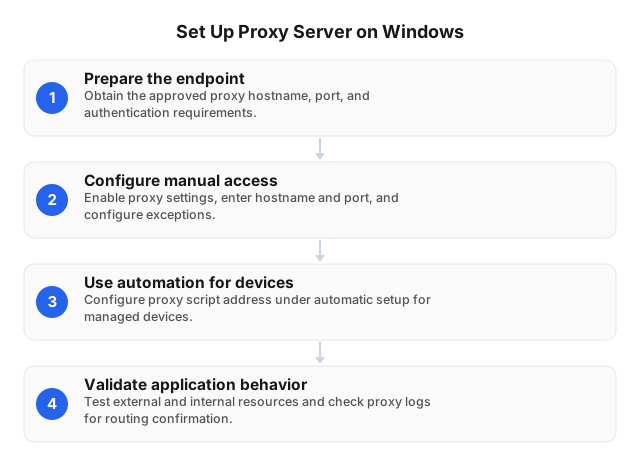
Windows client configuration starts in Settings > Network & internet > Proxy, where administrators can enter a proxy endpoint manually or supply an automatic configuration script. Have the endpoint ready before rolling settings out across organizational devices.
- Prepare the endpoint details. Obtain the approved proxy hostname, listening port, authentication requirements, and internal-address exceptions from your network administrator. Confirm that the proxy permits connections from the intended client network.
- Configure manual access. Under Manual proxy setup, select Set up beside Use a proxy server. Enable the setting, enter the hostname and port, configure approved exceptions, and save. Avoid exceptions that unintentionally send organizational traffic directly.
- Use automation for managed devices. Distribute approved settings consistently through automated tools. If your organization supplies a proxy configuration script, enter its address under automatic setup.
- Validate application behavior. Test an external destination and an internal resource. Check proxy logs to confirm routing and verify authentication before expanding deployment.
Setting Up a Proxy Server on macOS
On macOS, proxy settings apply to a selected network service. Open System Settings > Network > Wi-Fi or Ethernet > Details > Proxies to enter an endpoint manually or supply a proxy auto-configuration (PAC) URL.
- Prepare the connection details. Obtain the approved hostname, port, protocol, and authentication requirements from your network administrator. Record the current settings before changing them so you can restore connectivity.
- Configure manual access. Open Proxies, enable the required Web Proxy (HTTP), Secure Web Proxy (HTTPS), or SOCKS Proxy option, and enter its hostname and port. Enable authentication if required; avoid sharing individual credentials.
- Configure automated access. Enable Automatic Proxy Configuration and enter your organization’s approved PAC URL. Use managed device configuration for fleet deployment rather than asking employees to edit settings.
- Apply and verify. Save changes and test external and internal resources. If access fails, check endpoint reachability, credentials, and bypass entries; restore the previous settings while investigating to limit network disruption.
Setting Up a Proxy Server on Linux
Unlike the client configuration above, this Linux walkthrough deploys the endpoint itself: install Squid, restrict access to authorized networks, and test requests from a client. Enforce access restrictions before starting the service.
- Install Squid on Debian or Ubuntu.
sudo apt update sudo apt install squid sudo cp /etc/squid/squid.conf /etc/squid/squid.conf.backup - Restrict clients in
/etc/squid/squid.conf. ReplaceYOUR_LAN_CIDRwith your authorized subnet. Preserve the packaged safe-port restrictions; replace existing client-access grants with:acl corporate_clients src YOUR_LAN_CIDR http_access allow corporate_clients http_access deny all
Rule order matters: Squid evaluates access rules from top to bottom. - Validate and start.
sudo squid -k parse
sudo systemctl enable --now squid
sudo systemctl reload squid
Restrict the listening port to approved clients in the host firewall. - Test from an authorized Linux client.
curl --proxy PROXY_HOST:PROXY_PORT example.org
Confirm unauthorized clients are denied. Review/var/log/squid/access.logfor failures; protect logs because they expose browsing metadata.
Automated Proxy Server Setup Tools
Once the server and client configurations work, automation can make deployment repeatable. Keep server provisioning and client configuration as separate workflows. Choose automation that validates configuration before deployment and preserves a rollback path, rather than scripts that overwrite live settings without checks.
| Tool or approach | Recommended role | Deployment safeguard |
|---|---|---|
| Configuration management, such as Ansible | Define Linux package installation, Squid configuration, authentication, and service state as repeatable tasks. | Validate the candidate configuration before reloading; retain the previous file. |
| PowerShell deployment scripts | Apply approved Windows proxy settings through your endpoint-management workflow. | Verify settings in the intended user and application context. |
| Managed device profiles | Distribute supported proxy settings to macOS and mobile endpoints. | Pilot on enrolled devices before fleet deployment. |
| Proxy auto-configuration (PAC) file | Centralize client routing rules without editing each endpoint manually. | Test internal destinations, external destinations, and proxy outages; explicitly approve any direct-connection fallback. |
Keep configuration templates version-controlled and credentials out of scripts and repositories. Treat configuration changes as reviewed deployments with access checks and rollback tests.
Troubleshooting Common Proxy Server Issues
Whether settings are deployed manually or automatically, troubleshooting starts by isolating the failing layer: client configuration, network reachability, authentication, or upstream access. Test from one affected client and correlate the request with proxy logs before changing shared settings. A missing log entry points toward client routing or connectivity; a recorded denial directs investigation toward authentication or access policy.
Connection failures
Confirm the proxy service is running and listening on the configured interface. Check firewall rules between the client and proxy without opening access to public networks. On Windows, inspect the proxy settings for an incorrect address or conflicting configuration.
Authentication and policy errors
Verify credentials, client source addresses, and access-rule ordering. If requests traverse NAT, compare the address recorded by the proxy with the allowlist. Keep authentication enabled while diagnosing denials.
TLS errors and slow requests
Check certificate trust and hostname matching; do not disable certificate validation. Compare approved requests through the proxy with direct requests where policy permits. Separate connection delays from upstream response delays, and redact credentials before sharing logs.
Related reading
For further detail on Linux deployment and curl certificate-error handling:
FAQ
How do I manually set up a proxy server?
Manually deploy a proxy by updating the host, installing Squid, configuring its listener and access rules, enabling authentication, and pointing authorized clients to its address and port. Restrict access before exposing the listener so the server does not become an open proxy.
What are the benefits of using a proxy server?
A proxy server gives an organization a central point for controlling supported outbound requests, recording access activity, and caching eligible content. Applications that ignore configured settings remain outside that policy path unless separately controlled. Encrypted traffic also limits content visibility unless an explicitly approved inspection mechanism is deployed; proxy access alone does not provide malware protection.
How do I troubleshoot proxy server issues?
Troubleshoot proxy failures by checking client settings, network reachability, authentication, access rules, and server logs in that order. Compare the same permitted request from the affected client and a known-working client to distinguish device configuration errors from server-side failures. Investigate certificate errors separately from connection failures.
Can I automate proxy server setup?
Yes—configuration-management tools can automate server installation and policy deployment, while endpoint-management tools can distribute client settings. A PAC file selects routing behavior; it does not install or secure the server, and applications may differ in whether they honor it.
What is the role of a proxy server in a network?
A proxy server is an intermediary that receives client requests and forwards permitted traffic to destination services under an organization’s access policy. A forward proxy serves outbound clients, while a reverse proxy sits in front of hosted services. An explicit forward proxy is not a network-wide tunnel: unmanaged applications and unsupported protocols require separate routing or enforcement controls.
This article was written by the EProxies team and reviewed against our editorial quality standards before publishing.