
How to Ignore SSL Errors With curl in 2026
TL;DR: Run curl -k localhost:8443 or curl --insecure localhost:8443 to bypass certificate verification for one diagnostic request. Safer fixes include --cacert, a trusted local development CA, and correcting expired certificates or hostname mismatches. Never use the bypass for production traffic or requests containing secrets.
The https:// prefix matters: curl localhost normally makes an HTTP request, so it does not test TLS certificate verification. With -k, HTTPS traffic remains encrypted, but curl stops verifying the destination server’s certificate chain and hostname.
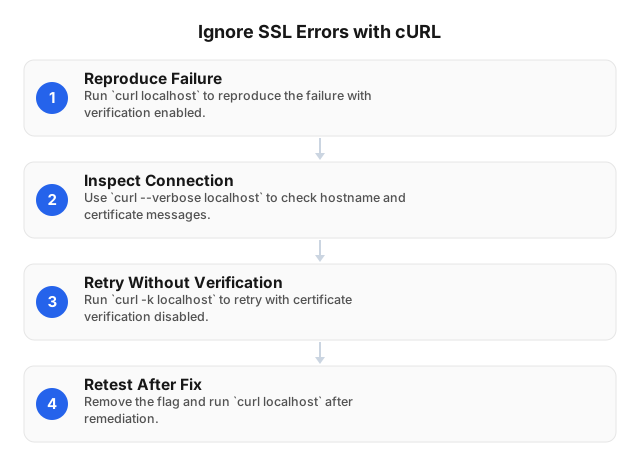
Ignore SSL Errors with cURL: Four Steps
Use a development endpoint you control and a request without authorization headers, cookies, or sensitive payloads.
1. Reproduce the verified failure
curl -q localhost:8443
Keep -q first: it prevents curl’s default configuration file from silently adding options such as insecure. Record the error message and exit code before changing the command.
2. Inspect the connection
curl -q --verbose localhost:8443
curl --version
Verbose output can show certificate failures, proxy use, and CA-file paths, depending on the TLS backend. curl --version identifies that backend—for example, OpenSSL or Schannel—which helps explain differences between machines.
Redact credentials, cookies, and internal hostnames before sharing logs.
3. Make one insecure diagnostic request
curl -q --insecure localhost:8443
The short option is equivalent:
curl -q -k localhost:8443
If only the insecure request succeeds, certificate verification is blocking access. This does not prove that the server is genuine or that its HTTPS configuration is correct.
4. Restore verification and retest
After fixing the certificate or trust configuration, repeat the original command:
curl -q localhost:8443
Keep the verified and unverified commands identical except for -k. Changing the hostname, proxy, and certificate options together makes it harder to identify which change resolved the failure.
Identify the Error Before Choosing a Fix
The error recorded in the first step determines the fix. An “SSL error” can mean certificate verification failed, but it can also mean the TLS handshake failed before verification. -k addresses the former—not every TLS problem.
| Signal | Likely cause | Next action |
|---|---|---|
curl: (60) | Server certificate verification failed | Read the accompanying message: issuer, hostname, and validity failures need different fixes |
curl: (77) | Curl cannot use the configured CA certificate file | Check the file path, permissions, and PEM format |
curl: (35) | TLS connection or handshake failed | Inspect TLS versions, server configuration, and proxy behavior |
| “unable to get local issuer certificate” | Missing intermediate or untrusted issuing CA | Check the server chain and the client’s CA bundle |
| “certificate has expired” | Expired certificate or incorrect client clock | Check the clock; renew the certificate if necessary |
| Hostname mismatch | Requested name is absent from the certificate | Use the correct hostname or reissue the certificate |
A browser succeeding while curl fails often points to different trust stores. Inspect the environment that actually fails: a container or CI runner may lack a CA installed on your laptop.
Do not retry HTTP 403 or 429 responses with -k. Those responses indicate the request reached an HTTP server; changing certificate verification does not fix access restrictions or rate limits.
Safer Alternatives to Ignoring SSL Errors
Once you have identified the cause, keep verification enabled and repair the specific trust failure. Adding a CA certificate fixes missing trust; it does not repair an expired certificate or a hostname mismatch.
Trust a private CA with --cacert
Obtain the CA’s public certificate through an authenticated administrator channel, then provide it explicitly:
curl -q --cacert ./internal-root-ca.pem service.example.test
For a genuinely self-signed server certificate, supply that certificate as the trust anchor:
curl -q --cacert ./dev-server.pem localhost:8443
The certificate must still be valid for the requested hostname. Never copy a CA’s private key to the client; curl needs only the public certificate.
Use a trusted local development CA
For local development, a certificate tool such as mkcert can create certificates covering names like localhost and addresses like 127.0.0.1. Install its development CA into the appropriate local trust store, or supply the CA certificate with --cacert.
Keep that CA limited to development machines. Protect its private key: possession of the key allows someone to issue certificates trusted by those machines.
Correct a hostname mismatch without bypassing verification
If a certificate covers dev.example.test but the service runs locally, preserve that hostname while directing curl to the local address:
curl -q \
  --cacert ./dev-ca.pem \
  --resolve dev.example.test:8443:127.0.0.1 \
  dev.example.test:8443
--resolve changes address resolution while retaining the URL hostname for TLS verification and server-name indication. It does not make an otherwise invalid certificate valid.
Repair the certificate chain or CA bundle
For public services, configure the server to send the leaf certificate and required intermediate certificates. Clients normally obtain trust in the root CA from their own trust store.
If the client’s public CA bundle is outdated, update the OS or container’s ca-certificates package, then verify the fix inside the failing environment.
Separate Destination Errors from HTTPS Proxy Errors
When a proxy is involved, first establish which connection is failing. An HTTPS proxy can introduce two independently verified TLS connections:
- Curl to the HTTPS proxy.
- Curl through the proxy tunnel to the HTTPS destination.
Use the option that matches the failing connection:
| TLS connection | Explicit trust file | Temporary bypass |
|---|---|---|
| Destination server | --cacert | --insecure or -k |
| HTTPS proxy | --proxy-cacert | --proxy-insecure |
For an HTTPS proxy signed by a private CA:
curl -q \
  --proxy proxy.example.test:8443 \
  --proxy-cacert ./proxy-ca.pem \
  destination.example
If the destination also uses a private CA, add --cacert ./destination-ca.pem. Avoid disabling both checks simply because the first request failed.
An http:// proxy does not have a TLS certificate on the curl-to-proxy leg, although the HTTPS destination still does. SOCKS5 also does not provide a separate HTTPS-proxy certificate check.
For EProxies residential connections, use the supplied endpoint and protocol rather than assuming every proxy address should start with https://. See the Guide to Choosing the Best Proxy for Your Needs: 2026 for protocol selection and the Guide to Setting Up a Proxy Server on Linux for configuration steps.
What --insecure Puts at Risk
Whether verification is bypassed for the destination or the HTTPS proxy, encryption without verified identity can connect you securely to the wrong server. An impersonating endpoint can read bearer tokens and request bodies, or return altered JSON and downloads.
Keep these four controls around any temporary bypass:
- Send no secrets: omit credentials, session cookies, and personal data.
- Keep the exception local: do not add
insecureto.curlrc, shared scripts, or container defaults. - Avoid persistent metadata: when HSTS or Alt-Svc caching is enabled, an unverified response can influence later connections through stored entries.
- Require a verified retest: close the issue only after the request succeeds without
-kor--proxy-insecure.
Proxy rotation changes the exit IP; it does not repair certificate trust. For separate IP-based access controls, consult Detecting and Blocking Proxies: 2026 Security Guide.
FAQ
What is an SSL certificate error?
It means curl cannot authenticate the server certificate. Use the error table above to distinguish issuer, expiry, and hostname problems from broader TLS handshake or protocol failures; curl -q --verbose your-host.example provides diagnostic details.
How do I ignore SSL errors in cURL?
Run curl -k localhost:8443 or use the equivalent --insecure option for a controlled diagnostic request. The bypass applies to destination certificate verification; it does not fix TLS protocol incompatibilities or provide a required client certificate.
What are the risks of ignoring SSL errors?
The main risk is server impersonation, with credentials exposed or returned content modified. Restrict insecure tests to controlled endpoints with synthetic data, and follow the safeguards above.
Are there safer alternatives to ignoring SSL errors?
Yes. Choose the repair that matches the failure: --cacert, a trusted development CA, an updated client CA bundle, or corrections to the server certificate, chain, or requested hostname. These fixes preserve authentication rather than merely suppressing the error.
How can I use cURL with self-signed certificates?
Obtain the self-signed public certificate through a trusted channel and run curl --cacert ./dev-server.pem localhost:8443. It must cover localhost and remain within its validity period. If a private CA issued it, supply that CA’s certificate instead.
Why does cURL reject a certificate that my browser accepts?
The failing environment may use a different CA store. Check curl --version and verbose output, then install or explicitly supply the correct CA there—not just on the host running your browser.
Does --insecure also ignore an HTTPS proxy’s certificate errors?
No. Use the HTTPS-proxy options in the table above: prefer --proxy-cacert ./proxy-ca.pem for a private proxy CA, reserving --proxy-insecure for a temporary diagnostic bypass. Specify an https:// proxy URL when testing that TLS connection.
This article was written by the EProxies team and reviewed against our editorial quality standards before publishing.