
Detecting and Blocking Proxies: 2026 Security Guide
TL;DR: Detect proxies with layered evidence: IP intelligence, connection metadata, device continuity, and session behavior. Score the combined risk, challenge uncertain sessions, and block only high-confidence abuse.
Proxy detection should be an operational workflow, not a static IP ban. This guide explains how to collect signals, choose tools, create proportional controls, test rules, and reduce false positives from residential networks, corporate gateways, and privacy relays.
Understanding Proxies and Their Uses
A proxy receives a client request, forwards it from another IP address, and returns the response. It conceals the source IP from the destination, but it does not remove cookies, authentication records, device attributes, or behavioral patterns.
Common deployment models include:
- Forward proxies: Control employee egress, filter destinations, and enforce network policy.
- Reverse proxies: Route inbound requests, terminate TLS, cache content, and protect origin servers.
- Residential proxies: Use consumer-network IPs for localization tests, public-web research, and other authorized workflows.
- Datacenter proxies: Use hosting-provider infrastructure for stable, high-capacity connections.
- Privacy relays: Separate the client IP from request content or destination information.
Attackers also use proxies to conceal command-and-control traffic or route activity through several systems. MITRE ATT&CK documents these uses under its Proxy technique T1090.
Authorized activity should comply with network policy, target-site terms, and applicable legal boundaries.
Why Detecting Proxies Matters for Network Security
A proxy indicator should increase scrutiny, not cause an automatic denial. Corporate gateways, mobile carriers, privacy services, and accessibility tools can all relay legitimate traffic.
Attackers may route credential-stuffing attempts through rotating addresses. This makes per-IP limits less effective because each address produces only a few requests. The OWASP credential-stuffing guidance recommends combining IP intelligence with device, connection, and behavioral defenses.
Proxy detection can strengthen these controls:
- Authentication: Request MFA when a proxy signal coincides with a new device or unusual login sequence.
- Fraud prevention: Link sessions through account, cookie, and device continuity even when IPs change.
- Geographic policy: Review conflicts between IP location, account history, time zone, and transaction data.
- Incident response: Store the proxy classification with the IP, ASN, device ID, account, and timestamp.
This risk-based approach also aligns with NIST’s Zero Trust Architecture, which bases access decisions on multiple contextual signals rather than network location alone.
Common Proxy-Detection Techniques
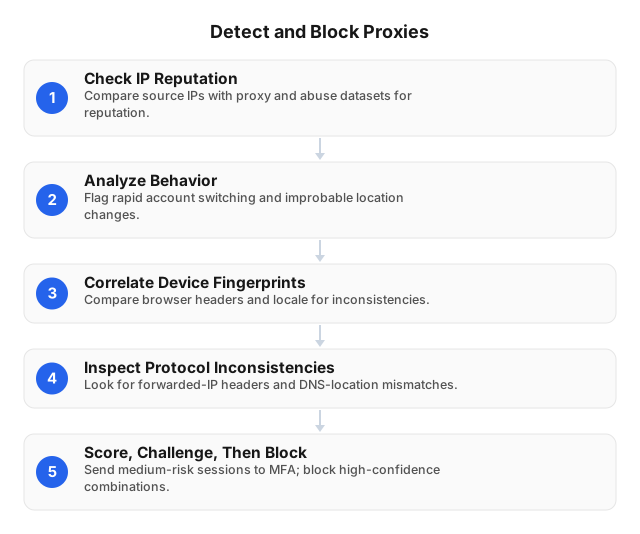
Use at least two independent signal groups before blocking. An IP label plus abnormal account behavior is stronger evidence than either signal alone.
1. Check IP and network intelligence
Classify the source IP by ASN, network type, geolocation, reputation, and observed proxy status. Record the feed timestamp because residential and mobile addresses can change users.
Residential exits require extra care. A 2026 FBI cyber alert on residential proxy networks describes how these networks can use consumer devices and recommends monitoring for related traffic. A residential classification is therefore a review signal, not proof of abuse.
2. Analyze account and request behavior
Measure events within defined windows, such as:
- Ten failed logins against different accounts within 60 seconds
- One account moving between distant regions within an implausible period
- Many accounts repeating the same URL sequence and timing
- One cookie or device identifier appearing across dozens of IPs
- Checkout or account-recovery attempts that exceed the user’s baseline
Use account-level and device-level limits alongside IP limits. Otherwise, rotating traffic can reset the counter on every connection.
3. Correlate device and session evidence
Compare cookie continuity, browser version, operating system, locale, time zone, screen properties, and TLS characteristics. Treat these attributes as probabilistic because browsers update and users can change devices.
For example, a new residential IP is weak evidence by itself. The same IP change becomes more significant when it accompanies a new device, an absent session cookie, a conflicting time zone, and a password-reset attempt.
4. Inspect protocol metadata
Check header structure, HTTP version, TLS properties, DNS behavior, and connection reuse. Do not trust Forwarded or X-Forwarded-For values received directly from an untrusted client. RFC 7239 warns that forwarded information can be modified or lost and may expose sensitive data.
Strip client-supplied forwarding headers at the trusted edge. Then insert values only from infrastructure that your organization controls.
5. Score and enforce
A simple policy might assign:
- 20 points for a known anonymizing network
- 20 points for a new device
- 25 points for impossible geographic movement
- 25 points for high authentication velocity
- 30 points for one device accessing many accounts
Allow low-risk traffic. Apply MFA, CAPTCHA, or rate limits at a medium threshold. Block only when the score and protected action justify denial.
Tools for Proxy Detection
No tool class provides complete coverage. Select tools based on the signal they add and the latency your application can tolerate.
| Tool class | Useful signals | Integration point | Main limitation |
|---|---|---|---|
| IP intelligence API | Network type, ASN, location, proxy status, abuse history | CDN, WAF, identity gateway | Residential and mobile classifications can produce false positives |
| SIEM or network analytics | Rotation, request bursts, account-to-IP patterns | Authentication, DNS, firewall, and application logs | Requires clean identifiers and tuned time windows |
| Device-risk service | Browser, OS, TLS, cookie, and time-zone consistency | Login, checkout, account recovery | Browser changes reduce stability; collection needs privacy review |
| Reverse-proxy or firewall rules | Known exits, egress policy, ports, protocol restrictions | Network or application edge | Lists age quickly; port rules cannot stop proxies using normal HTTPS |
| Identity platform | MFA, session revocation, managed-device checks | Sensitive account actions | Controls identity risk rather than identifying every proxy |
Test candidates with labeled legitimate and abusive sessions. Measure false-positive rate, false-negative rate, lookup latency, analyst review time, and successful user appeals.
Step-by-Step Guide to Blocking Proxies
Start in monitor mode. A blanket ban can lock out remote staff, mobile users, or an office that shares one public IP.
- Define the policy. List prohibited proxy categories, protected applications, approved gateways, exceptions, retention periods, and review owners.
- Normalize telemetry. Send authentication, DNS, firewall, device, and application events to a common store. Use consistent account, session, and device identifiers.
- Protect egress. Allow outbound traffic through approved gateways. Restrict unmanaged tunneling protocols and apply equivalent IPv4 and IPv6 rules.
- Protect forwarding headers. Remove client-supplied values and regenerate them at the trusted reverse proxy.
- Create a risk score. Combine IP classification with device continuity, location changes, request velocity, and account behavior.
- Apply graduated controls. Rate-limit automation, challenge uncertain logins, and deny high-confidence abuse.
- Test exceptions. Verify remote-work VPNs, mobile networks, privacy services, accessibility workflows, and corporate gateways.
- Review performance. Track false positives by ASN, country, network type, rule, and protected action. Expire stale entries.
Teams can also review proxy-blocking techniques and symptoms before changing production rules.
Testing Detection Controls Safely
Test only applications and networks you own or are authorized to assess. Build a matrix that covers residential and datacenter addresses, HTTP(S) and SOCKS5, sticky sessions, rotation, IPv4 and IPv6, and several regions.
EProxies can support this controlled validation with 72M+ residential IPs across 195+ countries and both HTTP(S) and SOCKS5. The service reports 98.2% uptime backed by a 99.9% uptime SLA. Residential access starts at $0.25/GB on pay-as-you-go plans, while ISP SOCKS5 starts at $0.95 per IP.
Record the expected result for every test case. For example, an approved residential session should pass, a high-velocity multi-account login should receive a challenge, and a known abusive endpoint should be denied. The guide to choosing a proxy explains the trade-offs between proxy types.
Challenges and Limitations
Residential proxies can resemble ordinary household traffic because both use consumer-network addresses. Static blocklists may also lag behind address rotation or reassignment.
Shared infrastructure creates the opposite problem. Carrier-grade NAT, office gateways, schools, hotels, and mobile networks can place many legitimate users behind one IP. Blocking that address may affect hundreds of unrelated sessions.
Encryption also limits what an intermediate network sensor can inspect. A sensor that does not terminate TLS can observe connection metadata, but not the encrypted HTTP payload. Application-side telemetry remains available after TLS termination.
Device fingerprints are not permanent identifiers. Browser updates, privacy controls, device replacement, and accessibility settings can change individual attributes. Store only the features required for a documented security purpose, limit retention, and provide an appeal path.
New Technologies and Standards Affecting Detection
As of 2026, the main development is not a universal “proxy detector.” It is the use of richer correlation, privacy-preserving authorization, and managed-device evidence.
Entity graphs
A graph can represent accounts, devices, IPs, payment instruments, and sessions as nodes. Edges record observed relationships, such as one device signing into 30 accounts or several devices following the same request sequence.
Graph models are already used in real-time fraud research. For example, the peer-reviewed BRIGHT framework evaluates graph neural networks for fraud detection. Applied to proxy-assisted abuse, graph features can expose coordinated relationships that per-IP rules miss. They do not prove that a connection used a proxy.
Privacy-preserving authorization
Some systems can verify that a client passed an earlier challenge without storing a stable browsing identifier. The IETF’s Privacy Pass architecture, RFC 9576, defines unlinkable authorization tokens for this purpose.
This approach can reduce repeated challenges while limiting cross-session tracking. It supplements proxy detection rather than classifying the network itself.
Oblivious and encrypted relays
Oblivious HTTP, RFC 9458 separates request content from client-identifying network information by using a relay and gateway. No single intermediary needs to see both the client IP and the unencrypted request.
Such designs make selected network signals unavailable by design. Defenders should rely more on server-side account history, authorization state, request rate, and protected-action risk instead of attempting to recover intentionally separated data.
Managed-device attestation
The WebAuthn Level 3 specification defines enterprise attestation for controlled deployments. An organization can use it to evaluate approved authenticators or managed-device policy at sensitive login points.
Attestation does not detect a proxy. It adds device assurance when network location is uncertain, and unsupported users still need a secure fallback path.
Related Reading
- Guide to Choosing the Best Proxy for Your Needs: 2026
- How to Detect Proxy Blocking Techniques
- Proxy Server Setup for Privacy and Security
FAQ
How do proxies affect network security?
Proxies replace the client’s visible source IP, which can weaken IP-based rate limits, geolocation checks, and incident attribution. Approved gateways can also improve security by filtering traffic and enforcing egress policy, so teams must distinguish authorized infrastructure from unknown relays.
What are the best tools for detecting proxies?
Use an IP intelligence feed, SIEM or behavioral analytics, device-risk signals, and identity controls together. Evaluate them with labeled traffic and measure false positives, missed detections, response latency, ASN coverage, and analyst workload.
How can I block proxies on my network?
Restrict outbound traffic to approved gateways, remove untrusted forwarding headers, and block confirmed malicious endpoints at the firewall or application edge. Challenge medium-risk sessions with MFA or CAPTCHA, and reserve hard blocks for cases supported by several independent signals.
What challenges exist in detecting proxies?
Residential exits can resemble household users, while mobile NAT and corporate gateways can make many legitimate users look like one client. Rotation, stale reputation data, encryption, and changing browser attributes further reduce the accuracy of single-signal rules.
Are there new technologies for proxy detection?
Yes. Newer approaches include real-time entity graphs that link accounts, devices, IPs, and sessions; privacy-preserving authorization tokens; and managed-device attestation. These technologies add context, but none proves proxy use alone, so production systems should combine them with IP intelligence and behavioral evidence.
Should every detected proxy connection be blocked?
No. Allow approved corporate gateways and permitted privacy services, then assess the account, device, action, and behavior. Use rate limits or additional verification when evidence is mixed, and block only when policy and confidence support denial.
How often should proxy blocklists be updated?
Refresh lists at the feed provider’s publication cadence and expedite updates during active abuse. Expire stale entries, test changes in monitor-only mode, and track false positives separately for residential, hosting, mobile, and corporate networks.
This article was written by the EProxies team and reviewed against our editorial quality standards before publishing.