
Proxy Server Setup for Privacy and Security in 2026
TL;DR: A secure proxy masks the client’s public IP, centralizes egress controls, keeps credentials out of applications, routes DNS through the proxy, and blocks direct fallback. It does not replace TLS, endpoint security, or browser-fingerprint controls; test the exact browser, script, or container used in production.
How a Proxy Changes the Connection Path
A forward proxy accepts a client request, opens the destination connection, and relays the response. This separates the client from the destination at the network layer and gives administrators one enforcement point for authentication, destination allowlists, rate limits, and security logs.
Client → Proxy server → Destination
Client ← Proxy server ← Destination
The destination sees the proxy’s public IP rather than the client’s direct public IP. This reduces direct IP exposure, but it does not remove cookies, browser fingerprints, account identifiers, tracking parameters, or information submitted to a website.
For an HTTPS destination, the client normally establishes TLS with that destination through the proxy. An authorized inspection gateway can terminate TLS, but doing so requires managed certificates, restricted access to decrypted traffic, and a documented policy. Keep modern TLS settings and certificate validation enabled.
SOCKS5 can relay TCP and, where supported, UDP traffic. It does not encrypt application payloads by itself; RFC 1928 defines routing and authentication behavior, not transport encryption.
Choose the Proxy Type by Traffic Model
Residential, ISP, and data-center proxies present different network identities and session characteristics. The IP category does not determine payload security: an ISP proxy carrying plain HTTP still exposes content, while a data-center proxy carrying correctly validated HTTPS protects it in transit.
| Proxy type | Suitable use | Main trade-off |
|---|---|---|
| Data-center | Controlled tests, APIs, and low-risk automation | The IP is identifiable as hosting infrastructure |
| Rotating residential | Authorized public-data collection and localization testing | Rotation can interrupt authenticated sessions or carts |
| Sticky residential | Regional QA and workflows that expect one source IP | A blocked or degraded exit remains assigned longer |
| ISP SOCKS5 | Stable application traffic that requires SOCKS5 | Usually purchased and managed per IP |
Check five items before deployment:
- Protocol support: Match HTTP(S) or SOCKS5 to the application.
- Authentication: Use dashboard-issued credentials or source-IP allowlisting. Never expose an unauthenticated proxy to the public internet.
- Session behavior: Confirm rotation intervals, sticky-session duration, and events that replace an exit IP.
- Location controls: Test country, city, or ASN targeting against the actual destination.
- Contract terms: Review uptime calculations, exclusions, service credits, IP sourcing, and data-retention terms.
EProxies provides 72M+ residential IPs across 195+ countries with HTTP(S) and SOCKS5 support. Current options include pay-as-you-go residential traffic from $0.25/GB, tiered pricing of approximately $0.73/GB at 300GB, ISP SOCKS5 from $0.95/IP, and unlimited plans from $79 per month. Verify current pricing and pool availability in the dashboard before purchase.
EProxies reports 98.2% uptime backed by a 99.9% uptime SLA. Observed uptime is an operational metric; an SLA is a contractual commitment governed by a measurement period, exclusions, and service-credit rules. Neither figure guarantees that a specific destination will accept every request.
Use the guide to choosing the right proxy for your needs to compare protocols, session models, targeting controls, and billing structures.
Set Up the Proxy
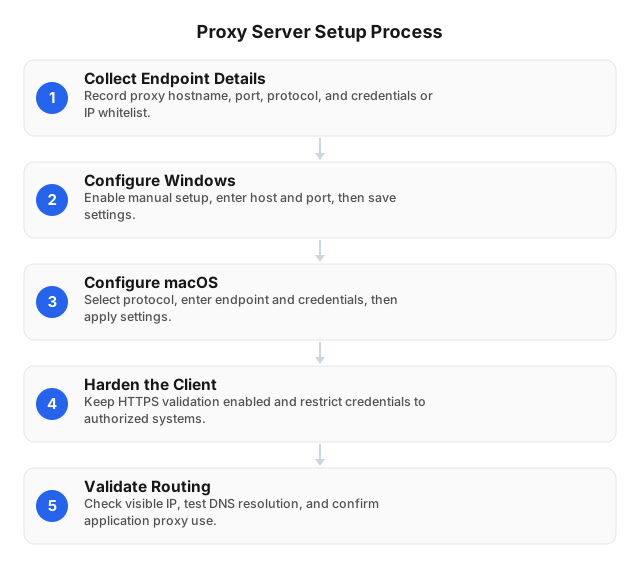
1. Record the connection details
Collect the proxy hostname, port, protocol, authentication method, selected location, and rotation settings from the provider dashboard. Store usernames and passwords in a secret manager—not source code, shell history, screenshots, container images, or shared configuration files.
2. Configure the operating system or application
Windows: Open Settings → Network & internet → Proxy. Enable manual proxy setup, enter the hostname and port, and save the configuration.
macOS: Open System Settings → Network → Details → Proxies. Select the required protocol, enter the endpoint and authentication details, and apply the change.
System settings do not cover every process. Command-line tools, containers, browser profiles, package managers, and custom applications may maintain separate proxy configurations, so verify each production runtime independently.
3. Keep certificate validation enabled
Never disable TLS checks to bypass an error. A hostname mismatch, expired certificate, unknown issuer, or incomplete chain can indicate a mistyped endpoint, interception failure, compromised route, or incorrect system clock.
4. Test the visible IP and session
Run an IP check from the configured production client—not only from a browser—and verify that:
- The visible IP differs from the direct public IP.
- The reported country matches the selected location.
- Repeated requests follow the expected rotation or sticky-session policy.
- HTTPS certificates validate without exceptions.
- Disabling the proxy restores the original IP or blocks traffic under a fail-closed policy.
Harden DNS, Routing, and Headers
Control DNS resolution
DNS requests can reveal destinations even when application traffic crosses a proxy. With SOCKS5, clients can send domain names to the proxy for resolution; applications commonly label this setting proxy DNS, remote DNS, or socks5h. Test from the same browser, script, or container used in production because a host-level DNS test does not prove that every application follows that path.
Block direct fallback
Some clients silently retry without the proxy after an authentication error or timeout, exposing the direct IP. A fail-closed configuration uses firewall egress rules to permit only approved proxy endpoints and essential infrastructure; if the proxy stops, protected traffic must stop with it.
Test the control explicitly:
- Remove undocumented application bypass entries.
- Allow outbound traffic only to approved proxy endpoints and required infrastructure.
- Stop or block the proxy temporarily.
- Confirm that the application fails instead of connecting directly.
- Repeat after browser, client, firewall, or container-image updates.
Apply least-privilege firewall rules and document every exception with an owner, purpose, and review date.
Limit identifying headers and browser leaks
Do not add X-Forwarded-For, Forwarded, internal hostnames, or private IP addresses unless the destination requires them. Because a third-party proxy may modify headers, inspect requests at a controlled test endpoint before deployment and after provider-side configuration changes.
Browser workflows also require separate WebRTC testing. An HTTP proxy setting does not automatically govern WebRTC interfaces, cookies, canvas fingerprints, installed fonts, or authenticated accounts; the anonymous web browsing setup explains those additional layers.
Measure Performance Against Your Workload
Build a baseline for the exact target, proxy location, protocol, and session type rather than relying on an unrelated industry average. Run at least 100 representative requests so median and 95th-percentile latency are less vulnerable to one-off connection delays.
Record:
- Connection, authentication, DNS, and TLS errors
- Accepted and rejected HTTP status codes
- Median and 95th-percentile latency
- Exit IP and reported location
- Rotation or sticky-session behavior
- Timestamp, target, and proxy endpoint
Define business success before testing. A 403 response proves that the destination answered, but it remains a failed request if the workflow requires a 200, redirect, or completed transaction.
Compare three paths:
- A direct connection to a neutral test destination
- A proxied connection to the same neutral destination
- A proxied connection to the production destination
If only the third path fails, the destination may be rejecting the exit IP, request pattern, location, or account. If both proxied paths fail, investigate credentials, protocol mismatch, DNS, endpoint reachability, and TLS before changing rotation settings.
Troubleshoot Common Failures
Authentication errors
Verify the hostname, port, selected protocol, credential status, and source-IP allowlist. Repeated prompts commonly result from expired credentials, a changed corporate egress IP, URL-encoding errors in a password, or an HTTP client pointed at a SOCKS5 port.
Timeouts and unstable connections
Send identical requests to one fixed destination through rotating and persistent sessions. If one exit fails while others work, replace that session; if every exit fails, inspect local firewall rules, DNS, endpoint availability, destination rate limits, and connection-pool timeouts.
Wrong location
Confirm the requested country or region in the dashboard, then save the returned IP and timestamp. Geolocation databases update at different intervals and may disagree, so compare at least two databases before treating the mismatch as a routing fault.
DNS or IP leaks
Test from the real runtime, interrupt the proxy connection, and watch for continued requests. A fail-closed setup should stop protected traffic; if it does not, inspect DNS settings, WebRTC, application bypass lists, background services, split routes, and retry logic separately.
Maintain the Security Boundary
Rotate credentials after suspected exposure and revoke them when an operator, device, or workload is retired. Restrict dashboard access with role-based permissions and multifactor authentication where available, and issue separate credentials per application so one leak does not expose every workload.
Treat logs as sensitive data. Exclude passwords, proxy URLs containing credentials, access tokens, session cookies, connection strings, and full request bodies; restrict log access and set a retention period tied to operational or legal requirements.
Review these controls on a fixed schedule:
- Authentication failures and disabled accounts
- Unexpected countries or autonomous system numbers
- Certificate and TLS errors
- Direct-connection attempts
- DNS resolver changes
- Firewall exceptions
- Client and dependency updates
- Usage spikes and unexpected costs
Run a fail-closed test after every material network, firewall, browser, container, or application change.
Proxy vs. VPN
A proxy routes traffic from configured applications or requests, while a VPN typically creates an encrypted tunnel through a virtual network interface. The practical distinction is scope: proxy rules can target one process or request, whereas VPN routes often affect most device traffic.
| Criterion | Proxy | VPN |
|---|---|---|
| Scope | Configured applications or requests | Usually device-wide |
| Encryption | Depends on the application and protocol | Encrypts the device-to-VPN tunnel |
| Routing | Granular by app, request, session, or location | Based on VPN routes and server location |
| Primary use | Controlled egress, filtering, automation, and localization | Device protection on untrusted networks |
| Main failure risk | DNS or unsupported applications bypass the proxy | Split-tunnel rules exclude traffic |
An authorized proxy workload can operate inside a VPN tunnel, but layering the tools does not automatically prevent leaks. Retest DNS resolution, route priority, visible IP, and fail-closed behavior after enabling both.
Related Reading
FAQ
How do proxy servers enhance security?
Proxy servers enhance security by hiding the client’s public IP from destinations and centralizing authentication, destination filtering, rate limits, and audit logs. They can also route DNS remotely and enforce a single approved egress path, reducing accidental direct exposure. A proxy does not inherently encrypt SOCKS5 or plain HTTP traffic, so sensitive connections still require TLS and certificate validation.
What are the best proxy servers for privacy?
The best proxy servers for privacy are paid, private, authenticated services that support HTTPS or SOCKS5 remote DNS, disclose retention practices, and let applications fail closed instead of reconnecting directly. Rotating residential proxies reduce repeated IP linkage, while sticky residential or ISP proxies suit authenticated sessions that require a stable address. Avoid open free proxies because their operators, logging practices, traffic controls, and availability are usually unverifiable.
How do I set up a proxy server?
Obtain the hostname, port, protocol, credentials, location, and rotation settings from the provider. Configure the production application, then test the visible IP, TLS validation, DNS path, session behavior, and direct-fallback handling.
Which proxy type is best for privacy?
Rotating residential proxies suit authorized workflows that benefit from changing source IPs. Sticky residential or ISP proxies fit accounts and sessions that require a stable address, while HTTPS remains necessary to encrypt payloads regardless of IP type.
How can I troubleshoot proxy problems?
Separate authentication, endpoint, DNS, TLS, routing, and destination failures. Compare direct and proxied requests to a neutral destination before testing the production target, and record timestamps, exit IPs, status codes, and latency percentiles.
Does SOCKS5 encrypt traffic?
No. SOCKS5 relays TCP and, where supported, UDP traffic but does not encrypt the payload. Use HTTPS, SSH, or another encrypted application protocol for sensitive data.
What is the difference between a proxy and a VPN?
A proxy routes traffic from configured applications or requests. A VPN typically encrypts traffic routed through a device-level tunnel, making it better suited to broad transport protection than request-level egress control.
Is using a residential proxy legal?
Legality depends on authorization, jurisdiction, collected data, access methods, and destination terms. Document the business purpose, minimize personal data, respect authentication barriers and rate limits, and obtain legal review for regulated or cross-border processing. The legal boundaries of proxy server usage guide provides a more detailed checklist.
This article was written by the EProxies team and reviewed against our editorial quality standards before publishing.