
Guide to Choosing the Best Proxy for Your Needs: 2026
TL;DR: Match the proxy’s IP origin, location precision, session behavior, protocol, and billing model to an authorized workload. Before committing, test real destinations and measure success rate, p95 latency, retries, geographic accuracy, IP diversity, session stability, and cost per successful result—not headline pool size or gateway speed alone.
Understand the Main Proxy Types
The exit IP’s origin determines how destinations classify requests, which locations you can test, and whether billing is usually based on traffic or assigned addresses. Session behavior is a separate choice: rotating proxies change IPs by request or interval, while sticky proxies retain one IP for a defined period.
- Residential proxies use IPs associated with consumer internet connections. They provide country, city, or ISP context for localized workloads.
- Datacenter proxies use IPs hosted in server infrastructure. They provide predictable capacity for high-throughput destinations that accept hosting-network traffic.
- Mobile proxies route through carrier networks, providing the context needed to test regional mobile-web and app behavior.
- ISP proxies combine ISP-registered addresses with server-hosted operation. Static ISP IPs provide a consistent address for persistent sessions and vendor allowlists.
HTTP(S) proxies are designed for web traffic. SOCKS5 supports more application types, but it does not encrypt payloads by itself; use end-to-end TLS and validate destination certificates.
With these distinctions established, the next step is to evaluate each category against the workload rather than selecting one by label alone.
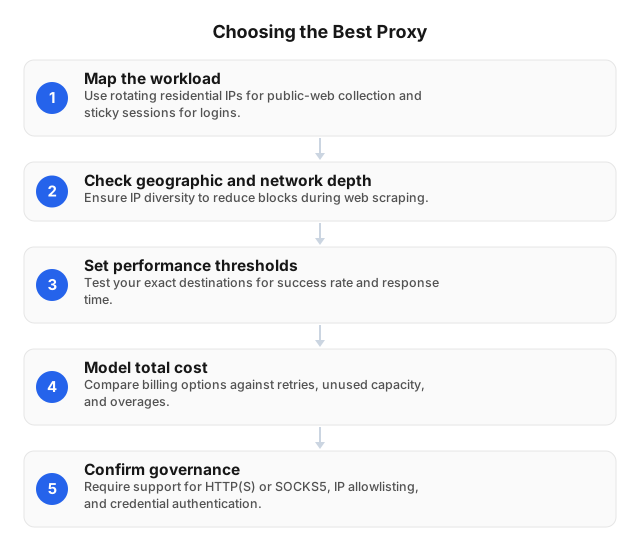
Choose a Proxy Using Six Criteria
1. Define the workload
Record the authorized destinations, request rate, expected monthly traffic, required countries or cities, session duration, concurrency, and data sensitivity.
A public price-monitoring job across 20 cities needs location accuracy and controlled rotation. An internal API integration may instead need one static IP that a vendor can allowlist. Buying one configuration for both increases cost and complicates access controls.
For a broader security checklist, see Choosing the Right Proxy Server for Secure Browsing.
2. Check useful geographic depth
A global pool total does not reveal how many usable IPs exist in one city or ASN. Ask for country- and city-level availability, then verify delivered IPs with independent geolocation and ASN databases.
EProxies provides access to 72M+ residential IPs across 195+ countries. Residential IPs connect and disconnect, so treat those numbers as network-wide specifications rather than guaranteed inventory for every market. During a pilot, record unique IPs, cities, ASNs, and /24 subnets to detect concentration within a small portion of the advertised pool.
3. Match rotation to state
Use rotation for independent requests. Use sticky or static routing for authorized logins, carts, pagination flows, and tests in which cookies or server-side state must remain associated with one IP.
Set session duration explicitly. An IP change halfway through checkout can invalidate a test, while sending an entire crawl through one IP can trigger destination rate limits.
4. Verify protocols and access controls
EProxies supports HTTP(S) and SOCKS5 for browsers, scraping clients, command-line tools, and compatible applications.
Require controls appropriate to the deployment:
- Unique credentials for each application
- Separate development and production accounts
- IP allowlisting for fixed servers
- Secrets stored outside source code
- Immediate credential revocation
- Logs for authentication and configuration changes
5. Distinguish observed uptime from the SLA
EProxies reports 98.2% uptime and backs its service with a 99.9% uptime SLA. Reported uptime is an operational measurement; an SLA is a contractual commitment governed by measurement windows, exclusions, claim procedures, and service credits.
A 99.9% monthly target corresponds to about 43 minutes of downtime in a 30-day month before contractual exclusions. Check whether the SLA measures the gateway, the entire network, or the specific service assigned to your account.
6. Calculate effective cost
Compare cost per delivered result rather than the lowest displayed unit price:
Effective cost = plan price + overages + retry traffic + dedicated-IP fees + monitoring overhead
EProxies offers:
- Pay-as-you-go residential traffic from $0.25/GB
- A 300GB residential tier at approximately $0.73/GB
- ISP SOCKS5 proxies from $0.95/IP
- Unlimited plans from $79/month
Review each plan’s conditions because these prices represent different products and billing structures. A request that downloads images, fonts, scripts, and video can consume many times the traffic of an API or HTML-only response.
Together, these criteria create a shortlist. The following comparison clarifies the practical trade-offs before testing begins.
Compare Proxy Types
| Proxy type | Suitable workloads | Main advantage | Main trade-off | Typical billing |
|---|---|---|---|---|
| Residential | Localized research, ad verification, public e-commerce data | Consumer ISP and location context | Variable IP availability | Per GB |
| Datacenter | Internal testing, bulk processing, stable integrations | Predictable throughput | Hosting ranges are easier to classify | Per IP or bandwidth |
| ISP | Persistent sessions and allowlisted workflows | Stable, ISP-registered IP | Higher per-address cost | Per IP |
| Mobile | Carrier, mobile-search, and mobile-app testing | Mobile-network routing context | Higher cost and variable latency | Per GB or port |
No category guarantees access. Destination rate limits, authentication, browser fingerprints, request timing, TLS setup, and regional server capacity can affect results independently of IP type. The comparison narrows the options, but only a production-like pilot can identify the best fit.
Test Performance on Real Destinations
Published speed and pool-size claims cannot predict performance against your destinations. Build a pilot with the same domains, methods, payload sizes, locations, concurrency, and session lengths planned for production.
For collection projects, apply the rate, minimization, and error-handling controls in Best Practices for E-Commerce Web Scraping in 2026.
Measure actionable metrics
Record:
- Successful responses divided by total attempts
- Median, p95, and p99 response latency
- DNS, connection, TLS, timeout, and HTTP errors
- Retries and bytes per successful result
- Unique IPs, ASNs, subnets, countries, and cities
- Sticky-session survival for the required duration
- Geolocation mismatches
- Cost per 1,000 successful results
A provider with lower median latency may still perform worse if p99 latency causes frequent timeouts. Likewise, a cheap per-GB plan becomes expensive if retries double traffic or full browser pages download unnecessary assets.
Inspect routing and stability
Test from the same client regions used in production. Physical distance, inefficient routes, gateway load, available bandwidth, network congestion, DNS resolution, TLS handshakes, destination response time, response size, and client concurrency all contribute to observed latency.
Run the pilot through at least one complete workload cycle, including peak hours. Group failures by destination, region, ASN, protocol, status code, and session type to distinguish provider-network issues from destination-specific blocking or application errors.
Once the pilot identifies a suitable configuration, adapt its routing and session behavior to each use case.
Configure Proxies by Use Case
E-commerce and market research
Use rotating residential sessions for independent price, stock, and search-result checks. Use sticky sessions only for stateful journeys such as regional carts. Block images and unnecessary scripts when permitted to reduce bandwidth charges.
Digital marketing
Residential routing can support authorized localization checks and ad verification. Log the requested location, observed creative, timestamp, landing page, and exit IP so discrepancies can be reproduced.
IT operations
Datacenter or static ISP proxies suit fixed outbound access, vendor allowlists, and controlled application tests. Assign separate credentials to each service instead of sharing one unrestricted proxy account.
Real estate and travel research
City-level residential routing can expose public differences in listings, availability, and localized offers. Set collection limits before processing descriptions, host details, or contact information, and review the legal boundaries of proxy use before collecting personal or regulated data.
Even a well-matched configuration can fail if the selection process overlooks practical constraints.
Avoid Common Selection Errors
- Buying on pool size alone: Measure usable addresses in the required markets.
- Testing only a gateway: A fast gateway does not represent a retail, travel, or search destination.
- Ignoring response size: Per-GB billing counts downloaded bytes, not requests.
- Rotating during stateful flows: Keep one IP for sessions that depend on cookies or server-side state.
- Treating an SLA as an outage guarantee: Apply its exclusions, measurement rules, and credit limits when assessing availability.
- Skipping legal review: Confirm lawful IP sourcing, destination terms, retention limits, and permitted purposes. Reassess the legal boundaries of proxy usage in 2026 when adding markets or data categories.
FAQ
What factors affect proxy performance?
Proxy performance depends on the network path, gateway and destination capacity, workload size, concurrency, and session configuration. These factors influence latency, errors, retries, delivered IP diversity, and cost per successful response, so evaluate them on real destinations rather than through gateway speed alone.
What are the best proxies for web scraping?
Rotating residential proxies are usually the best fit for authorized scraping of location-sensitive public pages because they provide consumer-network and geographic context. Datacenter proxies are often faster and cheaper for high-volume destinations that explicitly accept hosting-network traffic, while static ISP proxies suit stateful or allowlisted workflows. The best choice is the one that produces the highest destination-specific success rate at an acceptable cost without exceeding permitted request limits.
How can I ensure proxy security?
Apply unique credentials, IP allowlists, environment separation, secure secret storage, immediate credential revocation, and authentication logging. Grant each application only the destinations and permissions it needs. A proxy changes the network path; it does not replace TLS, endpoint security, data minimization, or legal controls.
How should I test proxy quality?
Use the production-matched pilot and metric set described above. Run enough authorized requests to expose intermittent failures without violating destination limits, and include peak periods and a complete workload cycle so the results reflect actual operating conditions.
Should I choose per-GB, per-IP, or unlimited pricing?
Per-GB plans suit variable rotating traffic that can be capped and stripped of unnecessary assets. Per-IP pricing fits static sessions and allowlisted integrations; unlimited plans may suit sustained traffic but require review of concurrency, fair-use, location, and workload restrictions. Compare all options using cost per 1,000 successful results.
What EProxies specifications should I verify during a trial?
Verify the published residential pool coverage, required market availability, supported protocols, rotation, and sticky-session behavior. Compare observed availability with reported uptime, review the SLA’s measurement and credit terms, and test the relevant pricing model using actual response sizes and retry rates.
This article was written by the EProxies team and reviewed against our editorial quality standards before publishing.