
Choosing the Right Proxy Server for Secure Browsing
TL;DR: A secure proxy setup is not “pick any IP and browse.” Match the proxy type, protocol, authentication, session behavior, and location targeting to the task; then test for IP, DNS, HTTPS, and fallback leaks before real use. EProxies supports HTTP(S) and SOCKS5, 72M+ residential IPs across 195+ countries, rotating and sticky/static sessions, username-password or IP whitelist authentication, and 98.2% uptime backed by a 99.9% uptime SLA.
What Secure Browsing With a Proxy Actually Means
A proxy server sits between your device and the sites or apps you access. Your browser or tool sends traffic to the proxy first, and the destination sees the proxy IP instead of your original IP.
That improves privacy, regional control, and workflow consistency, but a proxy is not a complete security stack. Secure browsing still depends on HTTPS, careful configuration, access control, and avoiding traffic leaks.
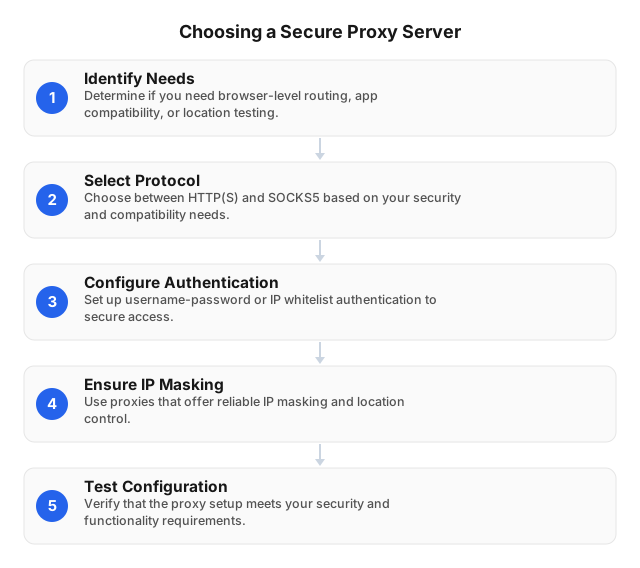
A practical secure proxy setup should answer six questions:
- What traffic needs routing? Browser only, one app, or a full system workflow?
- Which protocol fits? HTTP(S) for web traffic; SOCKS5 for broader app compatibility.
- Who can access it? Username-password, IP whitelist, or both.
- How should sessions behave? Sticky for logins and multi-step flows; rotating for distributed research.
- Where should traffic appear from? Country, city, ASN, or a stable ISP-issued IP.
- How will you verify it? Check visible IP, HTTPS behavior, DNS handling, and fallback settings.
For a deeper taxonomy, see this Comprehensive Overview of Proxy Server Types.
Proxy Types: How to Choose Without Guesswork
Different proxy labels describe different things: protocol, IP source, anonymity level, and session behavior. Mixing them up is one of the fastest ways to misconfigure a secure browsing workflow.
| Proxy category | Best fit | Main trade-off |
|---|---|---|
| HTTP(S) | Browsers, web apps, QA, ad verification, localized page checks | Primarily designed for web traffic |
| SOCKS5 | Apps, automation tools, broader TCP/UDP-compatible workflows | Less web-specific inspection than HTTP proxies |
| Residential | Geo-specific browsing, market research, localization, account testing | Usually priced by bandwidth |
| Datacenter | Fast, cost-efficient technical workloads | Less residential network context |
| ISP | Stable sessions with ISP-issued IPs | Less rotating-pool flexibility than residential |
| Rotating | Public web research, availability checks, distributed validation | Can break login continuity if overused |
| Sticky/static | Dashboards, carts, account flows, multi-step QA | Less request distribution |
EProxies supports HTTP(S) and SOCKS5, plus rotating and sticky/static sessions, including 24h+ sticky sessions. If you are comparing IP sources, this Residential or Datacenter Proxies? 2026 Guide explains the operational differences.
Security Features That Matter Most
Authentication and access control
Never use an open proxy for sensitive browsing. At minimum, require username-password authentication or IP whitelist authentication.
Use username-password authentication when users, browsers, or tools need individual access. Use IP whitelisting for controlled servers, office networks, or production environments where traffic should only originate from known infrastructure.
For teams, treat proxy credentials like API keys: assign owners, rotate them after personnel changes, and remove stale whitelisted IPs from old offices, vendors, or cloud instances.
HTTPS compatibility and protocol fit
For browser-based secure browsing, use HTTP(S) proxy settings and keep HTTPS enabled on destination sites. The proxy routes the connection, while TLS protects the content exchanged between your browser and the website.
Use SOCKS5 when the application does not fit normal browser proxy settings or needs broader network compatibility. Examples include QA tools, app testing environments, or software that routes more than standard web requests.
Session controls
Session behavior affects both security and reliability.
Use sticky/static sessions for:
- Logins and dashboards
- Checkout or form testing
- Multi-step QA flows
- Account-based workflows where IP continuity matters
Use rotating sessions for:
- Public web research
- Regional availability checks
- Large-scale page validation
- Workflows where distributing requests is more important than maintaining one identity
A common mistake is rotating too aggressively during a login or checkout flow. That can look abnormal to websites and may trigger security checks.
Location and ASN targeting
Location targeting should be specific enough to match the task, but not more complex than necessary.
If you are testing a German checkout page, use Germany rather than a broad regional setting. If you need to validate city-specific pricing, inventory, or content, choose city-level targeting. If the test depends on a particular network context, ASN-level targeting may matter.
EProxies offers 72M+ residential IPs across 195+ countries, with options such as city- and ASN-level targeting. That is useful for localization QA, ad verification, regional UX reviews, and compliance-aware research.
Reliability and failover discipline
Reliability is part of security. If a proxy drops during sensitive work, users may retry outside approved routing, expose traffic directly, or create inconsistent test results.
EProxies reports 98.2% uptime, backed by a 99.9% uptime SLA. Before production use, test the exact protocol, country, city, session type, and authentication method your workflow will use.
How to Configure a Proxy for Safer Browsing
Step 1: Choose the routing level
Decide whether the proxy should apply to:
- One browser profile
- One application
- A server-side process
- The operating system’s network settings
For secure browsing, browser-profile configuration is often cleaner because it avoids routing unrelated device traffic. For server-side work, IP whitelisting can reduce credential exposure.
Step 2: Enter the proxy details
You usually need:
- Proxy host or gateway
- Port
- Protocol: HTTP(S) or SOCKS5
- Username and password, or whitelisted source IP
- Target country, city, or ASN
- Session type: rotating or sticky/static
On Windows, proxy settings are typically under Settings > Network & Internet > Proxy, where you can enable manual proxy setup and enter the host and port. For Linux environments, follow this Guide to Setting Up a Proxy Server on Linux.
Step 3: Disable unsafe fallback behavior
Check whether your browser, app, or automation tool has options such as:
- “Bypass proxy for local addresses”
- “Use direct connection if proxy fails”
- “Auto-detect proxy settings”
- Split routing by domain or protocol
These can be useful in some networks, but risky for sensitive browsing. If a proxy fails, the safer behavior is usually to stop traffic—not silently continue through a direct connection.
Step 4: Verify before production use
Run a short validation checklist:
- Visible IP matches the intended country, city, or ASN.
- HTTPS sites load and certificates appear normal.
- DNS requests are not bypassing the intended route.
- Sticky sessions keep the same IP for the expected duration.
- Rotating sessions rotate at the expected interval.
- Authentication failures return expected errors.
- Apps do not leak traffic through a direct connection.
Common status clues include 407 for proxy authentication required, 403 for access denied, 429 for rate limiting, and 5xx errors for upstream or availability problems. Log these during testing so you can distinguish configuration mistakes from target-site restrictions.
Common Proxy Mistakes to Avoid
Using free or unknown proxies for sensitive work
Free or unknown proxies may log traffic, inject content, disappear without notice, or lack basic authentication. If the workflow involves accounts, internal research, QA, or customer-facing checks, compare the risk before choosing the cheapest option. See Comparing Free vs Paid Proxy Servers: Pros and Cons.
Assuming a proxy replaces HTTPS or a VPN
A proxy routes configured traffic. It does not automatically encrypt every app on your device.
HTTPS still protects website content in transit. A VPN is usually better for whole-device routing on public Wi-Fi, while a proxy is better for controlled browser, app, location, and session workflows.
Overloading one IP
Sending too many requests through one IP can trigger rate limits or blocks. For research workflows, use rate limits, concurrency caps, retries with backoff, and rotation rules that mirror normal access patterns.
Rotating during account flows
Rotating IPs mid-login, during checkout, or between multi-step forms can create suspicious behavior. Use sticky sessions for continuity, then reserve rotation for non-login research or validation.
Leaving access controls stale
Old credentials and forgotten whitelisted IPs are common security gaps. Review proxy access after employee changes, vendor offboarding, office moves, and cloud infrastructure updates.
If your work involves scraping or public data collection, combine proxy controls with legal review, request pacing, and data minimization. This guide on Ethical Use of Proxies for Web Scraping is a useful reference.
Practical EProxies Setups
Secure regional browsing
A team testing region-specific content can use residential IPs in target markets, username-password authentication for individual users, and sticky sessions for dashboard access. This keeps access controlled while making regional behavior easier to reproduce.
Localization and QA
QA teams can test pricing, language, inventory, forms, ads, and checkout flows from specific locations. With 72M+ residential IPs across 195+ countries, EProxies helps teams validate user experience across markets instead of relying on a single office connection.
App and tool routing with SOCKS5
When a tool does not use normal browser proxy settings, SOCKS5 can provide broader compatibility. EProxies offers ISP SOCKS5 from $0.95/IP, which is useful when stable ISP-issued IPs matter.
Cost planning
EProxies options include pay-as-you-go residential proxies from $0.25/GB, tiered residential pricing down to about $0.73/GB at 300GB, ISP SOCKS5 from $0.95/IP, and unlimited plans from $79/month. For secure browsing, evaluate price together with authentication, targeting, session control, reliability, and support—not bandwidth cost alone.
FAQ
What are the different types of proxy servers?
Common proxy server types include HTTP(S) proxies for web traffic, SOCKS5 proxies for broader application routing, residential proxies, datacenter proxies, ISP proxies, rotating proxies, and sticky/static proxies. They can also be grouped by direction, such as forward proxies that serve users and reverse proxies that sit in front of websites or applications. For secure browsing, the most important choice is usually protocol, IP source, and session behavior.
What security features should I look for in a proxy server?
Look for strong authentication, IP whitelisting, HTTPS and SOCKS5 support, session controls, reliable uptime, and clear location targeting. The provider should let you restrict who can connect, avoid open proxy exposure, and choose sticky or rotating sessions based on the workflow. Also check for operational safeguards such as uptime commitments, support, and transparent handling of proxy errors.
What are the common mistakes to avoid when using proxy servers?
Common mistakes include using free or unknown proxies for sensitive browsing, choosing the wrong proxy type, ignoring authentication, and assuming a proxy encrypts all device traffic. Teams also run into problems when they rotate IPs during logins, overload one IP with too many requests, or leave old whitelisted IPs active. Test the setup before production use.
How do I configure a proxy server for secure browsing?
Choose HTTP(S) for browser traffic or SOCKS5 for apps that need broader compatibility, then enter the proxy host, port, protocol, credentials, target location, and session type in your browser, operating system, or application settings. Enable username-password authentication or IP whitelisting, and avoid direct-connection fallback where sensitive traffic is involved. Before browsing, verify the visible IP, HTTPS behavior, DNS handling, and sticky or rotating session behavior.
What is the best proxy type for secure browsing?
For most browser-based secure browsing, HTTP(S) proxies are the best starting point. For apps or tools that need broader compatibility, SOCKS5 may be a better fit. Residential proxies are useful when location accuracy and real-user network context matter.
Does a proxy encrypt all my traffic?
Not necessarily. A proxy routes traffic for the configured browser, app, or system setting. HTTPS websites still encrypt the connection between your browser and the destination site, but a proxy does not automatically protect every app on your device the way a VPN typically does.
Should I use rotating or sticky sessions?
Use sticky/static sessions when continuity matters, such as logins, dashboards, carts, or multi-step QA. Use rotating sessions for compliant public research, availability checks, or workflows where request distribution is more important than session continuity.
Can proxies be used for web scraping?
Yes, but only with responsible practices. Follow applicable laws, website terms, robots.txt where relevant, and internal data policies. Use rate limits, avoid collecting sensitive data unnecessarily, and document your compliance process.
This article was written by the EProxies team and reviewed against our editorial quality standards before publishing.