
5 Tips for Using Proxies in China Safely in 2026
TL;DR: Test authorized proxy access before arrival, match session persistence to the task, protect credentials, and benchmark the real destination from each network you plan to use. EProxies supports HTTP(S) and SOCKS5 through 72M+ residential IPs across 195+ countries, with pay-as-you-go, stable ISP, and unlimited options for different traffic patterns.
This guide helps expatriates and digital nomads configure lawful access to work platforms, communication tools, and localized services while in China. It covers reliability, security, and compliance—not bypassing access controls.
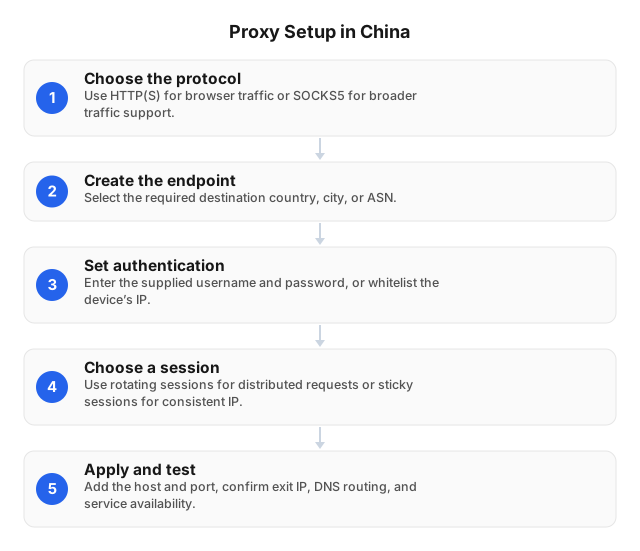
Why Connections Behave Differently in China
Researchers have documented DNS injection, connection disruption, IP blocking, and encrypted-traffic detection within China’s filtering systems. The USENIX Security study on DNS censorship and OONI’s analysis of fully encrypted traffic blocking describe several of these mechanisms. A failed request can therefore originate from the local connection, proxy configuration, network controls, or destination service.
Do not assume that a test on hotel Wi-Fi predicts behavior on office broadband or mobile data. Build a simple diagnostic matrix:
- Open a permitted domestic website without the proxy.
- Test a neutral international destination through the proxy.
- Test the required work service through the same endpoint.
- Repeat the sequence on Wi-Fi and mobile data, if both are authorized.
If the domestic test fails, investigate the local connection. If the neutral proxied test fails, check authentication, DNS, and the endpoint. If only the required service fails, examine its regional policies, login controls, and account status before changing exit IPs. Establishing this baseline before departure makes later troubleshooting much easier.
Tip 1: Configure and Test Before Arrival
Install the required client, store endpoint details in an encrypted password manager, and verify account recovery before entering China. Keep an offline copy of setup documentation and support contact details.
Start with one application instead of changing the entire device:
- Select a protocol. HTTP(S) fits browsers and web requests. SOCKS5 supports more application types, but SOCKS5 itself does not encrypt payloads.
- Enter the endpoint. Copy the proxy hostname and port exactly as supplied.
- Configure authentication. Use a username and password when the local public IP may change. Reserve IP allowlisting for fixed connections.
- Check DNS behavior. Enable remote DNS for SOCKS5 if the client exposes a
proxy DNSorSOCKS5hoption, then test for DNS leakage. - Confirm the exit. Verify that the detected IP and country match your selection.
- Test the required service. An IP checker confirms routing; only the real destination confirms whether the workflow functions.
HTTPS protects supported web traffic between the client and destination. It does not secure an infected device, leaked credential, or unencrypted application protocol. Follow the hardening steps in Proxy Server Setup for Privacy and Security in 2026.
Once the configuration works, select a proxy and session model that fits the workflow.
Tip 2: Match the Proxy and Session to the Task
Choose by session persistence, protocol, targeting options, and billing model—not pool size alone.
| Option | Suitable use | Main trade-off |
|---|---|---|
| Rotating residential | Independent public-web requests and localization checks | Exit IP changes can interrupt authenticated sessions |
| Sticky residential | Email, dashboards, and other continuous logins | Reusing one exit IP concentrates activity on that address |
| ISP SOCKS5 | Applications that need a consistent exit IP | Less rotation flexibility |
| Unlimited residential | Sustained traffic where per-GB billing is inefficient | Higher fixed monthly commitment |
For sticky residential access, check the selected plan’s documented session-duration and concurrency limits rather than assuming a fixed persistence period.
Keep one exit IP and country for the full lifetime of an authenticated session. Rotation is better suited to independent requests where cookies, tokens, and server-side state do not need to remain associated with one address.
Current EProxies options include pay-as-you-go residential traffic from $0.25/GB, volume pricing of approximately $0.73/GB at 300GB, ISP SOCKS5 from $0.95 per IP, and unlimited plans from $79 per month. Compare targeting, concurrency, session controls, and overage terms before selecting a plan. The Guide to Choosing the Best Proxy for Your Needs: 2026 provides a broader selection framework.
Whichever option you choose, secure the credentials and limit where the proxy is used.
Tip 3: Protect Credentials and Limit Proxy Scope
A proxy changes the network path; it does not secure the device or account. Use unique proxy credentials, multifactor authentication for work accounts, and an encrypted password manager.
Apply four controls:
- Route only the application that requires the proxy.
- Keep usernames and passwords out of shared scripts, configuration repositories, and screenshots.
- Revoke credentials immediately after a device is lost or a team member leaves.
- Use employer-managed hardware and approved connections for confidential work.
Do not share one proxy login across a team. Shared credentials weaken audit trails and force every user to update their configuration when access must be revoked. Automation should retrieve secrets from environment variables or a secrets manager, with logs configured to redact proxy URLs and authorization headers.
After securing the client and account, test performance across the complete route rather than relying on provider-wide figures.
Tip 4: Benchmark the Actual Route
Provider-wide figures cannot predict one connection to one destination. Measure the complete path from the network you will use to the service you need.
Test two or three permitted exit locations. For each combination of network, protocol, and exit, record:
- Proxy connection time
- Time to first byte
- Total request time
- HTTP status code
- Authentication failures
- Timeouts and connection resets
Run at least 20 requests per route during expected working hours. Calculate the median to represent typical performance and the 95th percentile to expose intermittent slowdowns. Test HTTP(S) and SOCKS5 only where the application supports both; neither protocol is inherently the fastest for every client.
EProxies offers 98.2% uptime, backed by a 99.9% uptime SLA. Review the SLA’s eligibility, measurement window, exclusions, and credit process separately from your route test: service availability does not establish that a specific destination will accept a particular exit IP.
Configure bounded failover. Retry a transient timeout once with a short randomized delay, then move to a tested backup endpoint. Do not rotate an authenticated session after a single slow response; switch only after a defined failure condition such as three consecutive connection errors.
Technical reliability is only one part of the decision. The connection must also comply with applicable rules.
Tip 5: Check Legal, Employer, and Platform Rules
Proxy use in China can involve telecommunications, cybersecurity, data-protection, employment, and cross-border transfer requirements. The applicable rules depend on the connectivity service, authorization, purpose, and data being processed.
Use employer-managed connectivity for regulated or confidential work. Corporate systems can enforce device certificates, multifactor authentication, access logging, and data-loss controls that a personal proxy cannot supply.
Before connecting:
- Confirm that the connectivity method is authorized.
- Review employer, university, accommodation, and carrier policies.
- Check the destination platform’s terms of service.
- Determine whether personal or confidential data will leave mainland China.
- Obtain qualified local legal advice for commercial, regulated, or cross-border processing.
A nearby exit, stable address, or encrypted application does not make unauthorized activity lawful. Use the checklist in Legal Boundaries of Proxy Server Usage in 2026 before deploying access for employees or customers.
Even with an authorized, tested setup, failures can occur. The following process helps isolate them without destroying useful diagnostic evidence.
Troubleshooting Proxy Failures
Change one variable at a time. Simultaneously rotating the exit IP, changing protocols, and clearing cookies destroys the evidence needed to isolate the fault.
Authentication errors
Re-enter the hostname, port, username, and password. If the account uses IP allowlisting, check whether moving between Wi-Fi and mobile data changed the public IP. Confirm that the subscription is active and has available traffic or IP allocations.
One destination fails
Open a neutral permitted endpoint through the same proxy. If it succeeds, preserve the current session and inspect the target’s status page, account security alerts, regional policies, and HTTP response code. Avoid rapid retries after 403, 429, or repeated verification responses.
Logins trigger repeated verification
Keep the same exit country, IP, cookies, and user agent throughout the login. Clear cookies only after securing recovery codes and confirming account access; cookie deletion can make the next request appear to come from a new device.
Connections are slow
Test the same URL through two or three exits and compare median connection time, time to first byte, and total duration. If connection time is low but time to first byte is high, the destination or application is the likely bottleneck. Reduce concurrency before changing exit IPs if delays coincide with 429 responses.
DNS results look wrong
Enable remote resolution and repeat the test. For SOCKS clients, look for SOCKS5h, proxy DNS, or resolve through proxy. Plain SOCKS5 may resolve domains locally, while SOCKS5h sends hostname resolution through the proxy. If the application cannot route DNS as required, use a client that can rather than assuming the proxy covers every lookup.
If a personal proxy remains unsuitable or is not authorized, consider a managed or offline alternative.
Alternatives to a Personal Proxy
Test international roaming before relying on it for work. Confirm the carrier’s data allowance, hotspot policy, eSIM support, throttling threshold, coverage, and applicable usage rules before departure.
For employment, prefer an approved corporate VPN or managed cross-border connection. Corporate IT can control identities, devices, access logs, and data handling while providing an escalation path when an endpoint fails.
Prepare an offline kit containing essential documents, maps, recovery codes, software installers, support contacts, and configuration instructions. Store sensitive files in an approved encrypted location, not an unprotected downloads folder.
Related Reading
- Best Practices for Using Proxies in Social Media 2026
- Creating Effective Web Scraping Strategies Using APIs
FAQ
How does a proxy work in China?
A proxy relays an application’s requests through an intermediary endpoint, so the destination sees the proxy IP rather than the user’s local IP. Network controls can still block or interrupt the endpoint or destination, and encryption depends on the application protocol.
Which proxy type is best for China?
Use sticky residential proxies for continuous logins, rotating residential proxies for independent requests, and ISP SOCKS5 proxies when an application needs a consistent exit IP. Select the smallest permitted exit set that supports the workflow.
What are the best proxies for China?
The best options are authorized proxies tested against the exact carrier, destination, and application you will use. Evaluate session persistence, protocol support, targeting, concurrency, billing, and measured route performance rather than relying on pool size alone.
Is using a proxy legal in China?
Legality depends on the service, configuration, purpose, authorization, and applicable regulations. Follow employer, carrier, accommodation, and platform rules, and obtain qualified local legal advice for business activity, regulated data, or cross-border transfers.
How can I improve proxy speed in China?
Benchmark permitted exit locations during expected working hours, then compare median and 95th-percentile connection time, time to first byte, and total duration. Limit unnecessary concurrency and, after one retry for a transient timeout, fail over to a pretested endpoint instead of repeatedly reconnecting to the same route.
What should I do if my proxy stops working?
Test the local connection without the proxy, then verify the endpoint, protocol, credentials, subscription status, DNS mode, and allowlisted IP. If a neutral endpoint works but the required service does not, preserve the session and investigate the destination’s response code, account controls, and regional policies before rotating.
What are the main alternatives to proxies?
The practical alternatives are employer-managed connectivity, permitted carrier roaming, locally available services, and offline synchronization. Managed corporate access is preferable for confidential work.
This article was written by the EProxies team and reviewed against our editorial quality standards before publishing.