
How to Avoid CAPTCHA with Proxies: 2026 Guide
TL;DR: Reduce CAPTCHA triggers by binding each authorized workflow to one exit IP, cookie jar, browser profile, and location. Rotate only between independent sessions, cap aggregate request rates, and stop on persistent challenges. Proxies can reduce IP-related risk signals; they cannot solve CAPTCHA or grant permission to access blocked content.
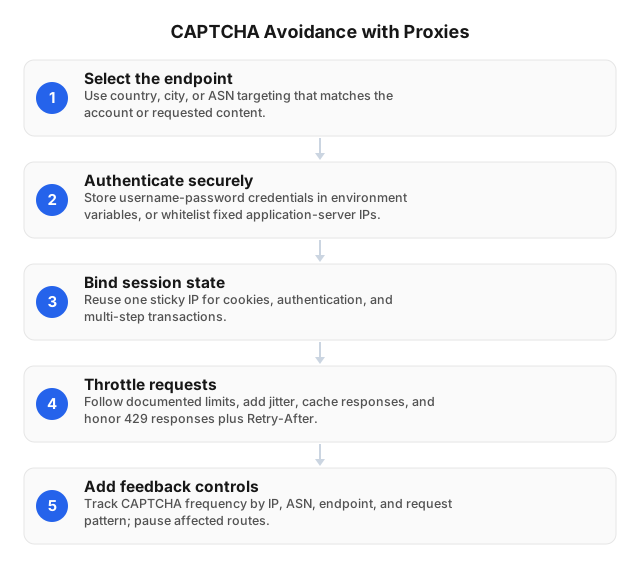
Why CAPTCHA Appears
CAPTCHA systems score more than the current IP address. A site may compare the IP’s ASN and country with cookie history, account region, browser settings, request timing, navigation order, and concurrent activity. Changing only the IP leaves those other signals intact—and may create a new inconsistency.
Common triggers include:
- Multiple workers sharing one authenticated cookie
- A country or ASN change during login, checkout, or pagination
- Repeated requests at fixed intervals
- Aggregate traffic exceeding an endpoint’s limit
- Conflicts between exit location, timezone, language, and account region
- Retrying
403or429responses through new IPs - An exit IP with poor reputation on the target
Treat each challenge as a diagnostic event. Log the URL, timestamp, status code, redirect chain, worker, proxy session, exit IP, ASN, cookie-jar ID, concurrency, and preceding action.
How Proxies Reduce CAPTCHA Triggers
A proxy can give each authorized worker a stable network identity and distribute independent jobs across separate addresses. This helps when a target assigns risk partly by IP reputation, network type, location, or request concentration.
The operating rule is one identity per journey. Keep these signals together from the first request through completion:
- Exit IP and geographic region
- Cookie jar and authentication state
- User agent and browser profile
Accept-Language, timezone, and locale- Account, cart, or API token
- Connection behavior supported by the client
Do not rotate between a login form and confirmation page, a category page and pagination, or a product page and cart submission. For additional controls, see How to Avoid IP Bans When Web Scraping in 2026.
Choose the Proxy by Session Type
| Proxy type | Suitable workflow | Recommended binding | Main risk |
|---|---|---|---|
| Rotating residential | Independent public-page checks | New IP between completed jobs | Per-request rotation can break state |
| Sticky residential | Search, pagination, carts, localization QA | One IP per cookie jar | A degraded IP affects the session until replacement |
| Static ISP SOCKS5 | Permitted account sessions lasting hours or days | One IP per account or worker | Concentrated traffic still requires rate limits |
| Datacenter | Tolerant APIs, development, low-risk endpoints | Stable pool with explicit quotas | Hosting ASNs may receive stricter screening |
EProxies provides HTTP(S) and SOCKS5 access, with 72M+ residential IPs across 195+ countries. Residential pay-as-you-go access starts at $0.25/GB, volume pricing reaches approximately $0.73/GB at 300GB, unlimited plans start at $79/month, and ISP SOCKS5 starts at $0.95/IP.
Choose by targeting precision, stickiness, protocol, concurrency, and traffic model—not price alone. The guide to choosing a proxy for your needs covers the broader trade-offs.
Proxy Setup That Minimizes Challenges
1. Confirm the access boundary
List permitted domains, endpoints, accounts, data fields, and request limits. Prefer an official API when it supplies the required data, and define stop conditions for CAPTCHA, 403, and repeated 429 responses.
2. Configure the proxy transport
Enter the EProxies gateway, port, username, and password in the HTTP(S) or SOCKS5 settings of the browser, scraper, or API client. Store credentials in a secret manager or environment variables, then verify the observed exit IP, DNS behavior, certificate validation, and target region before starting a job.
Use country targeting only when the workflow needs it. City or ASN targeting narrows the available pool and can reduce capacity.
3. Bind state to a proxy session
Create one cookie jar and browser profile for each account or browsing journey. Associate them with a sticky session identifier or static ISP address; never share authenticated cookies across workers.
If an IP must be replaced, create a fresh cookie session. Reusing a cookie established in one country through an exit in another country preserves the mismatch.
4. Control aggregate pressure
Limit requests per second and concurrent connections across the entire deployment. Fifty workers making one request per second still generate 50 requests per second.
For each endpoint:
- Cache responses that do not require refreshing
- Deduplicate URLs before dispatch
- Queue actions for the same account
- Honor
Retry-After - Use bounded retries, such as waits of 2, 4, and 8 seconds
- Pause after the final retry instead of changing IPs indefinitely
Start below the documented limit and raise traffic only after measuring stable completion. For regional testing, align the proxy country with the account region, timezone, locale, and Accept-Language; see How to Leverage Proxies to Avoid Geo-Blocks in 2026.
5. Rotate at a clean boundary
Rotate after logout, cookie expiry, job completion, or a documented cooldown. Keep the same IP throughout stateful sequences such as login, pagination, checkout, and multi-step forms.
A challenge should trigger a pause and log review—not an automatic IP-swap loop. Rapid retries can turn an endpoint restriction into an account suspension.
Practitioner Case Study: Fixing a CAPTCHA Spike
In a controlled EProxies QA run against a staging storefront we were authorized to test, eight workers made 600 product-page requests while rotating residential IPs on every request. The workers shared a cookie jar and used a fixed 500 ms interval; 73 requests reached the configured challenge page, a 12.2% challenge rate.
We repeated 600 requests after assigning one sticky residential session and cookie jar per worker, reducing aggregate concurrency to two, and rotating only after each category-to-product journey finished. Two requests were challenged, or 0.3%, while median latency increased from 1.1 to 1.4 seconds because of the lower concurrency.
The test isolates a configuration lesson, not a universal proxy benchmark: session consistency and traffic reduction changed together, so the result cannot be attributed solely to IP quality. Production teams should test one variable at a time against their own authorized targets.
Monitoring and Troubleshooting
Calculate challenge incidence as:
challenge rate = challenged eligible requests ÷ total eligible requests
Segment it by hostname, endpoint, account, proxy type, country, ASN, worker version, and cookie-jar ID. A pool-wide average can conceal one broken route or account.
| Symptom | Likely cause | Corrective action |
|---|---|---|
| CAPTCHA on every new session | Exit reputation, unsupported region, or policy block | Run a clean-browser control test; stop if the traffic class is blocked |
| Challenge after several pages | Excessive rate or concurrency | Lower aggregate traffic, cache pages, and add a cooldown |
| Verification immediately after login | IP, cookie, or profile changed | Bind the account to one sticky or static session |
429 before CAPTCHA | Endpoint, account, or API-key limit | Honor Retry-After; do not evade the limit through rotation |
| Only one region fails | DNS, locale, timezone, or account-region mismatch | Verify all location signals against the exit country |
| New IPs fail with old cookies | State carried between identities | Start a fresh cookie jar at the rotation boundary |
403 persists in a normal browser | Authorization or policy restriction | Stop and review access rights and terms |
EProxies reports 98.2% uptime backed by a 99.9% uptime SLA. These figures measure infrastructure availability, not CAPTCHA-free completion; track challenge rate, successful workflows, retries, and latency against each target.
Legal and Operational Limits
A proxy changes the network route. It does not authorize access to an endpoint, increase an account quota, or override a CAPTCHA decision.
Before deployment, document the collection purpose, applicable terms, API rules, privacy requirements, retention period, and escalation owner. Persistent CAPTCHA, explicit blocks, or repeated 403 responses should stop the workflow pending review.
See the legal boundaries of proxy usage in 2026 for jurisdictional and contractual considerations.
Related Reading
- How to Avoid IP Bans When Web Scraping in 2026
- How to Leverage Proxies to Avoid Geo-Blocks in 2026
- Guide to Choosing the Best Proxy for Your Needs: 2026
FAQ
How can I set up a proxy to avoid CAPTCHA?
Configure an HTTP(S) or SOCKS5 proxy, verify its exit location, then bind one sticky or static IP to one cookie jar, browser profile, and authorized workflow. Keep the IP stable during stateful actions, limit aggregate concurrency, honor Retry-After, and rotate only after the session ends. This reduces common triggers but cannot guarantee that CAPTCHA will not appear.
What are common issues when using proxies for CAPTCHA?
Frequent problems include rotating mid-session, sharing cookies across workers, using mismatched locations and browser settings, exceeding account-level limits, and retrying blocked requests through new IPs. Poor exit-IP reputation, congested routes, DNS leaks, and unsupported proxy protocols can also cause challenges or connection failures. Diagnose the complete session before replacing the address.
How do proxies help in bypassing CAPTCHA?
Proxies do not bypass or solve a presented CAPTCHA. They can reduce pre-challenge IP signals by separating independent authorized sessions, providing an appropriate location, and preventing excessive traffic from concentrating on one address. If a challenge appears, pause or complete it through the site’s approved process rather than rotating to evade it.
Are there legal concerns with bypassing CAPTCHA?
Yes. Circumventing CAPTCHA or other technical controls may violate site terms, contracts, account rules, or applicable law, depending on the jurisdiction and data involved. A proxy provides no additional access rights, so obtain authorization and legal review for protected, regulated, or account-restricted workflows.
Why can changing IPs increase CAPTCHA frequency?
Cookies, accounts, carts, and login sessions may remain associated with the original IP and region. Changing country or ASN mid-session creates an identity conflict, especially when the old cookie persists. Sticky residential or static ISP sessions prevent that break.
What should I do after repeated 429 responses?
Honor Retry-After, reduce total concurrency, remove duplicate requests, and extend the cooldown. Do not rotate IPs to evade the limit because it may apply to the account, API key, endpoint, or behavior rather than the address.
This article was written by the EProxies team and reviewed against our editorial quality standards before publishing.