
How to Avoid IP Bans When Web Scraping in 2026
TL;DR: Treat blocking signals as control feedback, not a prompt to cycle through more IPs. For permitted scraping, identify whether the failure is transport-, rate-, session-, parser-, or authorization-related; enforce one aggregate limit per domain; keep stateful sessions on a stable IP; validate response content; and pause on CAPTCHAs, login barriers, repeated 403s, or 429s. Residential proxies add geographic coverage and session isolation, but they do not create permission to access restricted data.
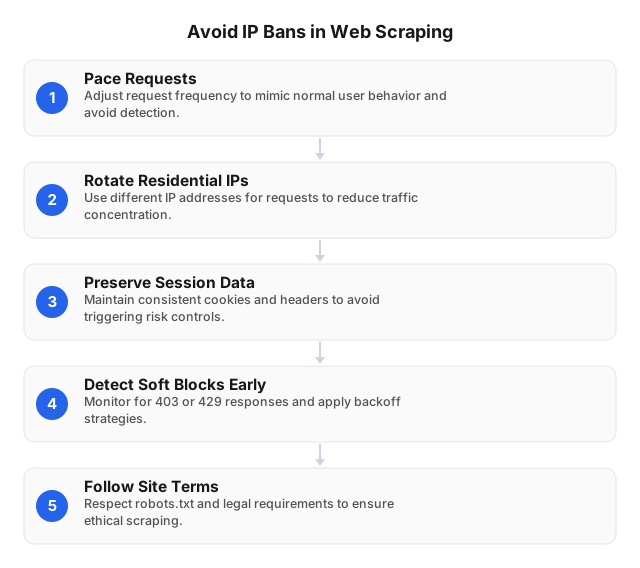
Diagnose the Failure Before Rotating a Proxy
An unsuccessful extraction does not prove that the IP is banned. A server can restrict an address, subnet, account, session, URL pattern, or request rate; the extractor itself may also fail after a markup change.
Classify the response before retrying:
| Signal | Likely cause | Correct action |
|---|---|---|
429 Too Many Requests | Aggregate request rate exceeded | Parse Retry-After, pause the domain queue, and reduce throughput |
403 Forbidden | Missing permission, policy denial, or route restriction | Inspect the body and access rules; do not enter a rotation loop |
| Redirect to login | Session expired or authentication required | Stop or renew through an authorized workflow |
200 OK with empty or substituted content | Soft block, consent page, or rendering problem | Quarantine the response and test content assertions |
| CAPTCHA or human-verification page | Explicit challenge | Stop automated collection and request approved access |
| DNS, TLS, connection, or proxy timeout | Transport failure | Retry within a strict budget or retire the failing endpoint |
| Correct page with missing extracted fields | Parser regression | Update selectors; changing IPs will not fix the extractor |
Run a controlled comparison against 20–50 permitted URLs using a clean cookie jar and known-good route. Record the status, redirect chain, body size, expected identifiers, latency, and parser result. Change only one variable—such as proxy route, concurrency, or session policy—per test; changing all three eliminates the evidence needed to isolate the fault.
Where Residential Proxies Fit
Residential proxies route traffic through residential IP addresses instead of one fixed data-center egress. Their legitimate value comes from geography, workload isolation, and route resilience.
- Geographic verification: Check localized prices, stock, language, taxes, or search results from a specified country or city.
- Session isolation: Give separate jobs independent proxy sessions and cookie jars so one failed workflow does not contaminate every worker.
- Egress resilience: Reduce dependence on one address that may be offline or have poor reputation from unrelated activity.
For example, a retailer may show USD pricing in the United States, EUR pricing in Germany, and city-specific availability. Before scaling, test a fixed sample in each location and compare product IDs, currencies, stock fields, canonical URLs, response bytes, and DOM structure. A country mismatch is a routing defect; a missing product ID is usually a content or parser defect.
EProxies provides 72M+ residential IPs across 195+ countries, with country-, city-, and ASN-level targeting plus HTTP(S) and SOCKS5 support. A proxy changes the network route—not the user’s authorization—and should not be used to bypass paywalls, CAPTCHAs, account controls, or access restrictions.
Build a Rate-Limited Scraping Architecture
Per-worker delays do not control total load. If eight workers each send one request every two seconds, the domain receives approximately four requests per second.
Use a central queue or distributed token bucket that covers every process, container, and proxy session targeting the same hostname:
- Establish a baseline. Run one worker against 20–100 representative URLs. Measure valid-page rate, p50 and p95 latency, response bytes, parser failures, and
403/429frequency. - Increase one step at a time. Move from one worker to two, then four only if error rates and latency remain stable.
- Apply bounded jitter. A short random delay prevents synchronized bursts; it does not justify a higher average request rate.
- Honor
Retry-After. Support both delay-seconds and HTTP-date formats, then pause the entire domain queue for that interval. - Cap transient retries. For eligible
5xx, timeout, or connection failures, use delays such as 2, 4, 8, and 16 seconds, then stop. - Deduplicate URLs. Remove fragments, normalize tracking parameters, and map variants to canonical URLs before dispatch.
- Use cache validators. Send
If-None-MatchorIf-Modified-Sincewhere supported;304 Not Modifiedavoids downloading and parsing an unchanged page.
Retry only requests that are safe to repeat. Replaying a cart mutation, form submission, reservation, or other non-idempotent action can create duplicate side effects.
Match Proxy Rotation to Session State
Rotate between independent tasks
Public product pages, property listings, and unrelated search URLs can often run as isolated tasks. Assign each task or small batch its own proxy session and cookie jar, while keeping all workers behind the same domain-level limiter.
Do not rotate after every response. Excessive rotation creates more DNS, TCP, and TLS setup work, reduces connection reuse, and may produce inconsistent geography or locale signals. Retire a route after repeated transport failures, not after a single parser error.
Keep stateful workflows sticky
Carts, authorized logins, cursor-based pagination, and multi-step forms may bind server-side state to cookies and the current network route. Keep these elements together until completion:
- Proxy session and location
- Cookie jar
- User agent and accepted language
- Authentication context
- Workflow and correlation ID
Use the shortest sticky duration that completes the measured workflow. End the session after logout, authentication failure, consent changes, or an unexpected authorization prompt; do not move the same authenticated cookies between countries or unrelated IPs.
For implementation patterns covering queue coordination and session handling, see How to Automate Web Scraping Without Getting Blocked.
Validate the Page Before Saving Data
HTTP status alone is not a data-quality check. A challenge page can return 200 OK, causing an extractor to store null prices or verification text as product titles.
Define target-specific assertions. A product page might require:
- A product ID matching the requested record
- A non-empty title
- A numeric price or explicit out-of-stock marker
- The expected canonical URL
- No login, CAPTCHA, consent, or access-denied markers
- A response size within the observed range
If normal pages measure 150–220 KB and a response is 12 KB with no product ID or price container, quarantine it even if the status is 200. Compare failed bodies by hash or a short redacted sample to distinguish one recurring challenge template from a genuine site redesign.
Log the timestamp, privacy-safe URL identifier, proxy country and ASN, session ID, status, redirect chain, response bytes, latency, retry count, and failed assertions. Never log passwords, bearer tokens, full session cookies, payment data, or unnecessary personal information.
Define Stop Conditions Before Launch
A worker without a stop policy can turn a temporary denial into thousands of unwanted retries. Start with explicit investigation thresholds, then adjust them from measured baselines:
- Any unexpected CAPTCHA, payment prompt, or authentication requirement
- Three consecutive
403responses on one route 429responses above 5% in a rolling window of 100 requests- Valid-page rate below 95% after a previously stable run
- The same challenge template across three clean sessions
- p95 latency above the job limit for five minutes
- A relevant change to terms,
robots.txt, API policy, or access rules
Crossing a threshold should pause the hostname, preserve redacted diagnostics, and require review. It should not trigger faster rotation or more concurrent workers.
Ethical and Legal Operating Checklist
Before collection begins, create a short data-access record that names the business purpose, target domains, permitted fields, request schedule, retention period, and responsible owner. This turns ethical constraints into reviewable controls rather than informal assumptions.
Use the following launch gate:
- Review the site’s terms, access instructions, and
robots.txt. - Prefer an official API, licensed feed, bulk export, or partner integration when available.
- Collect only fields required for the documented purpose; exclude unrelated personal data.
- Identify applicable privacy, copyright, database, contract, and computer-access rules by region.
- Use an identifiable crawler user agent and contact address where appropriate.
- Set domain-level rate limits, quiet periods, retry caps, and deletion deadlines.
- Secure stored data with least-privilege access and audit logging.
- Stop at authentication, payment, CAPTCHA, or explicit technical access controls.
- Provide a process for correction, deletion, and site-owner complaints.
robots.txt expresses crawler preferences; it is not a substitute for authorization or legal review. Requirements vary by jurisdiction and dataset, so consult web-scraping legalities and best practices by region.
Use browser automation only when a permitted page genuinely requires JavaScript or interactive state. Direct HTTP or an authorized API transfers fewer bytes, uses fewer compute resources, and creates fewer session failure points. Retail collectors can apply the field-validation and change-detection workflow in Best Practices for E-Commerce Web Scraping in 2026.
Choose Capacity Using Measured Traffic
Estimate billable traffic from successful pages, retries, redirects, and browser assets. If 100,000 HTML responses average 180 KB, the response bodies alone total roughly 18 GB; rendered browsers may consume several times more by loading scripts, fonts, images, and API calls.
EProxies offers:
- Residential network: 72M+ IPs across 195+ countries
- Protocols: HTTP(S) and SOCKS5
- Availability: 98.2% uptime, backed by a 99.9% uptime SLA
- Pay-as-you-go residential: From $0.25/GB
- Tiered residential: Approximately $0.73/GB at 300GB
- ISP SOCKS5: From $0.95 per IP
- Unlimited plans: From $79 per month
Bandwidth plans fit jobs whose transferred bytes can be forecast from a representative sample. ISP SOCKS5 suits approved workflows that need longer-lived routes; test actual concurrency, target locations, session duration, and acceptable-use requirements before selecting an unlimited plan.
FAQ
How do residential proxies help in web scraping?
Residential proxies provide location-specific routes, isolate independent sessions, and reduce dependence on one egress address during permitted collection. They help verify localized prices or inventory, but they neither grant access permission nor justify increasing the target domain’s aggregate request rate.
How can I rotate proxies effectively?
Rotate between independent tasks or bounded batches, not automatically after every response. Keep the proxy, cookies, locale, user agent, and authentication context fixed for stateful workflows, and place every session behind one domain-level limiter.
What are the best practices for ethical web scraping?
Document a legitimate purpose, collect only required fields, review terms and robots.txt, and prefer an official API or licensed feed where available. Identify applicable privacy and access laws, publish crawler contact details when appropriate, cap aggregate request rates, minimize retention, and protect stored data. Stop on CAPTCHAs, payment barriers, authentication requirements, explicit denials, or a site owner’s valid opt-out request.
What tools can help avoid IP bans?
Use a central token bucket or queue, an HTTP client with cookie and cache-validator support, a robots.txt parser, and monitoring that validates expected content. A proxy session manager can isolate approved jobs, while browser automation should be limited to permitted pages that require JavaScript.
What is an IP ban?
An IP ban is a server-side restriction associated with an address, subnet, or reputation profile. A 403 may instead indicate missing permission, and a 429 specifically signals excessive request frequency, so inspect the response body, redirects, and session state before changing routes.
Should I retry a 429 with another IP?
No. Honor Retry-After, pause the entire domain queue, and lower aggregate throughput; switching addresses while preserving the same request rate disregards the server’s throttling signal.
Should I retry a 403?
Do not place 403 responses into an automatic proxy-rotation loop. Verify authorization, route permissions, terms, and response content, then stop if the response presents a CAPTCHA, login requirement, payment barrier, or explicit restriction.
How can I detect a soft block?
Require expected identifiers and content instead of accepting 200 OK alone. Flag abnormal body sizes, challenge text, login redirects, empty templates, consent pages, and missing fields, then quarantine the response rather than writing null records.
How do I test whether a proxy pool improves reliability?
Run an A/B test using the same permitted URLs, schedule, concurrency, timeout, geography, and retry policy. Compare valid-page rate, 403 and 429 frequency, p50 and p95 latency, transport failures, transferred bytes, and parser success while changing only the proxy configuration.
This article was written by the EProxies team and reviewed against our editorial quality standards before publishing.