
How to Safely Purchase Residential Proxies
TL;DR: Buy residential proxies like you would buy infrastructure: verify access controls, review privacy and acceptable-use terms, test performance on your own targets, and protect data with HTTPS, credential rotation, least-privilege access, and clear internal rules before scaling.
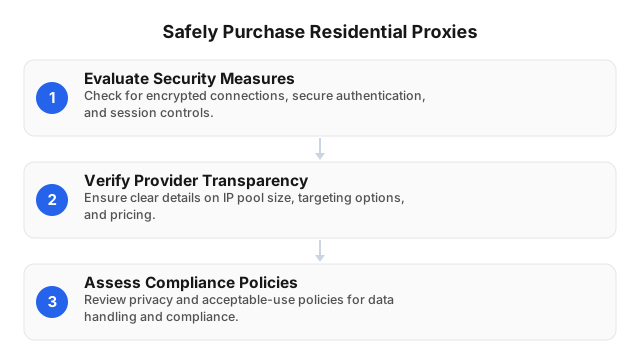
What Makes a Residential Proxy Purchase “Safe”?
Residential proxies route traffic through IP addresses associated with real residential networks. They are useful for public web data collection, ad verification, localization testing, QA, market research, and price monitoring—but the provider becomes part of your security, reliability, and compliance stack.
A safe purchase answers four practical questions:
- Can your team control access? Look for username-password authentication, IP whitelisting, project-level credential separation, and fast revocation.
- Can you protect data in transit? Use HTTPS for sensitive web traffic, avoid sending unnecessary personal data, and store proxy credentials in a secrets manager—not in scripts or shared spreadsheets.
- Can the network support your workflow? Rotating sessions suit distributed collection; sticky/static sessions suit logins, carts, and multi-step tests.
- Can the provider prove reliability and responsible use? Check uptime, success rate, support quality, acceptable-use policies, and compliance terms—not just pool size.
EProxies is designed around these criteria: 72M+ residential IPs across 195+ countries, HTTP(S) and SOCKS5, rotating and sticky/static sessions, username-password or IP whitelist authentication, and transparent plan options including residential traffic from $0.25/GB, ISP SOCKS5 from $0.95/IP, and unlimited plans from $79/month.
Security Checks Before You Enter Payment Details
Confirm authentication and access controls
At minimum, a residential proxy provider should let you restrict who can use your traffic. Username-password credentials are flexible for distributed teams and automation tools; IP whitelisting is better when traffic should only originate from approved servers.
For business use, apply the same discipline you use for API keys:
- Create separate credentials for each project or environment.
- Store credentials in a secrets manager or CI/CD vault.
- Revoke access when employees, contractors, or vendors leave.
- Avoid sharing one credential across scraping, QA, and research teams.
- Monitor unusual spikes in bandwidth, locations, or destinations.
From EProxies onboarding and support work, the most avoidable security issues usually come from operational mistakes: credentials pasted into chat tools, test scripts committed to repositories, or old access left active after a project ends. Strong proxy security is partly provider-side and partly workflow discipline.
Use the right protocol for the job
Protocol support affects both compatibility and security.
- HTTP(S) is typically best for browser traffic, API calls, and web data workflows. For sensitive traffic, use HTTPS so payloads are encrypted end to end between your client and the destination site.
- SOCKS5 is useful when applications need broader protocol compatibility or lower-level routing flexibility.
If you are unsure which proxy type fits your stack, compare the tradeoffs in residential vs. datacenter proxies before buying.
Review privacy, logging, and acceptable-use terms
Do not skip the legal and security pages. A provider should be clear about prohibited activity, account abuse, billing rules, support channels, data handling, and compliance expectations.
Before purchasing, document:
- Who can access proxy credentials
- Which destinations are approved
- Whether personal data will be processed
- What data should be excluded, masked, or minimized
- Rate limits and retry rules
- How credentials are rotated or revoked
- Who reviews logs and usage reports
For scraping and data collection, align the purchase with ethical proxy use, especially when working with public data at scale. Proxies can support privacy and resilience, but they do not replace legal review, consent requirements, contractual limits, or responsible collection practices.
For a deeper look at traffic protection, see how EProxies secures your web traffic.
How to Evaluate Performance Without Guesswork
Published specifications are useful, but your workload is the real benchmark. Residential proxy performance varies by target site, region, session type, request rate, and retry logic. A setup that works well for ad verification in Germany may behave differently for public price monitoring in Brazil or QA testing in the United States.
Use a small paid pilot before scaling. Track:
- Success rate: completed requests divided by total attempts
- Median and p95 response time: not just the fastest result
- Geo accuracy: whether the IP appears in the requested country, city, or ASN
- Session stability: whether sticky sessions remain consistent long enough
- Error pattern: timeouts, 403s, CAPTCHAs, DNS failures, and connection resets
- Cost per successful request: total spend divided by usable responses
- Support response quality: how quickly and specifically issues are handled
EProxies provides 98.2% uptime backed by a 99.9% uptime SLA, broad global coverage, and HTTP(S)/SOCKS5 support. Treat provider metrics as a starting point, then validate them against your own targets. No single number proves proxy quality; speed, reliability, geography, and target-specific success all matter.
A practical rule: if the cheaper plan creates more retries, blocks, failed sessions, or engineering work, it may cost more than a higher-quality setup.
Choosing the Right Session Type
Use rotating sessions for distribution
Rotating residential proxies are best when your task benefits from spreading requests across many IPs. Examples include public web monitoring, SERP checks, ad verification, localization checks, and market research.
Rotation can reduce repeated-request patterns, but it should still be paired with sensible rate limits, realistic user-agent behavior, and compliant use. For a deeper security angle, see the security benefits of rotating proxies.
Use sticky/static sessions for continuity
Sticky or static sessions are better when a workflow needs the same IP for a period of time. Examples include:
- Multi-step checkout testing
- Logged-in QA workflows
- Localized content verification
- Form testing
- Session-based research tools
EProxies supports rotating and sticky/static sessions, including long-running session behavior for workflows that need continuity. The key is to match the session type to the task instead of enabling rotation everywhere by default.
Pricing: Compare Real Cost, Not Headline Cost
Residential proxy pricing can look confusing because providers charge by bandwidth, IP count, unlimited access, or a hybrid model. Instead of comparing only the listed price per GB, calculate the effective cost per successful outcome.
For example:
Effective cost = total proxy spend ÷ successful usable results
If a $10 test produces 8,000 usable results, the cost is $0.00125 per successful result. If another setup has a lower sticker price but produces more failures, CAPTCHAs, retries, or unusable locations, the real cost may be higher.
EProxies offers several entry points:
- Residential pay-as-you-go: from $0.25/GB
- Residential volume tiers: around $0.73/GB at 300GB
- ISP SOCKS5: from $0.95/IP
- Unlimited plans: from $79/month
The safest plan is the one that matches your workload. A small QA team may prefer predictable unlimited access; a data team may prefer bandwidth-based pricing; a project needing stable identities may evaluate ISP SOCKS5 instead of rotating residential traffic.
Step-by-Step Buying Checklist
1. Define the use case
Before purchasing, write down:
- Target countries, cities, or ASNs
- Required protocol: HTTP(S), SOCKS5, or both
- Session type: rotating or sticky/static
- Expected bandwidth
- Approved target sites
- Compliance requirements
- Sensitive data that must not pass through the workflow
- Success criteria for the test
2. Verify provider transparency
Look for concrete technical details, not generic claims. A serious provider should publish pool size, coverage, protocols, session options, authentication methods, uptime expectations, support access, pricing rules, and acceptable-use boundaries.
EProxies provides specific operating details: 72M+ residential IPs across 195+ countries, city- and ASN-level targeting, HTTP(S), SOCKS5, rotating and sticky/static sessions, and authentication through username-password or IP whitelist.
3. Secure your setup before testing
Before the first production-style run:
- Use HTTPS destinations when transmitting sensitive data.
- Place proxy credentials in environment variables or a vault.
- Restrict access with IP whitelisting where possible.
- Separate development, staging, and production credentials.
- Set spend alerts or bandwidth limits.
- Keep internal usage logs for auditability.
- Avoid sending passwords, tokens, or regulated personal data through proxy workflows unless necessary and approved.
This step is often where teams reduce the most risk quickly. In practice, a well-configured account with scoped credentials and whitelisted servers is safer than a large shared credential used by multiple teams without visibility.
4. Run a controlled pilot
Start with a small test. Use realistic request rates, real destinations you are permitted to access, and your actual tools. Capture results for several regions if geo-targeting matters.
Monitor:
- Success rate
- Response time
- Geo accuracy
- Session persistence
- Bandwidth used
- Blocks and CAPTCHAs
- Support response quality
- Any unexpected destinations, spikes, or credential use
5. Scale gradually
Do not jump from a small test to full production overnight. Increase traffic in stages, watch error rates, and confirm that spend scales predictably. Rotate credentials when team members change roles, and keep logs of internal proxy usage for auditability.
6. Re-check compliance over time
Terms of service, privacy rules, and business requirements can change. Review your proxy usage periodically, especially if you expand to new countries, collect new data categories, or automate new workflows. Teams running public data projects should revisit ethical proxy usage before scaling.
Common Mistakes to Avoid
Buying only on the lowest advertised price
Cheap traffic is not automatically unsafe, but it can become expensive if success rates are poor, geo accuracy is weak, or support is slow. Compare total operating cost, not just price per GB.
Using free or unclear proxy sources for business work
Free proxies often lack clear ownership, support, uptime guarantees, and privacy commitments. For any workflow involving business data, credentials, or repeatable results, use a paid provider with transparent terms. If you are weighing the tradeoffs, read free vs. paid proxy servers.
Ignoring authentication controls
Shared credentials without IP restrictions are risky. Use IP whitelisting where possible, separate credentials by project, and revoke unused access.
Sending unnecessary sensitive data
A proxy does not make sensitive data safe by default. Minimize payloads, use HTTPS, avoid routing secrets through proxy workflows, and mask or exclude personal data whenever possible.
Using the wrong proxy type
Residential, datacenter, ISP, rotating, and sticky proxies solve different problems. If your task requires session continuity, aggressive rotation may break it. If your task needs broad distribution, one static IP may create unnecessary friction.
Skipping a real-world test
A provider’s benchmark is not a substitute for your own pilot. Test against your actual tools, regions, and permitted destinations.
Treating proxies as a compliance shortcut
Proxies do not override laws, contracts, robots policies, or platform rules. Safe purchasing includes safe use.
FAQ
What are residential proxies?
Residential proxies route requests through IP addresses associated with real residential networks. They are commonly used for compliant public web data collection, localization testing, ad verification, market research, and QA workflows where location accuracy and request distribution matter.
What should I check before buying residential proxies?
Check authentication methods, protocol support, session controls, pricing clarity, uptime commitments, privacy terms, acceptable-use policies, and support availability. Also confirm that the provider supports your target countries, cities, or ASNs.
How can I ensure the security of my data when purchasing proxies?
Choose a provider with clear privacy terms, authentication controls, IP whitelisting, secure protocols, transparent acceptable-use rules, and responsive support. Use HTTPS for sensitive traffic, store proxy credentials in a secrets manager, separate credentials by project, and rotate or revoke access when roles change. Minimize the personal or confidential data sent through proxy workflows, and run a small pilot while monitoring usage, destinations, bandwidth, and error patterns before scaling.
Are rotating or sticky sessions safer?
Neither is universally safer. Rotating sessions are better for distributed request patterns, while sticky/static sessions are better for workflows that require continuity. The safest option is the one that matches the workflow and is used with reasonable limits.
How does EProxies support secure residential proxy use?
EProxies offers 72M+ residential IPs across 195+ countries, HTTP(S) and SOCKS5 support, rotating and sticky/static sessions, username-password authentication, IP whitelist authentication, city- and ASN-level targeting, and published reliability indicators including 98.2% uptime backed by a 99.9% uptime SLA.
How much do residential proxies cost?
Pricing depends on bandwidth, session needs, location targeting, and plan type. EProxies residential traffic starts from $0.25/GB, with volume tiers around $0.73/GB at 300GB. ISP SOCKS5 starts from $0.95/IP, and unlimited plans start from $79/month.
How should I test a provider before scaling?
Run a small pilot using your real tools and permitted target sites. Measure success rate, response time, location accuracy, session stability, error patterns, bandwidth usage, and support responsiveness. Then calculate cost per successful request before increasing volume.
This article was written by the EProxies team and reviewed against our editorial quality standards before publishing.