
How to Leverage Proxies to Avoid Geo-Blocks in 2026
TL;DR: Proxies help bypass geo-restrictions by routing your traffic through an IP address in the target country, city, or ASN, so the destination site sees a local network instead of your real location. For most geo-blocked QA, ad verification, pricing checks, and ecommerce testing, use residential proxies; use sticky residential or ISP SOCKS5 for logins, carts, and repeatable browser sessions. Match the proxy location with browser language, time zone, cookies, DNS behavior, and account region, or the site may still serve the wrong market. EProxies provides 72M+ residential IPs across 195+ countries, HTTP(S) and SOCKS5 support, 98.2% observed uptime backed by a 99.9% uptime SLA, residential access from $0.25/GB, ISP SOCKS5 from $0.95/IP, and unlimited plans from $79/month.
What Geo-Restrictions Actually Check
Geo-restrictions usually start with IP geolocation, then compare that signal with account country, billing address, browser language, time zone, cookies, DNS resolver, device fingerprint, SIM/GPS data, and login history. A German residential IP with en-US headers, a New York time zone, and old USD pricing cookies can still receive the US storefront.
Common geo-restriction outcomes include:
- Hard denial: “This content is not available in your region.”
- Market redirect:
/fr-fr/redirects to/en-us/after a locale cookie is read. - Localized pricing: VAT-inclusive EUR prices in Germany, pre-tax USD prices in the US.
- Inventory split: a product available in London but unavailable in Manchester.
- Ad visibility differences: paid search or display previews shown only in approved regions.
- Checkout gating: shipping, payment, or tax rules enforced after cart creation.
For SEO, ecommerce, ad verification, streaming QA, and localization teams, the task is not simply “changing IPs.” It is reproducing the same request context a real user in the target market would create.
Which Proxy Type to Use
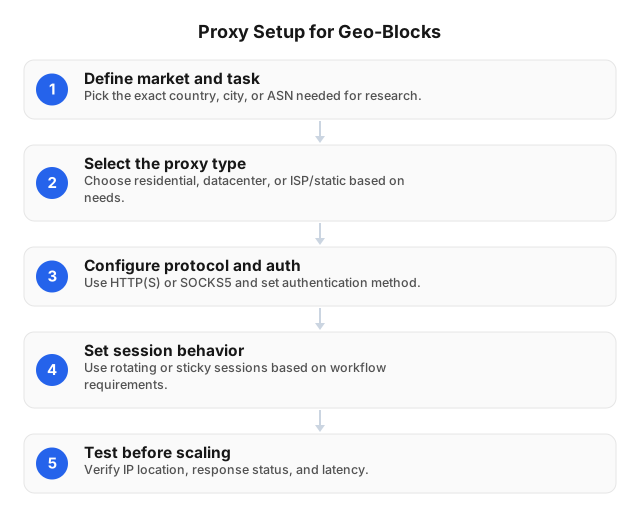
Once the target market is defined, choose the proxy type based on whether the workflow is public and stateless or tied to a continuing session.
| Proxy type | Use it for | Why it works | Main trade-off |
|---|---|---|---|
| Rotating residential | SERP checks, public product pages, ad previews, price monitoring | Uses consumer-like IPs across many regions | Poor fit if the IP changes during login, cart, or checkout |
| Sticky residential | Multi-page flows, checkout QA, account tests, localized browsing | Keeps one residential IP for session continuity | Lower IP diversity during the sticky window |
| ISP SOCKS5 | Stable browser sessions, desktop apps, repeat tests from one region | Provides persistent IP routing with SOCKS5 flexibility | Requires per-IP planning and inventory control |
| Datacenter | Internal QA, speed checks, low-friction public pages | Fast and economical | Easier for sites to classify as hosting traffic |
Start with residential proxies for consumer-facing sites because many ecommerce platforms, publishers, search engines, and ad systems evaluate whether traffic resembles a real household connection. Use sticky residential when the flow has state: login → product page → cart → checkout. Use ISP SOCKS5 when the same tester or application must appear from the same region for hours or days.
EProxies supports rotating and sticky sessions, city/ASN targeting, and tiered residential pricing down to about $0.73/GB at 300GB, alongside its residential, ISP SOCKS5, and unlimited plan options.
A Repeatable Geo-Testing Workflow
1. Define the market profile before connecting
Write the test case as a complete user state, not just a country name:
- Location: Germany, Berlin
- Visitor state: logged out, first visit
- Browser language:
de-DE - Time zone: Europe/Berlin
- Currency expected: EUR
- Success signal: German copy, VAT notice, Berlin delivery estimate, no redirect to
/en-us/ - Session mode: clean browser profile with no old consent, currency, or cart cookies
This prevents one test report from mixing anonymous users, logged-in accounts, desktop browsers, mobile apps, city targeting, and account-level personalization.
2. Match proxy mode to the flow
Use rotating residential sessions for broad public checks, such as 1,000 product pages across 20 countries. Rotate between pages or batches, not during a single page load, because asset requests, API calls, and redirect checks may fail if they come from different IPs.
Use sticky residential or ISP SOCKS5 for stateful flows. Checkout pages, MFA prompts, account dashboards, streaming previews, and ad tools expect cookies and network identity to remain stable. If the IP changes between cart creation and payment preview, the site may reset currency, trigger fraud checks, or force reauthentication.
For ecommerce implementation patterns, see Integrating Rotating Proxies in E-commerce: 2026 Guide.
3. Align browser and device signals
Before opening the target site, set the browser language, time zone, and profile isolation to match the proxy region. For a UK test, use a UK proxy, en-GB language headers, Europe/London time zone, a clean profile, and no old US shipping or currency cookies.
Keep one browser profile per market. A single “global QA” profile accumulates consent banners, redirect preferences, checkout state, and pricing cookies that contaminate later tests. For deeper browser isolation, fingerprint hygiene, and proxy routing, use Building an Anonymous Web Browsing Setup.
4. Validate manually before automation
Run 5–10 manual checks before scaling. Record:
- Proxy country, city, ASN, protocol, and session type
- Browser language, time zone, and profile ID
- Target URL and final redirected URL
- HTTP status code
- Screenshot
- Currency, language, inventory, shipping estimate, and visible offer
- Timestamp and account state
If an IP-location checker shows France but the target site serves the US page, clear cookies and retry in a new profile. If the mismatch remains, the site may use a different geo-IP database, prioritize account history, or cache location at the application layer.
For scripted QA flows, see Proxy Scripts for QA Automation: Practical 2026 Guide.
Setup Checklist for Browsers, Devices, and Scripts
Most proxy configurations require four fields: host, port, username, and password. Some deployments use IP whitelisting instead; whitelist the outbound NAT IP of the CI runner, office gateway, or server, not a developer laptop that changes networks.
For desktop and mobile testing:
- Windows: Settings → Network & Internet → Proxy
- macOS: System Settings → Network → Details → Proxies
- Browser profiles: configure one proxy per region-specific profile
- Mobile Wi-Fi: set the proxy under the active Wi-Fi network; verify app behavior because some apps bypass Wi-Fi proxy settings
- Streaming or media QA: test bandwidth, session stability, and location consistency before judging content availability; see How to Choose Proxies for Streaming
For scripts, store proxy credentials in environment variables or a secret manager. Do not commit usernames, passwords, or allowlists to repositories. Use HTTP(S) for normal web requests and browser automation; use SOCKS5 for applications that need broader protocol handling.
After configuration changes, use this validation sequence:
- Open a neutral IP-location checker.
- Confirm country, city, ASN, and protocol.
- Open the target in a clean browser profile.
- Capture the final URL, status code, screenshot, language, currency, and visible offers.
- Repeat from a second IP in the same country if the result affects pricing, ads, compliance, or release approval.
Troubleshooting Geo-Blocked Results
Authentication fails
Test the proxy with a simple HTTPS request before opening the target site. Check copied credentials for spaces, expired passwords, wrong ports, protocol mismatch, traffic limits, and whitelist errors. In CI, print the runner’s outbound IP at runtime because cloud NAT addresses can change between jobs.
The location appears wrong
Compare three signals: an IP-location checker, the target site response, and the proxy dashboard configuration. Clear cookies, switch to a clean profile, align language and time zone, and retry with city or ASN targeting. If only the target site disagrees, it may be using cached account location or a different geolocation database.
The page loads but shows the wrong country
Inspect redirect chains, currency cookies, consent state, account country, billing region, shipping address, and browser locale. A Canadian account can override a UK proxy, and a EUR cookie can keep affecting a US test until the profile is reset.
Blocks increase during automation
Lower concurrency before adding more IPs. Add random delay ranges, load required assets, keep cookies for multi-page flows, stop retrying after hard denials such as 401 or 403, and avoid rotating IPs mid-session. Faster rotation can look less human if every request arrives with no cookies, no browsing history, and a new network identity.
For scraping workflows, prefer official APIs when available, limit fields, respect rate limits, and define stop conditions before launch. See Creating Effective Web Scraping Strategies Using APIs and Ethical Use of Proxies for Web Scraping.
Legal, Security, and Operational Boundaries
Use proxies to view permitted content as a user in the target market would see it. Do not use proxies to defeat authentication, evade paid access, create fake engagement, manipulate reviews, or collect data you are not authorized to access.
Document four controls before running a campaign:
- Business purpose: ad verification, SEO localization, ecommerce QA, pricing audit, streaming availability test, or public research.
- Data scope: URLs, fields, screenshots, retention period, and personal-data exclusions.
- Access rules: site terms, account terms, robots instructions where applicable, and legal review for regulated markets.
- Operational limits: request rate, retry policy, stop conditions, escalation owner, and incident log.
For credential handling, network access controls, and internal routing policy, see building a secure network with proxies.
Related Reading
- Proxy Scripts for QA Automation: Practical 2026 Guide
- Integrating Rotating Proxies in E-commerce: 2026 Guide
- Building an Anonymous Web Browsing Setup
FAQ
How do proxies help bypass geo-restrictions?
Proxies help bypass geo-restrictions by sending your request through an IP address in the target location, so the website sees the proxy’s country, city, or ASN instead of your real network. A tester in the US can use a UK residential proxy to verify UK pricing, local ads, regional search results, or content availability. Results are most reliable when the proxy location matches browser language, time zone, cookies, DNS behavior, and account region.
What should I do if my proxy isn't working?
First verify the proxy outside the target site with a simple IP-check page or HTTPS request, then confirm host, port, username, password, protocol, plan limits, and whitelist settings. If the proxy connects but the target still blocks or misroutes you, clear cookies, use a clean browser profile, align language and time zone, and switch to sticky sessions for logins or checkout flows. If you receive repeated 401, 403, or CAPTCHA responses, reduce concurrency and stop automated retries until permissions and request patterns are reviewed.
What are the best proxies for avoiding geo-blocks?
Residential proxies are the best default because many geo-restricted sites trust consumer ISP traffic more than hosting-network traffic. Use rotating residential proxies for high-volume public checks, sticky residential proxies for carts and logins, and ISP SOCKS5 proxies when one stable regional IP is required. Datacenter proxies are suitable only after testing that the target does not treat hosting IPs differently.
What are geo-blocks and why do they exist?
Geo-blocks are rules that restrict, redirect, or personalize content based on IP address, account country, billing region, language, time zone, GPS, cookies, and device signals. They exist for licensing, shipping, tax, fraud prevention, local pricing, ad targeting, and regulatory compliance. An ecommerce site may show different inventory by city, while a media site may restrict content by country-level rights.
How can I set up a proxy on my device?
Copy the proxy host, port, protocol, username, and password into your browser, operating system, mobile Wi-Fi settings, or application proxy settings. On Windows, use Settings → Network & Internet → Proxy; on macOS, use System Settings → Network → Details → Proxies. After saving, verify the IP location first, then open the target page in a clean region-specific browser profile.
What proxy type is best for geo-restricted market research?
Residential proxies are the best first choice for consumer-facing market research because they resemble real user networks. ISP SOCKS5 proxies are better for repeat browser checks, desktop tools, and QA flows where the same IP must persist. Datacenter proxies fit internal tests and low-sensitivity public pages where hosting traffic does not affect results.
Should I use rotating or sticky sessions?
Use rotating sessions for broad public checks across many pages, keywords, products, or regions. Use sticky sessions for logins, carts, checkout previews, ad tools, account dashboards, and any workflow where cookies must remain tied to one IP. EProxies supports rotating residential access, sticky residential sessions, and ISP SOCKS5 options for stable locality.
Are residential proxies legal?
Residential proxies are legal tools, but each use case depends on the target site, jurisdiction, data type, access method, and purpose. Lower-risk uses include public localization checks, ad verification, regional QA, and price comparison. Higher-risk uses include evading paywalls, bypassing authentication, collecting sensitive data, or violating platform terms.
This article was written by the EProxies team and reviewed against our editorial quality standards before publishing.