
Scraping Websites Legally with Python: A 2026 Guide
TL;DR: Scraping websites legally with Python requires checking access permissions, site terms, privacy obligations, and rights to reuse the data—not just whether a page is publicly accessible. Legal requirements depend on the jurisdiction, collection method, data, and intended use. Build those constraints into your scraper before sending live requests.
For analysts responsible for compliance, the first deliverable should be a documented collection decision—not a working scraper. Translate that decision into approved URLs and fields, request limits, retention rules, and stop conditions for access denials or CAPTCHAs. Permission to view a page does not necessarily include permission to collect, store, or republish its contents.
Understanding Web Scraping and Its Legal Implications
Web scraping is not inherently illegal, but its legality depends on what you collect, how you access it, and how you use it. For a Python project, review the intended dataset and downstream analysis—not merely whether a script can retrieve a page. Public access, contractual restrictions, privacy obligations, and intellectual property rights require separate assessment.
Before collection, document these distinctions:
- Data: Separate product facts from personal information and copyrighted content. Public visibility does not settle whether collection or reuse is lawful.
- Access: Identify whether pages require authentication. Permission to view an account does not necessarily authorize automated extraction.
- Use: Specify whether records support internal analysis, redistribution, or publication; each purpose needs its own review.
Record the approved purpose alongside dataset metadata so later reuse triggers reassessment. For projects spanning jurisdictions, use the global web scraping compliance guide to structure the review, then obtain jurisdiction-specific advice where needed.
Setting Up Your Python Environment for Web Scraping
Separate dependencies, credentials, and collection rules before making live requests. Requests and BeautifulSoup provide a small starting stack for static HTML extraction, while an isolated environment makes that stack reproducible. Build compliance settings into the project rather than leaving them in an analyst’s notes: neither dependency isolation nor a working parser establishes legal authorization.
- Create an isolated environment. Run these commands; on Windows, activate with
.venv\Scripts\activate:python -m venv .venv source .venv/bin/activate python -m pip install requests beautifulsoup4 python -m pip freeze > requirements.txt - Separate secrets from code. Store approved credentials in environment variables; exclude local secret files and collected data from version control. Avoid logging authorization headers, session cookies, or proxy credentials.
- Record collection boundaries. Document approved domains, permitted fields, permission evidence, retention rules, and stop conditions. Test parsing against saved, authorized HTML before enabling network requests.
- Set network safeguards. Give every request an explicit timeout, such as
timeout=(5, 30)for connection and read timeouts. Limit retries so a failing endpoint cannot trigger an uncontrolled request loop.
Choosing the Right Tools for Web Scraping with Python
Use Requests with BeautifulSoup for static HTML, Scrapy for scheduled crawls, and Selenium when authorized collection requires browser rendering. Choose the least complex tool that retrieves the approved fields reliably. Tool capability does not establish permission: a browser automation library does not expand your rights to access accounts, extract content, or reuse the resulting dataset.
| Tool | Best fit | Compliance control to implement | Operational trade-off |
|---|---|---|---|
| Requests + BeautifulSoup | Fetching and parsing static HTML | Restrict URLs and extracted fields to the approved scope | Scheduling and audit logging require additional code |
| Scrapy | Recurring, structured collection | Configure robots.txt handling, request delays, and domain restrictions | More configuration than a small script |
| Selenium | Rendering JavaScript-dependent content | Automate only authorized interactions; stop at unexpected authentication or CAPTCHA barriers | Browser execution adds compute and maintenance costs |
Check for an authorized API or export before building an HTML parser. An API can provide documented fields and explicit quotas, though its license still controls permitted use; the beginner’s guide to scraping with APIs explains that workflow.
Step-by-Step Guide to Scraping Websites Legally
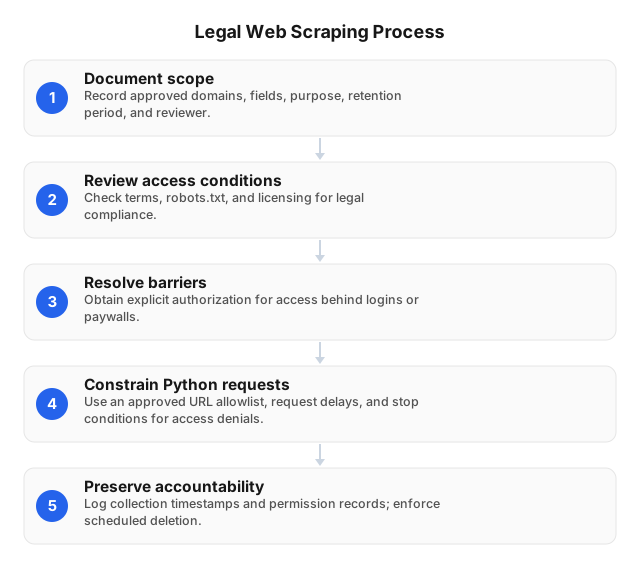
Review the data, access method, and intended use before sending requests, then encode the approved boundaries in your Python job. Public access alone does not establish permission to collect or reuse data. A defensible workflow records why collection is permitted, limits what the scraper can retrieve, and stops when access conditions change.
- Document scope. Record approved domains, fields, purpose, retention period, and reviewer. Exclude personal data unless its collection and use have a documented legal basis.
- Review access conditions. Check terms, robots.txt, and licensing. Treat robots.txt as a crawl instruction, not legal authorization; its silence is not permission.
- Resolve barriers. Obtain explicit authorization for automated access behind logins or paywalls. Stop at CAPTCHAs rather than circumventing them.
- Constrain Python requests. Use an approved URL allowlist, per-host request limits, caching, and explicit timeouts. Validate redirect destinations before fetching URLs outside the approved scope.
- Handle refusals deliberately. Pause on HTTP 401 or 403 responses. For HTTP 429, honor
Retry-Afterwhere provided and reduce the request rate; do not switch IPs to evade the limit. - Preserve accountability. Log collection timestamps and permission records without storing secrets. Restrict dataset access and enforce scheduled deletion.
Best Practices for Ethical Web Scraping
Collect only fields necessary for the stated purpose, respect access boundaries, and limit the burden on the source website. Legal availability does not by itself make every use ethical: combining public records can expose individuals in ways the original pages did not. Assess privacy risks and downstream sharing before scheduling recurring collection.
Configure per-host request limits and cache responses when freshness requirements permit. A daily price report usually does not need the same product page fetched every minute. Track request counts, response latency, and error rates so collection pauses when the source begins struggling.
Treat login credentials and subscriptions as permission to access an account, not automatic authorization for bulk extraction. For operational controls around site defenses, consult best practices for web scraping with anti-bot protection; a technical workaround is not a substitute for permission.
Proxies can route authorized requests through different IP addresses, but they do not guarantee anonymity or legal compliance. Never rotate IPs to override a site’s refusal. Exclude unnecessary personal identifiers, restrict raw-data access, and apply deletion rules to exports as well as the primary dataset.
Handling Legal Challenges in Web Scraping
Pause disputed collection before changing the scraper’s access method. An objection may concern access authorization, personal data, copied content, or redistribution, and each requires a different response. Preserve the approval record and relevant logs so counsel can assess what happened without relying on assumptions about what the script was intended to do.
If a site challenges access, retain the notice, relevant terms, request logs, and permission records. Disable the affected Python job while counsel reviews scope. Do not treat a working login or continued technical access as evidence that the objection has been resolved.
For a privacy complaint, restrict access to affected records and trace downstream exports while the responsible privacy team assesses response deadlines and deletion obligations. For a copyright objection, identify copied text or images separately from extracted facts, and suspend disputed redistribution pending review. Record who authorized any restart, the permitted fields, and the revised access conditions.
Case Studies: Legal Web Scraping in Action
Documented permission, limited collection, and controlled reuse provide stronger project evidence than successful HTTP responses. The following illustrative scenarios show decisions an analyst can record before collection; they are not reported customer projects or legal determinations. Technical access is not evidence of authorization, and each scenario requires review against the actual permission or license.
Retail price monitoring: An analyst receives written permission to collect specified public product fields at an agreed frequency. A BeautifulSoup parser extracts prices and availability, excluding reviewer identities. The project record stores the permission, approved URLs, and collection timestamps alongside the dataset.
Subscription research: An analyst can read a paid publication but has no confirmed automation or redistribution rights. The Python collection job remains disabled while the publisher reviews a licensing request. A permitted export replaces scraping if the agreement authorizes that route.
FAQ
Use the answers below as collection rules, not as a jurisdiction-specific legal opinion. Before production, record the applicable jurisdiction, source terms, data categories, and intended recipients in the project’s approval record. Reassess that record when the source changes its access conditions or when analysts propose a new use for the dataset.
Is web scraping legal in 2024?
Yes, web scraping could be legal in 2024, and it can still be legal in 2026, depending on the circumstances. Legality depends on the jurisdiction, data collected, access method, and intended use—not whether the scraper uses Python. Public visibility does not automatically authorize collecting personal information, reproducing copyrighted material, or disregarding applicable contractual restrictions.
How can I scrape data legally?
Scrape only when your access, collection, storage, and intended use comply with applicable laws and permissions. Before running Python code, document the target pages, required fields, relevant terms, privacy obligations, and any authorization covering automated access. Obtain explicit authorization for restricted or paywalled collection, and stop if access is denied or your approved scope no longer matches the project.
What are the best Python tools for web scraping?
Requests with BeautifulSoup is a good default for static HTML, Scrapy for recurring crawls, and Selenium for pages requiring browser execution. BeautifulSoup parses returned HTML but does not execute JavaScript that may populate a page. Choose the least complex tool that retrieves your authorized data, and review permission rather than escalating automation when authentication barriers or CAPTCHAs appear.
How do I set up Python for web scraping?
Create an isolated environment with python -m venv .venv, activate it, and install Requests and BeautifulSoup with python -m pip install requests beautifulsoup4. Record dependencies in requirements.txt so another analyst can reproduce the environment. Before scheduling collection, test against authorized HTML and configure URL restrictions, timeouts, request pacing, logging, and stop conditions for denied access.
What are the ethical considerations in web scraping?
Ethical scraping requires minimizing data collection, respecting access boundaries, limiting server load, and preventing harmful downstream use. Exclude personal or sensitive fields unless the project has a documented justification and appropriate safeguards; public availability does not eliminate privacy risks. Set retention and deletion rules before collection, and avoid sharing raw records that could identify individuals even when published findings use aggregates.
This article was written by the EProxies team and reviewed against our editorial quality standards before publishing.