
Web Scraping with APIs: Beginner's Guide for 2026
TL;DR: The best tools for API web scraping are Requests for simple Python jobs, HTTPX for asynchronous requests, and Scrapy for multi-source pipelines. Use a documented data API before adding HTML parsing or browser automation; add residential proxies only for permitted location-specific collection, not to bypass API quotas.
Choose the Right Collection Method
Three different workflows are often called “API web scraping.” They require different tools and budgets:
| Method | What you send | What you receive | Main responsibility |
|---|---|---|---|
| Source’s official API | Parameters, authentication, pagination cursor | JSON or XML records | Follow the source’s schema and usage limits |
| Managed scraping API | A webpage URL and extraction options | HTML or extracted records | Verify extraction accuracy and cost |
| Your own scraper | HTTP requests or browser actions | HTML, network responses, files | Maintain retrieval, parsing, and scheduling |
For a product-price dataset, an official API might return product_id, price, currency, and availability. Extracting those fields from JSON avoids maintaining CSS selectors whenever the retailer changes its page layout.
A managed scraping API is useful when authorized data exists only on webpages and you want to outsource retrieval infrastructure. Check whether it returns raw HTML or validated records: an HTTP 200 response can still contain an error page or missing fields.
A residential proxy supplies a network route—not an API, parser, or access permission. Choose the data source and retrieval tool before choosing the proxy.
Best Tools for API Web Scraping
Start with the smallest stack that handles the source’s response format. Browser automation adds memory consumption, page assets, and execution time that a JSON endpoint usually does not need.
| Tool | Best use | Concrete advantage | Limitation |
|---|---|---|---|
| Requests | Sequential Python API extraction | Sessions reuse connections; built-in JSON decoding | Pagination and retry policies require your code |
| HTTPX | Concurrent API requests | Synchronous and asynchronous clients | Concurrency must still respect shared quotas |
| Scrapy | Multiple sources and scheduled extraction workflows | Request scheduling, middleware, and item pipelines | More setup than a small API script |
| BeautifulSoup | HTML returned by an endpoint | Extracts fields with CSS selectors | Does not fetch data or execute JavaScript |
| Playwright | Authorized workflows requiring browser execution | Runs JavaScript and supports browser interactions | Heavier than an HTTP client |
| Pydantic | Validating extracted records | Enforces types and required fields | Validates data; does not retrieve it |
For a daily job reading one paginated endpoint, Requests plus a validation layer is usually enough. Consider HTTPX when independent requests can run concurrently within the documented allowance; choose Scrapy when scheduling, retries, and multiple source pipelines become harder to maintain than extraction itself.
If evaluating a managed scraping API, compare cost per 1,000 usable records, not just advertised request prices. Test the same permitted URLs and record extraction completeness, latency, retry charges, geographic options, and whether browser rendering costs extra.
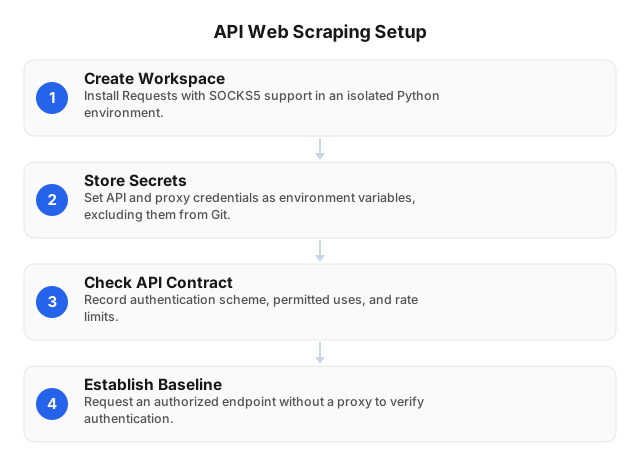
Set Up a Minimal Python Environment
Keep API credentials, proxy credentials, and extraction logic separate. This makes a failed request easier to diagnose and prevents secrets from appearing in source control.
python -m venv .venv
# macOS/Linux
source .venv/bin/activate
python -m pip install "requests[socks]"
Before writing a collection loop, record these six details from the API documentation:
- Authentication: API key, bearer token, OAuth, or none.
- Pagination: page number, offset, cursor, or next-page URL.
- Quota: requests per interval and whether limits apply to the account or IP.
- Fields: required identifiers, types, currencies, and timestamps.
- Incremental updates: support for filters such as
updated_since. - Usage conditions: storage, redistribution, and proxy restrictions.
Make one direct request before adding a proxy. If that request fails, resolve authentication or endpoint errors before introducing another network layer.
Reproducible Example: Collecting Open Library Book Records
Open Library’s public Search API provides a concrete API-first workflow: retrieve book metadata as JSON without rendering search pages. The following example collects up to three pages of 100 results for “machine learning,” selects three fields, and deduplicates records by work key.
This is a reproducible integration example, not a claimed EProxies customer deployment or performance benchmark. Check Open Library’s current usage guidance before running it repeatedly.
import json
import time
import requests

session = requests.Session()
session.headers["User-Agent"] = "BookMetadataDemo/1.0"

records = {}

for page in range(1, 4):
    response = session.get(
        "https://openlibrary.org/search.json",
        params={
            "q": "machine learning",
            "fields": "key,title,first_publish_year",
            "limit": 100,
            "page": page,
        },
        timeout=(10, 30),
    )
    response.raise_for_status()
    payload = response.json()
    docs = payload["docs"]

    for doc in docs:
        key = doc.get("key")
        title = doc.get("title")
        if not key or not title:
            continue

        records[key] = {
            "source_id": key,
            "title": title,
            "first_publish_year": doc.get("first_publish_year"),
        }

    print(f"page={page} received={len(docs)} unique={len(records)}")

    if len(docs) < 100:
        break
    if page < 3:
        time.sleep(1)  # Example pacing, not a published quota.

with open("books.jsonl", "w", encoding="utf-8") as output:
    for record in records.values():
        output.write(json.dumps(record, ensure_ascii=False) + "\n")
The three-page cap deliberately produces a sample, not a complete catalog. A missing publication year remains null; it is not converted to 0, which would introduce a false date into downstream analysis.
This example needs no proxy because it does not require a geographic network origin. For a production job, add documented rate-limit handling, extraction timestamps, and durable checkpoints before scheduling unattended runs.
Add Residential Proxies Only When the Task Requires Them
A permitted regional availability check may require requests from different countries. First inspect whether the API supports a documented country, market, or locale parameter; that can be simpler and cheaper than changing the network route.
If results genuinely depend on the request’s IP location, EProxies provides 72M+ residential IPs across 195+ countries, with HTTP(S) and SOCKS5 support. Verify the target’s proxy policy and the required location before committing bandwidth.
For an authorized HTTPS endpoint, Requests can route traffic while keeping API authentication separate:
import os
import requests

with requests.Session() as session:
    response = session.get(
        os.environ["API_URL"],
        headers={
            "Authorization": f"Bearer {os.environ['API_TOKEN']}"
        },
        proxies={
            "https": os.environ["PROXY_URL"]
        },
        timeout=(10, 30),
    )
    response.raise_for_status()
    data = response.json()
Use a consistent exit IP when the API binds a session to its network origin. Rotate only when the source permits it and the workflow benefits from changing locations; rotating IPs does not reset an account’s API quota.
Handle Failures Without Corrupting the Dataset
Log the endpoint, status code, elapsed time, page or cursor, and accepted-record count. Never log bearer tokens or proxy URLs containing passwords.
| Signal | Likely issue | Next action |
|---|---|---|
401 | Missing, expired, or invalid credentials | Check token expiry and authentication format |
403 | Insufficient permissions or access-policy restriction | Review scopes and source policy; do not rotate around it |
407 | Proxy authentication failure | Check proxy credentials separately from the API token |
429 | Rate limit exceeded | Honor Retry-After and pause workers sharing the quota |
502, 503, 504 | Potentially transient upstream failure | Retry safe requests with bounded backoff |
200 with invalid records | Schema change, error payload, or extraction failure | Validate fields before loading records |
For idempotent GET requests, a starting retry policy might allow three retries with delays of 1, 2, and 4 seconds, plus jitter—unless the source specifies a different policy. A valid Retry-After header takes precedence. Do not blindly repeat POST requests that may create duplicate operations.
Checkpoint pagination after the batch is durably stored. Enforce uniqueness on the source ID so an interrupted job can replay its last page without duplicating rows.
Measure Useful Output Before Scaling
Request counts hide failed extraction and unnecessary bandwidth. Track these four measures per source:
- Valid-record rate: accepted records ÷ retrieved records.
- Cost per 1,000 usable records: collection cost ÷ accepted records × 1,000.
- Transferred bytes: response traffic, retries, and browser assets.
- Freshness: time between the source observation and dataset availability.
A bandwidth example illustrates the trade-off: 10,000 responses averaging 50 KB equal roughly 0.5 GB of response payload before retries and other traffic. If 10% of requests need one additional attempt, the payload rises to roughly 0.55 GB.
Quota arithmetic matters more than thread count. With an allowance of 60 requests per minute shared by four workers, the combined average must stay within one request per second; each worker does not receive its own 60-request allowance.
Request fewer fields where supported, use incremental updates, and avoid browser rendering for JSON endpoints. See 12 Steps to Optimize Web Scraping Scripts in 2026 for further script-level improvements.
Related Reading
- Creating Effective Web Scraping Strategies Using APIs
- How to Upscale Web Scraping for Large Datasets in 2026
FAQ
What is an API in web scraping?
An API is an interface that lets a script request data, commonly as JSON or XML. A source’s official API exposes its records directly; a managed scraping API retrieves webpages and may extract fields on your behalf. Check which interface supplies the required fields and permits your intended use.
How do you scrape data using an API?
Authenticate, request a sample, validate its fields, and follow the documented pagination mechanism. Save records with stable source IDs and extraction timestamps, then checkpoint each page after storing it. Continue until the API’s documented completion condition is reached—not merely until the first successful response.
Why use residential proxies for API scraping?
Use residential proxies when authorized collection requires a particular network location, such as checking country-dependent availability. Direct connections are usually sufficient for ordinary authenticated APIs. Proxies do not grant access rights or increase account-level quotas.
What are the best tools for API web scraping?
Requests is the best starting point for simple Python API jobs, HTTPX suits asynchronous collection, and Scrapy suits multi-source pipelines. Add Pydantic for record validation, BeautifulSoup for HTML parsing, or Playwright only when browser execution is necessary. For managed scraping APIs, compare extraction accuracy, location support, latency, and cost per usable record using a representative permitted test set.
How to handle API rate limits in scraping?
Honor Retry-After and coordinate pacing across all workers sharing the same quota. Use bounded retries with jitter when the source allows them, and save pagination checkpoints before pausing. If the quota cannot support the reporting schedule, reduce collection frequency, use incremental updates, or request a higher allowance.
How do I keep an API data pipeline working after an API version change?
Pin a supported API version where available and validate required fields before loading records. Keep representative response fixtures for regression tests, treating missing fields differently from explicit null values. Quarantine incompatible records and monitor deprecation notices rather than silently importing incomplete data.
This article was written by the EProxies team and reviewed against our editorial quality standards before publishing.