
How to Protect Your Networks With Proxies in 2026
TL;DR: Protect a corporate network by routing approved outbound traffic through an authenticated forward proxy, blocking direct egress, and sending proxy, DNS, firewall, and identity events to the SIEM. Use HTTP(S) for web-aware applications and SOCKS5 for broader TCP routing, but retain TLS for encryption. Pilot DNS, certificates, authentication, failover, and application compatibility before enforcing the route.
How Proxies Protect Corporate Networks
A forward proxy sits between users or workloads and internet services:
User or workload → Forward proxy → Internet service
The proxy evaluates each request against identity, destination, protocol, schedule, and bandwidth rules. It can allow or block the connection, then record the decision with a timestamp and byte count. External services generally see the proxy’s public address rather than the client’s private address.
This architecture creates a controlled egress point for employee browsing, server updates, public-web research, and automation. Administrators can associate requests with users or service accounts, separate workloads by subnet and credentials, and investigate unusual uploads or newly observed destinations.
Enforcement is essential. If managed devices can open direct TCP 443 connections, applications can bypass proxy authentication and logging. Permit internet-bound web traffic only through approved gateways, with narrow, documented exceptions for incompatible services.
NIST’s firewall guidance explains that application-proxy gateways can inspect application traffic rather than relying only on addresses and ports. That visibility adds processing overhead and requires protocol-specific configuration.
What a Proxy Cannot Do
That controlled egress point has clear limits. A proxy does not automatically encrypt traffic, detect malware running on an endpoint, or secure connections that bypass it. It also cannot replace firewalls, endpoint detection, identity controls, VPNs, or legal review.
HTTPS requires careful handling. An explicit proxy can receive the destination through HTTP CONNECT, a method defined in RFC 9110, but it cannot read encrypted page content unless the organization deploys TLS inspection.
TLS inspection requires managed root certificates, restricted access to decrypted data, and exclusions for certificate-pinned, mutual-TLS, banking, or healthcare services. CISA has warned that poorly implemented HTTPS interception can weaken TLS. Never disable certificate validation to resolve an inspection error.
Choose the Right Proxy Type
Within those limits, select a proxy type that matches the traffic and purpose:
| Proxy type | Best fit | Primary limitation |
|---|---|---|
| Forward filtering proxy | Employee and server internet access | Clients can bypass it unless firewalls enforce the route |
| Reverse proxy | Publishing internal web applications | Does not control outbound browsing |
| HTTP(S) proxy | Browsers, APIs, and web automation | Supports only compatible protocols |
| SOCKS5 proxy | Mixed applications and broader TCP routing | Does not inspect or encrypt application content |
| Residential proxy | Authorized localization, advertising, and public-web testing | Not a replacement for a secure web gateway |
| ISP proxy | Stable sessions requiring ISP-addressed egress | Provides routing and identity, not payload encryption |
SOCKS5 relays traffic according to RFC 1928, so applications must still use TLS or another encrypted transport. For EProxies workflows, confirm HTTP(S) and SOCKS5 connection options in the current dashboard or plan documentation before deployment.
EProxies’ published network profile lists 72M+ residential IPs across 195+ countries. Use that geographic coverage for approved localization or public-web testing rather than general employee browsing. Isolate these workloads, assign credentials per application, and review proxy usage and global compliance.
Recommended Network Architecture
After selecting the proxy type, place it within a layered outbound architecture:
Managed device → VPN or office gateway → DNS control → Authenticated proxy → Internet
Send security events to one monitoring system:
Proxy + firewall + DNS + endpoint + identity logs → SIEM
Each layer handles a distinct failure mode:
- VPN: Encrypts traffic from remote devices to the corporate network.
- DNS filtering: Blocks prohibited or known-malicious domains before connection.
- Proxy: Applies identity, destination, protocol, and usage policies.
- Firewall: Prevents direct egress around the proxy.
- Endpoint protection: Detects malicious files, processes, and local behavior.
- SIEM: Correlates proxy activity with authentication and endpoint events.
This design aligns with NIST SP 800-207: network location alone should not establish trust.
Step-by-Step Proxy Setup
Implement the architecture in stages, beginning with the traffic it must support.
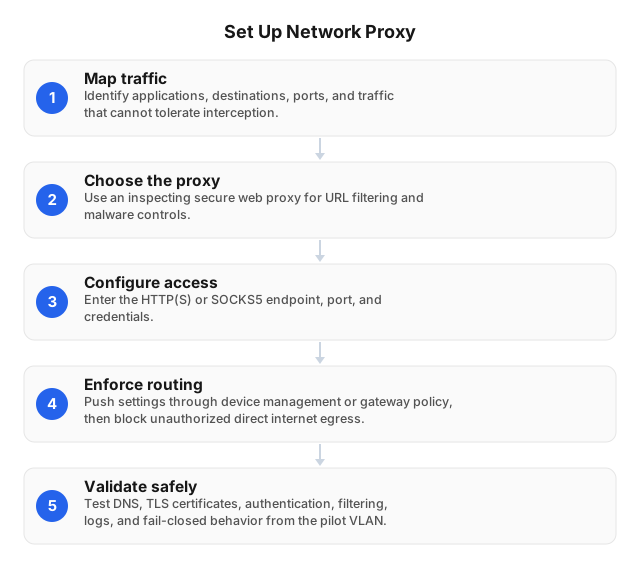
1. Inventory and classify traffic
List the users, devices, workloads, destinations, protocols, and ports that require internet access. Identify certificate pinning, mutual TLS, hard-coded DNS, nonstandard protocols, and applications that ignore operating-system proxy settings.
Assign every flow to one outcome:
- Proxy and inspect.
- Proxy without TLS inspection.
- Permit through a narrow direct route.
- Block.
Every bypass should record the application, owner, destination, reason, approval, and expiration date.
2. Select protocols and gateways
Use HTTP(S) for browsers, REST APIs, and web-aware software. Use SOCKS5 when an application requires broader TCP routing or lacks HTTP proxy support.
Choose gateways near users or cloud workloads, but test against actual destinations. Distance to the proxy is only one latency component; destination throttling, DNS resolution, TLS negotiation, and exit location also affect response time.
3. Configure authentication
Create credentials per application, team, or environment. Do not share one account across production automation, test workers, and employee devices.
Source-IP allowlisting identifies a gateway, not an individual user. Pair it with scoped credentials or an identity-aware control when attribution matters. Store secrets in a vault and rotate them after staff changes, suspected exposure, or unexpected traffic.
4. Force the approved route
Deploy proxy settings through device management, browser policies, environment variables, or a proxy auto-configuration file. Configure firewalls to deny direct outbound web traffic from managed segments.
Avoid blanket exceptions for TCP 443. Restrict bypasses to named destinations and ports, log their use, and alert on repeated direct-connection attempts.
5. Define DNS behavior
Decide whether clients, corporate resolvers, or the proxy resolve hostnames. Proxy-side DNS can align resolution with the exit region, while local DNS may expose destinations or return a different regional endpoint.
Test DNS behavior from every supported client, including browsers, command-line tools, containers, and applications with their own resolver libraries.
6. Pilot and enforce
Start with one VLAN, office, or device group. Test successful and failed authentication, allowed and blocked destinations, certificate trust, pinned applications, uploads, large downloads, logs, and gateway recovery.
Choose fail-open or fail-closed behavior explicitly. Fail-closed provides stronger control but can interrupt operations; any emergency bypass should require approval, produce an alert, and expire automatically.
Integrate Monitoring and Security Controls
Once the route works reliably, integrate its telemetry with the broader security stack. Send authenticated identity, source segment, destination, timestamp, policy action, response code, and byte count to the SIEM. Do not log passwords, session tokens, or unnecessary request content.
Correlate proxy downloads with endpoint execution. A downloaded executable followed by a new process and connections to an uncategorized domain warrants investigation. DLP rules should target high-confidence cases, such as regulated identifiers uploaded to unapproved storage, and only where inspection is authorized.
Synchronize clocks across proxies, firewalls, DNS resolvers, identity providers, endpoints, and the SIEM. Even a two-minute mismatch can obscure the sequence between authentication, download, and process execution.
Performance, Availability, and Cost
Security controls also need operational validation. Measure complete application transactions rather than proxy TCP reachability. Track:
- DNS lookup time.
- Proxy connection and authentication time.
- TLS negotiation time.
- Time to first byte.
- Total transfer time.
- HTTP status or application result.
- Success rate by gateway, destination, and exit region.
EProxies’ published service profile states 98.2% uptime backed by a 99.9% uptime SLA. Monitor availability from each office and cloud region because provider-level figures do not capture local routing, DNS, or destination failures.
For high-volume automation, distribute requests across regional gateways and cap concurrency per destination. Proxy sharding can improve performance, but it increases routing, credential, and log-management complexity. For sustained rate reductions, use the diagnostic controls in How to Mitigate Proxy Speed Throttling in 2026.
Published EProxies pricing includes pay-as-you-go residential traffic from $0.25/GB, tiered pricing of about $0.73/GB at 300GB, ISP SOCKS5 from $0.95 per IP, and unlimited plans from $79 per month. Estimate cost from measured transfer volume, concurrency, session duration, and required exit locations.
Common Proxy Failures
When monitoring reveals a problem, isolate it by symptom:
- Authentication errors: Check credential scope, source-IP restrictions, account status, system time, and whitespace or encoding in secrets.
- TLS certificate errors: Verify the managed root certificate, chain, hostname, and expiration date. Create narrow bypasses only for confirmed pinned applications.
- Routing loops: Exclude proxy management traffic and health checks from automatic proxy rules; separate client-facing and upstream routes.
- DNS leaks: Compare client and proxy-side resolution, then inspect traffic for direct UDP/TCP 53 or encrypted DNS connections.
- Unexpected latency: Test the same payload and destination with the same resolver, protocol, and exit region to isolate proxy overhead.
- Application incompatibility: Confirm whether the software supports HTTP(S), SOCKS5, authentication, and PAC files before granting direct access.
Example Deployment Scenarios
The same architecture can support several controlled use cases.
Employee web access
Route managed browsers through a filtering proxy and block direct web egress. Send user, destination, action, response code, and byte count to the SIEM. Limit TLS inspection to authorized categories and named device groups.
Incident containment
Place a suspected server in a proxy-only quarantine VLAN. Allow operating-system updates, endpoint-response tools, and approved investigation services while denying direct internet routes and unapproved destinations.
Regional application testing
Run test workers in isolated accounts or subnets and select the required country, city, or ISP exit. Use sticky sessions for multi-step login and checkout tests, then set destination allowlists, traffic caps, and credential expiration dates. See Choosing Proxies for Digital Ads: 2026 ROI Guide.
Related Reading
FAQ
How do proxies enhance network security?
A forward proxy centralizes outbound authentication, destination filtering, policy enforcement, and logging. Firewalls must block direct egress to prevent applications from bypassing those controls.
How do I set up a proxy for a corporate network?
Inventory traffic, choose HTTP(S) or SOCKS5, deploy scoped credentials, and push settings through device management or PAC files. Enforce the route with firewall rules, then pilot DNS, TLS, logging, compatibility, and failover before an organization-wide rollout.
What are common issues when using proxies?
Common failures include rejected credentials, certificate errors, DNS leaks, routing loops, unsupported applications, slow destinations, and blocked requests caused by rate limits or reputation controls. Diagnose them by comparing direct and proxied transactions while keeping the destination, payload, DNS resolver, protocol, and exit region constant. Never fix TLS errors by disabling certificate validation.
How to set up a proxy server for my network?
Deploy a hosted or on-premises gateway with a stable address, configure HTTP(S) or SOCKS5 listeners, enable authentication, and define destination policies. Push the proxy address and port to clients, then allow direct egress only to documented destinations. Test DNS resolution, certificate trust, logs, gateway health checks, and failover from a pilot subnet before enforcement.
Can proxies and VPNs be used together?
Yes. A VPN encrypts the path from a remote device to the corporate network, after which the proxy applies destination and application policies. Test DNS, MTU, certificates, and route order to prevent leaks or loops.
Do proxy servers encrypt network traffic?
Not by default. HTTPS encrypts web content, while SOCKS5 relays traffic without encrypting the payload. Sensitive applications should retain TLS or another approved encrypted transport.
What is the difference between a forward and reverse proxy?
A forward proxy represents clients making outbound requests. A reverse proxy receives inbound requests for published servers and can conceal origin infrastructure, terminate TLS, or apply web-application controls.
Are residential proxies network-security tools?
Residential proxies support authorized localization, advertising verification, and public-web testing, but they do not provide endpoint protection, malware detection, or payload encryption. Isolate these workloads and restrict their credentials, destinations, concurrency, and transfer volume.
This article was written by the EProxies team and reviewed against our editorial quality standards before publishing.