
How to Mitigate Proxy Speed Throttling in 2026
TL;DR: Test direct and proxied requests against an endpoint you control, recording connection time, time to first byte, throughput, p95 latency, and errors. If throttling is confirmed, reuse connections, lower concurrency, apply bounded retries, isolate slow sessions, and route traffic according to measured gateway health.
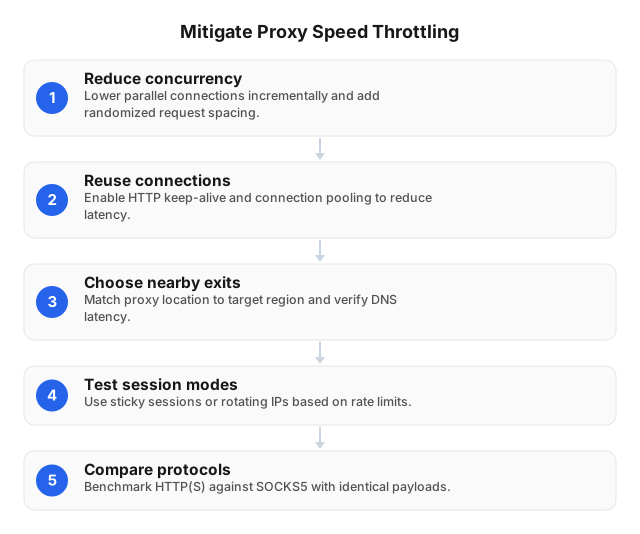
What Proxy Throttling Looks Like
Proxy-imposed throttling limits bandwidth, requests per second, burst size, or concurrent connections. A provider may enforce a limit across an account, gateway, sticky session, exit node, or protocol.
Slow traffic alone does not prove throttling. Target processing, 429 responses, packet loss, long geographic routes, repeated TLS handshakes, DNS delays, and exhausted client connection pools can produce similar symptoms.
The strongest signal is a repeatable throughput ceiling across unrelated destinations that share the same proxy gateway or account. If only one destination slows, investigate that target’s rate limits and processing time before changing proxies.
| Pattern | Likely cause | Verification step |
|---|---|---|
| Throughput plateaus while concurrency rises across several targets | Account or gateway limit | Repeat through another authorized gateway |
One target slows or returns 429 | Target-side rate limit | Lower per-domain concurrency and honor Retry-After |
| One session degrades while others remain stable | Exit congestion or route failure | Replace only the affected session |
| TCP or TLS time rises but transfer speed stays stable | Routing, packet loss, or handshake overhead | Test a nearer region and reuse connections |
| Direct and proxied traffic slow together | Target or local-client bottleneck | Inspect origin health, CPU, sockets, and bandwidth |
| Errors start after frequent rotation | Lost state or connection overhead | Use a provider-supported sticky session |
How to Test Proxy Speed Effectively
Use a controlled endpoint with at least two payloads: a small object for connection latency and a larger object for sustained throughput. Public speed-test services may introduce caching, rate limits, or routing changes that distort results.
Record the following for every request:
- Gateway, exit region, protocol, and session ID
- Target hostname and response size
- DNS, TCP, TLS, time to first byte, and total time
- Effective throughput and HTTP status
- Retry count and active connection count
- Direct or proxied test mode
Compare matched requests
Send the same headers, payload, and client configuration directly and through the proxy. If direct access is unavailable, compare two proxy gateways while keeping the target, country, protocol, session mode, and concurrency constant.
With curl, capture time_connect, time_appconnect, time_starttransfer, time_total, and size_download. A high time_starttransfer after a fast connection suggests gateway queueing or target processing; high connection and TLS times point toward route quality or repeated setup.
Increase load in steps
Test 1, 2, 4, 8, and 16 concurrent requests rather than jumping immediately to peak load. Hold each level long enough to collect a representative sample, then compare median latency, p95 latency, throughput, and error rate.
A throughput plateau paired with rising p95 latency indicates queue saturation. For example, if 8 workers and 16 workers both transfer 40 MB/minute but p95 latency doubles at 16, the extra workers are creating delay rather than capacity.
Segment results by gateway, target, country, protocol, and session. Account-wide averages can hide one congested route behind several healthy routes.
Practical Ways to Reduce Throttling
Control concurrency per target
Set separate worker limits for each domain or API. Ten requests distributed across five authorized targets create a different load pattern from ten simultaneous requests to one target.
Honor Retry-After. For temporary failures without explicit timing, use exponential backoff with jitter and a strict retry limit—for example, delays of approximately 1, 2, and 4 seconds with ±20% randomization. The guidance in How to Avoid IP Bans When Web Scraping in 2026 covers target-side controls in more detail.
Reuse connections
Enable HTTP keep-alive and connection pooling to avoid repeated TCP and TLS setup. On long-distance routes, connection reuse can remove multiple round trips from every request.
Test HTTP/2 against a small HTTP/1.1 pool instead of assuming multiplexing is faster. A saturated HTTP/2 connection can delay unrelated streams, while too many HTTP/1.1 connections can hit gateway concurrency limits.
Match sessions to the workload
Use sticky sessions for logins, shopping carts, localization journeys, and other multi-step workflows. Use rotation for independent, stateless requests when the target and provider permit it.
Do not rotate simply because one request was slow. Replace a session only after repeated degradation relative to other sessions on the same target; otherwise, rotation destroys diagnostic evidence and adds setup overhead.
Test region and protocol separately
Choose exits near the target’s serving region, which may differ from the client’s location. A CDN can also map two exits in the same country to different points of presence, so verify the route with measurements.
Compare HTTP(S) and SOCKS5 under identical conditions. Keep DNS behavior consistent: local DNS resolution through a SOCKS5 client is not equivalent to remote hostname resolution through the proxy.
Published product specifications on this site list HTTP(S) and SOCKS5 access, 72M+ residential IPs, and coverage across 195+ countries. Treat those figures as the available route pool, not a guarantee that every route will perform equally against a particular destination.
Advanced Capacity Controls
Use adaptive concurrency
An additive-increase, multiplicative-decrease controller adjusts load from live results:
- Start with one or two workers.
- Add one worker after a stable measurement interval.
- Stop increasing when p95 latency or errors exceed the application budget.
- Halve concurrency after sustained degradation.
- Resume gradual increases after a recovery period.
Run a separate controller for each target and route. One slow commerce endpoint should not reduce capacity assigned to an unrelated API.
Route by measured health
Score eligible gateways using recent p95 latency, success rate, and throughput. Temporarily remove a route after repeated failures, probe it at low volume, and restore it only after recovery.
Use weighted distribution instead of moving all traffic to the fastest gateway. Sending 100% of traffic to one healthy route can immediately recreate the queue you were trying to avoid.
HAProxy and Envoy can enforce per-route connection caps, passive health checks, circuit breakers, and weighted routing. For API-oriented designs, see Creating Effective Web Scraping Strategies Using APIs.
Separate request budgets
Maintain independent limits for account-wide concurrency, gateway connections, per-target request rates, per-session connections, and retries. This prevents a target-side 429 from triggering account-wide proxy rotation.
Advanced mitigation should not be used to defeat a destination’s access controls or published quotas. If telemetry confirms an account-level proxy ceiling, request a capacity review or select a plan designed for the measured transfer volume.
Tools That Diagnose and Improve Proxy Speed
| Tool | What it measures or changes | Practical use |
|---|---|---|
curl | TCP, TLS, first-byte, total time, and transfer rate | Compare direct and proxied phases |
mtr in TCP mode | Route instability and packet loss | Identify a poor network path |
Wireshark or tcpdump | Retransmissions, resets, and handshake delays | Confirm transport-level failures |
| Prometheus and Grafana | Historical p50/p95 latency, throughput, and errors | Alert by gateway, target, region, and protocol |
| k6, JMeter, or Locust | Repeatable authorized load | Find the concurrency level where queues form |
| HAProxy or Envoy | Pooling, connection caps, circuit breaking, and weighted routing | Shift traffic away from unhealthy routes |
Tools improve speed only when they drive a configuration change. For example, curl may reveal excess TLS setup, after which keep-alive improves performance; Grafana may expose one slow gateway, after which Envoy reduces that gateway’s weight.
Published service figures on this site report 98.2% observed uptime backed by a 99.9% uptime SLA. Availability and speed require separate monitoring: a reachable gateway can still miss an application’s latency budget.
Workload Examples
Localization testing
Assign one sticky session to each test journey so cookies, location signals, and checkout state remain consistent. Limit each session to a small connection pool and replace it only after route-specific telemetry shows sustained degradation.
For operational considerations in a restricted network environment, see 5 Tips for Using Proxies in China Safely in 2026.
Authorized public-web collection
Create a connection pool and rate budget for each domain. If one domain slows while a controlled endpoint and other domains remain stable, lower that domain’s concurrency instead of rotating every route.
Stateful sequences should retain one permitted session; independent jobs can use eligible rotating routes. This distinction also makes 429, timeout, and CAPTCHA patterns easier to attribute.
High-volume API traffic
Reuse authenticated connections, capture rate-limit headers, and cap retries within a total time budget. If an API publishes a quota, schedule traffic within that quota rather than using rotation to exceed it.
The plans presented on this site advertise pay-as-you-go residential traffic from $0.25/GB, tiered pricing of about $0.73/GB at 300GB, ISP SOCKS5 from $0.95 per IP, and unlimited plans from $79 per month. Choose from measured monthly transfer, required session persistence, protocol support, and peak concurrency—not one latency result.
Related Reading
- Creating Effective Web Scraping Strategies Using APIs
- 5 Tips for Using Proxies in China Safely in 2026
- How to Avoid IP Bans When Web Scraping in 2026
FAQ
What are advanced methods to bypass throttling?
Use adaptive concurrency, connection reuse, health-weighted routing, bounded retries with jitter, and separate budgets for each target, gateway, and session. These methods bypass avoidable queueing and route congestion; they should not be used to evade destination quotas, access controls, or terms. If an account-wide ceiling remains, request more capacity or select a suitable service tier.
Which tools help improve proxy speed?
Use curl, Wireshark, tcpdump, and TCP-mode mtr to locate connection, routing, and retransmission delays. Prometheus and Grafana expose persistent route problems, while HAProxy or Envoy can improve performance through pooling, connection caps, circuit breakers, and weighted routing. k6, JMeter, or Locust can verify each change under controlled load.
How do I test my proxy speed effectively?
Compare matched direct and proxied requests against an endpoint you control, using both small and large fixed-size objects. Test concurrency in steps and record TCP time, TLS time, time to first byte, total time, throughput, p95 latency, and errors for each gateway and session. Change one variable per run so any improvement can be attributed to a specific route, protocol, region, or client setting.
What causes proxy speed throttling?
A proxy service may cap bandwidth, request rate, bursts, or concurrent connections at the account, gateway, or session level. Congested exits, packet loss, distant routes, repeated TLS setup, client saturation, and target-side rate limits can produce the same symptoms.
Should I rotate IPs when a connection slows down?
Rotate only when repeated measurements tie the slowdown to a specific exit, route, or session. Unnecessary rotation adds connection overhead, disrupts authenticated state, and makes the underlying bottleneck harder to identify.
Can proxy throttling be eliminated completely?
No. Capacity limits can exist in the client, gateway, exit network, upstream route, or destination. Reduce their impact with workload shaping and route diversity, then escalate persistent proxy-side limits with timestamps, gateway IDs, response sizes, concurrency levels, and throughput measurements.
This article was written by the EProxies team and reviewed against our editorial quality standards before publishing.