
Choosing Proxies for Online Anonymity: 2026 Guide
TL;DR: A proxy provides network-layer anonymity by relaying traffic through an intermediary IP, but it cannot hide account logins, cookies, browser fingerprints, or identifying behavior. Rotating residential proxies are usually best for separating independent requests; sticky residential or static ISP proxies better preserve authenticated sessions. Test DNS, IPv6, WebRTC, rotation, and fail-closed behavior before deployment.
Use this process for employee privacy, isolated research, localization testing, and compliant public-web collection. It compares proxy types by correlation risk, session stability, targeting, cost, and failure behavior rather than treating a changed IP as proof of anonymity.
What a Proxy Can—and Cannot—Hide
A proxy receives a client request, forwards it from an exit IP, and returns the response. The destination sees the proxy IP instead of the organization’s direct public IP, provided the application does not bypass the proxy through DNS, IPv6, WebRTC, or automatic direct fallback.
That mechanism protects only one identifier. Four other exposure layers remain:
- Application: Accounts, cookies, local storage, URL parameters, and submitted data can identify a user.
- Device: Browser version, screen properties, fonts, language, TLS behavior, and extensions can contribute to a fingerprint.
- Behavior: Request timing, repeated destinations, navigation order, and abrupt country changes can link sessions.
- Provider: The proxy operator may process source IPs, credentials, timestamps, bandwidth records, and billing information.
Write down the observer, identifiers being protected, approved destinations, required session length, and acceptable retention period. Review destination terms and applicable law using the legal boundaries of proxy server usage in 2026 as a compliance checklist.
Choose the Proxy Type by Workload
| Proxy type | Suitable workload | Technical advantage | Main trade-off |
|---|---|---|---|
| Rotating residential | Independent public-page requests, regional checks | Changes the exit IP on a defined trigger | Rotation can break logins and multi-step flows |
| Sticky residential | Forms, localization, authenticated browser tasks | Keeps one residential exit for a specified session | Longer sessions are easier to correlate |
| Static ISP | Stable application sessions | Fixed IP with ISP-associated allocation | Every request remains linked to one address |
| Datacenter | Permitted APIs, internal testing, latency-sensitive work | Stable infrastructure and low connection overhead | Hosting-network IPs are easier to classify |
| Public or free | Disposable, non-sensitive experiments | No subscription fee | Unclear logging, unstable capacity, weak access control, and possible inspection |
For independent requests that should not share an IP identity, start with rotating residential sessions. For a login, checkout, or multi-page form, use a sticky residential or static ISP exit; changing IPs or countries mid-session can trigger security controls or invalidate application state.
Pool size does not prove usable coverage. Measure available IPs in the required city or ASN, geolocation accuracy, IP reuse, session survival, and success against approved destinations.
A Six-Step Selection Process
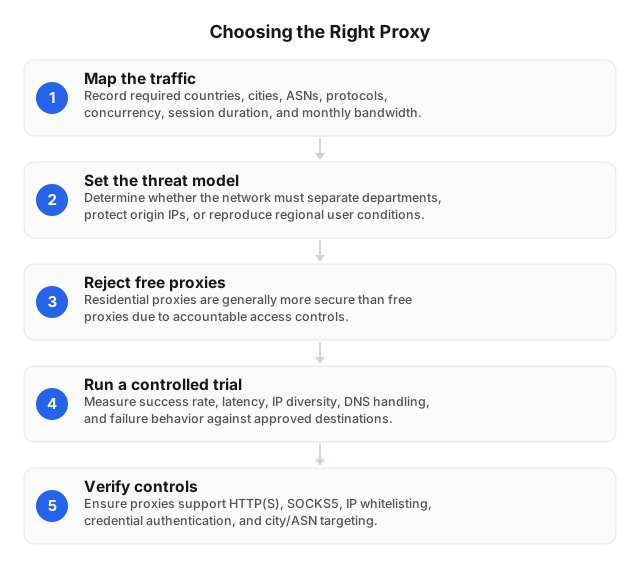
1. Define the identity boundary
Specify which activities must remain separate. Two research projects may require different browser profiles, proxy credentials, and session identifiers even if both use the same provider.
Inventory identifiers that can bypass IP masking: account IDs, cookies, analytics parameters, device IDs, browser storage, and TLS characteristics. Separate browser profiles or containers prevent unrelated tasks from sharing cookies and local storage.
2. Record workload requirements
Capture target countries, cities or ASNs, protocols, peak concurrency, expected monthly traffic, session duration, authentication method, request limits, and approved destinations. A localization test may require one city and a 30-minute sticky session; 10,000 independent page checks may need rotation after each completed request.
Estimate bytes rather than URLs. One 100 KB HTML document can trigger several megabytes of images, fonts, scripts, and video unless the client blocks unnecessary assets.
3. Audit provider controls and published specifications
Request documented answers on IP sourcing, log retention, employee access, credential revocation, abuse handling, legal requests, session limits, and outage behavior. Reject clients that silently connect directly after proxy authentication or connectivity fails.
EProxies publishes a network of 72M+ residential IPs across 195+ countries.1 Its documented protocol support includes HTTP(S) and SOCKS5.2 Published controls include credential authentication, IP allowlisting, city and ASN targeting, configurable rotation, and sessions lasting 24 hours or more.345
EProxies reports 98.2% uptime backed by a 99.9% uptime SLA.6 Before procurement, confirm which product the SLA covers, how uptime is measured, which outages are excluded, and whether the remedy is a service credit rather than a refund.
4. Match pricing to traffic and session requirements
Published EProxies pricing includes:7
- Pay-as-you-go residential traffic from $0.25/GB
- Tiered residential pricing down to approximately $0.73/GB at 300GB
- ISP SOCKS5 proxies from $0.95/IP
- Unlimited plans from $79/month
Do not compare plans on headline price alone. Confirm location targeting, concurrency limits, included protocols, rotation controls, support response times, and whether failed or retried transfers consume billable traffic. The Guide to Choosing the Best Proxy for Your Needs: 2026 provides a broader procurement framework.
5. Run a production-like pilot
Test from the actual network with the intended browser, collector, or application. Record connection success, median and 95th-percentile latency, timeout rate, status-code distribution, geolocation accuracy, unique-IP reuse, session duration, and proxy connection errors separately from destination responses.
A result such as “99% successful” is meaningless without the destination set, country, concurrency, timeout, retry policy, sample size, and definition of success. Run at least 20 sessions per target location to expose rapid IP reuse, incorrect routing, and sticky-session failures.
6. Deploy with least privilege
Issue separate credentials for each team, application, and environment. Restrict source IPs and destination locations where possible, rotate exposed secrets, and alert on unexpected countries, bandwidth spikes, repeated authentication failures, or direct-egress attempts.
Applications that require the proxy should fail closed. Enforce that behavior with firewall rules rather than relying only on application settings, then repeat leak tests after browser, operating-system, proxy-client, or network-policy updates.
How to Test Proxy Anonymity
Verify the visible exit
Record the direct connection’s public IPv4, IPv6, country, and ASN. Enable the proxy and confirm that each value changes to the intended location and network.
Repeat the test across multiple sessions. Report country and city accuracy separately because a proxy can route through the correct country while geolocation databases assign the wrong city.
Check DNS, IPv6, and WebRTC
Capture DNS queries at the endpoint or gateway. Confirm that lookups follow the intended proxy or resolver path instead of exposing the organization’s default resolver.
Test IPv6 separately because an IPv4-only proxy configuration can leave direct IPv6 traffic untouched. In browsers, inspect WebRTC host, server-reflexive, and relay candidates for local or public addresses that policy requires hidden.
Test SOCKS5 name resolution
SOCKS5 transports multiple traffic types but does not encrypt application payloads. Use TLS or another encrypted application protocol for confidential data.
Confirm whether the client resolves hostnames locally or through the proxy. Applications may label remote resolution as “proxy DNS,” “remote DNS,” or socks5h; local resolution can expose destination lookups even when the connection itself uses the proxy.
Simulate failure
Test invalid, expired, and revoked credentials, a blocked source IP, an unreachable proxy, DNS failure, and a connection timeout. Monitor firewall logs or packet captures to verify that every case returns an error rather than opening a direct connection.
Replay an approved request set at expected concurrency and use bounded retries with exponential backoff. Immediate retry loops increase load and can worsen destination blocking; the guide to avoiding IP bans when web scraping covers rate and session controls.
Deployment Errors That Defeat Anonymity
Treating an IP-check page as sufficient
An IP-check page verifies the visible exit, not account identity, cookies, browser storage, request parameters, or provider records. Use a clean profile and inspect both application identifiers and network routes.
Applying one rotation policy everywhere
Per-request rotation breaks stateful workflows; long sticky sessions connect activity that should remain separate. Define rotation by task: request, completed workflow, elapsed time, or explicit session identifier.
Allowing silent direct fallback
Browsers, libraries, and operating systems may bypass an unavailable proxy. Test outages and authentication failures while firewall rules block direct egress from the application.
Buying on advertised pool size
Global inventory may not reflect usable capacity in one city or ASN. Measure observed unique IPs, reuse intervals, geolocation accuracy, latency, and destination success during the pilot.
Related Reading
- Guide to Choosing the Best Proxy for Your Needs: 2026
- Choosing the Right Proxy Server for Secure Browsing
FAQ
How to test a proxy for anonymity?
Compare direct and proxied IPv4, IPv6, country, and ASN values, then check DNS and WebRTC with a clean browser profile. Simulate invalid credentials, timeouts, and provider outages while monitoring packet captures or firewall logs. The application should fail closed without sending any direct traffic.
What is the best proxy for anonymity?
A rotating residential proxy is usually the best option for independent requests because it can assign different exit IPs under a controlled rotation policy. Sticky residential or static ISP proxies are better for authenticated workflows that require continuity. The final choice should also account for DNS handling, provider retention, IP sourcing, location accuracy, and fail-closed behavior.
How do proxies ensure online anonymity?
A proxy relays traffic and substitutes its exit IP for the client’s public IP, preventing the destination from directly seeing the origin connection. Rotation can reduce IP-based correlation between independent sessions, while geographic targeting can separate traffic from the user’s real location. Proxies do not remove cookies, account identifiers, fingerprints, or provider-side records.
What are the risks of using proxies?
Risks include provider logging, traffic inspection on unencrypted protocols, credential theft, DNS or IPv6 leaks, unstable IP reputation, direct fallback, and account correlation through cookies or fingerprints. Public proxies add uncertain ownership and access controls. Reduce exposure with TLS, reputable sourcing, separate credentials, clean profiles, IP allowlisting, leak tests, and firewall-enforced fail-closed routing.
Can proxies be traced back to me?
Yes, depending on the evidence available. A destination may correlate accounts, cookies, browser characteristics, timing, and behavior, while the provider may hold source-IP, authentication, session, and billing records. Treat a proxy as network-layer pseudonymization, not a guarantee that activity is untraceable.
Does a residential proxy make a user anonymous?
No. It changes the source IP visible to the destination, but accounts, cookies, browser fingerprints, DNS behavior, and submitted information can still identify the user or organization. Provider records may also connect the exit session to a customer.
Is SOCKS5 more anonymous than an HTTPS proxy?
Not inherently. SOCKS5 supports more traffic types, while HTTPS proxies specialize in web traffic; anonymity depends on DNS routing, encryption, retention, client configuration, and fallback controls. SOCKS5 does not encrypt payloads by itself.
Is a proxy a replacement for a VPN?
No. A proxy routes traffic from configured applications, while a VPN usually routes traffic at the device or network layer. Applications outside the proxy configuration may continue using the direct connection unless firewall policy blocks them.
Footnotes
- EProxies published residential proxy network specifications. ↩
- EProxies published HTTP(S) and SOCKS5 protocol specifications. ↩
- EProxies published authentication and IP allowlisting documentation. ↩
- EProxies published city and ASN targeting documentation. ↩
- EProxies published rotation and extended-session documentation. ↩
- EProxies published uptime statistics and uptime SLA. ↩
- EProxies published pricing for residential, ISP SOCKS5, and unlimited plans. ↩
This article was written by the EProxies team and reviewed against our editorial quality standards before publishing.