
How to Optimize Proxies for Local SEO in 2026
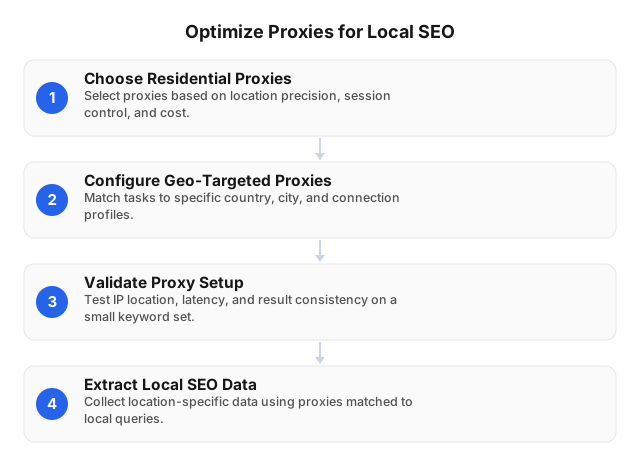
TL;DR: Configure proxies for local SEO by matching the proxy’s city, session type, browser profile, language, device, and request pace to the search market you are measuring. Use city-targeted residential IPs for local packs, Google Maps, and “near me” checks; sticky sessions for logged-in Google Business Profile QA; and rotating sessions for public SERP monitoring across many locations.
What Proxies Actually Do for Local SEO
Google’s local results change by relevance, distance, and prominence. A search for “emergency dentist near me” from central Phoenix can produce a different map pack than the same query from Scottsdale, even with the same device and keyword. A proxy lets your team test from the market being reported instead of relying on an office IP, a VPN exit point, or a rank tracker’s default location.
Proxies do not create higher rankings. They help you collect cleaner evidence: which competitors appear in the local pack, whether your Google Business Profile shows the right category and hours, whether a city landing page is visible, and whether ads or organic results differ by location.
Use proxies for these local SEO jobs:
- City-level rank checks: local pack, organic results, ads, and map results by metro area.
- Google Business Profile QA: public profile appearance, hours, categories, photos, services, menus, products, and review visibility.
- Competitor monitoring: public listings, review counts, categories, local landing pages, and repeated map-pack appearances.
- Localization testing: store locator behavior, schema, currency, opening hours, city pages, and language.
- Reporting validation: confirming that a rank change is not caused by the wrong IP geography.
If the workflow collects public pages at scale, define request limits, backoff rules, and exclusions before increasing volume. Ethical Use of Proxies for Web Scraping covers the operating model: collect only what you need, respect access controls, and treat failed requests as signals rather than reasons to retry indefinitely.
Best Proxy Configuration by Local SEO Task
Once the role of the proxy is clear, choose the proxy behavior by task rather than by pool size alone. Local SEO accuracy depends on location precision, session continuity, protocol support, authentication, uptime, and completed-check cost.
| Local SEO task | Recommended setup | Practical detail |
|---|---|---|
| “Near me” rank tracking | City-targeted residential proxy | Use the same city for the IP, search settings, and reporting market |
| Google Maps checks | City-targeted residential proxy with stable session per batch | Keep one session for one city-keyword group |
| Google Business Profile QA | Sticky/static session | Prevent login prompts and account-context changes |
| Multi-city SERP monitoring | Rotating residential sessions between batches | Rotate after finishing a city, not mid-query |
| Store locator testing | City-targeted session plus consistent browser profile | Test nearest-store logic from each market |
| Automation or rank-tracker integration | HTTP(S) or SOCKS5 | Match the protocol your tool supports |
| Security-controlled team access | IP whitelist or username-password auth | Use whitelisting for servers; credentials for portable tools |
EProxies provides 72M+ residential IPs across 195+ countries, including deep coverage in major local SEO markets such as the United States, United Kingdom, and Canada. Use that scale as a capacity signal, then test the exact cities, search engines, and websites you monitor before committing a recurring report to production.
EProxies supports HTTP(S) and SOCKS5, plus username-password and IP whitelist authentication. Residential traffic is available pay-as-you-go from $0.25/GB, tiered residential plans scale down to around $0.73/GB at 300GB, ISP SOCKS5 starts from $0.95/IP, and unlimited plans start from $79/month. Service runs at 98.2% uptime, backed by a 99.9% uptime SLA.
The Best Way to Configure a Proxy for Local SEO
Turn the task choices into a location matrix before touching proxy settings. Each row should contain: city, state/region, country, keyword group, device, browser language, search engine market, session rule, login requirement, delay range, retry limit, and output fields. This prevents the common failure mode where a report claims to measure “Chicago” but the IP, cookies, or search parameters point somewhere else.
A strong baseline configuration looks like this:
- Use city targeting for local pack, Maps, and “near me” terms. Country targeting is too broad for city-level decisions.
- Use one sticky session per city-keyword batch. For example: Dallas + mobile + 25 plumbing keywords + one session.
- Rotate only after the batch ends. Move to Austin with a new session instead of mixing Dallas and Austin signals.
- Match browser language and market. A Toronto test should not run with a U.S. English profile if the client reports Canadian results.
- Separate mobile and desktop. Local packs, ads, and click-to-call elements can differ by device.
- Log every run. Store city, keyword, session ID, device, timestamp, status code, final URL, result type, and screenshot path if used.
For a 20-location business with 50 tracked keywords and two devices, the base workload is:
20 locations × 50 keywords × 2 devices = 2,000 checks per reporting cycle
Add retries, screenshots, competitor pages, and GBP QA separately. A 10% retry rate turns 2,000 checks into 2,200 requests before screenshots or competitor collection.
Before scaling, validate with 20–50 test requests per major market:
- IP geolocation resolves to the intended city or metro.
- SERP language and market match the report.
- Local pack businesses are physically relevant to the target area.
- The result is not a consent page, CAPTCHA, soft block, or wrong-market page.
- Median and p95 latency fit the reporting window.
- Retry rate stays stable when concurrency increases.
For browser-based QA, keep proxy location, cookies, browser language, device emulation, and search settings stable for the whole run. Proxy Scripts for QA Automation: Practical 2026 Guide shows how to structure repeatable proxy-driven tests without mixing sessions or profiles.
Rotation Rules That Preserve Local Accuracy
After the matrix is validated, rotation becomes a scale control rather than a default setting. Rotation solves capacity problems, but careless rotation creates bad local SEO data. A Maps check that starts from Miami and finishes from Tampa is not a valid Miami measurement. A GBP dashboard review that changes IPs mid-login can trigger verification prompts or alter account context.
Use these rotation rules:
- Logged-in GBP QA: sticky/static session from start to finish.
- Single-city rank audit: one city-targeted session for the full keyword batch.
- Multi-city monitoring: rotate between cities, not between steps inside one query.
- Competitor collection: rotate after a defined group, such as one city plus five competitors.
- Failed requests: retry with backoff; do not hammer the same endpoint after a challenge page.
A conservative starting pace for public SERP monitoring is 3–10 seconds between requests, one device profile, and 10–25 related keywords per city batch. Increase concurrency only after you know the normal challenge rate, retry rate, and bandwidth per completed check for that market.
Avoid Proxy-Related Reporting Errors
The same context discipline that preserves rotation accuracy also prevents most reporting mistakes. Most proxy failures in local SEO are not “bad proxy” problems. They are mismatches: the IP says Dallas, the browser language says UK English, the cookies remember searches in Denver, and the rank report labels the result as Houston.
Fix these common issues:
- Country targeting for city decisions: a U.S. IP cannot validate a Brooklyn local pack.
- Mid-task rotation: do not change IPs during logged-in QA or a single city audit.
- Shared browser profiles: keep separate profiles for separate cities to avoid cookie leakage.
- Unbounded retries: cap retries and use backoff when consent pages, CAPTCHA, or blocks appear.
- False success counts: exclude challenge pages, wrong-market SERPs, and redirects from completed checks.
- Device mixing: report mobile and desktop separately when local pack layout affects results.
- Missing logs: without session ID, city, keyword, and final URL, errors become impossible to diagnose.
For team environments, use IP whitelisting for stable servers and username-password authentication for distributed tools. Broader access controls, segmentation, and monitoring practices are covered in Building a Secure Network With Proxies in 2026.
Measure Proxy Quality by Completed Local SEO Output
Clean configuration still needs measurement. Raw speed is a weak proxy metric: a 400 ms response from the wrong city is worse than a 2-second response that returns a usable local SERP from the correct market.
Track these metrics by city and task:
- Completed checks: usable SERPs, Maps results, GBP pages, or local landing pages.
- Location accuracy: percentage of checks matching the intended city or market.
- Median and p95 latency: p95 determines whether scheduled reports finish on time.
- Retry rate: high retries increase cost and can distort collection timing.
- Challenge rate: count CAPTCHA, consent, and block pages separately from HTTP errors.
- Bandwidth per completed check: the number that should guide plan selection.
- Wrong-market rate: results where the page loads but the geography is unusable.
For larger workflows, estimate volume before choosing a plan:
locations × keywords × devices × reporting frequency + retries + screenshots + competitor URLs
A weekly report for 30 locations, 40 keywords, and 2 devices equals 2,400 base checks per week. Add 10% retries and 5 competitor URLs per location, and the workload becomes closer to 2,790+ requests, before screenshot bandwidth. If your pipeline combines APIs, browser automation, and proxy routing, design the extraction layer first; Creating Effective Web Scraping Strategies Using APIs covers that architecture.
Practical Local SEO Workflows
The principles above apply differently depending on the business model. These examples show how to turn the same proxy rules into operational workflows.
Multi-location healthcare group
An 18-location clinic group can run one city-targeted batch per clinic: branded terms, specialty terms, “near me” terms, and top local competitors. Sticky sessions fit GBP dashboard QA, while rotating residential sessions fit public SERP and Maps checks. The output should identify missing categories, weak service pages, inconsistent hours, low review velocity, and competitors repeatedly appearing in the local pack.
Regional retailer
A retailer with stores across three states can test store locator pages, local promotions, map-pack visibility, and opening hours from each store city. If a proxy session in Raleigh shows a stale promotion while a Charlotte session shows the correct one, the team can isolate whether the issue is search localization, website geotargeting, CDN rules, or store data.
Agency reporting system
An agency can create one proxy template per client: target cities, keyword groups, device split, session rule, delay, retry cap, authentication method, and reporting cadence. EProxies’ residential pool, city/ASN targeting, HTTP(S)/SOCKS5 support, uptime SLA, and authentication controls fit that template-driven model. Keep per-client logs so one client’s failed Maps checks do not disappear inside account-wide averages.
Related Reading
- Proxy Scripts for QA Automation: Practical 2026 Guide
- Building a Secure Network With Proxies in 2026
- Ethical Use of Proxies for Web Scraping
- Creating Effective Web Scraping Strategies Using APIs
FAQ
What is the best way to configure a proxy for local SEO?
Use a city-targeted residential proxy, then keep one stable session for each city-keyword-device batch. Match the proxy with the browser language, search market, cookies, and device profile so the result reflects one clean local context. Use sticky sessions for logged-in Google Business Profile QA and rotating sessions for public SERP monitoring across multiple cities.
Can proxies improve Google Maps rankings?
No, proxies do not directly improve Google Maps rankings. They help you see what searchers in specific cities see, which makes it easier to diagnose the real ranking drivers: proximity, category fit, reviews, citations, photos, business data accuracy, and landing-page relevance. Use proxies for measurement and QA, not ranking manipulation.
How to avoid proxy-related issues in local SEO?
Keep proxy location, session type, browser profile, language, and device settings aligned for every batch. Do not rotate mid-audit, and do not count CAPTCHA, consent pages, block pages, or wrong-market SERPs as successful checks. Log city, session ID, keyword, status code, final URL, and result type so failures can be traced.
What are residential proxies used for in local SEO?
Residential proxies let SEO teams view SERPs, local packs, Google Maps results, ads, and public business listings from consumer-style IPs in specific markets. Common use cases include rank tracking, GBP QA, competitor monitoring, store locator testing, and localized landing-page validation.
How should I configure proxies for local rank tracking?
Use city-level targeting for local pack, Google Maps, and “near me” keywords. Keep one session stable for each city-keyword batch, separate mobile and desktop checks, rotate only between markets, and log every request with its city, keyword, session ID, status code, and final URL.
Does EProxies support HTTP(S), SOCKS5, and authentication controls?
Yes. EProxies supports HTTP(S) and SOCKS5, with username-password authentication and IP whitelist authentication. Sticky/static and rotating sessions are available, so you can match continuity or rotation to each local SEO task.
Are residential proxies better than datacenter proxies for local SEO?
Residential proxies are usually better for local rank tracking because they more closely resemble consumer connections and support more location-faithful testing. Datacenter proxies can still work for internal QA, uptime checks, or low-risk tooling where city-level SERP accuracy is not required.
How much bandwidth does local SEO monitoring need?
Estimate checks first: locations × keywords × devices × reporting frequency, then add retries, screenshots, and competitor URLs. EProxies offers residential pay-as-you-go traffic from $0.25/GB, tiered residential plans down to around $0.73/GB at 300GB, ISP SOCKS5 from $0.95/IP, and unlimited plans from $79/month.
This article was written by the EProxies team and reviewed against our editorial quality standards before publishing.