
Building a Secure Network With Proxies in 2026
TL;DR: Residential proxies improve security when they are used as controlled outbound routes: isolate external testing from corporate egress, authenticate each workload, choose HTTP(S) or SOCKS5 deliberately, keep TLS validation on, test DNS behavior, and log destination activity. EProxies provides 72M+ residential IPs across 195+ countries, HTTP(S)/SOCKS5 support, 98.2% published uptime, and a 99.9% uptime SLA for production planning.
How Residential Proxies Strengthen Security
Residential proxies route approved traffic through ISP-assigned residential IPs instead of exposing your office, VPN, cloud, or data center egress ranges. That separation is useful for security testing, fraud-rule validation, regional QA, and public-web monitoring because failures, blocks, and target responses are tied to a controlled proxy identity rather than your primary corporate network.
The security value comes from four mechanisms:
- Egress isolation: QA, scraping research, monitoring, and investigation traffic can run outside employee browsing paths and production admin networks.
- Attribution: Separate credentials per team, tool, and environment make it possible to trace abuse or misconfiguration to one workload.
- External visibility: Teams can test how public sites behave from residential networks in specific countries, cities, or ISP-like routes.
- Policy enforcement: IP allowlists, proxy authentication, session rules, rate limits, and logs create guardrails around outbound access.
Residential proxies do not replace endpoint security, identity management, HTTPS, DLP, legal review, or audit logging. Do not route secrets-management consoles, database administration, production control planes, or regulated customer data through a residential proxy unless a security architect has approved encryption, logging, retention, and access controls.
Best Use Cases for Secure Residential Proxy Deployment
Use residential proxies where the residential network viewpoint changes the result:
- Geo-specific QA: Check language, checkout, taxes, delivery estimates, consent banners, and price display from target regions.
- External monitoring: Test public pages from residential networks instead of probing everything from one corporate ASN.
- Fraud-rule testing: Compare login, cart, and checkout behavior across country, session stability, device profile, and ASN type.
- Approved public data collection: Use documented scope, request pacing, robots.txt review, and legal approval. See Ethical Use of Proxies for Web Scraping and Creating Effective Web Scraping Strategies Using APIs.
- Research isolation: Keep investigative traffic away from employee browsing, privileged devices, and production networks.
For commerce-specific patterns, see Integrating Rotating Proxies in E-commerce: 2026 Guide. For browser privacy workflows, see Building an Anonymous Web Browsing Setup.
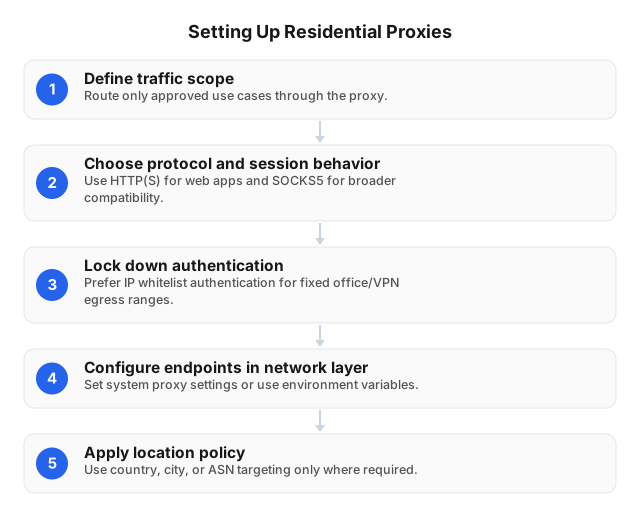
Secure Setup: A Practical Sequence
Start with one workload, one team, and one destination group. Add regions, rotation, and automation only after the first route produces clean logs, expected DNS behavior, and predictable error handling.
1. Define the operating boundary
Write down the allowed workload before issuing credentials.
| Field | Example |
|---|---|
| Team | Localization QA |
| Tool | Managed browser profile plus CI smoke test |
| Destinations | Public product pages and checkout test environment |
| Data allowed | Test accounts only; no real payment data |
| Region scope | 6 countries; city targeting only for delivery checks |
| Rate limit | 1 request every 3–8 seconds per flow |
| Owner | Named team lead and security contact |
This prevents a QA proxy user from becoming a shared account for scraping, monitoring, incident research, and ad-hoc browsing.
2. Choose HTTP(S) or SOCKS5
Use HTTP(S) for browsers, API clients, web monitoring, Playwright/Selenium, curl, and tools with standard proxy configuration. HTTPS traffic should remain encrypted end to end; scripts must not disable certificate validation to “fix” proxy errors.
Use SOCKS5 when the application needs broader TCP support or cannot cleanly use an HTTP proxy. Test DNS carefully: some SOCKS5 clients send traffic through the proxy but still resolve domains locally, which can leak resolver activity or break location testing.
EProxies supports both HTTP(S) and SOCKS5, so assign protocols by workload instead of forcing all traffic through one profile.
3. Select location and session behavior
Pick the narrowest location that matches the test. Country-level routing is enough for most content checks; city-level routing is useful for ads, marketplaces, delivery estimates, and regional fraud controls.
| Session model | Best fit | Trade-off |
|---|---|---|
| Rotating residential IPs | Public-page checks, distributed validation, broad monitoring | Can disrupt stateful flows |
| Sticky sessions | Login, cart, checkout, account QA | Repeated activity from one IP can create a pattern |
| ISP SOCKS5 | Stable ISP-routed testing and fixed-IP planning | Capacity is planned per IP |
A mid-checkout IP change can trigger risk controls. A session that never changes can also look repetitive. Choose the failure mode you can measure.
4. Lock down authentication
Use two controls where possible:
- IP allowlisting for office egress, VPN gateways, CI runners, and fixed NAT ranges.
- Username-password authentication per team, tool, and environment.
Store credentials in a secrets manager. Do not place proxy credentials in browser profiles, shell history, Git repositories, ticket comments, screenshots, or CI logs.
5. Configure routing centrally
Small teams can start with browser profiles or OS proxy settings. Larger teams should use MDM policies, PAC files, gateway rules, or application-specific configuration.
Common deployment points:
- Windows/macOS: MDM-managed system proxy profile.
- Linux: environment variables, systemd drop-ins, or service files.
- Browsers: managed policies or isolated automation profiles.
- CI/CD: job-level proxy variables injected from a secret store.
- Gateways: policy routing for approved subnets only.
For rollout planning across users and devices, use Proxy Server Implementation Guide for Small Businesses.
6. Validate before production
Run the same checks from each client type:
- Confirm exit IP, ASN type, country, and city where applicable.
- Verify HTTPS certificate validation remains enabled.
- Check whether DNS resolves locally or through the proxy-aware application.
- Measure success rate, median latency, and p95 latency against real target URLs.
- Confirm logs include identity, source, destination, protocol, region, session type, status code, and byte volume.
- Trigger one failed login and confirm alerting.
Do not rely on a generic speed-test page. A CDN test may pass while a real login page returns 403 because of JavaScript challenges, cookie state, rate limits, or regional fraud scoring.
Security Protocols and Controls to Pair With Proxies
A proxy changes the route. Security comes from the controls wrapped around that route.
| Control or protocol | Where it fits | Implementation detail |
|---|---|---|
| HTTPS/TLS | Browser and API traffic | Keep certificate validation enabled; do not suppress TLS errors in scripts |
| HTTP CONNECT | HTTPS through an HTTP proxy | Allows encrypted tunnel creation while the proxy controls routing |
| SOCKS5 authentication | TCP-capable applications | Use per-workload credentials and verify DNS handling |
| IP allowlisting | Client-to-proxy access | Limit use to corporate NAT, VPN, CI, or managed gateways |
| VPN/IPsec | Managed user-to-network access | Keep device posture and corporate identity checks before proxy use |
| mTLS | High-trust service-to-gateway paths | Authenticate both client and gateway for internal proxy access |
| DNS-over-HTTPS / DNS-over-TLS | Resolver privacy | Reduce resolver leakage where clients and policy support it |
| SIEM logging | Detection and investigation | Alert on new destinations, 401/403 spikes, off-hours use, and unexpected countries |
| PROXY protocol | Trusted proxy-to-backend chains | Use only between trusted hops; never accept spoofable client metadata from the open internet |
A common high-control route is:
managed laptop → corporate VPN → approved proxy-enabled tool → residential proxy → public target
That pattern keeps endpoint controls and identity checks in place while still testing from a residential network viewpoint.
Operational Risks and Trade-Offs
Residential proxy failures usually come from workflow mismatch, not from the setup screen.
| Risk | Why it happens | Practical control |
|---|---|---|
| Latency variance | Residential routes differ by region, ISP, and target path | Track median and p95 latency per destination |
| DNS leakage | Some clients resolve locally before proxying | Test DNS path per browser, CLI tool, and automation framework |
| Session breakage | Rotating IPs disrupt login, cart, or risk-scored flows | Use sticky sessions for authenticated workflows |
| Compliance exposure | Public data access can violate terms or local law | Require legal review, rate limits, and documented scope |
| Credential sprawl | Shared accounts hide ownership | Use separate credentials per team, tool, and environment |
| Target blocking | Sites apply bot controls, rate limits, or regional rules | Monitor 403/429 rates, retry behavior, and request pacing |
| Cost overrun | High-volume jobs consume traffic quickly | Set usage alerts, budgets, and per-job limits |
EProxies plans include pay-as-you-go residential traffic from $0.25/GB, tiered residential pricing down to about $0.73/GB at 300GB, ISP SOCKS5 from $0.95/IP, and unlimited plans from $79/month. Match pricing to workload shape: intermittent QA often fits metered traffic; fixed-location testing may fit ISP SOCKS5; heavy monitoring needs budgets and byte-volume alerts.
Choosing the Right Proxy Type
Different proxy types solve different routing and control problems, so choose the one that matches the security objective.
| Proxy type | Best use | Security trade-off |
|---|---|---|
| Residential proxy | Geo-aware QA, public-web validation, external monitoring | Requires strict credentials, logging, and compliance review |
| Datacenter proxy | Fast lab testing, predictable egress, low-cost automation | Easier for targets to classify as hosting-origin traffic |
| ISP proxy | Stable ISP-routed sessions | Capacity planning happens per IP |
| Forward proxy | Employee filtering and outbound policy enforcement | Does not provide a residential viewpoint |
| Reverse proxy | Inbound app protection, TLS termination, origin shielding | Not used for outbound geo-testing |
Use residential proxies when residential IP context affects the test result. Use datacenter or forward proxies when speed, policy enforcement, and predictable corporate egress matter more than residential routing.
Monthly Operating Checklist
After deployment, run this checklist whenever browser, VPN, CI, identity, or routing changes could affect proxy behavior:
- Remove unused proxy users and stale credentials.
- Confirm IP allowlists match current office, VPN, and CI egress ranges.
- Re-test DNS behavior from every managed client type.
- Verify HTTPS certificate validation in scripts and browsers.
- Compare success rate, median latency, and p95 latency against baseline.
- Review top destinations and block unexpected categories.
- Separate production, QA, research, and CI credentials.
- Confirm rotation or sticky-session settings still match each workflow.
- Review legal approvals and target-site rules for automated access.
- Validate SLA fit against business impact and failover requirements.
Use published uptime and SLA commitments for planning, then test your own regions, destinations, DNS behavior, client tools, and retry logic before cutover.
FAQ
What are residential proxies?
Residential proxies route requests through ISP-assigned IP addresses. To the destination service, traffic appears to come from a residential network rather than directly from an office, VPN, or data center range.
How do residential proxies enhance network security?
Residential proxies enhance network security by isolating approved external testing traffic from corporate egress IPs, production networks, and employee browsing paths. They also improve attribution because each workload can use separate credentials, allowlists, session rules, and logs. The proxy adds value as a controlled routing layer; encryption, endpoint protection, identity controls, and audit logging must still remain in place.
What security protocols can be implemented with proxies?
Proxies can be paired with HTTPS/TLS, HTTP CONNECT, SOCKS5 authentication, IP allowlisting, VPN/IPsec, mTLS, DNS-over-HTTPS, DNS-over-TLS, and SIEM-based logging. In trusted proxy-to-backend chains, the PROXY protocol can pass client metadata, but it must only be accepted from trusted hops to avoid spoofing. These protocols protect the client-to-proxy path, proxy-to-target behavior, identity enforcement, and investigation trail.
What are the steps to set up a residential proxy?
Define the workload, destination list, allowed data, region scope, owner, and rate limit. Choose HTTP(S) or SOCKS5, select rotating or sticky sessions, enable IP allowlisting and/or username-password authentication, and configure the proxy in the browser, application, CI job, or gateway. Before production, test exit IP, DNS path, TLS validation, success rate, latency, status codes, and logging.
What are the challenges of using residential proxies?
The main challenges are latency variance, DNS leakage, session instability, compliance exposure, credential sprawl, target blocking, and cost control. Rotating IPs can help public-page checks but can break login or checkout flows, so session policy must match the workflow. Administrators should monitor p95 latency, 403/429 rates, DNS path, byte volume, and usage by credential.
What is the safest way to set up a residential proxy?
Start with one narrow use case, one team, and one destination group. Require authentication, apply IP allowlisting where possible, block unmanaged devices, and monitor destination domains, status codes, byte volume, region, and session type. Expand only after DNS, TLS, latency, and logging checks pass.
Should I use rotating or sticky sessions?
Use rotating sessions for public-page checks, distributed monitoring, and broad non-authenticated validation. Use sticky sessions for login flows, carts, checkout tests, account-based QA, and workflows where mid-session IP changes trigger risk controls.
Are residential proxies better than VPNs?
They solve different routing problems. VPNs are better for encrypted user-to-network access and managed corporate connectivity. Residential proxies are better for routing selected applications through residential IPs for regional testing, monitoring, and public-web validation.
How should administrators measure proxy performance?
Measure success rate, median latency, p95 latency, HTTP status codes, authentication failures, DNS path, selected region, session stability, and bytes transferred against real target URLs. Stable test endpoints can detect routing outages, but production targets reveal rate limits, bot controls, regional routing, and workflow-specific failures.
This article was written by the EProxies team and reviewed against our editorial quality standards before publishing.