
Guide to Proxy Servers for Remote Work Security: 2026
TL;DR: A security-focused forward proxy can enforce web-access policies and log routed activity for remote teams, but it does not replace a VPN, identity checks, or endpoint protection. Residential IP addressing alone does not provide those security controls.
Introduction to Proxy Servers for Remote Work
A proxy forwards employee requests to destination services, creating a control point for filtering, access restrictions, and audit logging. A security-configured forward proxy can enforce corporate web policies beyond the office network, provided devices route required traffic through it and administrators prevent unauthorized bypasses.
A configured browser does not prove every application uses the proxy. Document which connections require enforcement, which applications need separate configuration, and which exceptions the business permits.
Separate IP masking from security enforcement. A residential exit address alone does not establish malware filtering, user-level access controls, or usable audit records.
Understanding the Role of Proxies in Remote Work Security
Security-focused proxies can place destination filtering, access rules, and logging between employee devices and external services. Their value depends on supported capabilities and enforced routing: an IP-forwarding service does not necessarily include threat filtering, identity-based policies, or content inspection. Evaluate each control separately rather than treating an IP source as a security certification.
For an employee opening a phishing link, a useful control blocks a known malicious destination before access. Traffic outside that control’s path receives none of its filtering or logging protections.
Without TLS inspection, a proxy generally cannot read encrypted page content. Inspection requires compatible infrastructure, managed certificate trust, and a privacy review; never disable certificate validation to accommodate an application.
Types of Proxy Servers and Their Security Benefits
Choose a proxy by its enforcement capabilities first, then its traffic direction, protocol support, and IP source. These categories describe different properties, not equivalent security guarantees. A filtering forward proxy may govern employee browsing, while a residential proxy may simply provide an exit address for authorized regional testing.
| Type | Remote-work use | Selection caveat |
|---|---|---|
| Filtering forward proxy | Employee web filtering and audit logs. | Verify authentication and bypass prevention. |
| Reverse proxy | Inbound access to hosted applications. | Does not govern outbound employee browsing. |
| Data center proxy | Egress through hosted infrastructure. | IP source does not establish filtering capability. |
| Residential proxy | Authorized regional testing. | Not a workforce security control. |
| SOCKS5 proxy | Relays compatible application traffic. | SOCKS5 alone does not encrypt traffic. |
EProxies offers 72M+ residential IPs across 195+ countries, with HTTP(S) and SOCKS5 support. These are routing and coverage features—not evidence of employee authentication, malware blocking, or corporate policy enforcement.
Step-by-Step Guide to Setting Up a Secure Proxy for Remote Work
Start with traffic requirements, authenticated access, and managed device configuration—not simply a replacement IP address. Separate public web browsing from private application access, then specify which control governs each connection. A proxy should complement identity and endpoint controls, with acceptance tests proving permitted access and required blocking.
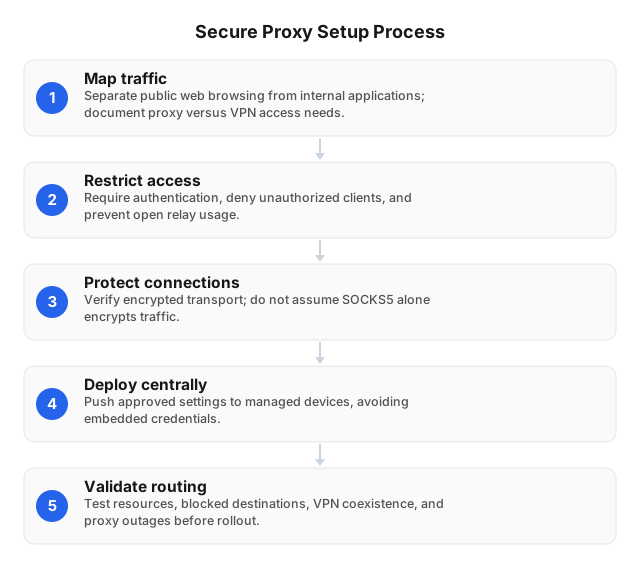
- Map traffic. Identify browsers, desktop applications, and background services. Specify which require a proxy, VPN, or application-specific control.
- Restrict access. Require authentication, deny unauthorized clients, and prevent an open relay.
- Protect connections. Verify encryption on each connection leg; SOCKS5 alone does not provide it.
- Deploy centrally. Push approved settings to managed devices without embedding reusable credentials in shared files.
- Validate routing. Test permitted resources, blocked destinations, VPN coexistence, and outages.
- Establish monitoring. Record authentication failures and policy denials; assign certificate-renewal and configuration owners.
Follow the operating-system proxy setup guide, then test each required application. Some use their own settings rather than the operating system’s configuration.
Best Practices for Maintaining Proxy Security
Maintain proxy security by reviewing credentials, filtering rules, software updates, and outage behavior—not just availability. Configuration drift can leave applications connecting directly or preserve access for departed employees. Assign owners and rerun enforcement tests after changes to clients, authentication, certificates, or routing.
- Revoke stale access. Remove departed employees’ credentials and obsolete allowlist entries. Rotate exposed secrets.
- Review exceptions. Give each exception an owner, expiration date, and documented business reason.
- Patch and verify. Update proxy software and clients; test devices switching between home and mobile networks.
- Test failures. Ensure protected applications cannot silently connect directly during outages. Document an approved fallback.
- Limit logging exposure. Restrict access and retention. Review employee-notice and privacy requirements before enabling content inspection.
Common Challenges and Solutions in Proxy Management
Expect authentication errors, added latency, application incompatibilities, and routing conflicts; diagnose them separately rather than weakening policy to restore connectivity. Measure gateway health and destination access independently. A reachable proxy does not prove an application works through it, and a slow destination does not establish that the proxy caused the delay.
Authentication failures: Compare client settings with gateway logs. Check expired credentials and whether a worker’s changed public IP invalidated an allowlist entry. Never restore access by removing authentication.
Latency and timeouts: Compare the same destination with and without the proxy using an approved test device or exception. Record request duration and errors, then check exit location, destination behavior, and gateway load. Use the proxy speed troubleshooting guide to isolate routing-related delays.
VPN conflicts and mobile failures: Test affected applications on each approved connection path. Verify proxy settings, DNS routing, and certificate trust.
Configuration failures: Stage changes on managed test devices and retain an approved rollback configuration. Alert on unexpected direct connections.
Deployment Acceptance Tests
Approve deployment only after managed remote devices demonstrate policy enforcement, predictable outage behavior, and usable audit records. A successful connection is insufficient: blocked destinations must remain blocked, exceptions must stay scoped, and administrators must be able to associate relevant events with the appropriate account or device.
Run these tests before rollout and after routing or authentication changes:
- Home-network access: Confirm approved destinations work and prohibited destinations are denied.
- Network switching: Check authentication and routing when devices change networks.
- Proxy interruption: Verify protected applications follow the outage policy.
- Application coverage: Test desktop applications and background services, not just browsers.
- Audit retrieval: Locate a test denial without exposing unnecessary browsing data.
Assign remediation owners before approving affected applications.
Related reading
Use these guides to validate device configuration or investigate how destinations identify proxy traffic. Configuration instructions establish a connection; they do not prove every application follows the intended route. After changes, repeat access, blocking, and outage tests on managed devices rather than relying on a browser’s displayed exit IP.
- How to Detect Proxy Servers and Bypass Blocks in 2026
- Setting Up Proxy Servers on Popular Operating Systems: 2026
FAQ
Choose controls according to traffic and risk: a forwarding service, filtering gateway, and VPN solve different problems. Distinguish application routing from policy enforcement when evaluating coverage. An exit IP confirms where a request emerged, not whether the connection received malware filtering, user authentication, or protection against unauthorized access.
What is a proxy server used for in remote work?
A proxy routes employee application traffic through an intermediary for controlled egress and, when supported, filtering and logging. A managed forward proxy can enforce browsing policies while presenting its exit IP to websites. Applications that ignore proxy settings may connect directly unless separate controls prevent it.
How do proxies enhance security for remote teams?
Security-focused proxies enhance security by enforcing web-access rules, blocking known malicious destinations, and logging routed requests for investigation. These protections require supported filtering and logging capabilities plus enforced routing across required applications. Residential IP addressing alone provides none of these controls and does not replace endpoint protection or identity checks.
What are the best practices for using proxies securely?
Secure proxy use requires authenticated access, restricted administration, maintained software, and controls against unauthorized direct connections. Protect credentials, limit log retention, and document inspection exceptions. Do not treat IP allowlisting as employee identity: public addresses can change or be shared. Review inspection and logging against applicable privacy requirements.
How can I set up a proxy server for remote work?
Define covered applications, configure an authenticated gateway, and distribute settings through managed devices. Configure destination rules and logging, then test permitted and blocked destinations, HTTPS behavior, and off-network access. Verify that outage behavior matches policy before deployment.
What challenges might I face with proxy servers?
You may face authentication failures, added latency, VPN conflicts, application incompatibilities, certificate errors, and traffic bypassing the proxy. Check credentials and allowlists first, then verify application settings, DNS routing, and certificate trust. Compare request timings on approved test paths and test outages to distinguish performance problems from enforcement gaps. Restore service through a tested configuration—not by disabling authentication, certificate validation, or filtering.
Do remote workers need both a proxy and a VPN?
Remote workers may need both when a VPN provides private-network connectivity and a proxy enforces web-access policies. A VPN tunnels configured traffic, while a forward proxy mediates supported application requests. Test routing and DNS with both enabled to detect conflicts or enforcement bypasses.
Are residential proxies suitable for employee access to corporate applications?
Residential proxies are generally better suited to authorized regional testing than primary employee access control. Corporate access should depend on user identity, device posture, and application policy—not an exit IP’s apparent location. EProxies’ residential coverage supports regional testing but does not establish employee authentication or authorization.
This article was written by the EProxies team and reviewed against our editorial quality standards before publishing.