
Impact of Proxy Servers on Internet Speeds: 2026 Fixes
TL;DR: Proxies can add delay through extra routing, processing, and queues. Caching can speed up repeat requests for eligible content. Measure direct and proxied traffic under matching conditions before changing settings.
A proxy forwards requests between a client and a destination server. For network administrators, the task is to locate delays: connection setup, security checks, waiting requests, or data transfer. Test the same workload before and after each change. A faster response is not an improvement if it comes with weaker security or more failures.
Introduction to Proxy Servers and Internet Speed
A proxy can improve application performance without increasing your internet connection’s bandwidth. A cache can serve eligible content without downloading it again from the original server. However, a proxy with limited capacity can become a bottleneck. Its effect depends on the route, available resources, and the work each request requires.
Define “speed” around the task you need to support:
- Page responsiveness: How long employees wait for usable content.
- Transfer throughput: How quickly large downloads finish.
- Peak-load performance: Whether shared capacity handles simultaneous requests without growing delays.
Caching, compression, and traffic prioritization can help in suitable configurations. They are not automatic benefits of enabling a proxy. Test employee workflows rather than relying on the office connection’s advertised speed.
For the underlying request flow, see Understanding Proxy Servers for Beginners: 2026.
How Proxy Servers Affect Internet Speed
A proxy adds another step to the request path, which can increase response time. The delay can come from routing, processing, limited bandwidth, or waiting for capacity. Destination behavior also matters. A quick response from a lightweight test endpoint does not establish how a business application will perform through the same proxy.
Under heavy demand, bandwidth limits and processing queues can delay requests despite a fast internet connection. Compare application response times under normal and peak loads before increasing connection limits. More connections can worsen congestion.
Caching reduces repeat downloads only when content is eligible for reuse. A standard HTTPS tunnel does not expose encrypted responses to the proxy for caching or compression. If authorized TLS inspection is enabled, measure its processing cost separately. Do not disable required security controls to improve a benchmark.
Common Misconceptions About Proxy Servers and Speed
Neither a proxy’s label nor its IP pool size tells you how fast your application will run. Performance depends on routing, load, destination behavior, and connection handling. Treat advertised response times as claims to test against your workload. Measure successful requests, because a fast error page can make a poor service look responsive.
“Every proxy slows traffic”
A caching proxy can serve reusable content without another request to the origin server. That can shorten repeat requests. A forwarding-only proxy cannot provide this cache benefit, and uncached requests still travel through the extra intermediary. Check whether your actual content supports caching before expecting faster delivery.
“More IPs means more bandwidth”
A larger IP pool does not, by itself, increase transfer capacity. Requests can still share bandwidth limits or constrained processing resources. Before adding addresses, check throughput limits, active connections, and peak demand. Extra IPs will not remove a saturated link between your network and the proxy.
Steps to Optimize Proxy Server Settings for Speed
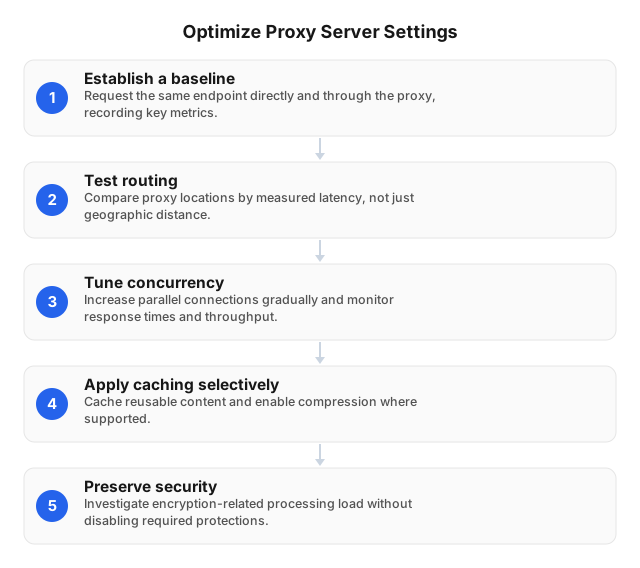
Start with a controlled comparison, then change one setting per test. Use the same destinations, files, and load for direct and proxied requests. Otherwise, a faster result may reflect a quieter network or a cached response. Record errors alongside timing so failed requests do not appear to improve performance.
- Establish a baseline. Record connection time, time to first byte, throughput, and errors for an approved endpoint.
- Test routing. Compare approved proxy locations. Choose by measured latency, not geographic distance alone.
- Tune concurrency. Increase parallel connections gradually. Reduce them if response times rise without a throughput gain.
- Check capacity. Inspect bandwidth limits, resource use, and waiting requests before raising connection limits.
- Cache selectively. Cache permitted, reusable content—not private or personalized responses without appropriate controls.
- Use compression selectively. Enable it where supported, but avoid spending resources recompressing already compressed files.
- Preserve security. Investigate inspection overhead without disabling required authentication, inspection, or TLS protections.
Use Best Practices for Maintaining Proxy Servers in 2026 to support ongoing configuration checks.
Comparing Different Types of Proxy Servers
Choose a proxy type for the job, then verify its performance under expected load. Residential connection quality can vary, while stable addressing does not guarantee bandwidth. Routing and available capacity can outweigh the category on the product page. Compare candidates using the same destinations, session behavior, and number of simultaneous requests.
| Proxy type or mode | Speed trade-off | Selection rule |
|---|---|---|
| Data center | Can offer fast connections; shared capacity can limit throughput | Test under expected peak load |
| Residential | Residential network quality can cause variable latency | Test the locations needed for authorized geographic checks |
| ISP/static | A stable address does not guarantee bandwidth | Verify capacity and routing separately |
| Rotating sessions | Address changes can disrupt connection reuse | Rotate only when the task requires it |
| Caching forward proxy | Cache hits avoid repeated origin transfers | Check whether the content permits caching |
Do not assume a residential proxy service provides corporate caching. Confirm the service’s actual features before designing around them.
Tools to Measure and Improve Proxy Server Performance
Use request timing, browser traces, and resource monitoring together to locate delays. curl supports repeatable request tests. Browser DevTools shows which page requests delay usable content. Proxy dashboards can show active connections and resource use. Compare direct and proxied traffic to the same authorized endpoint rather than relying on a public speed test.
In curl, use --proxy with these --write-out fields:
time_connect: Time until the connection is established.time_appconnect: Time until the TLS handshake is complete, where applicable.time_starttransfer: Time until the first response byte.time_total: Total request duration.speed_download: Average download speed.
For HTTPS tunnels, interpret TLS timing alongside connection timing. Total duration alone cannot isolate proxy overhead.
Match slow requests with CPU use, connection counts, and queue growth. On infrastructure you administer, run controlled load tests against an approved endpoint. Rising latency without higher throughput suggests a capacity constraint. Test lower concurrency before expanding connection limits.
Balancing Speed and Security with Proxies
Accept a speed improvement only if required security controls remain effective and failures do not increase. Compare each candidate configuration with the approved baseline under normal and peak loads. Reject changes that improve timing by weakening authentication, inspection, or access rules. Record both performance results and security checks in the change ticket.
Set acceptance criteria for each application. Interactive tools need responsive transactions; bulk transfers need sustained throughput. Check both alongside failed requests and proxy resource use.
Keep a rollback configuration. If inspection becomes a bottleneck, review capacity and policy scope with the security team rather than disabling controls across the network.
For access-restriction use cases, see Leveraging Proxies for Bypassing Internet Censorship (2026). Evaluate those configurations separately from routine corporate browsing.
FAQ
How do proxy servers impact internet speed?
Proxy servers can increase latency, while caching can shorten repeat requests for reusable content. The result depends on routing, load, and configuration. Measure response time and sustained throughput separately. Faster page responses do not necessarily mean faster large-file transfers, and a cache helps only when requests can reuse stored content.
Can proxy servers slow down my connection?
Yes, proxies can slow traffic when bandwidth, processing capacity, or connection limits become bottlenecks. Peak-hour slowdowns may suggest shared capacity contention, especially if direct connections remain stable. HTTPS inspection can also add processing work. Compare resource use and approved policies before changing controls; disabling protection is not a sound performance fix.
What are the best settings for proxy speed?
The best settings reduce unnecessary connection setup and keep concurrent requests within available capacity. Retain connection reuse where supported. Use sticky sessions when an application needs a consistent outbound identity. Cache only eligible content, preserve required security controls, and adjust connection limits based on measured delays rather than IP pool size.
How can I test my proxy server speed?
Compare direct and proxied requests to the same approved destinations under matching conditions. Use curl to record connection time, first-byte time, total duration, and download speed. Check status codes and errors too. Repeat with representative applications and peak-hour load; a fast test endpoint cannot establish acceptable performance for every business workflow.
Do all proxy servers affect speed the same way?
No, proxies differ in routing, hosting networks, load, and processing policies. A residential exit may outperform an overloaded data center endpoint on a particular route. Test candidates with matching destinations, payloads, session behavior, and concurrency. Count successful responses separately so fast error pages do not distort the comparison.
This article was written by the EProxies team and reviewed against our editorial quality standards before publishing.