
Leveraging Proxies for Bypassing Internet Censorship (2026)
TL;DR: Proxies can restore access to public information when a reachable intermediary offers a usable route to the website. They are not a guarantee of access, encryption, or anonymity. Match the protocol to your application, verify routing before signing in, and stop if testing requires disabling security controls or creates unacceptable risk.
For IT teams and digital rights activists, effective testing starts with a clear diagnosis and a controlled configuration. Treat legal authorization, provider trust, and personal exposure as separate decisions—not problems that a different exit IP necessarily solves.
Understanding Internet Censorship
An inaccessible page alone is not enough to diagnose censorship. Start by recording where the request fails: name resolution, connection establishment, or the website’s response. A proxy may provide another route, while account restrictions and application errors may require changes unrelated to routing.
Identify the restriction before choosing a tool
Compare the same public URL under controlled conditions before changing several settings at once. Use a nonsensitive page, record the error message, and distinguish a browser warning from an HTTP response returned by the website. This gives you a baseline for judging whether a proxied request changes the failure.
- Scope: Check whether one website, several websites, or all browsing fails.
- Context: Separate network restrictions from subscription requirements, account permissions, and website maintenance.
- Exposure: Decide whether attempting another route could create legal or personal risk.
- Evidence: Record the URL, connection method, and error without retaining credentials or sensitive query strings.
Understand the limits of changing routes
An alternate route can help only if both the proxy endpoint and the destination remain reachable along that route. Avoid treating an advertised proxy location as proof of accessibility. Test the endpoint from the actual network and application you intend to use, rather than relying on a provider dashboard or another user’s result.
If the endpoint cannot be reached, check its hostname, port, credentials, and supported protocol first. Repeatedly switching exit IPs without isolating the failure can obscure a configuration mistake.
What Are Proxies and How Do They Work?
To understand what an alternate route changes, consider the proxy’s role: it forwards requests between a configured client and a destination, allowing the client to use the intermediary’s network path instead of connecting directly.
The request path
The intended path is configured application → proxy → destination → proxy → application. Configuration applies to the client you set up: a browser’s proxy settings may not cover a command-line tool or messaging client. DNS handling also depends on the client’s settings and must be checked separately.
Two useful routing checks are the visible exit IP and the application’s behavior when the proxy becomes unavailable. Together, they help establish whether requests use the intended route and whether the client can fall back to a direct connection.
What changes between proxy types
Protocol and exit IP category answer different procurement questions. HTTP(S) and SOCKS5 describe connection options; residential describes the exit IP’s network category. Neither category alone establishes confidentiality, application coverage, or reliable access.
EProxies offers HTTP(S) and SOCKS5 access across 72M+ residential IPs in 195+ countries. Those facts describe coverage and compatibility—not guaranteed access to a particular censored website.
Types of Proxies for Bypassing Censorship
With that distinction in mind, choose a protocol your application supports, then evaluate exit location and provider policies. An HTTP(S) endpoint may suit a browser workflow, while SOCKS5 can suit compatible applications with explicit proxy settings. Confirm the exact configuration with the provider and test it against your intended public-information task.
| Type or feature | Practical use | What to verify |
|---|---|---|
| HTTP(S) proxy | Browser or HTTP-client requests through an intermediary | Whether the client supports the endpoint and how each connection leg is protected |
| SOCKS5 proxy | Routing applications that support SOCKS5 | Authentication, DNS settings, and the application’s own transport protection |
| Residential exit IP | Requests through a residential-network address | Exit location, endpoint-owner consent, and compatibility with the required protocol |
| Persistent endpoint or session | Tasks that need a consistent route | Session behavior and what happens when the endpoint becomes unavailable |
Do not assume that an “HTTPS proxy” label describes every part of the connection. Consult the provider’s configuration instructions to determine the documented protection for each connection leg.
If a network rejects the configured proxy connection, distinguish authentication and protocol compatibility failures from endpoint reachability and destination access problems. A different exit IP category is not automatically the remedy.
Step-by-Step Guide to Setting Up a Proxy
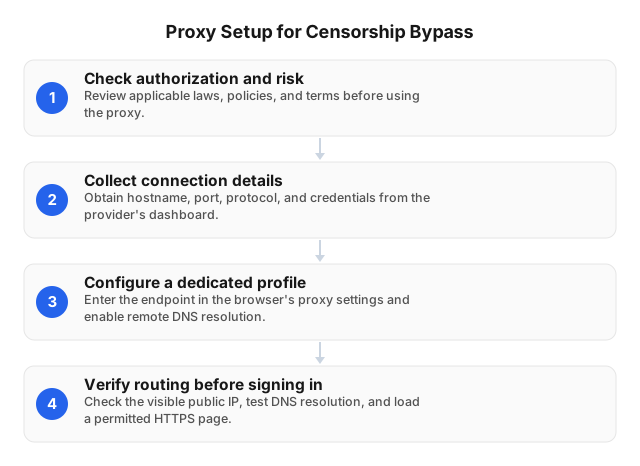
Once you have selected an endpoint, configure it in a dedicated application profile and test routing with nonsensitive requests before entering account credentials. Treat a successful page load as an access test only; it does not establish that certificate behavior, DNS settings, or direct fallback meet your requirements.
- Confirm authorization and risk. Review organizational policy, applicable law, and destination terms. Limit the test to public resources you are authorized to access.
- Collect verified connection details. Obtain the hostname, port, protocol, and authentication details through the provider’s authenticated dashboard or documentation. Do not substitute an endpoint received in an unsolicited message.
- Create a dedicated profile. Keep test cookies and accounts separate from routine browsing. Enter the supplied connection details.
- Check DNS settings. If the application supports proxy-side DNS resolution, configure it according to its documentation. Do not assume that selecting SOCKS5 enables the desired behavior automatically.
- Verify the route. Check the reported public IP and load a nonsensitive HTTPS page. Investigate certificate warnings instead of bypassing them.
- Test failure behavior. Make the proxy unavailable and repeat the request. If the application connects directly, change its fallback configuration or avoid using it for activity that requires the proxy route.
- Retest the target. Compare the original public URL with your baseline. Record connection failures separately from HTTP responses and account-related errors.
For recurring deployments, use proxy server maintenance practices to structure endpoint checks, credential handling, and configuration reviews.
Security Considerations When Using Proxies
After confirming access, evaluate security at three boundaries: the application, the connection to the proxy, and the destination connection. Before handling sensitive information, verify the documented transport behavior and assess provider practices alongside the routing results.
Check encryption and routing
Keep certificate validation enabled and investigate unexpected requests to install a certificate or change trust settings. Confirm client-to-proxy protection separately from protection to the destination. Where the application exposes DNS controls, compare its documented behavior with the tested route.
On mobile devices, perform these checks for each relevant application. A browser’s proxy settings should not be assumed to apply to the whole device.
Limit exposure and assess consequences
Ask the provider what connection metadata it records, how long it retains those records, and who can access them. Keep proxy passwords out of screenshots, shared configuration files, and diagnostic logs. For sensitive work, assess whether using an identifiable account or retaining browsing records would undermine the purpose of changing the route.
Define a stop condition before testing: an unexplained certificate warning, unexpected direct fallback, or an unverified logging policy may be enough to halt a sensitive workflow.
Ethical Implications of Bypassing Censorship
Technical safeguards do not resolve questions of permission or consent. Access to public information does not authorize entry into private systems or override account permissions. Define the task, the permitted resources, and the people whose infrastructure or data may be involved.
For IT teams, document the approved purpose. Testing access to public documentation differs from circumventing an employer’s security policy without authorization.
For residential endpoints, request an explanation of how connection owners consent, receive notice of bandwidth use, and withdraw from the network. Treat unclear answers as a procurement issue rather than something to solve through client configuration.
For activists, obtain informed consent before routing someone else’s traffic or sharing identifying diagnostic evidence. For collaborative work, agree on what diagnostic records may be collected and shared. Seek qualified local guidance when the consequences of circumvention are uncertain.
Practical Applications and Diagnostic Workflows
The following workflows bring diagnosis, configuration, and risk assessment together. They are illustrative, not documented customer outcomes or research findings. Each uses controlled comparisons, public pages, and minimal diagnostic records rather than sensitive accounts or personal browsing history.
IT operations: isolate the failure
An administrator testing an inaccessible public documentation page can compare direct and proxied requests from the same application. Keep the URL, certificate checks, and request method consistent. Record whether each attempt fails during name resolution, connection establishment, or after receiving an HTTP response; changing only the route makes the comparison more useful.
If the proxied request works, record that result without declaring the cause proven. A different route may change several network conditions. Repeat the test with another permitted public page and check whether the result is consistent.
Digital rights: prioritize exposure risk
A researcher accessing public reporting should decide what exposure is acceptable before testing a commercial endpoint. Apply the separate-profile, provider-review, and routing checks to nonsensitive requests first. If reaching the page requires weakening certificate checks or accepting unexplained configuration changes, stop rather than treating access as the sole objective.
Where the configured proxy remains unreachable, seek qualified digital-security advice about tools appropriate to that environment. Pool size alone is not evidence that another residential exit IP will solve the restriction.
For location-dependent access, distinguish censorship from licensing and service rules using this guide to bypassing geo-blocking legally.
FAQ
The questions below address common decisions about proxy use, from choosing a compatible connection to assessing security and authorization.
How do proxies bypass internet censorship?
A proxy can bypass some restrictions by requesting a public website through a reachable intermediary. Your application connects to the proxy, which forwards the request along its own route. Test whether the endpoint and destination are both accessible, and verify the application’s DNS configuration rather than assuming that changing the exit IP addresses every filtering mechanism.
What are the risks of using proxies?
Potential risks include provider logging, unexpected direct connections, insecure configuration, and legal or personal consequences. Review retention policies, keep certificate validation enabled, and test fallback behavior before signing in. Accounts and stored browser data may still reveal identity, so use a separate profile when the task requires keeping test activity apart from personal browsing.
Which type of proxy is best for bypassing censorship?
No proxy type is universally best; choose one your application supports and test it against the actual restriction. HTTP(S) may fit a browser task, while SOCKS5 may fit another compatible client. A residential exit IP describes the network address, not a guarantee of concealment, confidentiality, or access under traffic inspection.
How can I set up a proxy server?
To use an existing proxy server, enter its hostname, port, protocol, and authentication details in your application’s settings. Configure DNS behavior where supported, then test a nonsensitive HTTPS page and verify the visible exit IP. Finally, make the proxy unavailable to check whether the application stops or silently connects directly.
Are there legal issues with using proxies?
Yes, proxy use can raise legal issues depending on jurisdiction, purpose, and the resources accessed. Check local law, organizational authorization, and destination terms before deployment. Keep public-information access separate from defeating authentication or other access controls, and seek qualified local advice when circumvention could expose you or collaborators to penalties.
This article was written by the EProxies team and reviewed against our editorial quality standards before publishing.