
Best Practices for Maintaining Proxy Servers in 2026
TL;DR: Maintain proxy servers by staging software patches, monitoring gateway health separately from target-site responses, restricting access, automating checks, and testing configuration recovery.
For administrators managing residential proxies for authorized scraping and privacy workflows, maintenance spans gateway software, clients, provider connectivity, and session behavior—not just server uptime. The checks below help diagnose failed requests without treating every target-site refusal as a proxy outage. Apply them to workflows that respect target-site terms and applicable laws.
Define Maintenance Responsibilities
Keep software patched, configurations recoverable, and request handling observable across the infrastructure you control. With managed residential proxies, you typically maintain your gateways, clients, and credentials while the provider operates its upstream network. Document that boundary before assigning maintenance tasks: a client dependency, a gateway configuration error, and a provider connectivity problem require different owners and recovery steps.
Start with an ownership register covering each gateway, operating system, proxy client library, configuration repository, and provider account. Assign a maintenance owner and record where update notices arrive. A forgotten client dependency can remain exposed even when the gateway is current.
Keep infrastructure maintenance separate from collection policy: repairing a proxy connection does not authorize access to restricted data.
Regular Software Updates and Patching
With ownership established, build a patching plan for the operating system, proxy daemon, TLS libraries, and scraping-client dependencies under your control. Automate update discovery, but gate production rollout on authentication, connectivity, and session-continuity checks. Keep the previous working configuration available so a failed change has a tested rollback path.
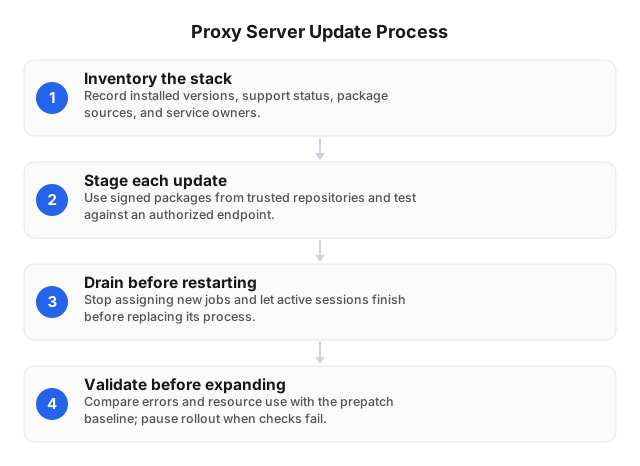
- Inventory the stack. Add installed versions, support status, and package sources to the ownership register. Prioritize security fixes affecting exposed listeners or authentication.
- Stage each update. Use signed packages from trusted repositories. Test HTTP(S) forwarding, SOCKS5 connections where supported, DNS resolution, and sticky-session behavior against an authorized endpoint. EProxies supports HTTP(S) and SOCKS5; test the protocol your workload actually uses.
- Drain before restarting. Stop assigning new jobs to the gateway being patched. Allow active sessions to finish where practical before replacing its process or container.
- Validate before expanding. Compare errors, latency, and resource use with the prepatch baseline. Pause rollout when checks fail, and retain diagnostic logs subject to the security controls below.
Monitoring Proxy Server Performance
The same checks used to validate an update should support ongoing monitoring. Measure gateway connectivity separately from target-site outcomes: a controlled endpoint tests the connection path, while an authorized target request also tests that site's availability and response behavior. Establish separate baselines rather than applying a universal success-rate or latency threshold across every route and destination.
- Establish paired checks. Send authorized test requests through the same gateway and session configuration to a controlled endpoint and your permitted target. Record connection time, total duration, response status, and content validity.
- Segment the dashboard. Group results by country, session type, and target hostname. Track bandwidth per valid response to expose retry-driven costs.
- Alert on correlated changes. Compare failures, latency, connection counts, and traffic against each route's baseline. A simultaneous failure across destinations warrants a different investigation from errors confined to one target.
- Protect monitoring access. Restrict dashboard ingress with firewall rules and encrypt telemetry transport.
Implementing Security Measures
Monitoring must not create another route into the gateway or expose the credentials used to access it. Apply security controls to gateways and scraping clients under your control, not provider-managed residential devices. A long-lived session is not a reason to leave credentials in scripts or logs: session continuity and credential exposure are separate concerns.
- Restrict access. Deny inbound access by default and permit approved workers only. Configure the authentication or allowlisting options available in your service and gateway. Keep administrative interfaces private.
- Protect credentials. Store secrets outside source code, redact authentication headers, and revoke exposed credentials. Separate production and test credentials where supported. Across diagnostic, monitoring, and maintenance logs, exclude passwords, session tokens and cookies, sensitive payloads, and scraped personal data.
- Validate connections. Require HTTPS for sensitive destinations and preserve certificate verification. SOCKS5 alone does not encrypt application traffic.
- Check security configuration. Automate checks for public listeners and missing access rules. Test rejection of unauthorized clients after configuration changes, not just successful access by approved workers.
Automating Maintenance Tasks
Once patching, monitoring, and security checks are defined, turn them into repeatable jobs. Schedule health checks, staged updates, credential rotation where supported, and configuration validation only on infrastructure you control. Require a successful post-change proxy request before returning a gateway to service. Keep recovery actions bounded so automation cannot turn one failure into repeated restarts or runaway retries.
- Define repeatable jobs. Use a scheduler and configuration-management scripts. Prevent overlapping runs, record exit status, and alert on missed executions.
- Gate deployments. Encode configuration-syntax validation and the staged rollout process in deployment jobs. Begin with a canary gateway and expand only after the required checks pass.
- Rotate credentials safely. Where overlapping credentials are supported, validate replacement credentials before revoking the old set. Otherwise, coordinate the change with a maintenance window.
- Bound automated recovery. Cap retries and quarantine failing gateways. Keep gateway recovery separate from target-site rate-limit handling so deployment automation does not repeatedly rotate IPs in response to a target refusal.
Backup and Recovery Strategies
Automation also needs a recovery path when a change cannot be repaired in place. Preserve gateway configuration, routing rules, secret references, and scraping checkpoints rather than assuming a previous residential IP can be restored. Keep recovery copies outside the gateway's failure domain, and define acceptable data loss and downtime so backup scheduling reflects the workload's actual recovery requirements.
- Capture reproducible state. Version configuration and infrastructure templates. Trigger encrypted backups after approved changes and alert on failed jobs.
- Separate credentials from configuration. Back up secret references rather than plaintext passwords, and document how authorized operators recover the referenced secrets. Restrict backup access.
- Restore without replaying work. Recover job checkpoints and deduplication records. Treat interrupted sticky sessions as potentially invalid; validate authentication and session state before resuming collection.
- Test the recovery path. Restore into an isolated environment before relying on the backup. Check routing and access controls, then run an authorized test request before releasing queued jobs. Reapply credential revocations made after the backup.
Common Challenges and Solutions
When checks fail during routine operation or recovery, classify the failure before changing rotation settings or adding capacity. Use the paired monitoring results to distinguish connection failures, authentication errors, rate limits, and invalid response content. Each points to different checks; treating them all as proxy outages can waste bandwidth and conceal the underlying problem.
For timeouts, inspect DNS resolution, connection establishment, and upstream response timing separately. Pause affected workers when the gateway fails; repeated retries can amplify congestion. Apply backoff within the configured retry limits.
For rate-limit responses, pause affected scraping jobs, honor Retry-After when present, and reduce target-specific concurrency. Do not rotate addresses to circumvent access controls.
For broken sessions, check whether cookies remain attached to the intended sticky session and whether the application depends on a consistent exit IP. Drain active jobs before changing session settings.
For authentication failures after deployment, verify secret versions and, where allowlisting is configured, the workers' outbound addresses. Log failure categories while following the credential-redaction rules.
Related Reading
These failure modes connect gateway maintenance with collection design. Checkpointing and deduplication determine how an interrupted job resumes, while target-specific scheduling shapes rate-limit handling and retry costs. Review those workflow decisions alongside gateway configuration so a technically successful restart does not resume duplicate requests or an overly aggressive collection schedule.
- How Proxy Servers Facilitate Data Mining Efforts in 2026
- Best Practices for E-Commerce Web Scraping in 2026
FAQ
Use these answers when reviewing your maintenance plan. For each task, record evidence of success alongside the responsible owner—for example, a rejected unauthorized connection or a completed restore test.
How often should proxy servers be updated?
Update proxy software and its operating system on a scheduled maintenance cycle, prioritizing security fixes according to exposure and exploit risk. An exposed service with an actively exploited vulnerability should not wait for routine maintenance.
What tools can monitor proxy server performance?
Use server-health monitoring alongside synthetic requests through the residential proxy to measure infrastructure health and end-to-end performance. Track authentication errors separately from connection failures and target-site response codes.
How do you secure a residential proxy server?
Secure your gateway by requiring authentication, restricting access to approved clients, protecting credentials, and keeping exposed software patched. For cloud-hosted workers, account for changing outbound addresses before relying on an IP allowlist. Remove obsolete permissions when workers retire.
What are the best practices for proxy server backups?
Back up configurations, access policies, deployment manifests, and recovery instructions in encrypted storage separate from the running server, then test restoration in isolation. Verify that the restored gateway authenticates approved clients and rejects unauthorized ones. Recover secrets through a controlled secrets-management process, and apply current access rules before accepting production traffic.
This article was written by the EProxies team and reviewed against our editorial quality standards before publishing.