
Setup Guide for Residential Proxies: 2026
TL;DR: Configure your residential proxy endpoint, authentication, protocol, and session policy, then verify the exit IP from the application using it. Test an authorized destination before scaling, and measure usable responses per billed GB—not just connection speed.
Decide whether requests need independent IPs or a consistent session identity. Diagnose routing separately from cookies and account settings when investigating authentication failures, unexpected localization, or blocked requests.
Introduction to Residential Proxies
Residential proxies route requests through IP addresses associated with residential internet connections. They let you test how an authorized destination responds to a particular network origin or location. Residential routing can reduce obvious datacenter-proxy signals, but it neither guarantees access nor prevents detection. It also leaves browser cookies and account settings unchanged.
Distinguish three controls before configuring your client:
- Exit location: where the destination observes the request originating.
- Session behavior: whether related requests retain an exit IP.
- Client configuration: which application actually uses the proxy.
Use residential connections for authorized regional testing and compliant public-data collection. Geographic availability does not grant permission to access restricted content.
Choosing the Right Residential Proxy Provider
Test required locations, session persistence, and target compatibility before committing traffic. EProxies offers 72M+ residential IPs across 195+ countries, with HTTP(S) and SOCKS5 support. Its published 98.2% uptime is backed by a 99.9% uptime SLA; check the SLA’s scope and remedies rather than treating coverage or availability figures as task-success guarantees.
For independent requests, evaluate rotation controls. For cookie-dependent workflows, verify sticky-session duration, reconnection behavior, and supported authentication methods.
EProxies lists pay-as-you-go residential pricing from $0.25/GB and a 300GB tier at approximately $0.73/GB. Confirm eligibility and billing conditions; these figures do not establish a single discount schedule. ISP SOCKS5 starts at $0.95/IP, and unlimited plans start at $79/month.
Request documented IP-sourcing practices and acceptable-use terms. Check traffic expiration, billable bytes, and retry charges before purchasing.
Prerequisites for Setting Up Residential Proxies
Gather the provider-issued hostname, port, protocol, and authentication details before changing application settings. Define the exit location and whether related requests require continuity. Verify the endpoint and outbound network access first: framework debugging cannot fix invalid credentials, blocked ports, or a client configured for the wrong proxy protocol.
Keep credentials in environment variables or a secrets manager. For IP-whitelist authentication, identify your public outbound IP; a VPN or corporate gateway can change it.
Confirm protocol support. Python Requests, for example, requires its SOCKS dependency for SOCKS connections. Keep a terminal available for an isolated test.
For terminology, see Proxy Server Setup: Basics for Non-Techies in 2026. Record permitted targets and retention requirements with your configuration.
Step-by-Step Guide to Setting Up Residential Proxies
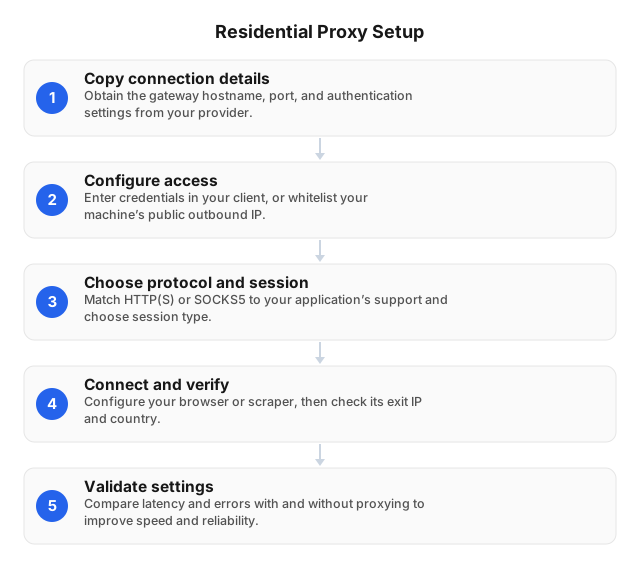
Configure gateway access first, select the session policy, and verify routing from the actual client. Use the endpoint and authentication instructions issued for your selected service. Saving proxy settings does not prove that traffic uses them: check both the observed exit IP and the content returned by an authorized destination.
- Copy connection details. Obtain the hostname, port, protocol, and authentication instructions. Store credentials outside source code.
- Configure access. Enter credentials or follow whitelist instructions. Whitelist the public outbound IP, not a private LAN address.
- Choose sessions. Use supported sticky sessions for cookie-dependent navigation and rotation for independent permitted requests.
- Check routing. Visit an IP-check service through the configured client and inspect the exit IP and country.
- Test content. Request an authorized page and validate its body, not just its status. Keep TLS verification enabled.
A controlled connection test
Test outside your application before adding framework settings, browser extensions, or concurrent workers. This cURL test isolates gateway access from destination behavior, making failures easier to locate. Use a trusted IP-check endpoint and an authorized destination; do not send application credentials or sensitive payloads to the IP-check service.
For an HTTP proxy with username-password authentication, set:
PROXY_URL: provider-issued URL, including scheme and port.PROXY_USER: username, including documented location or session parameters.PROXY_PASSWORD: password.IP_CHECK_URL: trusted IP-check endpoint.AUTHORIZED_TEST_URL: permitted test page.
Run:
curl --show-error --fail \
  --proxy "$PROXY_URL" \
  --proxy-user "$PROXY_USER:$PROXY_PASSWORD" \
  "$IP_CHECK_URL"
Then test the destination:
curl --show-error --fail \
  --proxy "$PROXY_URL" \
  --proxy-user "$PROXY_USER:$PROXY_PASSWORD" \
  "$AUTHORIZED_TEST_URL"
Interpret the results:
- IP check fails: investigate DNS, authentication, protocol, and firewall access.
- Only the destination fails: inspect permissions, rate limits, and response content.
- Only the application fails: compare its proxy, authentication, and certificate settings.
- Sticky exit changes: verify session parameters and documented persistence limits.
Environment variables avoid hardcoding secrets, but expanded command-line arguments may remain visible to local process-inspection tools. Use a secured runtime. For client configuration, see the Step-by-Step Guide to Set Up a Proxy Server in 2026.
Common Issues and Troubleshooting Tips
Separate gateway failures from destination refusals before changing IPs. A proxy-authentication error differs from a target denial, while a timeout can occur before either service responds. Compare minimal cURL and application requests using the same endpoint, protocol, credentials, and authorized URL to identify which layer diverges.
- Authentication fails: check credentials, port, and whitelist entries. Encode reserved characters if credentials appear in a proxy URL.
- Connections time out: verify DNS, firewall permissions, and protocol compatibility.
- Location or sessions change: retain the documented session identifier and the same cookie jar.
- Destination denies access: inspect the body and site permissions; residential routing does not make requests authorized.
- Rate limits appear: honor
Retry-Afterand reduce concurrency. - TLS fails: inspect the hostname, certificate chain, and trust store instead of disabling verification.
Optimizing Residential Proxy Performance
Measure against the intended destination, location, and session mode. Optimize for validated results per billed GB: a fast challenge page is not a successful collection result. Establish a small baseline, then change concurrency or session settings separately so you can attribute improvements or failures to a specific adjustment.
Keep sticky sessions for dependent browser actions; rotate between independent tasks, not midway through a stateful sequence.
Log requested location, observed exit IP, session identifier, elapsed time, status, transferred bytes, and content-validation results. Exclude passwords, authorization headers, and unnecessary personal data.
Increase concurrency gradually. Cache reusable responses and skip unnecessary browser assets where permitted. Compare billed traffic with validated records to expose expensive retries.
Use Cases for Residential Proxies
Use residential routing for authorized regional checks or public-page collection when network origin affects the response. Match sessions to the workflow: independent URLs may suit rotation, while connected browser actions need continuity. Define location and content-validation criteria before collection so routing changes do not produce false findings.
For public-page scraping, distinguish standalone listings from cookie-dependent pagination. Respect published rate limits and back off on throttling.
For price tracking, hold country, currency, language, and login state constant. Record exit location so localization errors do not trigger false price alerts.
For content testing, check IP location separately from browser language and account region. Subscription rights and licensing restrictions still apply.
Related reading
Use these guides to translate provider-issued connection details into browser, operating-system, or application settings. Establish gateway connectivity with an isolated test first, then repeat the exit-IP check inside the intended client. System proxy settings do not necessarily apply to every application, especially clients with their own networking configuration.
- Proxy Server Setup: Basics for Non-Techies in 2026
- Step-by-Step Guide to Set Up a Proxy Server in 2026
FAQ
Verify routing, session continuity, and destination permissions separately before purchasing substantial traffic. An exit-IP check confirms the address used by one request; it does not prove persistence, content eligibility, or client compatibility. Use representative authorized pages to test those properties before expanding a workload or increasing concurrency.
What are residential proxies used for?
Residential proxies support public-data collection, regional price checks, and authorized localization testing. A location-specific exit helps test currency, inventory, or language presentation in a particular market. It does not override subscription rights, access controls, site terms, or applicable laws governing the collection.
How do I choose a residential proxy provider?
Choose a provider by testing required locations, session controls, protocol compatibility, and total traffic cost. Confirm authentication options and persistence limits for the specific service you plan to purchase. Test representative authorized pages rather than treating advertised IP counts or geographic coverage as success guarantees.
What are common issues when setting up proxies?
Common issues include incorrect credentials, mismatched protocols or ports, stale whitelist entries, and unexpected exit locations. Compare settings with the provider-issued details, then run an isolated connection test. Recheck your public outbound IP after switching networks, enabling a VPN, or changing gateways.
How can I optimize proxy performance?
Optimize performance by preserving required sessions, reducing unnecessary traffic, and measuring validated responses on actual targets. Record retries and billed bytes, then reduce concurrency when throttling rises. Count usable content rather than successful connections: an HTTP response containing a challenge page is not a valid result.
What are the benefits of using residential proxies?
Residential proxies provide residential-network routing and geographic selection where those properties affect authorized testing. Supported sticky sessions can maintain continuity, while rotation suits independent tasks. Compare bandwidth cost, response time, and validated results against your requirements; residential routing alone does not guarantee destination acceptance.
This article was written by the EProxies team and reviewed against our editorial quality standards before publishing.