
Understanding Proxy Servers for Beginners: 2026
TL;DR: A proxy server routes configured application traffic through an intermediary for access control, regional testing, or managed connectivity. It can mask that application’s public IP, but it does not automatically encrypt traffic, cover every application, prevent account restrictions, or make browsing anonymous.
What Is a Proxy Server?
A proxy receives requests from a client and forwards them to a destination. Its coverage depends on configuration: a browser may use the proxy while background applications connect directly. DNS queries can also take a separate route, so successful page loading does not prove that all device traffic uses the intermediary.
Configured browser → Proxy server → Website
Identify the intermediary before troubleshooting
Identify the client application, proxy endpoint, exit IP, and destination before changing settings because each can fail independently. The endpoint is the hostname and port your application contacts; the exit IP is the address the destination sees. A provider gateway may use different exits according to location and session settings.
How Do Proxy Servers Work?
In this client-to-destination arrangement, a forward proxy accepts connections, contacts destinations, and relays responses. Websites generally see its exit IP instead of the client’s public IP, but account logins, cookies, and browser characteristics can still identify activity. Changing the network source does not remove identity information carried within a request.
For HTTPS, an HTTP proxy commonly uses a CONNECT tunnel. The browser’s encrypted connection passes through it; the proxy ordinarily sees connection metadata, not page contents. Authorized TLS inspection instead terminates and re-establishes encryption using a trusted inspection certificate.
SOCKS5 relays connections without encrypting application traffic itself. Use HTTPS for sensitive requests and check whether destination names resolve locally or through the proxy.
A reverse proxy, by contrast, receives requests for backend servers. Its protection depends on restricting direct access to those backends.
Types of Proxy Servers
These roles are only one way to classify proxies. Choose by role, exit-IP source, protocol, and access policy rather than treating every label as a separate product. Residential and datacenter describe exit-IP origins; HTTP(S) and SOCKS5 describe connection handling. Verify client compatibility, location availability, and session persistence before purchasing access, especially when a workflow needs a stable exit.
| Type | Practical use | Trade-off |
|---|---|---|
| Residential | Authorized regional storefront testing | Verify sourcing consent and available locations. |
| Datacenter | Controlled application testing | Does not represent a residential connection. |
| ISP | Workflows requiring persistent exits | Confirm hosting arrangements and session behavior. |
| Public | Non-sensitive demonstrations | Administration, logging, and reliability may be unclear. |
EProxies supports HTTP(S) and SOCKS5, with 72M+ residential IPs across 195+ countries. Pool size does not guarantee immediate availability in a particular location.
Benefits of Using Proxy Servers
With the appropriate role and protocol selected, managed proxies can enforce destination rules, centralize connection logs, and route supported applications through selected exits. Security improves only when required policies cannot be bypassed and administrators protect the intermediary. The trade-offs include an additional network hop and an operator that can observe connection metadata.
- School lab: Allow approved destinations and block direct connections if the policy is mandatory.
- Web application: Filter incoming requests through a reverse proxy.
- Localization testing: Compare authorized website behavior through a selected regional exit.
Residential routing and IP rotation do not guarantee destination acceptance.
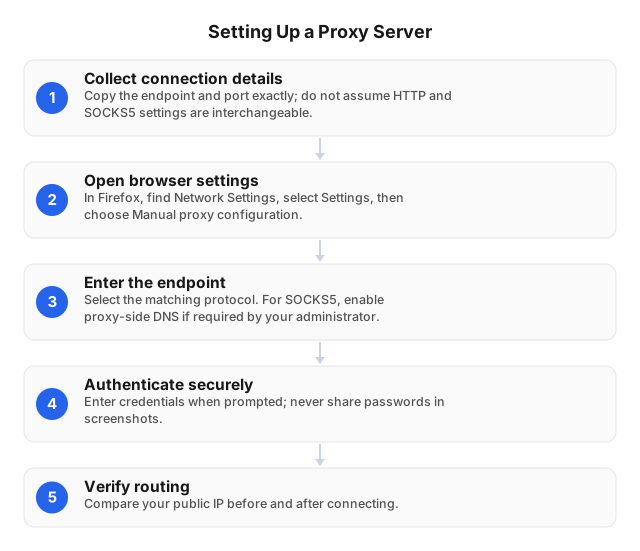
Setting Up a Proxy Server: A Step-by-Step Guide
To put these capabilities into practice, configure the provider’s connection details in an isolated browser profile, then verify routing and failure behavior. Save the original settings for rollback. Hosting your own proxy also requires access restrictions, updates, and monitoring: an exposed, unauthenticated forwarding service can be abused by others.
- Collect connection details. Obtain the hostname, port, protocol, and authentication requirements. Confirm credentials, IP allowlisting, or both. Allowlist the public IP of the connecting network.
- Open Firefox connection settings. Under Network Settings, choose Settings, then Manual proxy configuration.
- Match the protocol. Enter HTTP details in the HTTP field and SOCKS5 details in a SOCKS-compatible field, not an HTTP-only field. For SOCKS5, enable proxy-side DNS if required.
- Check scope. Confirm HTTPS routing and review “No proxy for” exclusions.
- Authenticate safely. Keep passwords out of screenshots, logs, and support tickets.
A controlled browser test
Compare a direct baseline, a configured connection, and a deliberately broken endpoint to detect accidental direct routing. Use an approved IP-checking service and a permitted HTTPS page in the isolated profile. This walkthrough is a diagnostic procedure, not a claim of first-hand testing or measured performance.
| Stage | Action | Watch for |
|---|---|---|
| Baseline | Record the public IP and load the HTTPS page without the proxy, where permitted. | Existing connectivity or certificate errors. |
| Enabled | Apply settings and repeat the requests. | An unchanged IP: inspect exclusions and protocol selection. |
| Failure check | Replace the endpoint with an invalid hostname and request a fresh permitted URL. | Unexpected loading: investigate caching, exclusions, or direct fallback. |
| Restore | Restore the endpoint and repeat both requests. | Intended exit IP and successful HTTPS loading. |
Use a fresh network request during the failure check; cached content can load without contacting a server. An IP-checking page verifies only its own route, not DNS or other applications. Record timestamps, destinations, protocols, and sanitized errors; never disable certificate verification to pass a test.
Common Use Cases for Proxy Servers
Once routing is verified, define success by the task, not merely by a changed IP. Validate the destination’s response before expanding a workflow to additional pages or applications.
Regional website testing
Keep a stable exit and consistent cookies while checking authorized storefront behavior, including currency, shipping options, and checkout responses. Record account preferences alongside location because cookies and preferences may override IP-based localization. Switching exits mid-session can distort observations or trigger additional verification, making comparisons less reliable.
Managed outbound access
Use managed application settings and network restrictions when gateway routing is mandatory; browser configuration alone does not enforce device-wide policy. Identify covered applications and test attempted direct connections. Restrict access to connection logs because URLs and query parameters may expose sensitive information even when page contents remain encrypted.
Public web research
Prefer a supported API when it supplies the information you are authorized to collect, and follow destination rate limits, terms, and applicable laws. For permitted page collection, maintain predictable request rates and session behavior. Treat destination denials as a reason to review authorization, not automatically change IPs.
Troubleshooting Common Proxy Server Issues
When a workflow fails, separate endpoint connectivity, proxy authentication, and destination rejection before changing settings. Compare the same permitted URL with and without the proxy only where direct access is allowed, then change one variable at a time. Record each result so a successful retry identifies a likely cause rather than hiding it.
| Symptom | First checks |
|---|---|
| Refusal or timeout | Hostname, port, protocol, firewall rules |
| Authentication failure | Credentials, account status, current public IP against allowlist |
| Slow responses | Direct baseline, exit location, destination responsiveness |
| One destination fails | Destination availability and access policy |
| Unexpected exit IP | Application settings, exclusions, session configuration |
| Certificate warning | Destination identity and authorized inspection trust chain |
After switching networks, check whether the public IP changed. After a password update, check for cached credentials. Send support the timestamp, endpoint, protocol, and sanitized error—not passwords or sensitive page contents.
Related Reading
After initial setup works, use the maintenance guide to plan credential changes and recurring connectivity checks. Consult the API guide before building page-collection workflows, and the automation guide before embedding proxy settings in test scripts. Document routing scope and failure behavior so later configuration changes can be checked against expectations.
- Best Practices for Maintaining Proxy Servers in 2026
- Web Scraping with APIs: Beginner's Guide for 2026
- Proxy Scripts for QA Automation: Practical 2026 Guide
FAQ
The following answers summarize the key distinctions for choosing, configuring, and evaluating a proxy.
What is the purpose of a proxy server?
A proxy mediates requests to control how traffic reaches a destination.
How do proxy servers enhance security?
Proxies enhance security by enforcing access rules, filtering requests, and limiting direct exposure when correctly configured. These controls supplement firewalls, authentication, updates, and HTTPS rather than replacing them.
What are the different types of proxy servers?
Proxy types include forward, reverse, HTTP(S), SOCKS5, residential, datacenter, and ISP proxies. These labels describe different properties and can overlap within one service.
How can I set up a proxy server?
Enter the supplied hostname, port, protocol, and authentication details in your application’s proxy settings, then verify routing.
What are common problems with proxy servers?
Common problems include timeouts, authentication failures, slow responses, destination denials, certificate warnings, and unexpected exit IPs.
Is a proxy server the same as a VPN?
No, a proxy typically routes configured application traffic, while a VPN commonly creates an encrypted network tunnel. Coverage depends on settings: proxy exclusions and VPN split tunneling can leave traffic outside the intended route. Neither technology alone makes browsing or account activity anonymous.
This article was written by the EProxies team and reviewed against our editorial quality standards before publishing.