
Proxy Scripts for QA Automation: Practical 2026 Guide
TL;DR: Proxy scripts make web automation more reliable by moving proxy selection, authentication, rotation, retries, and logging into code instead of browser settings. Use sticky sessions for stateful flows, rotating sessions for stateless requests, explicit timeout rules, and compliance checks before scaling.
This guide is for developers and QA engineers building Selenium tests, API collectors, localization checks, public-page monitors, or account QA workflows. It focuses on production mechanics: how to configure proxies, when to rotate, what to log, and how to avoid turning every network failure into a blind retry loop.
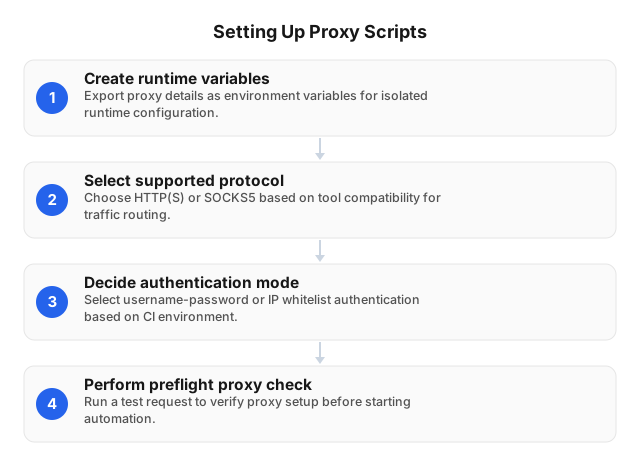
Introduction to Proxy Scripts for Web Automation
A proxy script is the part of an automation workflow that tells a browser, HTTP client, crawler, or test runner which proxy endpoint to use, how to authenticate, how long to keep a session, and what to do when a request fails. The bot performs the action; the proxy script controls the network path.
A practical proxy script defines:
- Protocol: HTTP(S) for browser/API traffic; SOCKS5 when the tool needs lower-level TCP routing.
- Authentication: username-password credentials for portable CI jobs, or IP allowlisting for fixed runners.
- Session behavior: rotating sessions for independent requests; sticky sessions for logins, carts, forms, and QA journeys.
- Failure handling: retry the same proxy, rotate to another proxy, back off, or stop the job based on the error class.
Keep proxy settings outside test steps. Store the host, port, scheme, username, password, region, and session mode in environment variables or a secrets manager so local runs, staging, and CI use the same structure without exposing credentials.
Why Proxy Scripts Improve Automation
Once proxy settings are managed in code, automation teams can control request origin, session continuity, and failure recovery. That control matters when the same Selenium suite must test a checkout flow from Germany, validate a cookie banner from California, or compare public search results across cities.
The main value is not “more IPs.” It is matching the network pattern to the task:
| Automation task | Recommended proxy behavior | Reason |
|---|---|---|
| Login, checkout, account QA | Sticky session | Cookies and risk signals stay consistent |
| Public page monitoring | Rotating session | Each check can stand alone |
| Localization testing | Country/city-targeted sticky session | Region must remain stable during the run |
| High-volume API collection | Rotating pool with rate limits | Distributes load without hiding bad retry logic |
EProxies supports HTTP(S) and SOCKS5, rotating and sticky/static residential sessions, 24h+ sticky sessions, and country, city, or ASN targeting across 72M+ residential IPs in 195+ countries. For reliability planning, use provider metrics as one input—EProxies lists 98.2% uptime backed by a 99.9% uptime SLA—but still measure success rate against your own target sites, because real-world latency and block rates vary by domain, geography, page weight, and request pattern.
Setting Up Your Environment for Proxy Scripts
Start with configuration boundaries, not code. A maintainable setup separates proxy credentials from test logic and lets you switch region, protocol, or session mode without editing Selenium steps.
export PROXY_SCHEME="http"
export PROXY_HOST="proxy.example.com"
export PROXY_PORT="12345"
export PROXY_USER="user"
export PROXY_PASS="pass"
export PROXY_REGION="us"
export PROXY_SESSION="sticky"
Use three setup checks before launching a browser:
- Verify credentials outside Selenium. Send one request with
curl, Pythonrequests, or your HTTP client and confirm the exit IP and region. - Match the protocol to the tool. Chrome and most API clients handle HTTP(S) cleanly; SOCKS5 fits workflows that need TCP-level routing or non-HTTP libraries.
- Fail fast on proxy errors. A
407 Proxy Authentication Requiredshould stop the run immediately; retrying it 20 times only burns CI minutes.
For authenticated residential proxies, username-password auth works well in hosted CI where runner IPs change. IP allowlisting is cleaner for fixed build agents, but it breaks when outbound IPs rotate without notice.
If the automation is part of a scraping pipeline, pair proxy setup with request scheduling, deduplication, and API-first collection where possible. See Creating Effective Web Scraping Strategies Using APIs for when an API call can replace a browser render.
Implementing Proxy Scripts in Selenium
After the proxy is validated, configure it before the browser starts. Chrome, Firefox, and Selenium capabilities do not reliably support changing the proxy mid-session while preserving cookies, TLS state, and browser profile behavior.
from selenium import webdriver
from selenium.webdriver.chrome.options import Options
import os

proxy_host = os.environ["PROXY_HOST"]
proxy_port = os.environ["PROXY_PORT"]

options = Options()
options.add_argument(f"--proxy-server=http://{proxy_host}:{proxy_port}")

driver = webdriver.Chrome(options=options)
driver.set_page_load_timeout(45)

try:
    driver.get("https://example.com")
finally:
    driver.quit()
Authenticated Chrome proxies need extra handling. If your proxy requires username-password authentication, use a small browser extension, Selenium Wire-style tooling, or IP allowlisting. Passing user:pass@host:port directly in --proxy-server is not reliable across Chrome versions and can expose credentials in logs.
Rotate at the browser-session boundary:
proxies = [
    "http://host1:port",
    "http://host2:port",
    "http://host3:port",
]

for endpoint in proxies:
    options = Options()
    options.add_argument(f"--proxy-server={endpoint}")

    driver = webdriver.Chrome(options=options)
    try:
        driver.get("https://example.com")
        # Run one complete workflow here.
    finally:
        driver.quit()
For Selenium, one complete workflow should usually equal one proxy identity. If a login starts on one IP and a checkout finishes on another, the test may fail because of normal session-risk checks rather than an application bug.
Common Challenges and How to Fix Them
With the browser setup in place, the next reliability gain comes from classifying failures correctly. A single “retry everything” rule hides root causes and can turn a small credentials mistake into thousands of failed requests.
| Symptom | Likely cause | Correct response |
|---|---|---|
407 Proxy Authentication Required | Bad credentials, wrong auth mode, expired token | Stop run; validate secret and auth format |
ECONNRESET or ETIMEDOUT | Network instability, overloaded target, wrong timeout | Retry once with backoff; then rotate or quarantine |
| TLS handshake failure | Protocol mismatch or target security policy | Confirm HTTP(S) vs SOCKS5 and browser config |
HTTP 429 | Rate limiting | Slow down; respect published limits; rotate only if allowed |
| Region mismatch | Wrong endpoint parameter or geo pool | Fail the test before business assertions run |
Set timeout values by target class. A lightweight CDN-hosted page can tolerate aggressive timeouts; a JavaScript-heavy retail page may need 45–90 seconds in a real browser. Public benchmark reports often show faster response times on stable test endpoints than on live websites, so build your own baseline from 100–500 requests per target type before setting CI thresholds.
For compliance, proxies do not change your obligations. Respect site terms, robots.txt where applicable, authentication boundaries, privacy rules, and rate limits. For a policy checklist, see ethical proxy use for web scraping.
Best Practices for Proxy Script Automation
Turn those troubleshooting rules into job-level defaults before the first request. A production-ready automation job should specify proxy type, region, session duration, timeout, retry limit, backoff schedule, and logging fields in configuration.
Use these rules as defaults:
- Keep stateful workflows sticky. Login, cart, checkout, form submission, and account QA should stay on one IP for the full browser session.
- Rotate only stateless work. Search checks, public page fetches, and independent availability tests can rotate between sessions.
- Back off before rotating on
429. A rate response is often a scheduling problem, not only an IP problem. - Log proxy metadata with every failure. Include endpoint ID, region, protocol, session ID, status code, timeout duration, and browser profile.
- Separate proxy pools by job type. Do not mix localization QA, scraping, and account testing in the same uncontrolled pool.
- Use preflight checks. Confirm exit IP, region, protocol, and auth before launching Selenium.
- Budget traffic by test design. Browser rendering consumes more data than HTTP requests; disable images or use API checks when the assertion does not require a rendered page.
EProxies pricing can fit several automation patterns: pay-as-you-go residential starts from $0.25/GB, tiered residential pricing goes down to about $0.73/GB at 300GB, ISP SOCKS5 starts from $0.95/IP, and unlimited plans start from $79/month. For cost control, log bytes per test case and split image-heavy browser journeys from lightweight API checks.
For broader anti-blocking architecture, combine proxy scripts with scheduling, realistic concurrency limits, request deduplication, and monitoring; see How to Automate Web Scraping Without Getting Blocked.
FAQ
What are proxy scripts used for?
Proxy scripts route automated browser or API traffic through proxy servers so developers can control network location, protocol, authentication, and session behavior. QA teams use them for localization checks, checkout testing, account regression flows, public-page monitoring, and data collection that needs consistent routing rules.
How do you set up a proxy script?
Store the host, port, protocol, username, password, region, and session mode in environment variables or a secrets manager. Test the proxy with a simple HTTP request before Selenium starts, then attach the proxy configuration to the browser or API client at launch.
What are common issues with proxy scripts?
The most common issues are authentication failures, protocol mismatches, timeout spikes, region mismatches, rate limits, and session loss. Debug them separately: 407 means credentials, 429 means pacing, timeouts need backoff and measurement, and region errors should fail before the business test begins.
How do rotating proxies work?
Rotating proxies assign different IPs across requests or sessions based on provider-side rules or script-side selection. Use rotation for independent requests; use sticky sessions when cookies, login state, cart state, or regional consistency must survive multiple page loads.
What are best practices for proxy automation?
Use explicit timeouts, bounded retries, exponential backoff, structured logs, and separate proxy pools for different job types. Keep sticky sessions for stateful browser flows, rotate only between independent sessions, and run a preflight IP/region/auth check before the browser opens. Respect target terms, robots.txt where applicable, and legal limits; proxies improve routing control, not permission.
Should I use rotating or sticky proxies for Selenium tests?
Use sticky proxies for login, checkout, multi-step forms, and account QA because those workflows rely on consistent cookies and risk signals. Use rotating proxies for stateless public-page checks where each browser session can finish independently.
How much do residential proxies cost for automation scripts?
Cost depends on rendered page weight, request volume, region targeting, and session length. EProxies residential pay-as-you-go starts from $0.25/GB, tiered residential pricing reaches about $0.73/GB at 300GB, ISP SOCKS5 starts from $0.95/IP, and unlimited plans start from $79/month.
This article was written by the EProxies team and reviewed against our editorial quality standards before publishing.