
Understanding Proxy Ports: Why 8080 Matters in 2026
TL;DR: Understanding proxy ports—and why 8080 matters—starts with separating the listening endpoint from its security settings: 8080 commonly accepts HTTP proxy connections, but the port number alone provides neither encryption nor a speed advantage.
For network administrators optimizing secure, efficient data flow, this guide compares common ports and explains how to configure and test an 8080 listener without exposing an open proxy or confusing HTTPS destination traffic with an encrypted client-to-proxy connection.
Introduction to Proxy Ports
A proxy port is the numbered endpoint on a proxy server where clients connect to send traffic through that server. The configured protocol, authentication, and access rules determine how the listening service handles those connections. Administrators must match the client’s proxy address and port to the service actually listening there.
For a configuration such as proxy.internal:8080, the hostname identifies the server and 8080 selects its listener. That listener could serve a forward proxy or a web application; the number alone does not establish its function.
Before distributing a proxy configuration, verify three separate settings:
- Endpoint: the intended proxy hostname and listening port.
- Protocol: the connection type supported by that listener.
- Access: which clients may connect and whether authentication is required.
What is Port 8080 and Why is it Important?
Port 8080 is a commonly used alternative HTTP port where a proxy server can listen for client connections, keeping proxy traffic separate from a web service listening on port 80. For network administrators, that separation makes listener configuration and firewall rules easier to distinguish.
An explicit proxy configuration points the client to a hostname and listener, such as http://proxy.internal:8080. The client connects to that proxy endpoint—not necessarily to the destination website’s port. Confusing those two endpoints can leave an otherwise reachable proxy unusable.
This distinction also matters when comparing 8080 with other commonly used ports: the listener’s configured role determines whether it can handle the client’s requests.
Comparison of Common Proxy Ports
Ports 8080 and 3128 commonly serve HTTP proxies, while 80 conventionally handles HTTP and 443 handles HTTPS. The following comparison separates those conventions from the configuration checks each listener requires.
| Port | Common role | Configuration decision |
|---|---|---|
| 80 | Standard HTTP; sometimes a proxy listener | Confirm the endpoint accepts proxy requests, not just website requests. |
| 443 | HTTPS; potentially a TLS-protected proxy listener | Verify TLS support and certificates; the number alone does not enable encryption. |
| 8080 | Alternative HTTP and HTTP proxy listener | Match client settings to the listener’s protocol. |
| 3128 | Common HTTP proxy listener | Compare against 8080 using identical routing, authentication, and workloads. |
A proxy on 8080 can add header-parsing and validation latency, but that overhead comes from proxy processing—not the number 8080 itself. Measure equivalent requests before attributing latency differences to port selection.
Security Implications of Using Port 8080
The same separation between port conventions and service configuration applies to security. Treat an exposed 8080 listener as a service requiring explicit protection, not as a safer alternative to standard HTTP. Configure TLS where supported; moving plaintext HTTP to another port leaves its contents exposed in transit.
Restrict listener access to approved client networks and require authentication where supported. Protect the client-to-proxy connection when credentials or sensitive traffic cross an untrusted network. HTTPS destination traffic and an encrypted proxy connection are separate considerations: accessing an HTTPS website does not necessarily encrypt every part of the proxy exchange.
For remote administration, keep the proxy behind a private network or controlled gateway rather than exposing an unrestricted forward proxy.
If a reverse proxy fronts an application on 8080, bind that backend to loopback or a private interface and block direct external access. Otherwise, clients may reach the backend without passing through gateway authentication or filtering. Verify that boundary from outside the trusted network.
How to Configure Port 8080 for Optimal Performance
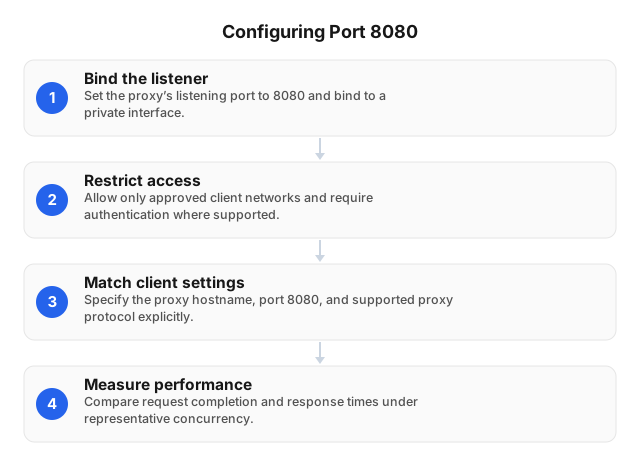
With those security boundaries established, align the listener, client settings, and firewall rules. Configure the complete connection path, not just the port number. Opening a firewall port alone does not create a proxy service.
- Bind the listener deliberately. Set the proxy’s listening port to
8080on the interface appropriate to its role: a private interface for internal clients or loopback for a local upstream application. - Apply the access policy. Configure firewall permissions and authentication to enforce the approved client access defined above.
- Match client settings. Specify the proxy hostname, port
8080, and supported proxy protocol explicitly. - Measure before scaling. Compare request completion, connection failures, and response times under representative concurrency. Adjust connection reuse and connection limits separately to identify which change improves throughput.
Validate changes against the same destinations and workload before deploying them.
Common Issues and Troubleshooting Tips for Port 8080
If testing reveals problems, separate connection failures from proxy-policy failures: a refused connection suggests a missing listener or active rejection, while a timeout suggests dropped traffic or an unreachable endpoint. Verify the listener and network path before changing ports. Moving to another port without identifying the failing layer can leave authentication, routing, or access-policy problems unresolved.
For connection failures, check the proxy’s listening address and process ownership with ss -ltnp. Look for an inactive service, a port conflict, or incorrect client settings. A loopback-only listener cannot accept remote clients; confirm the intended interface before adjusting firewall rules.
For authentication errors, verify credentials or the client’s permitted source IP. For HTTPS failures, inspect CONNECT policy and logs; do not disable certificate verification. For slow requests, compare proxy connection time with destination response time to identify where the delay occurs.
Best Practices for Managing Proxy Ports
Once the connection path works, keep it manageable over time. Document each listener’s owner and traffic policy, and keep listener settings, firewall rules, and client configurations in the same change record so a rollback restores the complete path.
Test from both an authorized client and an unauthorized network to confirm that access controls behave as intended. Before changing ports, verify legacy clients, health checks, and outbound firewall policies. For performance comparisons, hold destinations, connection reuse, authentication, and workloads constant.
Log authentication failures and connection errors without recording credentials. Alert on unexpected traffic growth, patch the proxy software, and remove unused listeners after confirming their dependencies.
Related reading
- Understanding Proxy Servers for Beginners: 2026
- Proxy Scripts for QA Automation: Practical 2026 Guide
FAQ
What is the purpose of port 8080?
Port 8080 commonly serves as an alternative HTTP listening port for proxy servers and web applications.
How does port 8080 differ from port 80?
Port 80 is the default port for HTTP, while port 8080 is an alternative that clients generally must specify explicitly. An HTTP URL without a port uses 80; reaching an HTTP service on 8080 requires an address such as http://proxy.example:8080. Performance depends on the proxy software, inspection rules, network path, and server load.
Is port 8080 secure for proxy use?
Port 8080 can support a secure proxy configuration, but the port itself provides no encryption or access control.
How do I configure port 8080 on my server?
Configure your proxy service to listen on the intended interface at port 8080, then permit only authorized clients through the firewall.
What are common problems with port 8080?
Common port 8080 problems include an inactive listener, a port conflict, firewall filtering, incorrect client settings, and authentication failures.
This article was written by the EProxies team and reviewed against our editorial quality standards before publishing.