
How to Monitor Social Media Statistics With Proxies (2026)
TL;DR: Use official APIs or authorized exports for account analytics, and region-selected residential proxies for permitted public visibility checks. Configure the proxy in the collector, verify its exit location, and validate page content before accepting metrics. Keep sessions stable for authenticated workflows, respect source limits, and report failed observations as missing—not zero engagement.
If a post had 125 likes yesterday and today’s request returns a login screen, today’s count is unknown. A reliable monitoring pipeline records both the social metric and the collection outcome; otherwise, an access failure becomes a false campaign decline.
Match the Data Source to the Measurement
Start by identifying which source exposes your metric, then decide whether regional routing or session continuity adds value.
| Objective | Preferred source | Proxy contribution |
|---|---|---|
| Reach, impressions, audience demographics | Official API or authorized account export | Routing only; no extra permissions or quota |
| Public likes, comments, or views | Approved API or permitted public collection | Regional observation point |
| Campaign visibility across countries | Permitted checks of the same campaign URL | Country-selected exits |
| Authorized browser workflow | Approved authenticated access | Stable routing across cookies and pagination |
For example, check a campaign URL from US and German exits within a five-minute collection window. Hold language, login state, cookies, and browser settings constant. If the German response lacks the post, label it “unavailable in this collection context”, not “deleted.”
Choose Rotation or Continuity Deliberately
Once the source and measurement context are clear, choose routing that preserves them. Independent public-page observations can use different exits between jobs. Pagination and authenticated workflows usually need continuity: changing the exit midway can invalidate the measurement context or interrupt a session. A client cookie jar alone does not guarantee a stable proxy IP.
| Workflow | Starting configuration | Verify before deployment |
|---|---|---|
| Independent public checks | Region-selected residential | Country accuracy and valid-record rate |
| Paginated collection | Sticky residential | Session lifetime exceeds job duration |
| Authorized account workflow | Sticky residential or static ISP | Stable exit and separate account cookies |
| Mobile-network research | Mobile connection | Research actually requires that network context |
Evaluate EProxies against the workload
EProxies offers 72M+ residential IPs across 195+ countries, with HTTP(S) and SOCKS5 support. Its stated 98.2% uptime, backed by a 99.9% uptime SLA, describes service availability—not successful social-media observations. Check the applicable measurement period, SLA exclusions, and remedies; an available proxy can still receive a platform refusal.
Published pricing includes pay-as-you-go residential from $0.25/GB, tiered pricing around $0.73/GB at 300GB, ISP SOCKS5 from $0.95/IP, and unlimited plans from $79/month. Treat these as plan-specific figures rather than one continuous discount ladder, and confirm current eligibility and billing terms before estimating collection costs.
Compare usable records, not advertised bandwidth alone
To evaluate those configurations, run a pilot with 20 permitted URLs in each of two markets: 40 planned observations per configuration. Keep URLs, timing, and validation rules identical. Record valid observations, transferred bytes including retries, latency, challenges, missing fields, and failures by market.
Calculate collection cost ÷ valid observations. An illustrative $3.20 run yielding 32 valid observations and a $4.00 run yielding 40 both cost $0.10 per valid observation. The second provides complete coverage; the first may introduce regional bias if its eight failures cluster in one country.
Set Up the Monitoring Collector
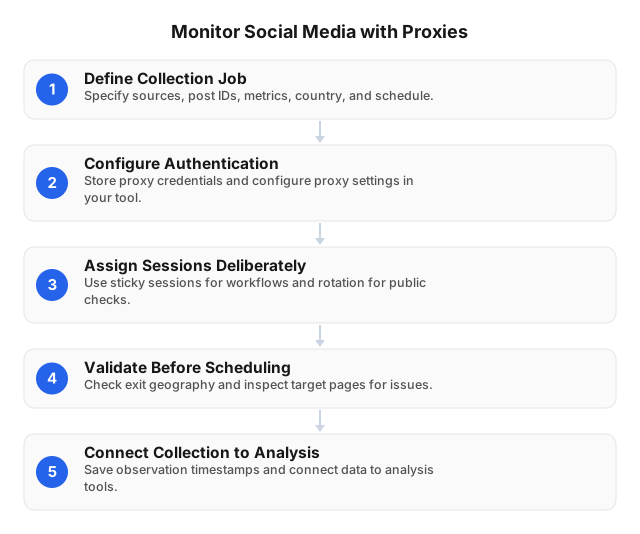
1. Define the observation contract
Turn the pilot’s measurement and validation rules into an explicit observation contract. Specify the platform, stable post ID, exact metric, country, language, login state, scheduled slot, and success criteria before collecting data. A visible view count and account-level impressions are different measurements; store their definitions rather than merging them into a generic “engagement” field.
For a small pilot, define success as: the expected post ID appears, the required metric parses, and no login or challenge template replaces the content. Set collection frequency from the source’s documented limits and your authorization—not from the number of available proxy IPs.
2. Configure routing where requests originate
Put proxy settings in the collector, not merely in its reporting dashboard. Python Requests handles HTTP collection; Scrapy adds crawl scheduling; Playwright supports browser-rendered workflows. Hosted analytics tools may use their own API integrations and offer no custom proxy routing.
import os
import requests

proxy = os.environ["PROXY_URL"]
target = os.environ["AUTHORIZED_TARGET_URL"]

with requests.Session() as session:
    session.trust_env = False
    response = session.get(
        target,
        proxies={"http": proxy, "https": proxy},
        timeout=(10, 30),
    )
    response.raise_for_status()
    # Validate the identifier, page template, and metric fields here.
This example uses 10-second connection and 30-second read timeouts, not a total job deadline. Keep TLS verification enabled, install suitable SOCKS support when needed, and use EProxies’ documented endpoint format. Store credentials in environment variables or a secret manager; redact passwords from logs.
Because trust_env=False disables inherited environment configuration, explicitly configure an approved CA bundle if your organization requires one. For Playwright, supply proxy server and authentication settings; for Scrapy, configure meta["proxy"] and verify authentication separately.
3. Verify the exit and session lifetime
Request an approved IP-check endpoint through the proxy before testing a social-media URL. Confirm the observed exit address and country, then fetch one permitted target. Repeat the routing check after a short pagination sequence to test continuity rather than assuming the sticky session setting works.
If a collection job takes eight minutes, choose a supported session lifetime longer than eight minutes, with room for permitted retries. Keep cookies isolated between authorized accounts. Do not rotate exits to continue after a platform denies access or instructs the collector to stop.
4. Validate content and start a limited schedule
With routing verified, check the response itself. An HTTP 200 can contain a login screen, consent page, challenge, or incomplete response. Apply the observation contract by checking the returned identifier, expected template, field presence, and numeric parsing. Record hidden fields separately from collection failures.
Start with one concurrent worker at the frequency defined in the contract, then adjust only within the source’s limits. After a page-layout change, compare parsed values with five permitted manual checks before restoring the full schedule. The social-media proxy best practices guide covers operational safeguards.
Store Measurements and Collection Health Together
Carry the observation contract into storage. Separate the intended observation slot from the actual collection timestamp: a retry at 11:00 should not silently become a 09:00 measurement. Preserve enough context to distinguish a campaign change from a routing, access, or parsing failure.
| Field | Example |
|---|---|
platform, post_id | platform_a, post_123 |
observation_slot | 2026-10-02T09:00:00Z |
observed_at | 2026-10-02T09:00:18Z |
country, language, login_state | DE, de-DE, logged_out |
collection_status | valid, throttled, parse_error |
likes, metric_status | 125, observed or null, hidden |
Write 0 only when the source explicitly reports zero. Deduplicate by platform, post ID, collection context, and scheduled slot; deduplicating by post ID alone removes legitimate later snapshots and regional observations. Retain sanitized diagnostics without session tokens or unnecessary personal data.
Report completeness alongside engagement
Use those collection statuses to calculate collection completeness = valid observations ÷ planned observations × 100. If 92 of 100 observations pass validation, publish 92% completeness and break it down by market. Eight failures concentrated in Germany create a different sampling problem from eight failures distributed across all markets.
Label engagement denominators explicitly: (likes + comments) ÷ followers × 100 is not interchangeable with a rate based on views. Compare equivalent contexts and observation windows. A change in login state or metric definition should create a reporting annotation, not an unexplained trend.
Troubleshoot Routing, Access, and Parsing Separately
When completeness drops, use the recorded diagnostics to test one variable at a time. An IP-check endpoint isolates routing; a permitted target tests platform access; content validation tests extraction. Changing credentials, country, session mode, and parser together makes the cause of recovery impossible to identify.
| Signal | Check | Response |
|---|---|---|
407 | Credentials, endpoint, port, IP allowlist | Correct authentication; retest routing |
| Timeout | Approved neutral endpoint through the proxy | Check networking and endpoint availability |
| TLS error | Certificate chain, hostname, clock, CA bundle | Repair trust; keep verification enabled |
429 | Retry-After, quota, concurrency | Honor delay and reduce request frequency |
403, login wall, challenge | Authorization and approved access method | Stop automatic retries; review access |
200, missing metrics | Identifier, template, selector | Diagnose parser or schema drift |
| Pagination resets | Cookies, exit continuity, session expiry | Verify sticky session configuration and lifetime |
For transient connection failures, a starting policy is two retries after 2 and 4 seconds plus jitter, subject to source rules. Do not apply it to denied access or challenges; handle rate limits separately. Count retry bandwidth and retain a failure record if collection remains unsuccessful.
Partition jobs by platform, market, and observation slot so eligible failures can be retried without rerunning successful observations. Preserve actual retry timestamps in observed_at. See large-dataset collection practices and Scaling Social Media Campaigns with Proxies Safely for workload planning.
FAQ
How to set up proxies for social media monitoring?
Choose an authorized data source, then select region-selected residential proxies for public checks or sticky residential or static ISP routing for session-dependent workflows. Add the proxy endpoint and credentials to the collector, verify the exit through an approved IP-check endpoint, and test one permitted target. Validate identifiers and metric fields before scheduling requests, respect source limits, and store failed observations as null with an explicit status.
What are the best proxies for social media analytics?
Region-selected residential proxies suit permitted regional visibility checks; sticky residential or static ISP routing suits authorized workflows requiring continuity. Compare valid-record rate, geographic coverage, session stability, and cost per valid observation rather than assuming the largest pool produces the best dataset.
What tools help in monitoring social media with proxies?
Use Requests for HTTP collection, Scrapy for crawl scheduling, or Playwright for authorized browser-rendered workflows. Validate records with SQL or pandas before reporting, and confirm custom proxy support before purchasing a hosted analytics tool that may rely exclusively on its own integrations.
How to troubleshoot proxy issues in social media monitoring?
Isolate routing, access, and parsing in that order: verify connectivity and exit location through an approved IP-check endpoint, then test one permitted target. Correct authentication for 407, honor delays for 429, and stop automatic retries for access refusals. If a 200 response lacks metrics, inspect the page template and parser before changing exits.
Can residential proxies reveal private social media statistics?
No. Private profiles, account reach, and audience demographics require appropriate authorization and approved platform access. A proxy changes the request’s route but cannot grant API scopes or reveal metrics unavailable to your account.
Should I use rotating or sticky sessions?
Rotate between independent permitted observations that do not share cookies or pagination state. Use sticky or static routing for authorized sequences requiring continuity, and verify that the session lasts longer than the job. Rotation must not be used to disregard access restrictions.
Does proxy location tell me where engagement comes from?
No. It identifies the collector’s network location, not the location of viewers or commenters. Report these observations as regional visibility checks and obtain audience geography from authorized account analytics.
How do I prevent proxy failures from creating false trends?
Store failed measurements as null, publish completeness by market, and compare matching language, login state, and timing contexts. Flag delayed retries and metric-definition changes so missing coverage does not appear as reduced engagement.
This article was written by the EProxies team and reviewed against our editorial quality standards before publishing.