
Best Practices for Using Proxies in Social Media 2026
TL;DR: Use sticky residential proxies for logged-in social media account work, rotating residential proxies for public regional checks, and ISP SOCKS5 when a tool needs stable long-running connections. Monitor proxy performance by workflow—success rate, p95 latency, timeout codes, platform prompts, session stability, and location accuracy—not as one blended provider average.
EProxies supports 72M+ residential IPs across 195+ countries, HTTP(S) and SOCKS5, rotating and sticky sessions, 98.2% observed uptime backed by a 99.9% uptime SLA, pay-as-you-go residential traffic from $0.25/GB, residential tiers around $0.73/GB at 300GB, ISP SOCKS5 from $0.95/IP, and unlimited plans from $79/month.
Understanding Proxies in Social Media Marketing
Proxies give each account, campaign market, or QA workflow a controlled network identity. A UK ad preview, German creator campaign check, Canadian retail promotion, and US inbox workflow should not all route through the same office IP or cloud server.
Use proxies for three specific jobs:
- Multi-account separation: assign separate sticky sessions to brand, franchise, client, or regional accounts.
- Geo-localized QA: verify ads, creator pages, landing pages, social search results, language, currency, and regional offers from the market being tested.
- Automation hygiene: route approved scheduling, reporting, monitoring, and QA tools through consistent proxy profiles instead of changing IPs mid-session.
Proxies do not create permission to bypass platform rules. They work best for compliant localization, QA, reporting, market research, and controlled automation with rate limits, human review, and permissioned accounts.
Choosing the Right Proxy for Social Media Tasks
With those boundaries in place, choose the proxy type by workflow. Logged-in account work needs continuity. Public research can tolerate rotation. Internal rendering tests may not need residential IPs.
| Proxy type | Best fit | Trade-off | Check before buying |
|---|---|---|---|
| Residential rotating | Public profile checks, hashtag monitoring, regional content research | Strong location realism; session changes can break logged-in flows | Country/city targeting, rotation controls, HTTP(S)/SOCKS5 |
| Residential sticky | Publishing, inbox work, ad previews, account dashboards | Better continuity; may use more traffic than lightweight checks | 24h+ sessions, replacement rules, authentication |
| ISP SOCKS5 | Automation tools that need stable IPs and SOCKS5 routing | Stable sessions; per-IP planning matters | Per-IP cost, concurrency limits, tool compatibility |
| Datacenter | Internal QA, rendering tests, non-sensitive dashboards | Fast, but less similar to consumer traffic | Avoid for account-sensitive workflows |
For residential and ISP workflows, EProxies supports city and ASN targeting, username-password authentication, and IP whitelisting. Published provider-side benchmarks, including high success-rate targets and sub-second response times, should still be validated against your exact social platforms, countries, tools, and session duration before scaling.
Setting Up Proxies for Social Media Platforms
After selecting the proxy type, map one account, region, and task type to one proxy profile before connecting schedulers, analytics exporters, or browser automation. Clean mapping prevents accidental region jumps, shared-session collisions, and unreadable audit logs.
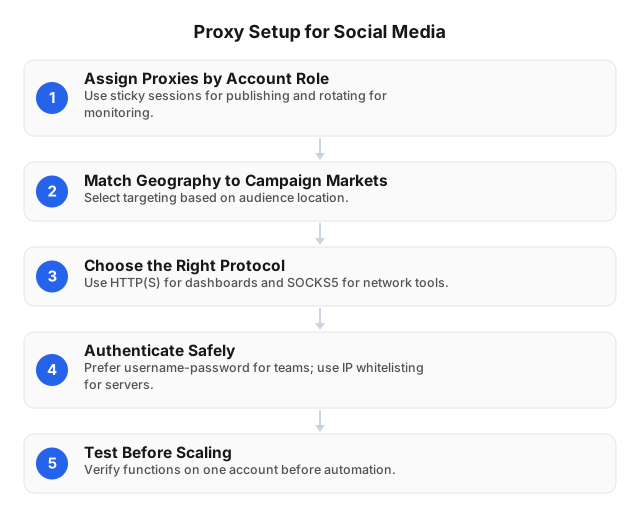
- Assign proxies by account role. Use sticky residential sessions for publishing, inbox management, ad QA, profile edits, and analytics exports. Use rotating residential sessions for public-page checks where no login is required.
- Match location to campaign geography. A Toronto retail campaign should be checked from Canada, and preferably from Toronto if ad delivery, creator discovery, or search visibility changes by metro area.
- Choose the protocol by tool. Use HTTP(S) for browser dashboards and most web-based tools. Use SOCKS5 when the application needs lower-level routing or handles HTTP proxies poorly.
- Control authentication. Use username-password credentials for distributed teams and IP whitelisting for fixed servers, CI runners, or internal QA nodes.
- Run a four-step smoke test. Before scaling, verify login, feed loading, media upload, and analytics export on one account. Record response time, failed requests, platform prompts, country, city, ASN, and session ID.
Teams collecting broader web data should separate platform-approved API access from browser-based QA. Creating Effective Web Scraping Strategies Using APIs covers that split in more detail.
Advanced Strategies for Proxy Use
Once the basic mapping works, refine rotation rules instead of rotating every request by default. Rotation helps public data collection; it can damage logged-in session continuity. Use stable sessions for account actions and controlled rotation for lower-risk research.
- Account management: keep logins, scheduled posts, inbox checks, billing pages, and profile edits on sticky residential or ISP SOCKS5 sessions from the same country or city.
- Geo-localized QA: test paid ads, creator posts, landing pages, coupon flows, app deep links, language, currency, and shipping rules from the target market.
- Public analytics checks: rotate residential IPs for public metric collection, hashtag visibility checks, and non-login market monitoring while respecting platform terms and rate limits.
- Automation queues: separate proxies by client, brand, region, or campaign. If a France pool starts timing out, only France jobs should pause.
- Evidence capture: save screenshots with proxy country, city, timestamp, account, campaign ID, tool version, and HTTP status where available.
Independent benchmarks can show materially different residential proxy success rates on stable test endpoints versus real-world targets. Treat those figures as market context, not a guarantee for social platforms. Your baseline should come from the country, workflow, account age, request volume, and automation stack you actually operate.
For scripted QA, proxy behavior belongs in the test design. Proxy Scripts for QA Automation: Practical 2026 Guide covers retry logic, session reuse, and error handling patterns.
Integrating Proxies with Automation Tools
Turn the proxy profile into an automation setting, not an afterthought. Each account-level profile should define protocol, location, authentication method, session type, allowed workflow, and retry policy.
A reliable setup looks like this:
- One social account = one primary proxy profile. Store the profile inside the scheduler, browser profile manager, scraping job, or automation tool.
- Sticky sessions for logged-in workflows. Keep scheduled posting, inbox workflows, ad previews, exports, and profile updates on stable 24h+ sessions.
- Rotating sessions for public checks. Use rotation for non-login research, public page availability checks, regional content discovery, and SERP-like social search checks.
- Separate production from testing. Never test new scripts against active client accounts. Use test accounts, staging campaigns, or read-only workflows first.
- Log proxy health with campaign events. Store success rate, latency, timeout type, location, account action, and session ID in the same log line.
For e-commerce brands validating social-to-store journeys, include product pages, checkout availability, currency, shipping rules, and regional promotions in the proxy test plan. The same location-control principles apply in Integrating Rotating Proxies in E-commerce: 2026 Guide.
Monitoring Proxy Performance
Measure proxy performance by workflow, not by provider average. A failed publishing action has a higher business cost than a delayed public metrics check, so those events need separate thresholds and alerts.
Track these metrics:
- Success rate: completed requests, successful logins, successful exports, completed post checks, and completed screenshots.
- Latency: median and p95 response time by country, tool, session type, and platform endpoint.
- Timeout rate: connection timeouts, read timeouts, DNS failures, TLS failures, and tool-level failures.
- Platform errors: checkpoint prompts, rate-limit responses, media upload failures, incomplete dashboards, and unexpected logout events.
- Location accuracy: country, city, ASN, language, currency, localized content, and regional ad eligibility.
- Session stability: whether sticky sessions remain consistent through a full publishing, reporting, or inbox workflow.
- Replacement rate: how often a proxy profile must be replaced to restore normal operation.
Use a simple log schema before building dashboards:
timestamp | account_id | campaign_id | country | city | proxy_type | session_id | tool | action | status | latency_ms | error_code | location_match
Set thresholds from your own baseline. If a UK ad QA workflow normally succeeds at 98% and drops to 90% for two hours, pause that queue, test location accuracy, check for account prompts, review timeout types, and confirm provider status before retrying. If p95 latency doubles but success rate remains stable, reduce concurrency or move heavy exports to a lower-traffic window before replacing the proxy pool.
Use published uptime and SLA specifications during vendor audits, then validate them against your exact mix of social platforms, countries, session duration, protocol, and automation tools.
Common Mistakes to Avoid
Avoid aggressive IP rotation during logged-in work. Publishing, inbox management, ad review, analytics exports, profile edits, and billing pages need stable location and session signals. Sudden country, city, ASN, or IP changes can create account friction.
Do not mix regions inside one campaign workflow. If a campaign targets France, run ad previews, social search checks, landing-page QA, and reporting from French proxy profiles rather than switching between unrelated markets for convenience.
Do not retry failures blindly. Timeouts, login challenges, media upload errors, and rate-limit responses should pause the queue, capture logs, and trigger review. Repeating the same action from fresh IPs can turn a temporary failure into a larger account issue.
Do not treat proxies as permission. Avoid fake engagement, deceptive account behavior, review manipulation, account abuse, or access-control evasion. For policy-safe operating principles, read Ethical Use of Proxies for Web Scraping.
Related reading
- Creating Effective Web Scraping Strategies Using APIs
- Proxy Scripts for QA Automation: Practical 2026 Guide
- Ethical Use of Proxies for Web Scraping
FAQ
What are proxies used for in social media marketing?
Proxies help teams separate account access, campaign QA, and regional checks by location and network profile. A common workflow is testing how an ad, creator page, landing page, or organic post appears in the US, UK, Germany, France, or Canada before launch.
Which proxy type is best for social media accounts?
Use sticky residential proxies or ISP SOCKS5 for logged-in account workflows because they keep a more consistent session. Use rotating residential proxies for public research, content availability checks, and regional monitoring where account login is not required.
Can proxies make social media automation more reliable?
Yes, when each account has a stable proxy profile and automation respects platform limits. Reliability usually comes from consistent sessions, clear retry rules, location matching, and error monitoring—not from sending more requests.
How do I monitor proxy performance effectively?
Monitor proxy performance with per-workflow dashboards for success rate, median and p95 latency, timeout rate, platform errors, location accuracy, and sticky-session stability. Segment every metric by account, country, proxy type, tool, and campaign so a failing market or automation job is visible within minutes. Set alert thresholds from your baseline, such as pausing a queue when success rate drops 5–10 percentage points or p95 latency doubles for more than 15 minutes.
What should I monitor in a proxy setup?
Monitor completed actions, response time, timeout type, platform-specific errors, country/city match, ASN, session ID, and proxy replacement events. Store these fields beside campaign and account events so proxy issues can be separated from platform changes, tool bugs, or account prompts.
How much should I budget for social media proxies?
Budget by traffic volume, countries, session type, and number of accounts. Use pay-as-you-go residential traffic, residential tiers, ISP SOCKS5 pricing, and unlimited plans as separate budget lines rather than blending all workflows into one average cost.
Are residential proxies better than datacenter proxies for social media marketing?
Residential proxies are usually better for geo-localized QA, account session continuity, and market research because they resemble normal consumer network paths. Datacenter proxies can be useful for internal speed tests and non-sensitive checks, but they are a weaker fit for account-sensitive workflows.
This article was written by the EProxies team and reviewed against our editorial quality standards before publishing.