
Crafting Efficient Web Scraping Scripts in 2026
TL;DR: Crafting efficient web scraping scripts means minimizing requests per usable record: parse HTML before rendering JavaScript, validate extracted fields, bound retries, and use residential proxies only when permitted geographic collection or request distribution requires them.
For data analysts automating market research, a successful request is not enough: each record needs a valid price, currency, source URL, and collection timestamp. Follow the guide to build a repeatable collection workflow, choose rotating versus sticky sessions without breaking pagination, and diagnose failures before retries consume your bandwidth budget. Respect site terms, robots.txt directives, and applicable laws; proxies do not grant permission to collect restricted data.
Introduction to Web Scraping
Web scraping turns website content into structured records for analysis; efficient scripts combine targeted extraction with tools suited to how each page delivers data. For market research, that means collecting comparable product prices, availability, and observation timestamps—not downloading pages without checking whether their contents answer the research question. Optimize for usable records, not completed requests.
Start with the dataset’s contract: define the fields, their formats, and what makes a record valid. A price without its currency or product variant can distort a comparison even when extraction succeeds. Preserve the source URL and collection time so analysts can investigate unexpected changes.
Match the collection method to the source. Requests and BeautifulSoup suit data already present in HTML; CSS selectors isolate the fields you need. Check that HTML before introducing browser automation for JavaScript-dependent content.
Keep fetching, parsing, and validation separate. That structure lets you adjust a changed selector without rewriting collection logic, and test extraction against saved HTML before making more requests to the source.
Setting Up Your Environment
A web scraping environment needs isolated dependencies, reproducible installs, and proxy credentials stored outside the script. For market research, keep collection settings separate from extraction logic so regional price checks use consistent configurations. Make each collection run reproducible before scheduling it.
- Create an isolated Python environment. Start with Requests for fetching HTML and BeautifulSoup for parsing it:
python -m venv .venv
source .venv/bin/activate
python -m pip install requests beautifulsoup4
python -m pip freeze > requirements.txt
On Windows, activate with.venv\Scripts\activate. Commit the dependency file, not the environment directory. - Configure residential proxy access separately. Store the provider-issued URL in a secret manager or environment variable, never source control. Residential proxies can reduce IP-related blocks and improve access reliability through request distribution; they do not override site permissions or rate limits.
- Prepare research outputs and safeguards. Separate raw responses, normalized records, and logs. Record source URL, collection timestamp, and requested market. Review robots.txt, site terms, and applicable laws before enabling scheduled collection.
Choosing the Right Tools and Libraries
Requests and BeautifulSoup are the starting stack for market-research pages that expose product names, prices, and availability in HTML; choose Playwright or Puppeteer when collection requires JavaScript rendering or browser interaction. Use the least expensive execution path that returns complete records, rather than rendering every page by default.
| Tool | Choose it for | Efficiency trade-off |
|---|---|---|
| Requests + BeautifulSoup | Fetching static HTML and extracting fields with CSS selectors | Avoids browser rendering; cannot execute page JavaScript |
| Playwright | Collecting rendered content or interacting with filters | Browser execution adds resource use; wait for the required field, not unrelated assets |
| Puppeteer | Browser-driven collection in a Node.js workflow | Fits JavaScript pipelines but still requires browser lifecycle management |
Handling pagination is crucial for multi-page research: require each site adapter to return both extracted records and the next-page URL or cursor. Test the final page explicitly to prevent loops and incomplete datasets.
Keep proxy configuration separate from extraction logic. Match HTTP(S) or SOCKS5 support to the client, and retain session continuity when pagination depends on cookies.
Implementing Efficient Web Scraping Scripts
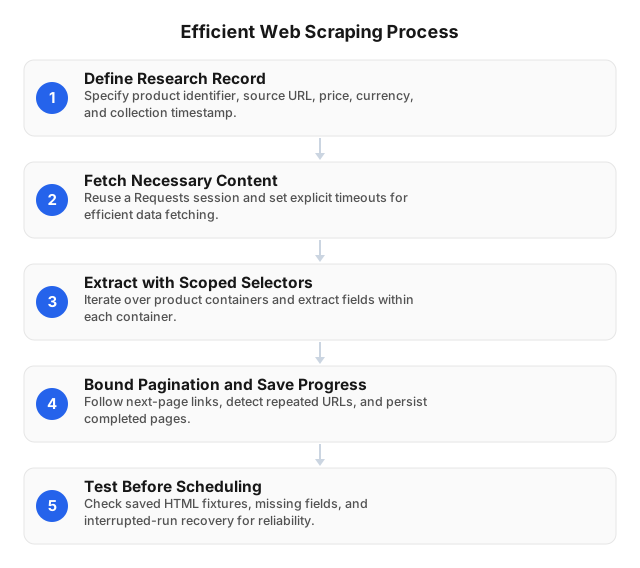
Efficient web scraping scripts separate fetching, parsing, and storage so a failed request does not discard completed market research data. Optimize for valid, saved records—not requests completed. Start with Requests and BeautifulSoup for HTML pages, then add browser rendering only where the required fields depend on JavaScript.
- Define the research record. Specify product identifier, source URL, price, currency, availability, collection timestamp, and market. Keep missing prices distinct from zero prices.
- Fetch only necessary content. Reuse a Requests session and set explicit timeouts. Keep proxy configuration outside parsing functions; preserve the intended market and session context across related requests.
- Extract with scoped selectors. Iterate over product containers with
soup.select(".product"), then extract fields within each container. Store site-specific selectors separately from shared collection logic. - Bound pagination and save progress. Follow permitted next-page links, detect repeated URLs, and persist each completed page before advancing. Respect robots.txt and applicable site terms.
- Test before scheduling. Testing and debugging are essential for reliability: check saved HTML fixtures, missing fields, duplicate records, and interrupted-run recovery.
Optimizing with Residential Proxies
Residential proxies should be evaluated against usable market-research records, not connection success alone: independent industry testing (2025) reported median success rates of 99.56% on stable infrastructure versus 94.30% on real-world targets. Optimize cost per validated record, not cost per request. Measure missing prices, duplicate listings, geographic mismatches, and transferred bytes alongside request latency before expanding a collection job.
Use rotating sessions for independent public-page requests; keep sticky sessions for pagination that depends on consistent cookies and location. Maintain per-domain request budgets across all proxy workers: changing IPs should not reset your scraper’s rate limits. Respect robots.txt, site terms, and applicable laws.
For regional price comparisons, EProxies supports city-level targeting and rotating or sticky/static sessions lasting 24h+. Store the requested location with each observation so analysts can separate regional differences from collection errors.
Language and library choices also affect efficiency: use Python Requests and BeautifulSoup when prices exist in HTML; reserve browser rendering for JavaScript-dependent fields. Fetching unnecessary browser assets consumes bandwidth without adding research data.
Handling Common Challenges
Real-world target sites produced a median success rate of 94.30% in industry benchmarks (2025), so scraping workflows need explicit failure handling. For market research, a successful response is not necessarily a usable observation: validate product identity, currency, location, and collection time before accepting a price.
- Classify failures before retrying. Separate transport errors, throttling, access denials, and parsing failures. Apply bounded backoff to transient failures; honor server retry instructions. Stop denied requests for review rather than cycling residential IPs to override access decisions.
- Preserve market context. Keep location and session settings consistent across pagination. Changing geography mid-run can mix regional prices into one market dataset.
- Escalate rendering selectively. Inspect returned HTML first. Use Playwright only when permitted content requires JavaScript; wait for the product selector rather than adding arbitrary sleeps.
- Prevent silent data loss. Track visited pagination URLs, reject repeated pages, and checkpoint completed records. Store missing prices as null—not zero—and quarantine unexpected layouts so incomplete observations never enter price comparisons.
Testing and Debugging Your Scripts
Testing scraping scripts requires separate checks for extraction accuracy, request failures, and dataset completeness. Treat validated records—not successful HTTP responses—as the acceptance criterion. For market research, a fetched page is useful only when its product identifiers, prices, currencies, and collection timestamps survive validation without mixing regional offers.
- Test parsing offline. Save permitted HTML fixtures for normal listings, missing prices, empty results, and pagination endings. Run BeautifulSoup selectors against those fixtures before spending proxy bandwidth. Assert expected field values, not merely nonempty output.
- Isolate proxy variables. Compare permitted requests using the same URL, headers, and session settings; change only the proxy configuration. Log connection errors, elapsed time, target country, and session identifiers. Redact credentials and cookies.
- Exercise failure paths. Simulate timeouts, malformed HTML, and rate-limit responses. Verify bounded retries, backoff, checkpoint recovery, and a stop condition for repeated access denials.
- Audit stored results. Check duplicate product-country keys, missing pagination segments, currency changes, and unexpected nulls. Quarantine suspect batches rather than publishing them into market dashboards.
Related reading
- 12 Steps to Optimize Web Scraping Scripts in 2026
- How to Ensure Web Scraping Compliance Globally in 2026
FAQ
What is the best language for web scraping?
Python is the best default for a data analyst, because Requests and BeautifulSoup handle HTML collection and parsing without requiring a browser. Python also lets you keep extraction, data cleaning, and analysis in the same workflow. Choose JavaScript with Playwright or Puppeteer when browser interactions drive collection; JavaScript-rendered content does not automatically require switching languages, since Playwright also supports Python.
How do I handle pagination in web scraping?
Follow permitted next-page links or pagination cursors, track visited pages, and stop at the final page or when pages repeat. Save each completed page before advancing, and test pagination endings explicitly to prevent loops and incomplete datasets. Keep cookies, location, and session settings consistent when pagination depends on them; use sticky sessions rather than rotating sessions for these requests.
Why use residential proxies for web scraping?
Residential proxies support geographically localized collection and request distribution when permitted market research requires residential IP addresses. EProxies offers city- and ASN-level targeting for localized comparisons, plus rotating and sticky/static sessions lasting 24h+ when browsing continuity matters. Keep location and session settings consistent within each comparison so regional differences do not distort price analysis. Proxies do not replace permission, robots.txt checks, site terms, or request-rate limits.
What are common errors in web scraping scripts?
Common scraper failures include timeouts, access denials, broken selectors, missing JavaScript-rendered content, and duplicate records. Separate retrieval errors from parsing errors: a successful page fetch can still produce an empty dataset or capture a consent page instead of product listings. Log the URL, response status, extraction outcome, and retry reason; retry temporary failures with bounded backoff rather than repeatedly requesting denied resources. Validate currency, availability, and product identifiers before loading records into analysis tables.
How can I test my web scraping script?
Test extraction against saved HTML fixtures, simulate request failures, and audit stored records for completeness and duplicates. Include normal listings, missing prices, empty results, and pagination endings, asserting expected field values rather than merely nonempty output. Simulate timeouts, malformed HTML, and rate-limit responses to verify bounded retries, backoff, and checkpoint recovery. Treat validated records—not successful HTTP responses—as the acceptance criterion, and quarantine suspect batches before publishing them.
This article was written by the EProxies team and reviewed against our editorial quality standards before publishing.