
Residential Proxies for Remote Learning: Setup in 2026
TL;DR: Route proxies at the component that sends the request: the LMS server, a managed browser, or an institutional gateway. Use residential IPs for authorized regional testing, not as a replacement for student authentication or network security. Start with synthetic accounts, keep the exit stable during sign-in, compare three workflows against a direct connection, and rehearse rollback before production use.
A Moodle server’s outbound proxy setting does not reroute a learner’s browser. That distinction determines whether your configuration affects a server-side resource fetch, a course-page download, or neither.
Map the Request Before Choosing a Proxy
A single course visit can involve four independent destinations: the LMS, the identity provider, a video host, and an assignment-upload service. Configuring only the LMS hostname can leave authentication, media, and submissions on different routes.
| Request origin | Configuration point | What to verify |
|---|---|---|
| LMS server fetching an external resource | Supported LMS outbound proxy setting | Whether the plugin uses the configured HTTP client |
| QA browser opening course pages | Managed browser or device | Browser routing, authentication redirects, download hosts |
| Remote device using institutional access controls | Institution-managed gateway | Device enrollment, routing, destination policy |
| Live classroom application | Application-specific network configuration | Media protocols, UDP support, documented requirements |
Moodle documents proxy settings for supported server-originated requests. For browser access to Canvas or Google Classroom, evaluate an approved device or gateway configuration rather than assuming native platform-wide proxy support.
Example: A course page loads, but an embedded video fails. Inspect the video hostname and application route first; changing the Moodle server’s outbound proxy will not necessarily affect that browser-to-video connection.
Separate Regional Testing from Security Controls
Residential proxies send requests through IP addresses assigned to residential internet connections. They are useful for checking whether an authorized resource displays the correct language, regional catalog, redirect, or download link from a selected country.
They do not grant course permissions, publisher licenses, or library access rights. Keep institutional authentication in place, and obtain approval before testing region-dependent resources.
An institution-managed gateway can enforce authentication, destination restrictions, and access logging. Those controls come from gateway configuration—not from the residential exit address. Retain HTTPS, SSO, MFA, and role-based permissions; see How to Protect Your Networks With Proxies in 2026 for gateway considerations.
IP masking is not anonymity or encryption. A destination can still identify a signed-in student through the account and cookies. SOCKS5 does not itself encrypt application traffic; verify both HTTPS protection and any required client-to-proxy transport protection.
Select Protocol, Session Behavior, and Budget
Match the proxy to the actual client, not merely to the platform name.
| Requirement | Starting choice | Trade-off |
|---|---|---|
| HTTPS resource checks | Client-supported HTTP(S) proxy | Adds connection setup and another failure point |
| SOCKS-capable application | SOCKS5 | Requires explicit client support |
| Authenticated regional QA | Sticky or static exit, where available | Persistence depends on session limits and exit availability |
| Country-specific content checks | Country-targeted residential exit | Geolocation databases can disagree |
| Live classroom media | Direct connection during the initial pilot | Needs separate protocol and quality testing |
EProxies offers 72M+ residential IPs across 195+ countries, supporting HTTP(S) and SOCKS5. Confirm session duration, targeting options, and exit-replacement behavior before relying on a persistent authenticated session.
EProxies lists 98.2% uptime, backed by a 99.9% uptime SLA. These are distinct figures: review the SLA’s service coverage, measurement window, exclusions, and remedies rather than treating the commitment as a measured result.
Advertised options include residential pay-as-you-go from $0.25/GB, tiered pricing around $0.73/GB at 300GB, ISP SOCKS5 from $0.95/IP, and unlimited plans from $79/month. Verify the applicable product and conditions; the two per-GB figures should not be interpreted as successive tiers of one interchangeable offer.
Estimate consumption from the pilot. Thirty downloads of a 20MB file equal approximately 600MB of payload, before retries and page assets. A one-hour stream averaging 2Mbps transfers approximately 900MB, which is why video should remain outside the initial residential-proxy test.
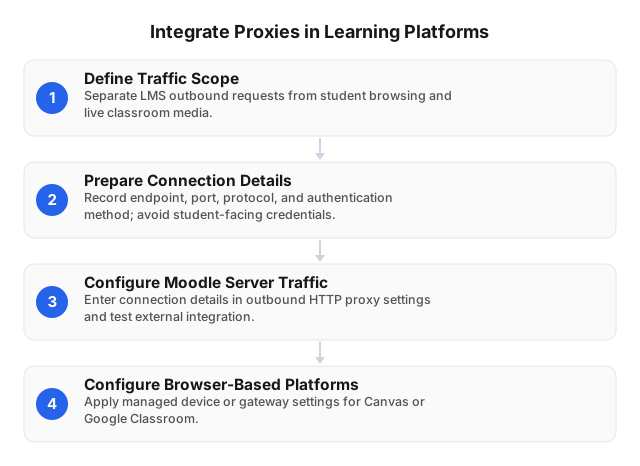
Integrate Proxies in Six Steps
1. Define a narrow, authorized scope
Write a deployment statement: “One managed QA browser will test approved course resources through a selected country exit using synthetic accounts.”
List the LMS, identity provider, resource host, and upload destination. Initially exclude student records, graded submissions, library authentication, and live media. Assign an owner for credentials, testing, and rollback.
2. Configure the component that sends the traffic
For Moodle, use the proxy settings documented for your installed version, then test the specific plugin or integration. A plugin using its own HTTP client may require separate configuration.
For a managed Windows device, start with Settings → Network & internet → Proxy and verify that the browser honors it. For a gateway, configure both routing and destination restrictions; remote devices do not automatically use a campus gateway.
Record the protocol, hostname, port, and authentication method. HTTP proxy support does not prove SOCKS5 support.
3. Protect credentials and authorize the correct IP
Store credentials in a secrets manager or protected gateway configuration—not in course pages, repositories, student handouts, or shared browser profiles.
If using IP allowlisting, authorize the public egress address visible to the provider. A private address such as 192.168.1.20 is not the workstation’s public internet address. Recheck allowlisting when a test device switches between campus Wi-Fi and a home connection.
4. Verify the route independently of the LMS
Compare direct and proxied public IPs using an institution-approved diagnostic endpoint. Verify the country separately; IP geolocation is not an exact physical-location measurement.
For a controlled HTTPS resource, use a client-level smoke test:
curl --proxy "$PROXY_URL" \
  --connect-timeout 10 \
  --max-time 30 \
  --output /dev/null \
  --write-out 'HTTP=%{http_code} total=%{time_total}s\n' \
  'https://approved-resource.example/test'
Replace the example destination and load proxy configuration through a protected environment. Avoid exposing secrets in command history, process arguments, or shared logs; use a protected client configuration when necessary.
My review checkpoint: I would not accept a successful curl response as evidence that the learning platform is integrated. It proves one client can complete one request; browser sign-in, cookie persistence, and uploads need separate tests.
5. Compare three workflows against a direct baseline
Run two routes × three workflows × five repetitions = 30 observations:
- Routes: direct and proxied.
- Workflows: sign-in, course-page loading, and a non-sensitive upload.
- Repetitions: five per workflow on each route.
Use the same account, device, file, and network. Alternate routes to limit time-of-day bias, and specify whether page-load tests use a cold or warm cache. Record timestamp, success, elapsed time, exit IP, destination, and error code.
For an illustrative calculation—not a measured EProxies result—a direct median of 2.0 seconds and proxied median of 2.3 seconds represent a 15% increase: (2.3 − 2.0) ÷ 2.0 × 100. Five repetitions can expose repeatable faults but cannot establish production uptime or dependable tail latency.
6. Set acceptance criteria and test rollback
Choose thresholds before reviewing results. Example pilot gates are:
- Zero failed sign-ins or uploads.
- No certificate warnings.
- The expected country and stable exit during authenticated workflows.
- No more than a locally approved 20% increase in median course-page load time.
The 20% threshold is an example, not an industry standard. Save the original configuration, restore it during rehearsal, and verify sign-in and upload again. Roll back immediately if routing disrupts submissions; do not disable certificate validation to force success.
Troubleshoot by Failure Boundary
| Symptom | First checks | Wrong fix |
|---|---|---|
| HTTP 407 | Proxy credentials, authentication method, allowlisted public IP | Resetting the LMS password |
| Login loop | Exit changes, cookies, identity-provider redirects and policy | Rotating IPs during diagnosis |
| Pages load; uploads fail | Upload hostname, size limits, timeouts | Assuming page loading proves compatibility |
| Live video fails | Media routing and application protocol requirements | Assuming HTTP proxying carries all media |
| Certificate warning | Hostname, trust chain, device clock, interception policy | Disabling TLS verification |
Repeat the identical request on both routes. If both fail, investigate the LMS or resource host first. If only the proxied request fails, inspect proxy authentication, routing policy, and timeout settings.
Keep exits stable during authenticated tests. Integrating Rotating Proxies in E-commerce: 2026 Guide provides additional session-management context, but rotation should be an explicit test variable—not the default for learner sessions.
Keep Student Data Out of the Pilot
Before routing identifiable education records, review processing terms, retention, authorized access, and incident procedures. A residential exit may add a provider and network path to the institution’s data-handling assessment.
Log timestamps, destination hosts, status codes, and timings. Exclude cookies, authorization headers, assignment content, and token-bearing URLs. Restrict diagnostic access and define deletion dates.
Public-data collection has different requirements. How to Effectively Scrape Wikipedia Data With Proxies: 2026 is relevant to approved research collection, not a template for handling student sessions.
FAQ
What are residential proxies?
Residential proxies route requests through IP addresses assigned to residential internet connections, so destination websites see the exit IP rather than the requester’s original public IP. They can support authorized regional checks of learning resources. They do not automatically encrypt traffic, authenticate students, or grant access to licensed content.
What are the steps to integrate proxies into a learning platform?
Identify the requests to route and configure the LMS server, managed device, or gateway that sends or controls them. Set a supported protocol, endpoint, port, and authentication method; protect credentials and restrict destinations. Verify the exit, compare sign-in, page loading, and uploads against a direct baseline, then approve deployment only after acceptance testing and rollback rehearsal.
How do proxies enhance remote learning security?
A managed gateway can authenticate access, restrict destinations, and log routed requests when those policies are configured. A residential proxy primarily changes the visible public IP and does not automatically provide those protections. Retain HTTPS, SSO, MFA, and institution-approved data-handling controls.
Which platforms support proxy integration?
Moodle documents outbound proxy settings for supported server requests. Browser access to Canvas and Google Classroom can be tested through approved device or gateway routing, without assuming universal native support. Validate mobile apps, redirects, embedded resources, and uploads separately.
Should I rotate IPs during an LMS session?
Use a consistent exit for ordinary authenticated testing because changing IPs can trigger risk checks and obscure diagnosis. Confirm sticky-session limits and what happens if an exit becomes unavailable.
Can a residential proxy replace library authentication?
No: an exit IP does not confer subscription rights or institutional eligibility. Preserve the library’s approved authentication route unless the institution and content provider authorize a change.
This article was written by the EProxies team and reviewed against our editorial quality standards before publishing.