
How-to-Secure-Your-Data-with-Datacenter-Proxies
TL;DR: Datacenter proxies secure outbound traffic by forcing requests through an authenticated, monitored egress layer. Use them for static routing, workload isolation, source-IP allowlisting, metadata logging, and fast credential revocation—but keep sensitive payloads encrypted with HTTPS and control proxy access like production infrastructure.
Introduction to Datacenter Proxies
Datacenter proxies are intermediary IP addresses hosted on server or cloud infrastructure. Instead of an external website seeing the IP address of an employee device, CI runner, analyst workstation, or internal application server, it sees the proxy endpoint.
Security teams use datacenter proxies when they need predictable outbound routing. A vendor portal may require a fixed allowlisted IP. A QA crawler may need repeatable test conditions. A threat-intelligence workflow may need separation from corporate office traffic so investigations do not expose internal network ranges.
A practical deployment gives teams four controls:
- Authentication: every user, script, or service account must authenticate before sending traffic.
- Source control: access can be restricted to approved office networks, VPN ranges, CI runners, or bastion hosts.
- Workload separation: SOC tools, QA jobs, vendor checks, and research browsers can use different pools.
- Auditability: logs can record user, source, destination domain, status code, latency, bytes transferred, and error category.
For a setup walkthrough, see setting up a datacenter proxy for beginners.
How Datacenter Proxies Secure Data
Datacenter proxies do not magically encrypt all data. HTTPS still protects payload confidentiality between the client and the destination, unless an organization intentionally deploys TLS inspection under its own policy. The proxy secures data by controlling where outbound traffic exits, who can use that route, and how suspicious activity is detected.
The strongest security mechanism is governed egress. A script with proxy credentials can be tied to one service account, one workload, and one approved destination set. If that credential appears in a leaked CI log, the team can disable that account without changing firewall rules across every endpoint.
The second mechanism is origin shielding. External services see the proxy endpoint rather than a corporate office IP, developer workstation, or internal application server. This reduces unnecessary exposure during public web monitoring, threat-intelligence lookups, localization checks, or QA automation.
The third mechanism is centralized telemetry. Proxy metadata can feed SIEM rules alongside VPN, DNS, firewall, and endpoint logs. A useful alert might trigger when a QA service account contacts a new destination category, exceeds its normal hourly request volume, or receives repeated 407 proxy-authentication errors.
For broader network design patterns, see building a secure network with proxies.
Deployment Pattern for Secure Proxy Use
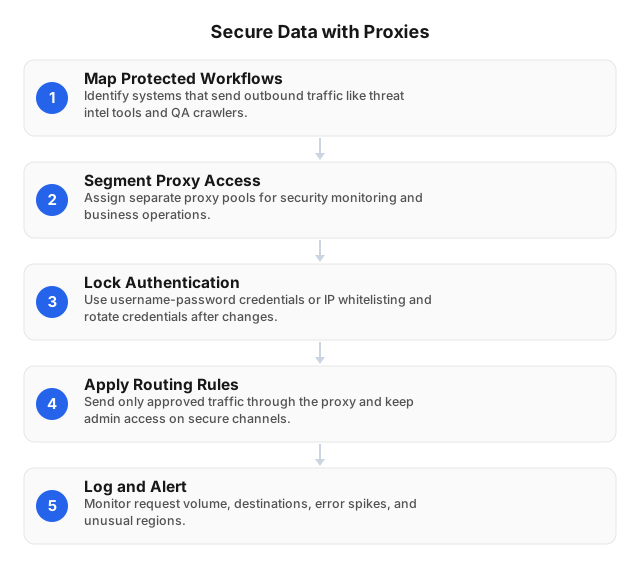
1. Map outbound workflows
Start with an inventory of systems that send requests to external services. Include SIEM enrichment jobs, brand-monitoring scripts, QA crawlers, vulnerability validation tools, vendor portals, and browser-based analyst workflows.
Record five fields for each workflow:
| Field | Example |
|---|---|
| Owner | SOC enrichment team |
| Source | CI runner, analyst VM, bastion host |
| Destination | Vendor API, public domain list, test environment |
| Protocol | HTTP(S) or SOCKS5 |
| Sensitivity | API keys, cookies, customer IDs, public data only |
Keep privileged administrative access on VPN, ZTNA, or another private-access control plane. A proxy is useful for governed outbound web traffic; it should not become a shortcut around admin access policy.
2. Segment proxy pools by workload
Once workflows are mapped, separate them by risk and behavior. Do not run every job through one shared proxy credential. A vendor login, QA crawler, and threat-intel enrichment script have different risk profiles and should leave different audit trails.
A simple segmentation model:
| Workload | Session pattern | Logging priority | Rotation approach |
|---|---|---|---|
| Vendor portals | Static or sticky | User, domain, login failures | Avoid rotation |
| Threat-intel lookups | Pooled | Domain, volume, status spikes | Controlled rotation |
| QA automation | Sticky per test run | Test ID, region, latency | Per scenario |
| Public monitoring | Rotating | Destination, status codes, rate limits | Rate-limited rotation |
Static routing helps with allowlists and authenticated workflows. Rotation helps with unauthenticated public monitoring, but it can break login sessions and trigger risk checks if used carelessly.
3. Lock down authentication
After segmentation, apply access controls to each pool. Use username-password authentication, source-IP allowlisting, or both. For service accounts, store proxy credentials in a secrets manager rather than source code, spreadsheets, local browser notes, or shared chat messages.
Rotate credentials after staff changes, vendor offboarding, leaked logs, or ownership transfers. Use one credential per automation job so a single broken crawler can be disabled without stopping unrelated systems.
For sensitive workflows, require requests to originate from known infrastructure: office egress IPs, VPN ranges, CI runners, or bastion hosts. A leaked proxy password is less useful if it cannot authenticate from an unknown network.
4. Define routing and failure rules
With access locked down, decide exactly what traffic is allowed to use the proxy. Send only approved HTTP(S) or SOCKS5 traffic through it. Sensitive workflows should block unknown destinations by default and require an owner-approved change before new domains are added.
Scripts should fail closed if the proxy is unavailable. A crawler that silently falls back to the corporate gateway can expose internal IP ranges and bypass logging. Browser-based investigations should use managed profiles with fixed proxy settings, disabled password sync, and no personal accounts.
Add backoff logic for 403, 407, 429, TLS failures, and repeated timeouts. A safe first deployment uses low concurrency, per-domain request ceilings, and hard stops after repeated authentication or rate-limit errors. For block detection patterns, see how-to-detect-proxy-blocking-techniques in 2026.
5. Log metadata, not secrets
Finally, make logging useful without turning it into another sensitive-data store. Capture timestamp, authenticated user or service account, source network, proxy pool, destination domain, HTTP status, latency, bytes transferred, and error category.
Avoid storing request bodies, session cookies, tokens, full URLs with sensitive query strings, and employee identifiers unless your legal or incident-response process requires them. Redact before forwarding logs to long-term storage, and set retention periods by workload risk.
Datacenter vs Residential vs ISP Proxies
Datacenter proxies fit workflows that need static infrastructure control. Residential and ISP proxies fit workflows where geography, consumer-like routing, or ISP network context affects the result.
| Proxy type | Best fit | Trade-off |
|---|---|---|
| Datacenter proxy | SIEM enrichment, vendor allowlists, QA automation, static egress | Some targets classify datacenter IP ranges more strictly |
| Residential proxy | Geo-validation, public web research, localization QA, fraud investigation | More governance work because endpoints are distributed |
| ISP SOCKS5 proxy | Stable sessions that need ISP-like routing | Smaller static footprint than large residential pools |
| VPN | Employee access to private resources | Less precise per-app routing for automation |
EProxies focuses on residential and ISP proxy use cases: 72M+ residential IPs across 195+ countries, HTTP(S) and SOCKS5 support, username-password and IP whitelist authentication, 98.2% uptime backed by a 99.9% uptime SLA, pay-as-you-go residential pricing from $0.25/GB, tiered residential pricing down to about $0.73/GB at 300GB, ISP SOCKS5 from $0.95/IP, and unlimited plans from $79/month.
Use datacenter proxies where fixed egress and allowlisting matter most. Use EProxies residential or ISP proxies where region, ASN type, or ISP-like routing determines whether a workflow gets accurate results. If your use case involves regional access testing, pair this guidance with How to Leverage Proxies to Avoid Geo-Blocks in 2026.
Common Mistakes That Create Risk
Using one shared credential for every script. A single leaked password can turn a controlled proxy layer into an unauthorized relay. Assign separate credentials to each team, service, and automation job.
Relying on password authentication alone. Add source-IP allowlisting for CI jobs, SIEM connectors, vendor dashboards, and admin-adjacent tools. A password leak should not be enough to send traffic.
Rotating IPs during authenticated sessions. Login-bound workflows often expect stable network identity. Blind rotation can trigger account challenges, invalidate sessions, or create confusing audit trails.
Letting scripts retry forever. Stop after repeated 403, 407, 429, TLS, or timeout errors. Aggressive retries can look like abuse and can hide a bad credential, blocked destination, or broken proxy rule.
Keeping full logs indefinitely. Proxy logs can expose customer identifiers, investigation targets, tokens in URLs, and internal service names. Store the minimum useful metadata and redact before archival.
FAQ
What are datacenter proxies?
Datacenter proxies are server- or cloud-hosted intermediary IP addresses that forward outbound requests so external services see the proxy endpoint instead of the original corporate system. Security teams use them for controlled egress, workload separation, static allowlisting, and audit logging.
How do datacenter proxies secure data?
They enforce authenticated outbound access, restrict use to approved source networks, separate workloads into dedicated pools, and produce investigation-ready logs. They also reduce direct exposure of internal IP ranges because external services see the proxy endpoint rather than the original device or server. They do not replace HTTPS; payloads should still be encrypted end to end unless your organization has a formal TLS inspection policy.
What are the risks of using datacenter proxies?
The main risks are leaked proxy credentials, misconfigured open access, poor IP reputation, shared-IP “noisy neighbor” effects, excessive logging of sensitive URLs, and accidental routing of sensitive traffic through the wrong pool. Some websites also apply stricter controls to datacenter IP ranges, which can increase 403 responses, CAPTCHAs, or account risk checks. Reduce exposure with per-workload credentials, source-IP allowlists, destination controls, rate limits, and metadata-only logging.
How to choose the right datacenter proxy provider?
Test the provider against your own destinations before routing sensitive workflows through it. Validate authentication methods, HTTP(S) and SOCKS5 support, source-IP allowlisting, uptime terms, session behavior, IP reputation, support response time, and logging controls. Choose static datacenter proxies for allowlisted vendor access and repeatable QA; choose residential or ISP proxies when geography, consumer-like routing, or ISP network context affects accuracy.
Are datacenter proxies better than residential proxies?
They are better for static routing, lower operational complexity, and controlled security workflows such as vendor allowlists or SIEM enrichment. Residential proxies are better when results depend on consumer-like location, regional availability, or public-web behavior. ISP SOCKS5 proxies sit between the two: they provide stable sessions with ISP-like routing.
Should security teams use rotating or static sessions?
Use static or sticky sessions for authenticated dashboards, vendor portals, and workflows where changing IPs can trigger risk controls. Use rotating sessions for unauthenticated public monitoring, distributed testing, or threat-intelligence collection where request separation matters more than continuity. Document the rotation rule per workload so debugging does not depend on guesswork.
What should be monitored after deployment?
Monitor authentication failures, destination domains, request volume, HTTP status codes, latency, bytes transferred, and new proxy pools or regions. Alert on repeated 407 errors, 403 or 429 spikes, traffic outside approved hours, and destinations that do not match the workload owner’s approved list. Feed proxy metadata into the same SIEM workflow used for DNS, VPN, firewall, and endpoint events.
This article was written by the EProxies team and reviewed against our editorial quality standards before publishing.