
Understanding Proxy Chains for Web Anonymity: 2026
TL;DR: Understanding proxy chains for web anonymity means knowing how sequential proxy hops separate your source IP from the destination—and why extra hops alone do not guarantee stronger privacy. For cybersecurity enthusiasts and IT professionals, this guide explains how to configure a chain, verify its exit IP and DNS routing, and identify traffic that may escape the intended path. You’ll learn when another hop adds useful separation, when it merely increases latency, and how to troubleshoot failures without silently falling back to a direct connection.
Introduction to Proxy Chains
A proxy chain is a sequence of proxy servers that forwards traffic through multiple intermediaries before reaching its destination, with the aim of enhancing online anonymity. Instead of connecting through a single proxy, the client sends traffic to an entry proxy, which passes it to another proxy and onward to the destination. Chaining changes the route traffic follows; adding intermediaries does not, by itself, establish stronger anonymity.
The basic routing model is:
Client → Entry proxy → Intermediate proxy → Exit proxy → Destination
“Proxy chain” describes that arrangement; “ProxyChains” refers to software used to route application traffic through a supplied proxy list. Keep those concepts separate when planning a setup: specifying a sequence of servers defines the intended path, while configuring the application determines which traffic actually uses that path.
How Proxy Chains Enhance Anonymity
Proxy chains enhance anonymity by separating the connection that reveals your source IP from the connection that reaches the destination. Configuring multiple proxy servers in sequence creates a route such as client → entry proxy → exit proxy → website. The anonymity benefit comes from separating visibility, not simply adding hops. The website sees the exit proxy’s address rather than your direct connection.
The entry proxy still sees your source IP, while the exit handles the destination-facing connection. Choosing different endpoints does not necessarily separate trust: a shared operator may retain records across the route.
Chaining also does not replace encryption or browser isolation. HTTPS protects content in transit; account logins, cookies, and browser fingerprints can still link activity. Evaluate which observer you need protection from before deciding whether another intermediary provides meaningful separation.
Setting Up a Proxy Chain: Step-by-Step Guide
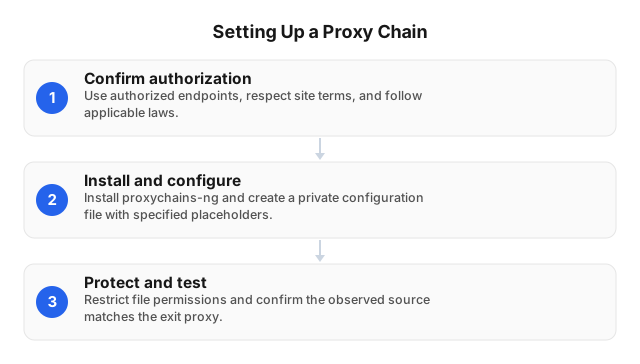
Proxy chain setup requires an explicit hop order, authenticated endpoints, and verification that the application actually uses the configured route. Use a strict chain when every configured hop must participate, then test with a command-line client before introducing browser traffic or sensitive sessions.
- Confirm authorization. Proxy chains can support legal or illegal activities depending on intent and conduct. Use authorized endpoints, respect site terms, and follow applicable laws.
- Install and configure. Install your distribution’s
proxychains-ngpackage. Create a private configuration file with this template, replacing every uppercase placeholder:strict_chain proxy_dns [ProxyList] socks5 ENTRY_HOST ENTRY_PORT USER PASS socks5 EXIT_HOST EXIT_PORT USER PASS - Protect and test. Restrict file permissions, then run:
chmod 600 ./chain.conf
proxychains4 -f ./chain.conf curl YOUR_CONTROLLED_ENDPOINT
Confirm the observed source matches the exit proxy. Stop a required hop and verify failure rather than direct fallback.
Common Use Cases for Proxy Chains
Proxy chains support privacy-conscious research, authorized security assessments, and localization testing when separating an originating network from destination-facing traffic serves a specific purpose. Use a chain for deliberate network separation, not as a substitute for browser isolation, authorization, or secure transport. Select high-speed proxies to limit avoidable delays.
For threat research, route an isolated analysis environment through a controlled chain rather than exposing a workplace connection. Keep personal accounts outside that environment; signing in can reconnect activity to an identity.
For authorized security assessments, document the exit addresses and scope with the system owner before testing. Maintain attributable audit logs rather than treating anonymity as permission.
For localization checks, select the exit location that matches the intended audience. Keep that exit stable during a session so location changes do not confound results.
Optimizing Proxy Chains for Performance
Proxy chain performance improves when you remove hops that serve no defined privacy purpose and measure the remaining route against a direct-connection baseline. Industry benchmarks (2025) reported median residential response times of 0.93s on stable infrastructure versus 4.63s on real-world targets—not chained-route results. Optimize against your own destination-specific baseline, not a provider’s advertised response time.
Keep the destination, request payload, and session behavior unchanged while testing each candidate route. Record connection setup time, time to first byte, completed-transfer throughput, and connection drops separately; a fast initial response can conceal a slow download.
Slow speeds and connection drops are common proxy-chain issues. Compare measurements before and after adding each hop, and retain that hop only when its privacy role justifies the measured cost. Recheck the full route after configuration changes.
Troubleshooting Common Issues with Proxy Chains
Proxy chain troubleshooting starts by isolating the failing hop: test each authorized endpoint separately, then rebuild the chain incrementally against a destination you control. Verify routing before increasing timeouts. Record the failing hop, error message, and elapsed time; a timeout alone does not distinguish authentication failure from an unreachable endpoint.
Connection failures: Check proxy type, hostname, port, and credentials. For IP-whitelisted endpoints, confirm which upstream address actually reaches the proxy—not merely your workstation’s public address.
Unexpected public IP: Confirm the application uses the intended configuration. Check for direct connections with a controlled endpoint and local traffic capture.
DNS leaks: Verify hostname resolution separately from exit-IP checks. A proxied connection does not prove DNS requests followed the same route.
Intermittent stalls: Compare individual-hop and full-chain behavior. Replace the failing endpoint before extending timeouts, and redact credentials from diagnostic logs.
Conclusion: The Future of Proxy Chains in Cybersecurity
Proxy chains in 2026 should be judged by verifiable routing behavior, not hop count: their future value in cybersecurity depends on demonstrating where traffic travels and what happens when a relay fails. Treat anonymity as a property to validate, not a benefit to assume. Prioritize configurations that can be audited and maintained over longer chains assembled without a defined threat model.
Make configuration changes trigger fresh checks of exit addresses, DNS resolution, and connection-failure behavior. Record the expected route alongside each approved application; a browser update or proxy replacement should prompt revalidation rather than inherit yesterday’s approval.
Procurement should also examine relay provenance, logging policies, and incident-response contacts. For authorized security assessments, document scope and applicable terms before routing traffic through third-party infrastructure; an additional intermediary does not expand permission to test a target.
Related reading
- Proxy Scripts for QA Automation: Practical 2026 Guide
- Crafting Efficient Web Scraping Scripts in 2026
FAQ
What is a proxy chain?
A proxy chain is a sequence of proxy servers that forwards a connection through successive intermediaries before reaching its destination. The route follows this pattern: device → entry proxy → intermediate proxy → exit proxy → destination. The chain is the network arrangement; ProxyChains is software used to route supported application connections through a configured proxy list.
How do proxy chains improve anonymity?
Proxy chains improve anonymity by separating the proxy that receives your connection from the proxy that connects to the destination. The entry proxy sees your originating IP address, while the destination normally sees the exit proxy’s address. That separation does not eliminate trust: shared operators, retained logs, or correlated traffic can weaken it, and signing into an identifiable account still links activity to that account.
Can proxy chains be used for legal purposes?
Yes, proxy chains can support lawful privacy protection, authorized security assessments, and localization testing. Legality depends on your jurisdiction, authorization, and activity—not simply on whether traffic passes through proxies. Use only endpoints you are authorized to access, respect target-site terms and applicable laws, and obtain written scope before testing another organization’s systems; a working proxy connection does not grant permission.
What are the limitations of proxy chains?
Proxy chains can add latency, constrain throughput, and introduce additional failure points without preventing every form of identification. Each hop adds connection and forwarding work, while a slow intermediary can bottleneck the route. DNS requests or unsupported application traffic may travel outside the intended path, and browser fingerprints or account logins can still identify activity. Proxy chaining alone also does not provide end-to-end encryption; use HTTPS for web connections.
How to troubleshoot proxy chain errors?
Troubleshoot proxy chain errors by testing each proxy individually, rebuilding the route incrementally, and checking DNS routing and application compatibility. First, verify each endpoint’s address, port, protocol, and authentication; then add intermediaries until the failure returns. Distinguish connection failures from destination-side denials, and inspect client logs before changing timeouts. After restoring connectivity, verify the exit IP and DNS behavior, because a successful page load does not prove traffic followed the intended route.
This article was written by the EProxies team and reviewed against our editorial quality standards before publishing.