
How to Set Up Geo-Targeted Ad Campaigns with Proxies
TL;DR: Choose proxies for geo-targeted ad campaigns by matching the campaign’s targeting granularity, session length, and tooling. Use city-level residential proxies for local ad and landing-page QA, rotating sessions for broad market coverage, sticky sessions for forms/checkout/attribution, and SOCKS5 or ISP proxies when you need stable app-level routing.
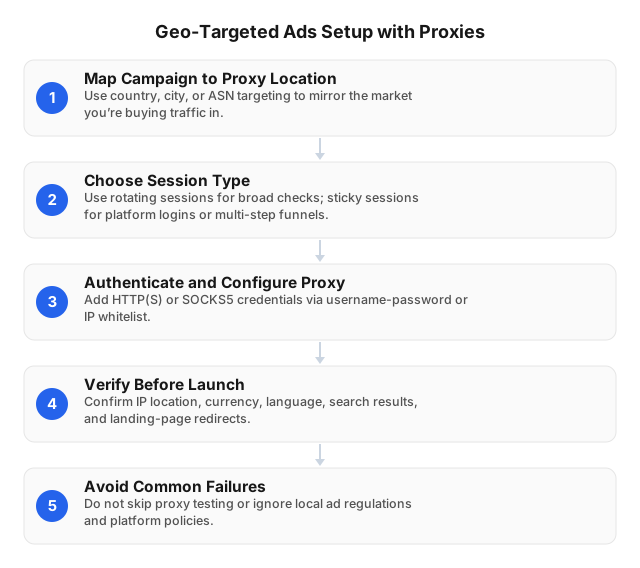
What Geo-Targeted Ad QA Must Prove
A geo-targeted campaign is not “working” just because the ad platform shows eligible impressions. The full local path must match the intended market: ad, redirect, landing page, compliance layer, conversion action, and analytics record.
Use this pass condition before scaling spend: a user from the target market can see the correct ad, land on the correct localized page, complete the intended action, and appear in reporting under the correct campaign, location, and conversion type.
| Layer | What to verify | Example failure |
|---|---|---|
| Targeting | Country, state, city, radius, exclusions, location intent | Boston excluded by an old negative radius |
| Creative | City name, language, currency, offer, phone number | Dallas discount shown to Austin users |
| Landing path | Redirects, store pages, inventory, pickup, tax, forms | Paris users sent to a generic France homepage |
| Compliance | Consent banner, age gate, regulated copy, tax disclosure | German users see no EU consent banner |
| Attribution | UTMs, call tracking, pixels, server-side events | Miami leads attributed to “US Generic” |
For campaigns with city-specific copy, store routing, or radius targeting, country-level testing is too coarse. A “US” session cannot prove that Chicago searchers see the Chicago phone number, local inventory, and correct sales-tax treatment.
Choose the Right Proxy Setup for the Campaign
Once the pass condition is clear, choose the proxy setup that matches how the campaign actually targets and measures users: geography first, then session behavior, then protocol.
Match proxy geography to the targeting rule
Start with the smallest location that affects delivery or page logic.
| Campaign rule | Proxy choice | Why it matters |
|---|---|---|
| Country campaign | Country-level residential exit | Checks language, currency, consent, national offer |
| State or province campaign | Regional exit | Checks legal copy, shipping rules, tax treatment |
| City or metro campaign | City-level residential exit | Checks local SERPs, map packs, phone numbers, store pages |
| Radius campaign | City/metro exit near the radius center | Checks “near me,” pickup, and service-area rules |
| Logged-in account review | Stable ISP SOCKS5 or sticky residential | Prevents session resets and risk triggers |
| Mobile layout or app prompt | Mobile/5G proxy where applicable | Tests click-to-call, deep links, and mobile local UI |
EProxies has 72M+ residential IPs across 195+ countries, with HTTP(S) and SOCKS5 support. Residential pay-as-you-go starts at $0.25/GB, tiered residential plans go down to about $0.73/GB at 300GB, ISP SOCKS5 starts from $0.95/IP, and unlimited plans start from $79/month. Infrastructure performance matters during QA runs, so plan around 98.2% uptime backed by a 99.9% uptime SLA rather than assuming every failed page load is a campaign issue.
Use rotating sessions for coverage
Rotating residential proxies work best for breadth. If you test 20 cities, 3 creatives, 2 devices, and 2 landing-page templates, you already have 240 checks before retries. Rotation reduces repeat requests from one IP and helps reveal market-level patterns, such as every Florida city receiving the wrong financing disclaimer.
Use rotating sessions for:
- ad preview checks across many markets;
- search result and local pack sampling;
- exclusion-rule validation;
- creative and URL spot checks;
- language, currency, and offer checks.
Keep retry logic conservative. Two failed loads from the same city should trigger a retest with a second local proxy exit before a paid search manager changes bids or pauses a campaign.
Use sticky sessions for proof
Sticky sessions keep the same proxy exit through a workflow. They are required when cookies, cart state, login state, fraud checks, or server-side conversion events must survive multiple steps.
Use sticky sessions for:
- lead forms with multi-page qualification;
- booking and appointment flows;
- checkout and pickup selection;
- call-tracking number assignment;
- logged-in account review;
- conversion attribution testing.
A rotating IP may load the landing page correctly and still break the funnel on step three. If the form submits from one IP but the conversion pixel fires from another, attribution systems may classify the event incorrectly or drop it.
Match protocol to the tool
HTTP(S) is the default for browser profiles, ad preview tools, no-code QA suites, and most manual checks. SOCKS5 is better for app-level testing, non-browser traffic, custom automation, and workflows that need broader protocol support.
For scripted test runners, store proxy credentials outside the script, log the proxy exit location with every test, and capture screenshots plus HAR files for failed cases. The implementation patterns in Proxy Scripts for QA Automation: Practical 2026 Guide are useful when turning manual geo QA into repeatable checks.
A Practical Geo Ad Verification Workflow
With the proxy setup defined, turn the campaign logic into a repeatable verification workflow. The goal is to prove one local journey at a time and make failures easy to assign.
1. Build a test matrix before touching the proxy
Create one row per market, device, creative, landing page, and conversion path. If Los Angeles, San Diego, and Sacramento use different store pages, do not collapse them into one “California” row.
| Field | Example |
|---|---|
| Campaign | Search - Miami HVAC |
| Target market | Miami, FL |
| Proxy exit | US / Florida / Miami |
| Session type | Sticky residential |
| Device | Mobile Chrome |
| Expected ad | “Same-day AC repair in Miami” |
| Expected URL | /miami-ac-repair |
| Conversion | Click-to-call + lead form |
| Evidence | Screenshot, HAR, event ID |
| Owner | Paid search manager |
One row should prove one market journey. If the test fails, the owner knows whether to inspect campaign targeting, redirect logic, CMS rules, analytics tags, or the proxy session.
2. Configure a clean local session
Use separate browser profiles for unrelated markets. Clear cookies between independent test cases, but do not clear cookies inside a funnel unless the test case is specifically “first visit only.”
Before each run, record:
- proxy country, region, city, and IP type;
- rotating versus sticky session;
- HTTP(S) or SOCKS5;
- browser language, time zone, and viewport;
- device type and user agent;
- timestamp and operator;
- expected campaign, URL, and conversion event.
For mobile-specific checks—map packs, click-to-call buttons, app deep links, and device prompts—use the process in How to Use 5G Mobile Proxies for Geolocation Testing.
3. Verify the entire path, not only the ad preview
Run the journey in order:
- confirm the ad or local search result appears for the target market;
- capture the final URL and redirect chain;
- verify city name, language, currency, price, offer, and inventory;
- check consent, tax, age-gate, finance, healthcare, or other regulated-market copy;
- complete the call, form, booking, cart, or pickup flow;
- confirm the pixel or server-side event fires;
- validate campaign, source, market, and conversion type in reporting.
Use ad platform preview tools or approved QA methods whenever possible. If a controlled live click is unavoidable, log the timestamp, campaign, proxy exit, and conversion ID so analytics can filter the test interaction.
4. Classify failures before changing media settings
Treat each failure as a specific defect, not a vague “geo issue.”
| Failure type | Signal | First action |
|---|---|---|
| Proxy/location mismatch | Exit resolves outside the target city or region | Retest with another local session |
| Ad delivery issue | Wrong creative, no extension, excluded market | Review targeting, negatives, and location intent |
| Landing-page issue | Wrong redirect, store, price, language, or consent banner | Check CDN, CMS, geo rules, and tag manager |
| Tracking issue | Event fires under the wrong campaign or market | Check UTMs, pixels, call routing, server events |
| Connection issue | Timeout, DNS error, repeated block | Check retry rate, session type, and target scripts |
Three independent sessions from the same target market showing the same defect usually indicate campaign or site logic. One failed session and two passing sessions should trigger a controlled retest, not an immediate budget cut.
Metrics That Actually Diagnose Geo Campaigns
After QA confirms the local path, measurement has to stay segmented enough to catch market-level waste and tracking errors.
Media performance metrics
Segment media reporting by country, region, city, device, campaign, creative, landing page, and conversion type. Blended national averages hide local waste: a campaign can show a $70 blended CPA while Boston sits at $120 and Dallas clears at $45.
| Metric | What it proves | Useful threshold example |
|---|---|---|
| Impressions | Ads enter auctions in intended markets | 95%+ spend in intended locations |
| CTR | Local creative matches intent | City ad beats national ad by 10–20% |
| CPC | Auction pressure by market | CPC stays inside bid model assumptions |
| Conversion rate | Landing page and offer fit | Local page beats generic page |
| CPA | Lead or sale efficiency | Miami HVAC leads under $60 CPA |
| ROAS | Revenue efficiency | Market clears 3.0x after refunds |
| Lead rejection rate | Geo and quality fit | Wrong-region leads under 5% |
| Call/form attribution | Tracking accuracy | 98%+ mapped to correct campaign |
| Mobile LCP | User experience by market | 2.5–4.0 seconds, depending on page type |
Tie thresholds to economics. A $95 CPA may be profitable for a high-margin emergency repair market and unacceptable for a low-margin retail pickup campaign.
QA reliability metrics
Every verification record should include:
- proxy exit country, region, city, and IP type;
- session mode and protocol;
- page-load time and retry count;
- expected versus actual ad, URL, language, currency, phone number, and conversion event;
- screenshot, HAR file, and analytics event ID;
- failure category and assigned owner.
Run daily checks for broken redirects, wrong-market pages, missing consent banners, and attribution failures. Run weekly checks for creative/bid decisions. Run monthly checks before expanding, cutting, or rebuilding a market.
Common Mistakes That Waste Geo Ad Budget
Most wasted geo ad spend comes from treating a local campaign as if it were a national campaign, or from mixing QA signals with media performance signals.
Testing city campaigns with country exits
Country-level proxies miss local phone numbers, service-radius logic, store inventory, local testimonials, map-pack differences, and city-specific ad copy. Use city or metro exits whenever the campaign names a city, targets a radius, or routes to a store page.
Rotating IPs during conversion flows
Rotation helps with coverage, but it can break cookies, cart state, fraud scoring, call-number assignment, and server-side conversion stitching. Use sticky sessions after the first page when the path includes a form, checkout, booking, account login, or call-tracking test.
Treating ad previews as full proof
An ad preview confirms eligibility and rendering. It does not prove redirects, consent banners, forms, inventory, phone numbers, pixels, call routing, or server-side revenue events.
Mixing infrastructure noise with media performance
A slow page can come from proxy routing, a consent platform, a CDN edge, a tag manager, a third-party widget, or the landing page itself. Keep page-load time, retry count, and proxy exit details separate from CTR, CPA, CVR, and ROAS so media teams do not optimize from noisy infrastructure data.
Leaving credentials unmanaged
Proxy credentials should not sit in spreadsheets, chat logs, QA screen recordings, or unmanaged browser profiles. Use named owners, scoped access, credential rotation, and IP whitelisting where practical; Building a Secure Network With Proxies in 2026 covers the operating model.
Related Reading
- Proxy Scripts for QA Automation: Practical 2026 Guide
- Building a Secure Network With Proxies in 2026
- How to Use 5G Mobile Proxies for Geolocation Testing
FAQ
What are geo-targeted ad campaigns?
Geo-targeted campaigns adjust delivery, bids, creative, landing pages, or conversion rules by country, region, city, radius, or location intent. A retailer may show different currency, shipping copy, pickup options, tax language, and ROAS targets in the US, UK, Germany, and France.
Why use proxies for geo-targeted ad testing?
Proxies let marketers verify ads and landing pages from the market the campaign targets instead of from an office, VPN, or cloud server location. They help catch wrong redirects, missing local offers, incorrect currency, broken consent banners, unavailable delivery options, and attribution errors before spend increases.
How do I choose the right proxy for my campaign?
Choose the proxy by geography, session behavior, and tooling. Use residential proxies for consumer-like location checks, city-level exits for local campaigns, rotating sessions for broad coverage, sticky sessions for funnels, and SOCKS5 or ISP proxies when you need stable app-level routing. If the campaign uses a city name, radius, store locator, call tracking, checkout, or regulated local copy, test from that specific city or metro rather than a country-level exit.
Should I use rotating or sticky proxies?
Use rotating proxies to check many markets, creatives, SERPs, and exclusion rules quickly. Use sticky proxies for forms, checkout, booking, login review, call tracking, and conversion attribution because those workflows need the same session across multiple pages.
How can I measure the success of my geo-targeted ads?
Measure each market’s impressions, CTR, CPC, conversion rate, CPA, ROAS, lead quality, call/form attribution, and landing-page load time against location-specific targets. Segment by country, region, city, device, campaign, creative, landing page, and conversion type so a strong national average does not hide a broken local market.
What are common mistakes in geo-targeted ad campaigns?
Common mistakes include testing only at the country level, rotating IPs during forms or checkout, trusting ad previews without checking the landing path, and optimizing from blended national reports. Teams also miss local compliance copy, wrong currencies, broken store-radius logic, non-local phone numbers, and conversion events that attribute to the wrong campaign or market.
Are proxies legal for geo-targeted ad verification?
Proxies are legitimate for localization QA, ad verification, and responsible market research when used within platform policies, site terms, privacy rules, and applicable law. Do not use proxies to fake engagement, manipulate auctions, misrepresent users, or evade enforcement.
This article was written by the EProxies team and reviewed against our editorial quality standards before publishing.