
Unblocking Geo-Restricted Content with Proxies in 2026
TL;DR: Use geo-targeted residential proxies for public or authorized localization QA, ad verification, SERP checks, price monitoring, and streaming research. Match the proxy location with browser language, time zone, cookies, account region, and DNS behavior; otherwise the test data is contaminated. EProxies’ published product specs list 72M+ residential IPs across 195+ countries, HTTP(S) and SOCKS5 support, 98.2% reported uptime, and a 99.9% uptime SLA; its published pricing includes pay-as-you-go residential from $0.25/GB, tiered residential down to about $0.73/GB at 300GB, ISP SOCKS5 from $0.95/IP, and unlimited plans from $79/month.
What Geo-Restricted Testing Really Measures
Geo-restricted content is not controlled by IP address alone. Most platforms combine several signals before deciding which price, catalog, ranking, ad, tax rule, shipping option, or language version to show:
- Network location: country, city, ASN, ISP type, and IP reputation.
- Account data: billing country, subscription region, saved addresses, and past logins.
- Browser signals: language, time zone, locale, cookies, and device fingerprint.
- App/device signals: GPS permission, SIM/carrier data, DNS resolver, and app store region.
- Session behavior: login history, request rate, redirects, CAPTCHA events, and failed auth attempts.
A clean test controls those signals. A Madrid residential IP with a US browser profile, Pacific Time, old US cookies, and a Canadian billing account will not produce defensible Spain data. Use separate browser profiles per market and record the exact configuration used for each run.
Use proxies only for public or authorized workflows: campaign QA, localization audits, regional pricing checks, SERP tracking, ad verification, catalog availability research, and approved streaming UX testing. Do not use proxies to bypass paywalls, evade copyright restrictions, access accounts you do not control, or ignore platform terms.
Choosing the Right Proxy Type
Residential proxies fit most consumer-facing geo checks because they route traffic through ISP-assigned residential IPs. That matters when a site expects normal users to arrive from home broadband or mobile-like consumer networks rather than obvious infrastructure ranges.
EProxies’ published residential proxy specifications list 72M+ residential IPs across 195+ countries, support for HTTP(S) and SOCKS5, 98.2% reported uptime, and a 99.9% uptime SLA. Those numbers are relevant when a QA team needs repeatable coverage across many countries without rebuilding proxy pools for every campaign.
| Workflow | Best setup | Session rule | Main trade-off |
|---|---|---|---|
| Local SERPs, public product pages, price snapshots | Rotating residential | Rotate per request or per small batch | Needs rate limits and retry logic |
| Checkout previews, account dashboards, ad preview tools | Sticky residential | Keep one IP for the full session | Lower throughput than rotation |
| Streaming landing pages, catalog checks, playback QA | Sticky residential or ISP SOCKS5 | Do not rotate after login | Must remain within service terms |
| App-like or non-browser tools | SOCKS5 | Keep stable during stateful flows | Requires tool-level proxy support |
| Lower-sensitivity internal validation | ISP SOCKS5 | Fixed IP when consistency matters | May be less suitable for strict consumer checks |
EProxies’ published pricing supports both short tests and recurring QA: pay-as-you-go residential starts from $0.25/GB, tiered residential plans scale down to about $0.73/GB at 300GB, ISP SOCKS5 starts from $0.95/IP, and unlimited plans start from $79/month. For a one-week localization audit, pay-as-you-go usually avoids unused committed bandwidth. For weekly SERP monitoring, retail price checks, or streaming catalog QA, a tiered or unlimited plan makes monthly spend easier to forecast.
Retail teams combining product, inventory, and pricing checks can extend this setup with the workflow in Integrating Rotating Proxies in E-commerce: 2026 Guide.
Step-by-Step Setup for Geo-Restricted Research
1. Define the test evidence before choosing the proxy
Replace vague tasks with measurable checks. “Check EU pricing” is not enough. Use a test case such as: “From Paris, Berlin, and Madrid, capture the PDP price, cart price, shipping banner, currency, tax message, redirect path, timestamp, and detected IP location.”
Log these fields for every run:
- Target country, city, and ASN if relevant.
- Proxy type: residential, ISP SOCKS5, or another approved setup.
- Protocol: HTTP(S) or SOCKS5.
- Session mode: rotating or sticky.
- Browser profile: language, time zone, cookies, and search region.
- Evidence: screenshot, URL, timestamp, HTTP status, and detected exit location.
- Result: price, ranking, creative, catalog item, redirect, error, or block page.
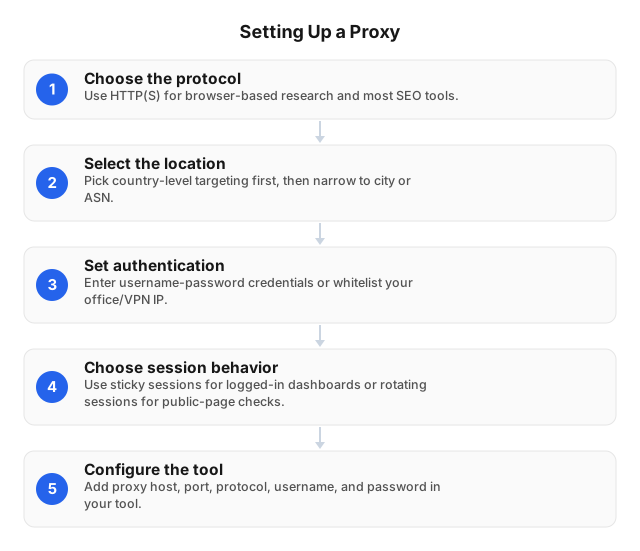
2. Match protocol to the tool
Use HTTP(S) for browser QA, SEO tools, ad preview tools, and most scripted web automation. Use SOCKS5 when the application sends non-browser traffic, handles video/app flows, or does not cleanly support HTTP proxies. SOCKS5 can proxy more traffic types, but it does not fix bad browser fingerprints, mismatched account regions, or aggressive request rates.
For automated QA, validate the exit region before every batch, retry only on defined failures, and write structured logs. The implementation pattern in Proxy Scripts for QA Automation: Practical 2026 Guide works well for repeatable localization checks.
3. Choose country, city, or ASN targeting
Use country targeting for catalog availability, currency, consent banners, subscription pages, and broad landing-page localization. Use city targeting for local SEO, store pickup, delivery promises, “near me” pages, and paid media previews. Use ASN targeting when the result may differ by network operator, such as broadband ISP A versus broadband ISP B in the same country.
4. Set rotation rules by page state
Rotate IPs for unauthenticated public pages where each request is independent, such as checking 100 city-level SERPs. Use sticky sessions for carts, logins, ad preview tools, subscription pages, and streaming QA. If cookies, device trust, or cart state build across clicks, changing the IP mid-flow can trigger CAPTCHA, reauthentication, wrong-region content, or a silent redirect.
5. Align the non-IP signals
Set browser language, time zone, search region, and cookies to match the proxy location. Use a clean browser profile per country. For app or streaming tests, confirm DNS behavior and account region as well. A correct IP with stale cookies can still show the wrong catalog, currency, or ad creative.
Streaming Proxy Setup for Authorized QA
Streaming workflows are stateful. Treat login, catalog navigation, plan pricing, ad loading, and playback checks as one session. Use a country-targeted residential proxy or ISP SOCKS5 proxy, enable a sticky session, and keep rotation off after login.
A practical streaming QA checklist:
- Use a dedicated test account approved for the market being tested.
- Select country targeting first; use city targeting only if the service localizes within a country.
- Match language, time zone, DNS behavior, and browser profile to the proxy country.
- Verify the exit IP before opening the streaming site or app.
- Record screenshots or HAR files showing page state, timestamp, test account, and detected region.
- Do not rotate during catalog checks, playback-related QA, or account flows.
For a deeper buying checklist, see how to choose proxies for streaming.
Practical Use Cases
Local SEO and paid search
City-level residential proxies help compare map packs, organic rankings, local ads, and landing-page redirects. A search for “same-day flower delivery” can produce different competitors in two neighborhoods because search engines combine IP location, search settings, device type, account history, and business proximity.
E-commerce pricing and availability
Retail pages may change by shipping zone, inventory location, tax region, currency, promotion rule, or delivery method. Capture the full path: category page, product page, cart, shipping estimator, and authorized checkout preview. A product can show one price on the PDP and a different total after ZIP code, tax, or fulfillment selection.
Streaming and media localization
Media teams can verify country-specific landing pages, sign-up copy, plan pricing, catalog visibility, subtitle availability, and ad loading. Use one sticky proxy session, a clean profile, and a dedicated test account per market. If playback is in scope, treat IP rotation as a test-breaking event.
Mobile-like geolocation testing
Carrier-specific offers, app install pages, SMS flows, and location-based promotions may require mobile-network validation. If residential broadband does not reproduce the issue, compare the setup with How to Use 5G Mobile Proxies for Geolocation Testing.
Failure Points That Corrupt Geo Tests
Mixed signals create most false results. A London IP with US cookies, Pacific Time, and a Canadian account is not a UK test. Start with clean profiles, correct time zones, and market-specific accounts where authorized.
Session churn breaks stateful flows. Rotation may work for public discovery pages, but it can disrupt carts, ad previews, dashboards, and streaming tests. Keep one IP for any workflow that stores cookies or account state.
Timeouts and wrong-location responses require different fixes. Track HTTP status, response time, CAPTCHA events, block pages, and detected region as separate fields. A 200 response from the wrong country is a failed geo test, not a success.
Legal and Compliance Boundaries
A proxy changes the network path; it does not grant permission. Keep testing limited to public pages, approved test accounts, licensed content, and workflows allowed by the target site’s terms.
Use these controls for marketing and QA work:
- Document the purpose: campaign QA, price verification, SERP tracking, localization testing, or public competitor research.
- Collect only the needed evidence: page content, prices, ad copy, screenshots, redirects, and timestamps.
- Avoid personal data unless the team has a lawful basis and an approved process.
- Rate-limit requests so testing does not degrade the target service.
- Use test accounts instead of employee personal accounts or customer accounts.
- Keep audit logs with URL, region, proxy type, timestamp, collection method, and tester.
For network governance, pair proxy access with credential controls, role-based access, and logs; see secure proxy network practices. If the workflow includes public web data collection, review Ethical Use of Proxies for Web Scraping.
FAQ
What is geo-restricted content?
Geo-restricted content changes based on detected location. Examples include country-specific streaming catalogs, city-level search results, regional ad creatives, localized prices, shipping messages, app pages, taxes, and currency displays.
How do proxies bypass geo-restrictions?
A proxy routes traffic through an IP address in the target location, so the website sees the proxy’s country, city, or network instead of your direct connection. For business research, use this only for public or authorized testing such as localization QA, ad verification, pricing checks, and catalog research.
How do I set up a proxy for Netflix QA?
Choose a country-targeted residential or ISP SOCKS5 proxy, configure it in the browser, device, router, or QA tool, then enter the proxy host, port, username, and password. Match browser language and time zone to the proxy country, verify the exit IP, and use a sticky session. Test only with an account and workflow you are authorized to use, and do not rotate the IP during login, catalog checks, or playback-related QA.
What are the best proxies for streaming research?
Country-targeted residential proxies or ISP SOCKS5 proxies with sticky sessions are the strongest fit because they provide a consumer-like location signal and keep the IP stable during account and playback flows. Rotating proxies are better for broad public availability scans, not logged-in streaming tests.
Should I use country, city, or ASN targeting?
Use country targeting for catalogs, currencies, consent banners, and landing pages. Use city targeting for local SEO, store availability, delivery promises, and paid media previews. Use ASN targeting when results differ by ISP or network type.
How do I reduce failed requests at scale?
Use residential rotation for public pages, sticky sessions for stateful flows, moderate request rates, retries with backoff, and pre-checks that validate the exit region. Track success rate, response time, HTTP status, CAPTCHA events, block pages, and detected location separately.
This article was written by the EProxies team and reviewed against our editorial quality standards before publishing.