
Best Practices for Proxy Usage in SaaS Applications (2026)
TL;DR: Best practices for proxy usage in SaaS applications start with workload-specific routing. Use sticky sessions for continuity, rotate between independent jobs, verify TLS certificates, and limit retries to control latency and cost.
For SaaS developers, proxy configuration belongs in application architecture—not just an environment variable. Define which integrations, localization tests, or authorized data-collection jobs need proxied traffic. Follow target-site terms and applicable laws. IP rotation does not replace permission or compliance with rate limits.
Where Proxies Fit in SaaS Applications
A proxy routes application requests through an intermediary server, giving selected workloads a separate outbound connection or regional exit. Adding a proxy does not automatically make requests faster. Latency can fall when better routing or permitted caching offsets the extra network hop. Test that trade-off against your actual destinations.
For example, a localization service can route regional checks through appropriate endpoints while keeping unrelated API traffic direct. This is an architecture example, not a measured performance result. Compare direct and proxied requests using the same destination and payload.
Before introducing a proxy, define three boundaries:
- Traffic: Which background jobs require regional exits?
- Measurement: Does end-to-end completion time improve, including retries?
- Trust: Which credentials and customer data would pass through the intermediary?
Keep sensitive traffic direct unless the proxy path has an explicit security justification.
Choose IP Origin and Session Behavior Separately
Residential proxies can support location-sensitive testing, while data center proxies can suit destinations that accept hosting-network traffic. Choose the IP origin separately from the session policy: residential does not automatically mean rotating. A multi-step workflow needs continuity; independent collection jobs may use different exits without sharing session state.
| Proxy option | SaaS application fit | Configuration trade-off |
|---|---|---|
| Data center | Backend jobs accessing destinations that permit hosting-network traffic | Validate destination acceptance before optimizing throughput. |
| Residential | Regional content checks and authorized public-data collection | Match exit geography to the test and measure target-specific latency. |
| Rotating sessions | Independent, stateless collection jobs | Rotate between jobs; rotation does not replace rate limits. |
| Sticky sessions | Login flows and multi-step localization tests | Preserve the exit identity without assuming indefinite IP availability. |
EProxies offers 72M+ residential IPs across 195+ countries and supports HTTP(S) and SOCKS5. Confirm that the selected configuration supports your required geography and session behavior before deployment.
HTTP(S) and SOCKS5 describe protocols, not IP origins. SOCKS5 alone does not encrypt application traffic; retain end-to-end TLS.
Configure Proxies at the Workload Boundary
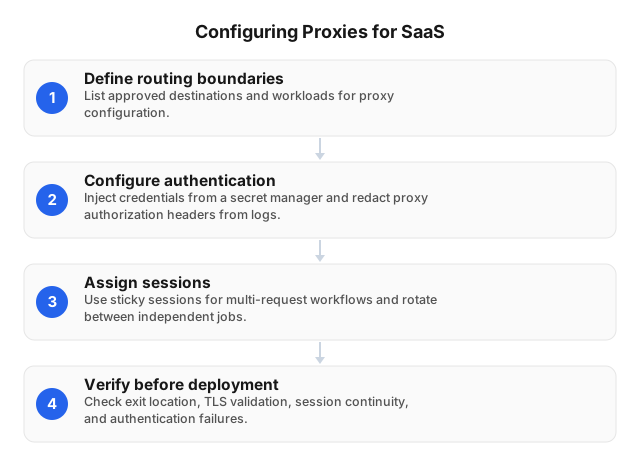
Configure routing, authentication, session policies, and failure behavior before enabling production traffic. Choose HTTP(S) or SOCKS5 according to client support, then validate the complete request path. Scope proxy settings to the workload, not the entire application. This limits unintended routing and reduces the chance of exposing credentials or internal traffic.
- Define routing boundaries. List approved destinations and workloads. Route localization workers through the required geography. Keep internal service calls outside that proxy configuration.
- Configure authentication. Inject credentials from a secrets manager and redact proxy authorization headers from logs. Use IP allowlisting only where outbound addresses remain predictable.
- Assign sessions. Keep one sticky session for a multi-request workflow. Rotate between independent jobs, not during authenticated actions.
- Verify before deployment. Check exit location, certificate validation, session continuity, latency, and authentication failures. Confirm that proxy failure cannot silently trigger direct connections.
Use the proxy automation setup guide when turning these checks into repeatable deployment tests.
Measure Completed Jobs, Not Just Proxy Speed
Optimize for completed application jobs rather than proxy response time alone. The supplied industry benchmarks report median response times of 0.93 seconds on stable CDN endpoints versus 4.63 seconds on real-world targets. These figures illustrate the importance of endpoint selection; they are not EProxies performance guarantees or predictions for your workload.
Measure connection setup, time to first byte, retries, and payload transfer separately. Those measurements help distinguish routing delays from destination behavior and application processing.
Reuse connections within the same proxy identity. Isolate connection pools by tenant, destination, and session. For a paginated analytics import, preserve the session throughout the job. Changing identity between pages can disrupt continuity or produce inconsistent results.
Cap concurrency per destination, honor rate-limit responses, and use backoff with jitter. Retry only operations that are safe to repeat, with explicit attempt and time limits.
Track billed bytes per completed import alongside latency. Repeated downloads can increase proxy spending without improving dataset completeness.
Verify Encryption and Restrict Access
Protect proxy traffic by validating TLS, limiting credentials, and restricting destinations. Check each connection leg rather than assuming the proxy protocol secures the entire path. Audit deployed workers as well as configuration templates. A correct template cannot protect a worker that starts with stale secrets or different routing settings.
- Validate TLS boundaries. Require HTTPS destinations and certificate verification. Confirm whether the client-to-proxy connection also uses TLS. SOCKS5 alone does not encrypt traffic. Reject invalid certificates instead of disabling verification.
- Restrict credentials and destinations. Store secrets outside application code and logs. Separate production credentials from development credentials. Allowlist approved destinations and prevent user-supplied URLs from reaching internal services.
- Test effective configuration. After deployment changes, test certificate rejection, credential revocation, and blocked destinations. Confirm that proxy failures cannot trigger unauthorized direct connections.
Record test results without storing authorization headers or customer payloads. For permitted collection workloads, apply these controls alongside web scraping practices for anti-bot protection, not as permission to bypass access restrictions.
Implementation Scenarios: Localization and Analytics
Validate complete workflows before expanding a proxy deployment. The supplied industry benchmarks report median success rates of 99.56% on stable infrastructure versus 94.30% on real-world targets. A successful connection does not prove that a workflow returned usable data. The scenarios below are illustrative designs, not verified customer case studies.
Localization QA: Keep Geography Consistent
Bind each browser context to a sticky session and isolate cookies between tenants. This keeps regional checks from sharing state or changing exits during a test. Validate the observed location before asserting currency, language, or availability. A requested exit region alone does not prove that the destination recognizes that location.
If the exit changes during a run, mark the result for review rather than treating it as a product defect. Keep the cookie jar and proxy session tied to the same test lifecycle.
Authorized Analytics: Control Retries Centrally
Queue permitted collection requests by destination and enforce rate limits in one shared scheduler. Independent workers should not each retry without accounting for the others. During a pilot, compare completed records, transferred bytes, and end-to-end latency against direct access. Exclude prohibited destinations rather than rotating around access controls.
Define completion at the dataset level. An HTTP success response may still contain a challenge page, missing records, or unexpected content. Validate the response before marking the import complete.
Avoid Session Breaks and Unsafe Retries
Bind proxy sessions to application workflows, not individual requests. A localization checkout test should retain its cookie jar and exit location throughout the transaction. Rotate between independent runs, not between cart and payment steps. Also separate connection failures from target responses so retries do not hide the source of errors.
Record connection time, time to first byte, retry count, and billable traffic without logging credentials. These measurements can reveal latency regressions that successful retries would otherwise conceal.
Do not automatically replay payment or provisioning requests after a timeout. The upstream operation may already have completed. Use application-supported idempotency keys and reconcile status before retrying.
Never disable certificate verification to resolve proxy errors. Repair the trust configuration instead. Honor target rate limits rather than changing identities to evade them.
FAQ
What are the best proxies for SaaS applications?
The best proxy depends on the workload and the destination’s requirements. Data center proxies can suit traffic accepted from hosting networks; residential proxies can support location-sensitive testing. Use sticky sessions when a workflow needs a consistent exit IP. Choose HTTP(S) or SOCKS5 based on client support, then test destination acceptance and session continuity.
How do proxies enhance SaaS application security?
A controlled forward proxy can centralize outbound access rules, authentication, and connection logging. Those benefits require configuration; proxy credentials alone should not authorize unrestricted access. Limit eligible workloads and destinations. Preserve destination certificate validation, redact secrets from logs, and retain application-level authorization. A proxy does not replace tenant isolation.
What are common mistakes in proxy configuration?
Common mistakes include mismatched protocols, exposed credentials, disabled certificate validation, and rotating IPs during stateful workflows. A login flow can fail if its exit changes after authentication. Bind the workflow to a suitable session and test failure behavior. A proxy outage must not silently trigger direct traffic when policy requires controlled outbound routing.
How can I optimize proxy performance for SaaS?
Reuse connections, choose an appropriate exit region, and limit concurrency according to destination capacity. Measure complete application requests, including TLS negotiation, retries, and response transfer. Compare results against a direct-access baseline using the same payloads. Honor rate-limit responses and bound retries so transient failures do not multiply traffic and bandwidth costs.
What are the security risks of using proxies in SaaS?
Proxy risks include credential theft, unencrypted traffic, excessive destination access, and sensitive information leaking through logs. A provider that terminates TLS introduces another trust boundary. Determine whether interception occurs before routing customer data through it. Apply destination allowlists, rotate secrets, and review data-handling terms. Proxy routing does not grant access permission.
This article was written by the EProxies team and reviewed against our editorial quality standards before publishing.