
Proxy Deployment in Cloud Services: Tips & Tricks
TL;DR: For secure cloud proxy deployment, choose the traffic direction first, restrict access, and validate routing, DNS resolution, and TLS before scaling. If you need residential exits, confirm the provider’s supported client configuration and test it from your deployed workload. Troubleshoot each network hop separately rather than treating every failed request as a proxy failure.
For engineers deploying on AWS, Google Cloud, or Azure, the critical distinction is between a forward proxy controlling outbound requests and a reverse proxy handling inbound application traffic. That choice determines network placement, authentication, monitoring, and cost controls—including how to handle changing egress IPs and applications that ignore proxy settings.
Understanding Proxy Deployment in Cloud Services
Place the proxy on the traffic path you intend to control: between workloads and external destinations, or between clients and application backends. Its placement determines which requests reach it. Forward proxies handle outbound requests; reverse proxies receive inbound requests and can terminate TLS or compress responses when configured to do so.
Define the traffic boundary
Document which connections must pass through the proxy and which may bypass it before configuring infrastructure. A proxy only enforces policy on traffic that reaches it. If workloads retain unrestricted direct internet access, client-side proxy settings alone do not establish an enforced outbound boundary; network rules must support that design.
- Outbound path: Workload → forward proxy → public endpoint. Use this model when cloud applications need a controlled route to external services.
- Inbound path: Client → reverse proxy → application backend. Use this model to centralize TLS handling and application routing.
Record permitted destinations, DNS resolvers, and bypass exceptions alongside the traffic diagram.
Choosing the Right Proxy Type for Your Cloud Environment
Start with traffic direction: use a forward proxy for outbound requests and a reverse proxy for inbound application traffic. Choose direction before protocol or IP source. HTTP(S) versus SOCKS5 describes protocol support; residential versus cloud-hosted describes the exit network. These choices complement each other rather than represent interchangeable proxy types.
| Choice | Cloud deployment fit | Selection trade-off |
|---|---|---|
| Forward proxy | Workloads accessing public endpoints | Configure clients explicitly; restrict permitted destinations. |
| Reverse proxy | Published applications needing centralized TLS handling or routing | Handles inbound application traffic, not general outbound access. |
| HTTP(S) | Web clients and APIs | Verify HTTPS tunneling support and whether the client-to-proxy connection uses TLS. |
| SOCKS5 | Applications with native SOCKS support | Confirm whether DNS resolves locally or through the proxy. |
| Residential exit | Authorized localization testing | Check location availability and session controls before choosing an endpoint. |
EProxies supports HTTP(S) and SOCKS5, with 72M+ residential IPs across 195+ countries. For a residential deployment, check the selected endpoint’s authentication method, supported client settings, and session options against the provider’s documentation. Test the observed exit address from the actual workload before relying on the configuration for location-sensitive tasks.
Step-by-Step Guide to Deploying Proxies in Cloud Services
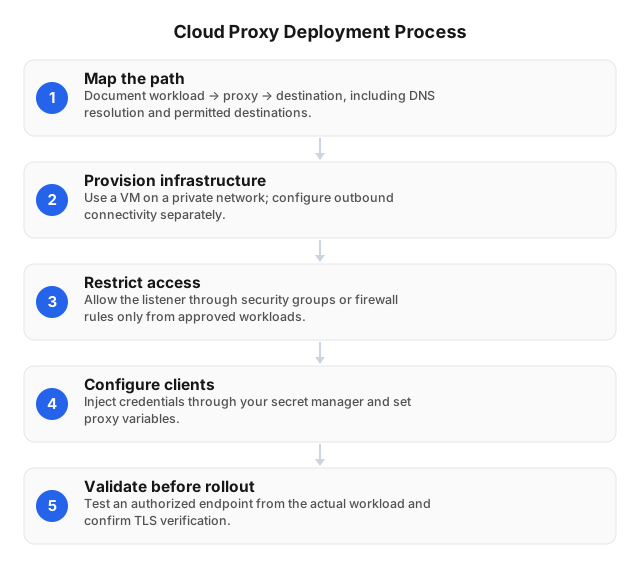
Plan the traffic path, restrict access, and validate connectivity before migrating workloads. Keep forward-proxy listeners private wherever possible; expose reverse proxies only through intended application entry points. Verify that each client supports the selected protocol rather than assuming environment variables enforce routing. Applications and libraries can interpret proxy settings differently.
- Map the path. Document workload → proxy → destination, including DNS resolution, outbound NAT, and permitted destinations.
- Provision infrastructure. Use a cloud VM or another runtime that supports the required protocols and connection lifetimes. Configure outbound connectivity separately from inbound access.
- Restrict access. Allow the listener through security groups or firewall rules only from approved workloads. Separate administrative access from proxy traffic.
- Configure clients. Inject credentials through your secret manager. Set proxy variables and
NO_PROXYexclusions where supported; verify application-specific settings. - Validate before rollout. Test an authorized endpoint from the actual workload. Confirm TLS verification, expected egress, and rejection of unauthorized clients.
- Roll out gradually. Start with a limited workload, watch connection failures and latency, and retain a tested rollback configuration.
Common Challenges in Cloud Proxy Deployment and How to Overcome Them
Cloud proxy deployments can introduce extra network hops, connection limits, and authentication dependencies. Separate proxy-path failures from destination delays before changing infrastructure. Measure connection setup and destination response time separately: a slow target, a congested route, and an overloaded proxy can produce similar end-to-end symptoms but require different fixes.
Latency under load
Compare direct and proxied requests to the same authorized endpoint from the same cloud region to isolate added overhead. Keep request size, connection reuse, and session behavior consistent. Check whether delays occur during connection establishment or after forwarding, then bound concurrency and retries so a slow destination cannot exhaust available connections.
Avoid comparing a lightweight health endpoint with a production page that performs redirects or returns a larger payload.
Security and scaling gaps
Restrict proxy ingress to approved workloads and require authentication; never expose an unauthenticated forward-proxy listener. Scaling can change source addresses, interrupt sessions, or exhaust shared connection limits. If authentication uses source-IP allowlisting, validate the actual public egress address after autoscaling or failover—not the workload’s private address.
Keep credentials out of deployment manifests and logs. Test whether newly created replicas receive the current secret and follow the expected NAT route.
Optimizing Proxy Performance in Cloud Environments
Optimize against measured connection pressure rather than CPU alone, and distribute traffic only across healthy instances. Measure proxy overhead separately from destination latency before adding capacity. Compare equivalent requests while holding destination, cloud region, payload, and session behavior constant; differences between test endpoints do not establish the proxy’s contribution to latency.
Distribute new connections across healthy replicas, but preserve affinity for session-dependent workloads. Drain existing connections before removing replicas; abrupt termination can trigger retries that amplify load.
Track active connections, queue time, memory, file-descriptor usage, and outbound bandwidth alongside CPU. Additional CPU will not resolve an exhausted file-descriptor limit or a saturated network link.
Reuse upstream connections where supported, cap per-destination concurrency, and bound retry budgets. For scraping workloads, efficient script design can help reduce unnecessary requests before infrastructure changes become necessary.
Security Considerations for Cloud-Based Proxies
Use restricted network access, authenticated clients, and encrypted transport on connections carrying credentials or sensitive data. Keep forward-proxy listeners private; expose reverse proxies only through intended application entry points. Separate administrative access from proxy traffic, and test denied connections during deployment validation—not just successful requests from an approved client.
Restrict AWS security groups, Google Cloud VPC firewall rules, or Azure NSGs to approved workload sources. For hybrid clients, prefer private connectivity or a VPN over publicly exposed listeners.
Store proxy credentials in a secret manager; exclude them from images, logged connection URLs, and deployment manifests. Verify certificates rather than disabling validation to bypass connection errors.
Limit forward-proxy destinations and CONNECT ports. Deny access to cloud metadata and internal management endpoints unless a documented requirement explicitly permits it, and account for destination names that resolve to private addresses.
Redact authorization headers, minimize URL logging, and set retention rules that match applicable privacy obligations. Patch the proxy software and its host through the same maintenance process used for other network-facing services.
Troubleshooting Proxy Deployment Issues
Isolate the failing hop: workload, cloud network, proxy, or destination. Reproduce the failure from the affected container or VM before changing configuration. Record the destination, timestamp, connection error, and request identifier without capturing credentials; a successful laptop test does not validate the workload’s DNS, routes, trust store, or authentication settings.
- Check reachability. Resolve the proxy hostname inside the workload. For connection timeouts, inspect security groups, network ACLs or firewall rules, and route tables.
- Verify client routing. Confirm the application uses the configured proxy and that
NO_PROXYdoes not unexpectedly bypass it. Check DNS behavior separately. - Separate authentication failures. Confirm credentials came from the current secret version. With IP allowlisting, verify the workload’s actual public egress address after NAT.
- Inspect TLS failures. Check certificate trust, hostname matching, and system time; never disable verification as a fix.
- Trace intermittent failures. Correlate proxy logs with connection counts, restarts, and destination responses before increasing retries.
Related reading
Use these guides for deployment decisions that extend beyond cloud networking. Regional access testing requires its own routing and compliance checks, while SaaS integrations need explicit handling of credentials, sessions, and client-library behavior. Apply those checks to the same workload and runtime used in production, not just a developer workstation.
- 5 Tips for Using Proxies in China Safely in 2026
- Best Practices for Proxy Usage in SaaS Applications (2026)
FAQ
Validate traffic direction, runtime support, performance, and access controls against the deployed application before approving a rollout. A proxy setting that works in a command-line client may not be honored by the application’s HTTP library. Run checks from the production-equivalent container or VM, using its DNS configuration, trust store, and secret-injection mechanism.
What is a proxy in cloud services?
A proxy in cloud services is an intermediary that forwards requests between clients and destination servers. A forward proxy handles outbound client traffic, while a reverse proxy receives inbound requests for an application and forwards them to its backends. Choose the traffic direction first, then check protocol compatibility and access controls.
How do you deploy a proxy in the cloud?
Deploy a cloud proxy by provisioning a suitable host, configuring forwarding rules, restricting access, and validating the complete request path before connecting production workloads. Verify that the selected runtime supports the required protocols and connection lifetimes rather than assuming an HTTP application endpoint supports forward-proxy tunneling. Keep credentials outside deployment images.
What are the challenges of cloud proxy deployment?
Cloud proxy deployment can involve added latency, connection exhaustion, authentication failures, session disruption, and variable bandwidth costs. Separate proxy failures from destination failures in monitoring: a reachable proxy can still encounter upstream timeouts or application-level rejections. For hybrid deployments, check overlapping network ranges and asymmetric return routes; for cost planning, account for compute, cloud egress, logging, and upstream proxy traffic charges.
How can I optimize proxy performance in the cloud?
Optimize cloud proxy performance by testing placement near clients, reusing connections where supported, and tuning concurrency against measured upstream capacity. Measure end-to-end latency against actual destinations, not just proxy connection time. Compare equivalent direct and proxied requests to identify added overhead. Preserve session affinity for stateful workflows, and cache only content that authorization rules and response headers permit.
What security measures are needed for cloud proxies?
Cloud proxies need authenticated access, restrictive firewall rules, encrypted transport, protected credentials, and timely patching. Never expose an unauthenticated forward proxy to the public internet; restrict destinations and block internal services and cloud metadata endpoints unless explicitly required. HTTPS tunneling does not automatically encrypt the client-to-proxy authentication exchange, so protect that connection separately. Redact credentials from logs and test that unauthorized clients are rejected.
This article was written by the EProxies team and reviewed against our editorial quality standards before publishing.