
Error Code 1015: Causes, Fixes, and Prevention in 2026
TL;DR: Error code 1015 indicates Cloudflare rate limiting. Its causes usually involve exceeding a site's request threshold; fixes start with pausing requests and respecting any supplied retry instructions. Prevent repeat errors by coordinating request budgets across workers—not simply changing IPs.
For developers and IT teams managing high-traffic websites or automation scripts, the key distinction is whether legitimate traffic exceeds your own rules or your scripts exceed another site's limits. This guide connects diagnosis to practical controls: centralized throttling, bounded retries, and session-aware residential proxy use for authorized testing and permitted data collection. You'll learn where request distribution helps—and where IP rotation merely hides an overloaded workflow without fixing it.
Understanding Error Code 1015
Cloudflare’s support documentation identifies rate limiting as the cause of error code 1015: the website’s configured controls have rejected a request for exceeding an allowed request frequency.
For developers, the relevant unit is traffic reaching the protected website—not how slowly an individual script appears to run. Concurrent workers can collectively exceed a limit even when each worker sends requests at a modest pace. Treat automation throughput as an aggregate workload rather than a collection of independent processes.
A 1015 response does not establish a universal request ceiling or cooldown duration. Those depend on the website’s configuration. Record request timestamps, affected URLs, and concurrent job activity so the incident can be correlated with server-side rate-limit events rather than diagnosed from the error page alone.
Common Causes of Error Code 1015
With that aggregate workload in mind, look for patterns that concentrate requests: concurrent workers, synchronized scheduled jobs, and immediate retries. A delay inside each worker does not control the combined workload; inspect request timestamps across the entire job.
Shared egress can also concentrate traffic when limits count requests by IP address. Multiple scripts using the same residential proxy session may therefore compete for the same allowance.
Distinguish traffic-related causes from browser-specific symptoms. Clearing browser cache is a secondary troubleshooting step for a previously displayed error page, not a way to reset the server-side limit.
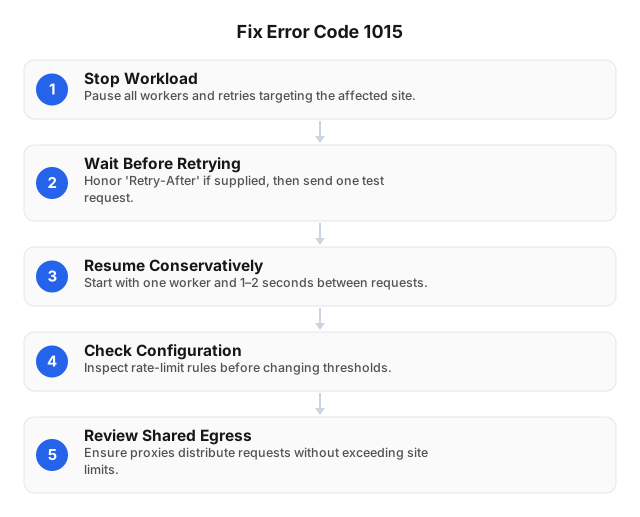
Immediate Fixes for Error Code 1015
Once you identify the affected workload, stop it, allow the restriction to expire, and restart at a lower request rate. Do not rotate IPs to continue a blocked workload.
- Stop the entire workload. Pause workers, scheduled jobs, browser refresh loops, and automatic retries targeting the affected site—not just the failing process.
- Wait before probing. Cloudflare recommends waiting before retrying. Honor
Retry-Afterif supplied, then send one test request. - Resume conservatively. Start with one worker and 1–2 seconds between requests. This is an initial setting, not a guaranteed safe interval; increase spacing if limits recur.
- Check your own configuration. Website owners should inspect the matching rate-limit rule before changing thresholds; preserve protection on sensitive endpoints.
- Review shared egress. Check whether other scripts using the same residential proxy session are consuming the allowance before resuming.
Advanced Prevention Techniques
After recovery, turn temporary pacing adjustments into controls that govern the whole workflow. Enforce the target’s permitted request budget across all workers, not separately per proxy.
- Coordinate concurrency. Use a shared queue and per-target limiter. Include browser navigation, background requests, and retries in the same budget so worker-local delays cannot leave aggregate bursts unchecked.
- Model human-paced workflows. Automation tools should mimic human interaction timing: wait for page readiness, avoid rapid repeated clicks, and pause between actions. Cursor movement cannot compensate for excessive traffic.
- Preserve authorized sessions. Keep cookies and residential proxy sessions aligned throughout a workflow. Use sticky sessions for authenticated workflows; reserve rotation for independent, permitted tasks such as approved localization tests.
- Stop retry amplification. Use capped exponential backoff with jitter when no retry instructions are supplied. Log the target, session, concurrency, and rate-limit events before cautiously resuming.
Using Residential Proxies to Avoid Rate Limiting
Within those controls, residential proxies can distribute authorized traffic across IPs, reducing concentration when a rule counts requests by source address. They do not increase a website’s permitted request rate or remove site-wide limits.
EProxies supports rotating sessions, sticky/static sessions lasting 24h+, and country-, city-, and ASN-level targeting. These options allow developers to match IP persistence and location to an approved workflow.
Keep proxy sessions within the shared per-domain request budget: separate IPs should not multiply your allowed traffic. Distribution also does not resolve limits tied to an account, session, or another identifier.
Respect target-site terms and applicable laws. Proxy rotation is not permission to circumvent access controls; if restrictions persist, consult the site operator rather than treating another IP as a fresh allowance.
Automation Tools and Best Practices
The next step is to implement these controls in the tools generating the traffic. Route Selenium navigation and retries through a central scheduler, with separate budgets by hostname and endpoint, capped concurrency, and no repeated page reloads.
Where an authorized HTTP endpoint suffices, skip browser automation to avoid unnecessary asset requests. A browser navigation can generate background traffic as well as the main page request, so scheduling must account for more than the number of scripted actions.
On a rate-limit response, pause affected jobs and apply the retry policy rather than allowing each worker to recover independently. Maintain the session continuity established for the authorized workflow.
Log endpoint, worker count, session identifier, response status, and cooldown duration. Alert on rising rate-limit responses, and require explicit restart criteria before draining queued jobs.
Comparing Error Code 1015 with Similar Errors
Reliable automation also needs to identify what it received. Error code 1015 identifies a Cloudflare rate-limit event; HTTP 429 expresses rate limiting at the HTTP protocol level. Distinguish the response’s status from its body text rather than treating every blocked request as the same failure.
| Signal | Diagnostic distinction | Automation response |
|---|---|---|
| Cloudflare error 1015 | A Cloudflare error page identifies a rate-limit event. | Pause the affected workload; inspect the matching rule if you manage the site. |
| HTTP 429 | The HTTP status identifies excessive requests, without necessarily identifying Cloudflare. | Honor Retry-After when supplied; reduce the request rate. |
| Previously displayed error page | Browser history or cached content alone cannot confirm an active restriction. | Verify a fresh network response before changing request scheduling. |
Detect both rate-limit signals, and record status, error text, endpoint, and session together. Changing residential IPs does not establish whether the rule counts requests by IP, account, or another key.
Related reading
- How to Effectively Scrape Wikipedia Data With Proxies: 2026
- How to Ignore SSL Errors With curl in 2026
FAQ
What is Error Code 1015?
It is Cloudflare’s error-page code for a request blocked by a website’s rate-limiting rule. The number is not an HTTP status code, so monitoring should capture both the response status and page content. For troubleshooting, include any displayed request identifier alongside the affected URL and timestamp so the site administrator can investigate the matching rule.
How can I fix Error Code 1015 quickly?
Stop the traffic source before retrying: pause scripts, background polling, and repeated browser refreshes, then follow the recovery steps above. If you manage the website, inspect rate-limiting events and correct an overly broad rule rather than disabling protection across the site.
What causes Error Code 1015?
A shared office connection, overlapping scheduled jobs, or a retry loop can trigger a block without any single user making unusually frequent requests. Investigate traffic under the rule’s counting criteria: several workers or users may share one allowance even when each client appears restrained.
How do residential proxies help prevent Error 1015?
They can reduce traffic concentration on a shared IP when the website’s rule counts requests by source address. Their usefulness depends on that counting criterion; account- or session-based limits require a different diagnosis. For approved localization testing, select the required location and session persistence, keep sessions consistent, and follow the target’s terms.
Can automation tools trigger Error 1015?
Yes. Parallel workers, frequent polling, and retries that immediately repeat failed requests can generate bursts. Browser automation also loads page resources, so a navigation can produce more traffic than a single API call. Include that traffic in the shared concurrency limit and retry budget, rather than budgeting only for explicit script requests.
Does clearing browser cache remove Error 1015?
No. It may help distinguish an old displayed error page from a fresh response, but it does not reset Cloudflare’s rate-limit counter. Repeated reloads can also generate additional requests. Wait first, then check the browser’s Network panel to determine whether the next request is still being blocked.
How long does Error 1015 last?
There is no fixed duration for every Cloudflare-protected site. Follow any supplied Retry-After guidance; otherwise, pause traffic and ask the site administrator for the applicable cooldown. A site owner should check the rule’s mitigation timeout, rather than assume that clearing cookies or restarting a browser will end the restriction.
This article was written by the EProxies team and reviewed against our editorial quality standards before publishing.