
Headless Firefox Proxy Scraping: Python Setup 2026
TL;DR: Use headless Firefox only when authorized data requires JavaScript, clicks, scrolling, or persistent browser state. Configure and verify the proxy before visiting the target, keep one IP for stateful flows, wait for specific DOM conditions, validate extracted fields, and capture HTML, screenshots, URLs, and logs before retrying failures.
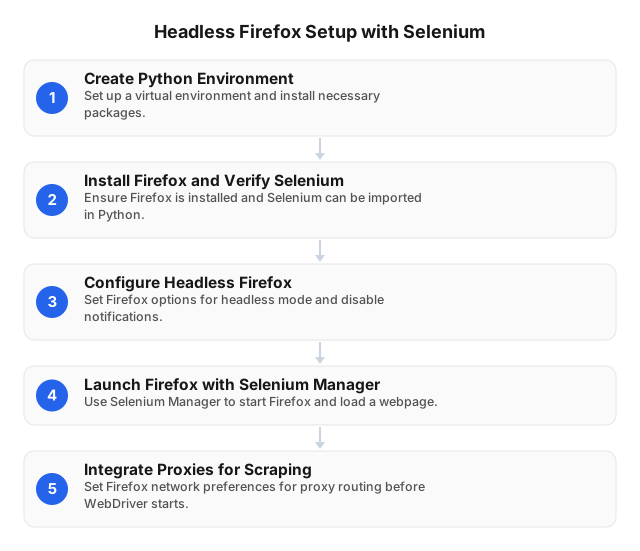
Decide Whether Selenium Is Necessary
Selenium controls Firefox through WebDriver, exposing rendered DOM content, cookies, JavaScript execution, forms, clicks, and browser navigation. That capability costs more CPU, memory, bandwidth, and startup time than an HTTP client.
Use the least expensive method that returns the required data:
| Target behavior | Recommended method |
|---|---|
| Documented API returns the required fields | API client |
| Initial HTML contains complete records | HTTP client plus parser |
| Permitted JSON endpoint exposes structured data | HTTP client |
| Data appears after JavaScript, scrolling, or clicks | Selenium |
| Authorized workflow spans login, filters, and pagination | Selenium with a sticky proxy session |
Inspect the browser’s Network panel before building automation. A permitted JSON response may eliminate hundreds of DOM operations and reduce transferred bytes; API-based collection can also reduce browser overhead.
Headless mode does not bypass authentication, access controls, rate limits, or privacy rules. Collect only authorized data and consult this guide to web-scraping laws by region and data type.
Install and Test Headless Firefox
Create an isolated environment and test Firefox without a proxy first:
python -m venv .venv
source .venv/bin/activate       # Linux or macOS
# .venv\Scripts\Activate.ps1    # Windows PowerShell

python -m pip install --upgrade pip selenium
from selenium import webdriver

options = webdriver.FirefoxOptions()
options.add_argument("-headless")
options.set_preference("dom.webnotifications.enabled", False)

driver = webdriver.Firefox(options=options)
driver.set_window_size(1440, 1200)
driver.set_page_load_timeout(30)

try:
    driver.get("https://example.com")
    print(driver.title, driver.current_url)
finally:
    driver.quit()
A fixed viewport prevents mobile and desktop templates from appearing unpredictably across workers. Keep quit() in finally; abandoned Firefox processes can exhaust a worker’s memory after repeated failures.
Pin the Python, Selenium, Firefox, and container-image versions used in production. Test upgrades against at least 100 representative URLs before replacing a stable runtime.
Configure Firefox to Use a Proxy
Set proxy preferences before creating webdriver.Firefox(). Supply the hostname without a URL scheme and use an integer for the port.
HTTP(S)
options = webdriver.FirefoxOptions()
options.add_argument("-headless")

options.set_preference("network.proxy.type", 1)
options.set_preference("network.proxy.http", "proxy.example.com")
options.set_preference("network.proxy.http_port", 8000)
options.set_preference("network.proxy.ssl", "proxy.example.com")
options.set_preference("network.proxy.ssl_port", 8000)
options.set_preference("network.proxy.no_proxies_on", "")
Configure both HTTP and SSL fields; otherwise, HTTPS destinations may not follow the intended route. An empty bypass list also prevents machine-specific exclusions from silently sending traffic directly.
SOCKS5 with remote DNS
options.set_preference("network.proxy.type", 1)
options.set_preference("network.proxy.socks", "proxy.example.com")
options.set_preference("network.proxy.socks_port", 1080)
options.set_preference("network.proxy.socks_version", 5)
options.set_preference("network.proxy.socks_remote_dns", True)
options.set_preference("network.proxy.no_proxies_on", "")
Remote DNS sends hostname resolution through the SOCKS route, reducing differences between the worker’s DNS location and proxy location.
For unattended jobs, prefer provider-supported IP allowlisting. If username/password authentication is mandatory, use a tested Firefox-compatible integration or a controlled local relay that authenticates upstream. Store credentials in environment variables or a secrets manager—not source code, proxy URLs written to logs, screenshots, or exception messages.
Verify the Route Before Collection
A successful connection does not prove that Firefox is using the correct location. Run a browser preflight from the same container as the scraper and confirm:
- The public IP differs from the worker’s direct IP.
- Country, city, and ASN match the requested route.
- The final target URL points to the expected regional storefront.
- Language, currency, and catalog region match the job.
- No proxy error, consent wall, login prompt, or challenge page replaced the expected content.
EProxies provides 72M+ residential IPs across 195+ countries, with country-, city-, and ASN-level targeting and HTTP(S) or SOCKS5 connections. Record the requested location, observed location, proxy session ID, and final URL with each result so wrong-region records can be isolated.
Use rotation according to browser state:
- Rotate between unrelated URLs that do not share cookies or server-side sessions.
- Keep one sticky route through pagination, locale selection, carts, or authorized account flows.
- Start a new browser when changing routes so cookies, cache, DNS state, and IP identity remain aligned.
- Never rotate midway through a transaction; the target may reset the session or return another regional catalog.
Wait for Data, Not an Arbitrary Number of Seconds
time.sleep(5) wastes five seconds on fast pages and still fails when a slow page needs six. Wait for the exact state required by the extractor:
from selenium.webdriver.common.by import By
from selenium.webdriver.support.ui import WebDriverWait
from selenium.webdriver.support import expected_conditions as EC

wait = WebDriverWait(driver, 20)

rows = wait.until(
    EC.visibility_of_all_elements_located(
        (By.CSS_SELECTOR, "[data-testid='product-row']")
    )
)
Prefer stable IDs and semantic data-* attributes. Use CSS selectors for straightforward attributes and structure; reserve XPath for text matching or relationships that CSS cannot express cleanly. Avoid generated classes and absolute paths such as /html/body/div[2]/div[3].
Locate elements again after filtering, pagination, or client-side rerendering. A cached WebElement refers to one DOM node; replacing that node causes StaleElementReferenceException.
Build Validation and Evidence into the Extractor
A loaded page is not necessarily a valid result. Product data, for example, might require a canonical ID, parseable price, currency, availability, expected country, source URL, and UTC timestamp.
from datetime import datetime, timezone
from pathlib import Path

artifact_dir = Path("artifacts")
artifact_dir.mkdir(exist_ok=True)

try:
    driver.get("https://example.com/products")

    card = wait.until(
        EC.visibility_of_element_located(
            (By.CSS_SELECTOR, "[data-testid='product']")
        )
    )

    record = {
        "product_id": card.get_attribute("data-product-id"),
        "price_raw": card.find_element(
            By.CSS_SELECTOR, "[data-testid='price']"
        ).text.strip(),
        "source_url": driver.current_url,
        "extracted_at": datetime.now(timezone.utc).isoformat(),
    }

    if not record["product_id"] or not record["price_raw"]:
        raise ValueError("Incomplete product record")

except Exception:
    driver.save_screenshot(str(artifact_dir / "failure.png"))
    (artifact_dir / "failure.html").write_text(
        driver.page_source, encoding="utf-8"
    )
    (artifact_dir / "failure.txt").write_text(
        f"url={driver.current_url}\ntitle={driver.title}\n",
        encoding="utf-8",
    )
    raise
finally:
    driver.quit()
Preserve raw values such as "$1,299.00" alongside normalized values such as 1299.00. Quarantine records with missing IDs, unexpected currencies, challenge-page markers, or mismatched locations instead of inserting them into the production dataset.
Troubleshoot Selenium Failures Systematically
Capture the exception type, selector, final URL, title, screenshot, HTML, Firefox version, proxy session ID, and requested location before changing the code. These artifacts separate selector defects from timing, browser, proxy, and regional-template failures.
| Error | Likely cause | Specific fix |
|---|---|---|
NoSuchDriverException | Firefox missing or incompatible runtime | Verify Firefox installation and Selenium Manager output; rebuild the worker image |
TimeoutException | Wrong condition, redirect, overlay, or slow route | Inspect the screenshot and final URL; correct the condition before increasing the timeout |
NoSuchElementException | Obsolete selector, iframe, or alternate template | Search captured HTML, switch frames, set the correct viewport, or update the locator |
StaleElementReferenceException | JavaScript replaced the DOM node | Wait for the update, then locate the element again |
ElementClickInterceptedException | Consent banner, modal, or sticky header | Wait for the overlay to disappear or scroll the control into view |
InvalidSelectorException | Invalid CSS or XPath syntax | Test the selector against saved HTML; do not retry unchanged code |
| Proxy connection error | Wrong endpoint, port, credentials, or allowlist | Test the route independently before reopening Firefox |
| Valid navigation, invalid record | Wrong locale, empty template, or challenge page | Quarantine the result and fix routing or validation |
Retry only transient failures. A bounded schedule of three retries after 2, 4, and 8 seconds limits duplicate traffic; syntax errors, missing browsers, and permanently obsolete selectors should fail immediately.
Measure Production Performance
Benchmark at least 100 permitted URLs spanning every template and target location. Hold the browser version, viewport, worker size, timeout, selector set, and concurrency constant while comparing proxy routes or plans.
Track:
valid-record rate = valid records / attempted URLs

retry rate = retried URLs / attempted URLs

p95 latency = 95th-percentile time to a validated record

cost per valid record =
    (proxy traffic cost + browser compute cost) / valid records
Do not use navigation success as the primary KPI. A challenge page or wrong-country storefront can load successfully while yielding no usable record.
Start with one Firefox process per worker and raise concurrency in small steps. Stop when valid records per minute decline, p95 latency rises sharply, or workers approach their CPU and memory limits. Add retry jitter, cap attempts per URL, and restart browsers at a measured memory or session-age threshold.
EProxies publishes 98.2% uptime backed by a 99.9% uptime SLA. Provider availability does not guarantee target-level extraction success, so evaluate valid-record rate and cost per valid record under the actual workload.
Select an EProxies Plan from Measured Usage
Published options include:
- Pay-as-you-go residential traffic from $0.25/GB
- Tiered residential pricing down to about $0.73/GB at 300GB
- ISP SOCKS5 proxies from $0.95 per IP
- Unlimited plans from $79 per month
Pay-as-you-go fits irregular collection; tiered traffic fits predictable monthly volume. ISP SOCKS5 can suit longer-lived routes, while unlimited plans require checking concurrency, location, session, and fair-use conditions. A cheaper gigabyte is not cheaper if wrong-region pages and retries double browser time.
For tool selection beyond Selenium, see Web Scraping Tools for Beginners: 2026 Guide. Compliance-sensitive projects may also benefit from How to Scrape Social Media Data Legally in 2026 and Web Scraping for Non-Profit Organizations in 2026.
FAQ
What are the benefits of using proxies in web scraping?
Proxies let authorized scraping jobs request location-specific pages, distribute independent sessions across IP routes, and keep the worker’s direct network address separate from target traffic. Residential routes can reproduce country-, city-, or ASN-specific storefronts, but every result still requires checks for the observed IP, locale, currency, final URL, and required fields.
How to troubleshoot common Selenium errors?
Capture the screenshot, HTML, final URL, title, exception, selector, browser version, and proxy session before retrying. Check runtime compatibility for driver errors, explicit-wait conditions and redirects for timeouts, frames and overlays for missing or blocked elements, and relocate nodes after DOM updates; retry only failures shown to be transient.
What are the best practices for web scraping with Selenium?
Use Selenium only for JavaScript or browser-state requirements, rely on explicit waits and stable selectors, keep sticky proxy sessions for stateful flows, and validate complete records rather than successful page loads. Pin runtime versions, cap retries, increase concurrency through measured tests, retain failure artifacts, protect credentials, and follow the target’s terms, access controls, rate limits, and applicable privacy law.
Is headless Firefox less reliable than headed Firefox?
Both modes use the Firefox engine, but viewport dimensions, prompts, extensions, and rendering conditions can differ. Reproduce failures in headed mode with the same Firefox version, profile, proxy route, cookies, and window size, then compare the final URLs, screenshots, and DOM snapshots.
This article was written by the EProxies team and reviewed against our editorial quality standards before publishing.