
Web Scraping Tools for Beginners: 2026 Guide
TL;DR: Start web scraping with one narrow public dataset, define the exact fields, test 20–50 rows, validate errors before scaling, then connect the output to tools your team already uses. Add proxies only when you need compliant geo-testing, session control, protocol flexibility, or more stable access to public web data.
Web scraping tools turn public web pages into structured data: CSV files, spreadsheets, JSON, databases, alerts, or API feeds. For beginners, the “best” tool is not the one with the longest feature list. It is the one that reliably captures the fields you need, exposes failures clearly, and fits the workflow you already use.
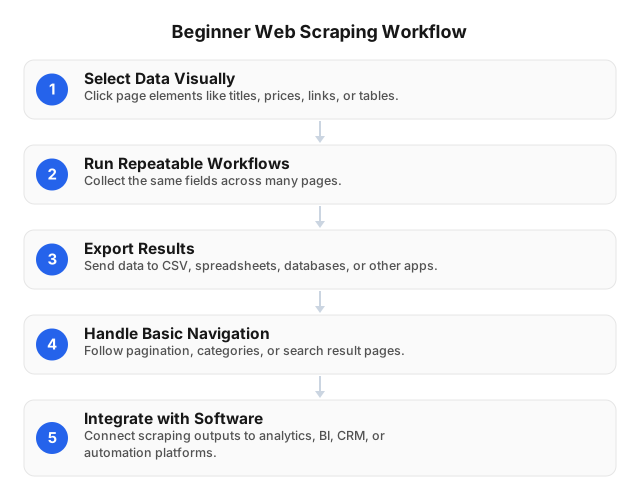
Start With the Workflow, Not the Tool
A beginner scraping project should begin with a data contract:
- Source: Which public pages or page types will be collected?
- Fields: Which columns are required?
- Frequency: One-time, daily, weekly, or event-triggered?
- Destination: Spreadsheet, CRM, database, dashboard, cloud folder, or API?
- Quality rule: What counts as a failed row?
- Owner: Who checks errors and maintains selectors when the site changes?
Example: instead of “scrape competitor products,” define: “Every Monday, collect product name, listed price, currency, availability, source URL, and collection timestamp for these 100 public product pages, then export clean rows to a spreadsheet for analyst review.”
That level of specificity prevents the most common beginner failure: collecting a large file full of breadcrumbs, ads, duplicate cards, promotional labels, and incomplete prices.
What Beginner Web Scraping Tools Should Actually Do
Once the workflow is clear, evaluate tools by how well they support that workflow. A beginner-friendly scraper should move you from manual copying to repeatable data collection. Prioritize these capabilities:
| Capability | Why it matters |
|---|---|
| Visual field selection | Lets non-developers select titles, prices, ratings, links, tables, and dates directly from a page. |
| Pagination support | Handles next-page links, category pages, search results, and infinite scroll. |
| Structured export | Sends rows to CSV, Excel, spreadsheets, cloud storage, databases, or APIs. |
| Scheduling | Runs hourly, daily, weekly, or on demand without manual clicking. |
| Validation signals | Shows failed pages, missing fields, duplicate rows, layout-change errors, and abnormal row counts. |
| Retry and backoff controls | Reattempts temporary failures without hammering a site or duplicating clean data. |
| Change detection | Compares new output with previous runs and triggers alerts for price, stock, rating, or content changes. |
A good rule: if the tool cannot show what failed and why, do not use it for business-critical scraping.
Which Tool Type Should Beginners Choose?
The right tool type depends on the destination, update frequency, and technical complexity of the pages you need.
No-code visual scrapers
Use no-code tools when you need public page data in a spreadsheet without writing code. They work well for product lists, public directories, event listings, job posts, review pages, and content audits.
Best for: marketers, analysts, founders, researchers, and operations teams.
Trade-off: fast to launch, but less flexible when pages rely heavily on JavaScript, change layout often, or require complex multi-step navigation.
Browser-extension scrapers
Browser extensions are useful for quick extraction from the page you are already viewing. They are good for samples, one-off research, and lightweight cleanup tasks.
Best for: 10–500 rows, quick checks, and ad hoc research.
Trade-off: limited scheduling, weaker retry logic, and inconsistent support for multi-page workflows.
API-based scraping workflows
API-based scraping is better when data must feed a dashboard, product, CRM, database, or internal reporting system. It takes more setup, but it is easier to monitor, automate, version, and connect to production tools.
Best for: recurring pipelines, developer workflows, dashboards, and higher-volume jobs.
Trade-off: you need to handle authentication, rate limits, response formats, error codes, schema changes, logging, and storage.
For a deeper technical path, see Creating Effective Web Scraping Strategies Using APIs.
Proxy-supported scraping stacks
Proxies are not required for every beginner project. A small scrape of a permissive public page may work without them. They become useful when you need region-specific public results, rotating or sticky sessions, distributed request routing, or testing how a public page appears in different countries.
For proxy fundamentals, review Comprehensive Overview of Proxy Server Types and Residential or Datacenter Proxies? 2026 Guide.
A Practical Beginner Web Scraping Workflow
With the tool category selected, keep the first implementation deliberately small. The goal is to prove the data is usable before you automate or scale it.
1. Define the business question
Good beginner questions are narrow and measurable:
- “What are the public prices for these 100 products every Monday?”
- “Which public job listings mention Python, SQL, or Salesforce in three target cities?”
- “Which product reviews mention shipping delays this week?”
- “Which public directory pages list companies in our target region?”
- “How do search snippets change for our top 50 pages?”
Avoid starting with “scrape the whole site.” Broad targets increase legal, technical, and quality risks.
2. Define fields before selecting the tool
For a price-monitoring workflow, your schema might look like this:
| Field | Example | Required? |
|---|---|---|
product_name | “Wireless Keyboard” | Yes |
price | 39.99 | Yes |
currency | USD | Yes |
availability | “In stock” | No |
source_url | Product page URL | Yes |
collected_at | 2026-07-09T10:00:00Z | Yes |
For each required field, decide what counts as invalid. For example, a price field should be numeric, a URL should be absolute, and a timestamp should use one consistent format.
3. Test 20–50 rows before scaling
A useful pilot is small enough to inspect manually but large enough to reveal layout and pagination problems. Check:
- Are required fields missing in more than 1–2% of rows?
- Are prices stored as numbers instead of text like “From $39.99”?
- Are URLs complete, canonical, and deduplicated?
- Did pagination collect page two, or repeat page one?
- Are sponsored cards, recommended products, or ads mixed into the output?
- Does the same page produce stable results when rerun?
- Are dates normalized into one timezone and format?
Do not schedule the scraper until the pilot output is trustworthy.
4. Integrate with tools your team already uses
After the pilot, connect scraping to existing workflows before building custom infrastructure. Common patterns include:
- Spreadsheet workflow: Scrape daily → export CSV/spreadsheet → analyst reviews exceptions → weekly report.
- CRM workflow: Scrape public directory data → validate manually → import approved rows into CRM.
- Dashboard workflow: Scrape → database table → BI dashboard → row-count and missing-field checks.
- Alert workflow: Scrape → compare with previous run → notify a team channel when price, stock, or rating changes.
- Research workflow: Public listings → normalized location/date fields → recurring internal summary.
Start semi-manually. For example, export weekly for two runs, verify the data, then schedule daily collection and change alerts only after the output is stable.
5. Monitor the scraper like a small production system
Even simple scrapers break when pages change. Track:
- URLs requested
- Successful pages
- Failed pages
- Empty rows
- Duplicate rows
- Missing required fields
- Retry count
- Average bandwidth per page
- Row count by run
- HTTP errors, especially 403, 404, 408, 429, and 5xx responses
If yesterday’s run returned 5,000 rows and today’s returns 43, stop the workflow and investigate before using the data.
Common Challenges Beginners Face
Most beginner issues come from assuming the page, output, or access pattern will stay stable. Watch for these problems early.
Page structure changes
A selector that works today may fail after a site redesign, A/B test, or seasonal promotion. Reduce risk by monitoring missing-field rates and keeping selectors as specific as necessary but not overly fragile.
JavaScript-rendered content
Some pages load key data after the initial HTML response. If prices, tables, or reviews are missing, you may need browser rendering, wait conditions, or an API-based workflow rather than a simple HTML scraper.
Pagination and infinite scroll
Beginners often collect only the first page or accidentally repeat the same page. Validate unique URLs, expected row counts, and page numbers during the pilot.
Rate limits and temporary blocking
HTTP 429, repeated timeouts, or sudden empty responses often mean your request pattern is too aggressive or unstable. Use delays, retries, backoff, and smaller batches instead of increasing speed.
Messy output
Raw scraped data often contains currency symbols, whitespace, duplicates, inconsistent dates, and promotional text. Build normalization rules early: trim whitespace, parse numbers, standardize dates, and deduplicate by source URL or unique ID.
Legal and ethical uncertainty
Public visibility does not mean unrestricted use. Review site terms, privacy expectations, robots.txt guidance, and data minimization requirements before collecting or storing data.
Ethical and Legal Guardrails
Turn those risks into operating rules. Treat scraping as data collection with responsibilities, not just automation.
- Review site terms and robots.txt guidance. Robots.txt is formalized in RFC 9309, but it is only one signal; terms, privacy expectations, and applicable law still matter.
- Avoid restricted areas. Do not scrape login-only pages, paywalled content, private dashboards, or data protected by access controls unless you have permission.
- Minimize personal data. Do not collect personal, sensitive, or unnecessary identifiers unless you have a lawful basis and retention plan.
- Respect server load. Use conservative request rates, retry limits, and backoff. HTTP 429 is a signal to slow down.
- Document the purpose. Record what you collect, why, how often, where it is stored, and who owns the workflow.
- Do not use proxies to bypass rules. Proxies should support responsible access patterns, localization, and session stability—not evasion.
For more detail, read ethical proxy use for web scraping.
Where EProxies Fits
When a compliant workflow needs proxy support, EProxies can help with public web access across locations, protocols, and session types. The network includes 72M+ residential IPs across 195+ countries, HTTP(S) and SOCKS5 support, rotating and sticky sessions, username-password authentication, and IP whitelist authentication. Residential service uptime is listed at 98.2%, backed by a 99.9% uptime SLA.
Choose the session type based on the job:
- Rotating sessions: Best for broad public data collection where each request can use a fresh route.
- Sticky sessions: Better for multi-step browsing, location consistency, or workflows that need session continuity.
- SOCKS5: Useful when your scraper, automation stack, or app needs protocol flexibility beyond HTTP(S).
- IP whitelist authentication: Good for server-based jobs from a fixed infrastructure IP.
- Username-password authentication: Good for local tools, laptops, scripts, or environments with changing IPs.
For cost planning, run a sample first. Measure bandwidth per page, multiply by expected monthly pages, and add a retry buffer. EProxies offers pay-as-you-go residential traffic from $0.25/GB, tiered residential pricing down to about $0.73/GB at 300GB, ISP SOCKS5 from $0.95/IP, and unlimited plans from $79/month.
If you are comparing proxy options, see Comparing Free vs Paid Proxy Servers: Pros and Cons and Exploring the Security Benefits of Rotating Proxies.
Editorial Test: What Broke First
The same principles showed up in an internal editorial QA workflow. We tested a small public price-monitoring setup using a visual scraper, spreadsheet export, and a proxy configuration for location consistency. The first run looked successful, but the output was noisy: product titles, prices, promotional text, breadcrumbs, image URLs, and unrelated labels were mixed into the same dataset.
After reducing the schema to five fields—product name, price, availability, URL, and collection date—the data became much easier to verify. The practical lesson: clean rows matter more than volume. A scheduled scrape of 200 accurate rows is more valuable than 20,000 untrusted records.
FAQ
What is web scraping?
Web scraping is the automated collection of web page information into structured formats such as spreadsheets, CSV files, databases, or API feeds. Beginners commonly use it for public price tracking, SEO research, market monitoring, content audits, and data enrichment.
Which web scraping tool should a beginner choose first?
Choose the simplest tool that can reliably produce clean data. A no-code visual scraper is usually best for spreadsheet workflows, while API-based scraping is better for recurring dashboards, databases, and product integrations.
What are the common challenges beginners face in web scraping?
Beginners commonly struggle with changing page layouts, JavaScript-rendered content, pagination errors, rate limits, duplicate rows, and messy fields such as prices or dates stored as text. They also need to understand ethical and legal boundaries, especially around restricted content, personal data, and server load. The safest approach is to test 20–50 rows, validate required fields, monitor errors, and scale only after the workflow is stable.
How can beginners integrate web scraping tools into their existing workflows?
Beginners should first export scraped data into tools they already use, such as spreadsheets, CSV files, cloud storage, CRMs, databases, or BI dashboards. A practical first workflow is: define fields, run a 20–50 row test, validate the output, schedule the scrape, and send changes to the reporting or operations channel your team already checks. As the process matures, use APIs, connectors, or automation rules to reduce manual uploads and trigger alerts.
How can beginners ensure their web scraping activities are ethical?
Beginners can keep scraping ethical by collecting only necessary public data, reviewing site terms and robots.txt guidance, avoiding login-only or restricted content, and respecting rate limits. They should minimize personal data, document the purpose of collection, and stop or slow down when servers return rate-limit or access errors. Proxies should be used for responsible access, localization, and session control—not to bypass rules.
Do beginners need proxies for web scraping?
Not always. Proxies become useful when you need geo-specific public results, rotating or sticky sessions, distributed request routing, or more controlled access patterns. If you use proxies, pair them with ethical rules, reasonable crawl speeds, and careful monitoring.
How should beginners estimate scraping costs?
Run a small sample first and measure bandwidth per page, failed requests, retry rate, and maintenance time. Then project monthly volume and compare it with scraper fees, proxy bandwidth, storage, and validation effort. This is more accurate than choosing a plan based only on advertised scale.
This article was written by the EProxies team and reviewed against our editorial quality standards before publishing.