
Dynamic Proxies for Fast Web Requests
TL;DR: Dynamic proxies improve scraping speed by reducing failed requests, retries, throttling, and location mismatches—not by magically lowering latency on every request. The practical setup is: use rotating residential IPs for independent public pages, sticky sessions for multi-step flows, target only the locations you need, cap concurrency per domain, and monitor success rate, retry rate, p95 latency, bandwidth per successful page, and status-code patterns.
What Dynamic Proxies Actually Do
A dynamic proxy setup routes requests through a proxy gateway that can change the exit IP according to your rules. In scraping, that usually means:
- Rotating sessions: a new or changing exit IP across requests, time windows, or retry events.
- Sticky sessions: the same exit IP is held for a defined period so a workflow remains consistent.
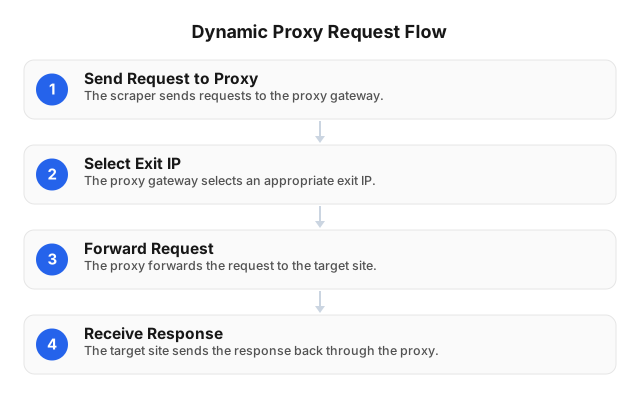
The request path is simple:
Scraper → Proxy Gateway → Residential Exit IP → Target Website → Response
The engineering value is not “more randomness.” It is controlled routing: choosing the right IP type, location, session behavior, protocol, and request pace for the target.
In our proxy troubleshooting work, the biggest performance gains usually come from reducing avoidable failures: retry storms, 429 throttling, region mismatches, broken sessions, and overloaded routes. A crawler with a 3% retry rate will often finish faster and cheaper than one with a 15% retry rate, even if both have similar median response times.
Dynamic proxies should also be used within responsible boundaries. Respect site terms, applicable laws, privacy rules, and reasonable request rates. For compliance fundamentals, see ethical proxy use for web scraping.
When to Use Rotating vs. Sticky Sessions
Once the proxy role is clear, the next decision is session behavior. Rotation and stickiness solve different problems, and using the wrong one can slow a crawl down.
Use rotating sessions for independent requests
Rotation is best when each page can be fetched independently and does not rely on the previous request. Good examples include:
- Public product pages
- Search result monitoring
- Marketplace listings
- Price comparison
- Large catalog discovery
- Public review or metadata collection
Here, rotation distributes traffic across residential routes and reduces overuse of a single IP. If one route starts returning 403, 429, timeouts, or slow responses, your crawler can move to another eligible route.
Use sticky sessions for multi-step workflows
Sticky sessions are better when the target expects continuity. Use them for:
- Checkout or cart QA
- Login-protected test environments
- Browser automation
- Multi-step forms
- Localized account flows
- Region-specific UX testing
If your IP changes halfway through a cart, form, or login session, the target may invalidate the flow. In those cases, aggressive rotation hurts speed because it creates more failures.
EProxies supports rotating sessions, sticky sessions, and static options for longer-running workflows, with country, city, and ASN targeting. The fastest configuration is the one that matches the workflow—not the one that rotates most frequently.
Why Dynamic Proxies Can Make Scraping Faster
Dynamic proxies rarely improve speed by making a single request inherently faster. They improve job completion time by reducing wasted work.
Common bottlenecks include:
| Bottleneck | What happens | Proxy strategy |
|---|---|---|
| 429 rate limits | Too many requests from one origin | Lower concurrency, rotate by domain, add backoff |
| 403 blocks | Route or behavior is rejected | Change exit IP, headers, pacing, or session mode |
| Timeouts | Route or target is slow | Set timeout caps and circuit breakers |
| Geo mismatch | Wrong country, currency, language, or inventory | Use country/city targeting |
| Session breakage | IP changes during a multi-step flow | Use sticky sessions |
| Retry storms | Failed requests multiply traffic | Cap retries and classify errors |
A practical benchmark should track:
- Success rate
- Retry rate
- Median and p95 response time
- Timeout rate
- HTTP status-code distribution
- Bandwidth per successful page
- Session failure rate
- Results by domain, region, protocol, and session type
For example, if a 100,000-page crawl has a 12% retry rate, you are not running 100,000 requests—you are running at least 112,000 attempts, plus extra wait time and bandwidth. Reducing the retry rate to 4% can save more time than shaving a few milliseconds off median latency.
EProxies lists 98.2% uptime and backs availability with a 99.9% uptime SLA, but real scraping speed still depends on the target website, crawler code, headers, browser requirements, concurrency, and request pacing.
Geo-Targeted and Region-Specific Workflows
Location is one of the most common reasons to use dynamic residential proxies. Many websites vary content by region, including:
- Prices
- Inventory
- Shipping options
- Currency
- Search rankings
- Language
- Ads
- Availability notices
- Redirect behavior
Routing through exit IPs in the region you need to test helps keep results aligned with the market you are measuring. A QA team may verify a Canadian checkout flow; a travel data team may compare public prices by country; an ad verification team may confirm whether a campaign appears in a specific city.
For sensitive region-specific workflows, residential or ISP routes often look closer to normal consumer traffic than generic hosting-origin routes. EProxies provides residential coverage across 195+ countries and ISP SOCKS5 options from $0.95/IP, giving teams flexibility when they need either rotation or stable ISP-based identity.
Use this responsibly. Dynamic proxies can support compliant localization, QA, market research, and public data collection, but they should not be used to bypass access controls, licensing restrictions, privacy protections, or platform rules.
Dynamic vs. Static Proxies
Session behavior also connects to the broader choice between dynamic and static proxies.
| Factor | Dynamic proxies | Static proxies |
|---|---|---|
| IP behavior | Rotates or stays sticky based on rules | Keeps one IP for longer periods |
| Best fit | Public data collection, geo-testing, distributed scraping | Stable account workflows, dashboards, fixed identity tasks |
| Speed impact | Reduces retries and throttling when configured well | Predictable route, but less adaptive under pressure |
| Risk if misused | Over-rotation can break sessions | Overuse can trigger throttling |
| Session control | Rotating and sticky options | Stable by default |
| Geo flexibility | Strong when paired with location targeting | Depends on available static inventory |
Choose dynamic proxies when you need scale, location variety, or route diversity. Choose static proxies or sticky sessions when continuity matters more than rotation.
EProxies supports both models across a large residential network: 72M+ residential IPs with deep country coverage, including approximately 5.6M US IPs, 1.9M UK IPs, 1.4M Germany IPs, 1.3M France IPs, and 1.0M Canada IPs. For a broader comparison, see Residential or Datacenter Proxies? 2026 Guide and this overview of proxy server types.
Implementation Playbook for Web Scraping
With the proxy model selected, implementation should start small and scale only after the error profile is understood.
1. Start with a small benchmark
Before scaling, test one domain, one region, one protocol, and one session strategy. Run enough requests to expose patterns—often 500 to 5,000 requests is enough for an initial read.
Measure success rate, p95 latency, retries, timeouts, and bandwidth per successful page. Do not optimize from averages alone; p95 and error distribution usually reveal the real bottleneck.
2. Pick the right protocol
Use HTTP(S) for standard scraping, API-style requests, and most browser automation. Use SOCKS5 when your stack needs broader traffic handling or SOCKS-level compatibility.
EProxies supports both HTTP(S) and SOCKS5, with username-password authentication and IP whitelist authentication.
3. Match rotation to the workflow
Use rotation when requests are independent. Use sticky sessions when the task has continuity.
A simple rule:
- Product listing crawl: rotate.
- Search monitoring by region: rotate within the target region.
- Checkout QA: sticky.
- Login-safe test environment: sticky.
- Browser session with cookies: sticky.
- Retry after 429/timeout: rotate, but cap retries.
Avoid changing IPs mid-form, mid-cart, or mid-login. That often creates the exact failures you are trying to avoid.
4. Target only the locations you need
If you need UK search results, use UK targeting. If you need city-level ad verification, use city targeting. If the target reacts differently by network, ASN targeting can help isolate behavior.
Overly broad targeting makes debugging harder because you cannot tell whether differences come from the page, the region, the IP route, or the crawler.
5. Control concurrency per domain
Fast scraping is controlled scraping. Add:
- Per-domain request limits
- Exponential backoff for 429, 403, and 5xx responses
- Retry caps, such as 2–3 attempts before classifying failure
- Timeout thresholds by target type
- Separate queues for browser-heavy pages
- Circuit breakers when error rates spike
For automation tactics, see How to Automate Web Scraping Without Getting Blocked.
6. Separate proxy issues from crawler issues
Not every failure is a proxy failure. A 403 may come from headers, cookies, JavaScript fingerprinting, missing tokens, excessive pace, or blocked content access. A timeout may come from the target server, your parser, your browser pool, DNS, or route quality.
Tag errors by class:
- Proxy authentication error
- Connection timeout
- Target timeout
- 403/429 response
- CAPTCHA or challenge page
- Parser failure
- Empty or region-mismatched content
- Session continuity failure
This makes scaling decisions much clearer.
Pricing and Cost Control
Proxy cost should be measured by successful output, not just sticker price. A cheap route that creates repeated failures can become expensive through wasted bandwidth, retries, and engineering time.
EProxies options include:
- Residential pay-as-you-go from $0.25/GB
- Tiered residential pricing, including around $0.73/GB at 300GB
- ISP SOCKS5 from $0.95/IP
- Unlimited plans from $79/month
To control spend, monitor bandwidth per successful page and retry rate. If retries rise, pause scaling and fix the cause before increasing volume. For more on proxy economics, see Comparing Free vs Paid Proxy Servers: Pros and Cons.
Best Practices Checklist
- Confirm the target data is allowed to be collected.
- Use rotating residential sessions for independent public pages.
- Use sticky sessions for carts, logins, forms, and browser flows.
- Keep the IP location aligned with the market being tested.
- Start with a small benchmark before scaling.
- Cap concurrency per domain, not just globally.
- Add backoff for 429, 403, and 5xx responses.
- Limit retries to avoid retry storms.
- Track p95 latency, success rate, retry rate, status codes, timeouts, and bandwidth per successful page.
- Segment metrics by domain, country, city, protocol, and session type.
- Re-test whenever the target site, crawler, headers, proxy region, or protocol changes.
FAQ
What are dynamic proxies?
Dynamic proxies route requests through a gateway that can change the exit IP according to rotation, targeting, or session rules. In web scraping, they are mainly used for IP rotation, geo-targeting, and session control.
What are the best practices for implementing dynamic proxies in web scraping?
Match the session type to the task: rotating proxies for independent public pages and sticky sessions for carts, logins, forms, or browser workflows. Use precise country/city/ASN targeting, cap concurrency per domain, add exponential backoff for 429/403/5xx responses, and limit retries to prevent retry storms. Monitor success rate, p95 latency, retry rate, status codes, timeout rate, and bandwidth per successful page, segmented by domain and region.
Are dynamic proxies faster than static proxies?
Not always on a single request. Dynamic proxies can make the full scraping job faster by reducing throttling, blocked requests, and retries. Static proxies can be better when a workflow requires a stable identity.
How can dynamic proxies help in bypassing geo-restrictions?
Dynamic proxies can route permitted requests through residential IPs in a specific country, city, or network, so a website returns the regional version of its content. This is useful for localization QA, ad verification, public price comparison, and market research. They should not be used to violate access controls, licensing restrictions, privacy rules, or platform terms.
When should I use sticky sessions?
Use sticky sessions when changing IPs would break the workflow. Common examples include checkout testing, login-safe QA, browser automation, multi-step forms, and sessions that depend on cookies or regional continuity.
Does EProxies support SOCKS5?
Yes. EProxies supports SOCKS5 as well as HTTP(S), with username-password authentication and IP whitelist authentication.
What metrics should I monitor?
Track success rate, median and p95 response time, retry rate, timeout rate, HTTP status codes, bandwidth per successful page, and session stability. Segment these metrics by domain, protocol, region, and session type so you can identify the real bottleneck.
What commonly causes proxy failures?
Common causes include incorrect credentials, IP whitelist mismatch, wrong protocol or port, excessive concurrency, weak timeout settings, inconsistent sticky-session IDs, and target-site rate limits. Troubleshoot by isolating one domain, one region, one protocol, and one session mode before scaling again.
This article was written by the EProxies team and reviewed against our editorial quality standards before publishing.