
Essentials of Proxy Management for Online Privacy: 2026
TL;DR: Protect proxy privacy by configuring each application’s route, securing credentials, verifying DNS behavior, and blocking direct connections during outages. A proxy changes the IP a destination sees, but logins, cookies, and browser fingerprints can still identify users. Test the actual workload during normal operation and proxy failure before deployment.
Understanding Proxy Management
Manage proxies per application because browsers, background services, and command-line clients can follow different routing settings on the same device. Document each workload’s approved route, credential owner, DNS behavior, and outage policy. Specify which connections must stop during proxy failure instead of trusting client defaults.
- Routing: Record endpoints, protocols, and approved bypass rules.
- Identity: Separate employee browsing from automated workflows and their cookie stores.
- Confidentiality: Require HTTPS; proxy protocols do not necessarily encrypt the client-to-proxy connection.
- Accountability: Define credential access, log retention, and revocation procedures.
Setting Up Your Proxy for Privacy
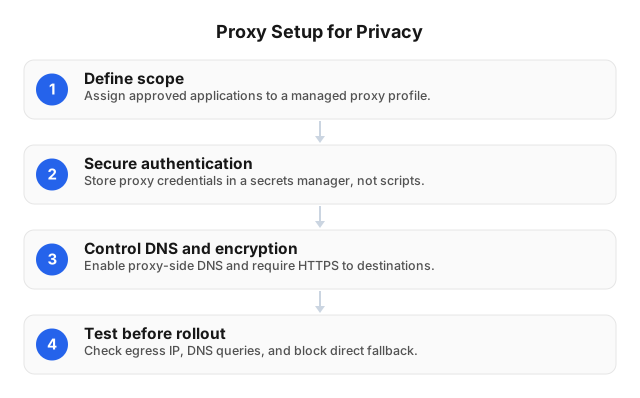
Configure the endpoint, authentication, DNS resolution, and outbound restrictions as separate controls. Selecting HTTP(S) or SOCKS5 does not establish all four. Verify application behavior using a destination you control and network logs: a successful response proves reachability, but not that traffic followed the approved route or avoided local DNS resolution.
- Define scope: List covered applications, services, destinations, and exceptions.
- Enter connection details: Use the provider-issued hostname, port, protocol, and authentication method.
- Protect credentials: Retrieve secrets at runtime rather than embedding them in scripts.
- Control DNS: Select proxy-side resolution where supported; require HTTPS with certificate validation.
- Restrict egress: Permit approved proxy connections and block direct destination access.
Run a controlled routing and outage test
Test the actual application against a controlled HTTPS endpoint, then make the proxy unreachable while ordinary internet access remains available. The endpoint should observe the expected exit during normal operation and receive no direct request during failure. A command-line test does not validate a browser’s separate configuration.
Inspect bypass lists and explicitly select remote DNS in SOCKS5 clients where supported; SOCKS5 itself provides no encryption.
Confirm blocked fallback through destination and egress logs, not an application error alone. Check DNS using a diagnostic hostname and resolver logs; inspect browser WebRTC behavior where relevant. Retain configuration versions and results without secrets. See Proxy Server Setup for Privacy and Security in 2026.
Common Mistakes in Proxy Management
Fix untested direct fallback, exposed credentials, and ignored application settings before tuning rotation or latency. These failures can expose traffic even when routine requests succeed through the proxy. Repeat exit-IP, DNS, and outage checks after client updates or routing changes, before restoring sensitive workloads.
Use workload-specific credentials where available so one compromised job can be revoked without interrupting unrelated services. Verify that revoked credentials stop working.
Redact authorization headers, cookies, and sensitive URL parameters before storing logs. Assign routing alerts to a named owner and include the affected application and configuration version—not its secrets.
Advanced Proxy Management Techniques
Separate workflows by credentials, cookie store, and proxy session, then align rotation with application state. Keep dependent requests on a stable exit and rotate between independent tasks. Coordinate workers through a shared request budget so additional exits do not multiply authorized traffic or produce synchronized retries after an outage.
Rotate at workflow boundaries
Keep an authenticated transaction on one exit until its dependent actions finish. Changing addresses between login and subsequent requests can invalidate sessions or trigger verification. Isolate independent jobs in separate browser profiles because IP rotation does not remove cookies, account identifiers, or locally stored session data.
Choose session duration around the workflow using Advanced Techniques for Proxy IP Rotation: 2026.
Enforce fail-closed routing
Enforce mandatory proxy use with outbound network rules, not application preferences alone. Permit approved proxy endpoints, block direct destination connections, and handle DNS explicitly. Scope restrictions to the intended process, container, or host so an unrelated application’s exception cannot become a bypass for protected traffic.
Repeat outage tests after firewall, client, or endpoint changes. If endpoint addresses change through DNS, ensure firewall rules track them without permitting unrestricted outbound access.
Coordinate request budgets
Apply destination-level limits across workers and exits through a shared scheduler or rate-limit store. Honor Retry-After, reduce concurrency when throttled, and cache responses where permitted. Adding addresses does not increase an authorized allowance; route retries through the same budget as new requests to prevent recovery bursts.
Tools and Software for Proxy Management
Select tools by enforceable controls: routing, credential access, outbound restrictions, and evidence of actual behavior. A browser extension cannot govern every process on a device. Before approving software for sensitive workloads, require an outage test and confirm that configuration exports exclude passwords, tokens, and other secrets.
| Tool | Acceptance check |
|---|---|
| Managed browser policies | Can users override routing or bypass rules? |
| OS proxy settings | Which applications ignore them? |
| Local forwarding agent | Where does DNS resolve during upstream failure? |
| Secrets manager | Can workloads retrieve credentials without logging them? |
| Configuration management | Are changes reviewed, versioned, and reversible? |
| Egress firewall | Does direct traffic remain blocked during outages? |
EProxies supports HTTP(S) and SOCKS5 across 72M+ residential IPs in 195+ countries. Pay-as-you-go residential starts from $0.25/GB; tiered residential pricing reaches approximately $0.73/GB at 300GB. ISP SOCKS5 starts from $0.95/IP, and unlimited plans start at $79/month. Confirm the applicable pricing structure and session options before deployment.
Monitoring and Maintaining Proxy Performance
Track route correctness separately from speed and request success, grouping results by application, proxy pool, and destination. A fast direct connection is still a routing failure. A destination rejection may occur despite successful proxy routing; recording these as separate outcomes prevents misleading availability reports and speeds diagnosis.
Compare repeatable requests to a controlled HTTPS endpoint with authorized workload requests. Keep payload, concurrency, and connection reuse consistent; record latency percentiles and timeout counts rather than successful-request averages alone.
| Observation | First investigation |
|---|---|
| Authentication failures | Credentials, access restrictions, client support |
| Throttling | Shared request budget and Retry-After |
| Latency increase | Exit location, connection reuse, destination timing |
| Unexpected exit IP | Bypass rules, fallback, application settings |
| Unapproved DNS path | Remote DNS support and resolver configuration |
EProxies lists 98.2% uptime, backed by a 99.9% uptime SLA. Neither figure is a measurement of your application’s availability; establish a workload baseline and review the SLA’s scope separately.
Deployment Scenarios and Acceptance Checks
Approve deployment only after the intended application demonstrates correct routing, blocked fallback, session isolation, and acceptable performance. A health endpoint cannot establish behavior at every business destination. Retain configuration versions alongside test results so operators can connect a failure to the routing or client change that introduced it.
Localization testing without corporate IP exposure
Use a dedicated application profile and country-targeted residential exits for authorized storefront checks. Verify the destination-visible IP and DNS path before assessing localized content. Then disable the proxy while ordinary internet access remains available; the protected application must not send the storefront a direct request.
Record country, exit, configuration version, and outage result. Control cookies and account settings when comparing regions because both can affect displayed content.
Public-data research without session crossover
Isolate approved collection jobs from employee sessions using separate credentials and cookie stores. Keep dependent requests sticky, rotate between independent jobs, and enforce one destination budget across workers. This prevents a collection job from reusing an employee’s authenticated session—a risk that changing the exit IP cannot address.
Log job identifiers, timing, and failure categories without authentication material or sensitive URL parameters.
Related Reading
Use the anonymity guide to identify signals that survive IP changes, then apply the setup guide to routing controls. Turn the findings into acceptance criteria for each application: an expected exit, approved DNS path, protected credentials, and evidence that direct fallback remains blocked during an outage.
- Choosing Proxies for Online Anonymity: 2026 Guide
- Proxy Server Setup for Privacy and Security in 2026
FAQ
Verify privacy and performance in the application carrying the workload, not just a separate proxy tester. Browsers, system preferences, and forwarding agents can behave differently on one device. Keep configuration versions with test results, and repeat affected checks whenever updates change routing, authentication, or DNS behavior.
What is proxy management?
Proxy management is the configuration, security, monitoring, and maintenance of application proxy routes. It covers endpoints, credentials, sessions, DNS, and outage behavior. Cookies, logins, and browser fingerprints require separate identity controls.
How do I set up a proxy for privacy?
Configure your application’s proxy endpoint and authentication, verify proxy-side DNS where supported, and block direct fallback. Protect credentials and require HTTPS with certificate validation. Check the observed exit IP, then disable the proxy while internet access remains available to confirm direct requests stop.
What are common proxy management mistakes?
Common mistakes include exposed credentials, untested direct fallback, sensitive logging, and treating rotation as anonymity. Test applications individually because some ignore system settings. Redact secrets before storing logs and repeat routing checks after updates.
What tools help with proxy management?
Configuration management, a secrets manager, an egress firewall, and monitoring provide the core controls. Use reviewed, reversible configuration changes and controlled credential retrieval. Test firewall enforcement during outages and distinguish routing violations from destination failures.
How can I monitor proxy performance?
Monitor latency percentiles, timeouts, authentication failures, response codes, and observed exit IPs using controlled requests and application telemetry. Compare controlled HTTPS checks with authorized workload requests under consistent conditions. Group results by application, pool, and destination; alert separately on routing violations and deviations from your baseline.
Does a proxy encrypt all company internet traffic?
No, a proxy does not automatically encrypt all company internet traffic. HTTPS protects content with certificate validation intact; SOCKS5 alone provides no encryption. TLS-inspecting intermediaries can access decrypted content, so review their access controls and privacy obligations.
Should company applications use rotating or sticky proxy sessions?
Use sticky sessions for dependent workflows and rotating sessions for independent authorized tasks. Unexpected IP changes can disrupt logins and multi-step transactions. Neither option replaces cookie isolation, authentication controls, or destination-wide request limits.
This article was written by the EProxies team and reviewed against our editorial quality standards before publishing.