
Advanced Techniques for Proxy IP Rotation: 2026
TL;DR: Use request-based rotation for independent public pages, sticky sessions for related navigation, and bounded retries for transient failures. Verify exit behavior before scaling; an IP change does not reset cookies or authorize access. Measure validated records and traffic consumption rather than counting IP changes or successful connections alone.
Introduction to Proxy IP Rotation
Proxy rotation changes the exit address a destination sees while leaving application state, including cookies, under your client’s control. Choose rotation boundaries around the work: independent fetches can use separate exits, while pagination and related navigation may require continuity. Changing an address mid-workflow can disrupt state or complicate diagnosis.
Keep three identities distinct:
- Exit identity: The proxy IP visible to the destination.
- Application identity: Cookies, accounts, and browser state.
- Workload identity: The task whose requests should remain consistent.
A proxy hides your direct source IP from the destination, but cookies and other signals can still link requests. Respect site terms, access controls, and applicable laws.
Why Use Advanced IP Rotation Techniques?
A shared rotation policy gives workers consistent routing rules and makes failures easier to diagnose. Its value is operational control, not guaranteed acceptance or anonymity. Define which tasks need continuity, which can use separate exits, and which response signals require a pause rather than another attempt before increasing concurrency.
Assign one session to a catalog traversal until pagination finishes; route unrelated product fetches separately. Record task and session IDs, requested geography, response status, elapsed time, validated records, and transferred bytes.
Compare validated records per gigabyte alongside latency. A successful HTTP response containing a challenge page is not a successful extraction.
Setting Up Basic IP Rotation
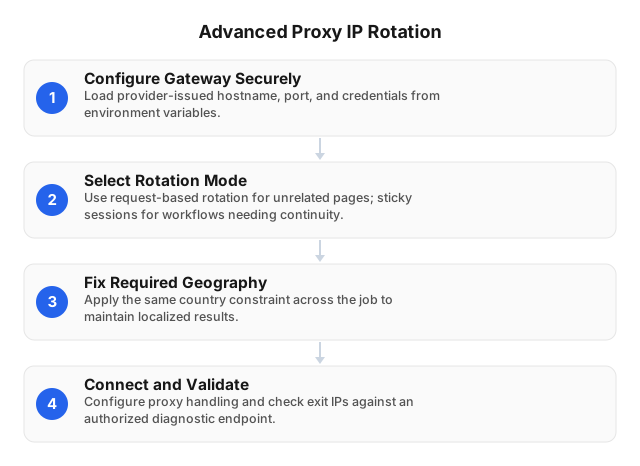
Start with a provider-issued gateway and verify its behavior before adding concurrency. An endpoint may rotate per request, connection, or session, so a working proxy URL does not establish when exits change. Select the mode your workflow requires, then test connectivity and continuity using permitted diagnostic and target endpoints.
- Secure credentials. Load gateway settings from environment variables and redact authenticated URLs from logs.
- Choose the boundary. Use request rotation for independent fetches and sticky sessions for related navigation. Check documented session duration and reconnection behavior.
- Set geography. Retain the same country constraint throughout a localized job.
- Validate results. Check observed exits, content validity, pagination, latency, and error handling before scaling.
EProxies offers 72M+ residential IPs across 195+ countries, with HTTP(S) and SOCKS5 support. Availability varies by location and task; verify your required configuration using the residential proxy setup guide.
Advanced Techniques for Residential Proxy IP Rotation
Coordinate scheduling, geography, and application state instead of changing addresses indiscriminately. Bind each logical task to the routing configuration it needs, then evaluate that policy against valid content, latency, and traffic consumption. Gateway connectivity alone cannot establish extraction success, and a larger exit pool cannot repair a broken cookie workflow.
- Separate queues. Route independent fetches separately from cookie-dependent navigation. End sticky sessions when their tasks finish.
- Partition geographically. Assign a country per task; add narrower constraints only when required and supported.
- Bind state explicitly. Map each task to its proxy session, cookie jar, and connection pool or browser context.
- Classify failures. Authentication errors, timeouts, throttling, and access challenges require different responses.
- Bound retries. Track attempts and bytes per completed task; stop workers that exhaust their budgets.
Automating IP Rotation with Scripts
Let the gateway perform its documented rotation while your script coordinates routing, task state, and failure handling. This example sends one request through an environment-supplied proxy; it does not force an exit change. Configure and verify request-based rotation separately before applying this pattern to independent public-page fetches at scale.
import os
import requests

proxy_url = os.environ["RESIDENTIAL_PROXY_URL"]

response = requests.get(
    os.environ["TARGET_URL"],
    proxies={"http": proxy_url, "https": proxy_url},
    timeout=float(os.environ["REQUEST_TIMEOUT"]),
)
response.raise_for_status()

# Validate expected content before accepting extracted records.
This assumes an HTTP(S) proxy endpoint; SOCKS requires compatible client support.
For related requests, pair a requests.Session with the provider’s documented sticky-session configuration. A client session retains cookies but does not guarantee a stable exit.
Keep retry policy outside extraction logic:
- Retry eligible transient failures within a fixed budget.
- Honor
Retry-Afterand reduce concurrency after throttling. - Stop for review on access challenges or denials.
- Validate content even after HTTP success.
Log task IDs and failure categories, not authenticated proxy URLs.
Integrating IP Rotation with Scraping Tools
Assign routing and cookie state at the same logical boundary in your framework. Independent requests may use separate exits; related navigation should retain its session configuration. Framework proxy support routes traffic, but the gateway or scheduler determines exit changes. Audit retries to ensure they preserve—or deliberately restart—the entire workflow state.
Requests
Use the proxies argument for routing and a separate requests.Session for each stateful workflow. Keep its proxy configuration and cookie jar together, and verify how connection reuse interacts with gateway rotation. Generate session and location settings from provider documentation rather than inventing username suffixes that may be ignored or rejected.
Scrapy
Assign request.meta["proxy"] through downloader middleware and use a cookiejar identifier for each logical session. Explicitly carry both assignments into follow-up requests. Audit retry middleware for unexpected reassignment: switching proxy sessions while retaining the previous workflow’s cookies can break continuity. Redact proxy credentials from exported metadata and diagnostic logs.
Playwright
Configure the proxy when creating a browser context and retain that context throughout related navigation. Keep cookies and requested geography aligned, then close the context when the task finishes. Recreating it changes browser state as well as routing; after failure, decide whether the workflow can restart cleanly or needs review.
Troubleshooting Common IP Rotation Issues
Classify the failure before changing routing: authentication, connection establishment, persistent exits, broken application state, and target throttling are different problems. Record task ID, redacted session ID, target hostname, status, elapsed time, and retry reason together. Change one variable per test so the result can be attributed to a specific adjustment.
Authentication failures: Check credentials, authentication mode, hostname, port, and URL encoding. Another exit will not repair invalid credentials.
Unchanged exit: Check sticky-session settings and connection reuse against documented rotation rules using a permitted diagnostic endpoint. Repeated addresses alone do not prove a fault.
Broken pagination: Verify that cookies, browser context, geography, and proxy session remain attached to the same task, including during retries.
Rising latency: Separate connection time from response time where possible. Hold geography constant before adjusting concurrency or pool selection.
Throttling or challenges: Honor retry instructions, reduce concurrency, and stop restricted workflows for review. Learn to detect proxy-blocking signals rather than treating every failure as an exit-quality problem.
Related Reading
Use these guides when evidence points to client configuration or target responses rather than rotation scheduling. Check operating-system settings before changing application code, and classify blocking signals before adjusting retries. Save the original configuration and a representative failed response so each test has a reproducible baseline for comparison.
- how-to-detect-proxy-blocking-techniques in 2026
- Setting Up Proxy Servers on Popular Operating Systems: 2026
FAQ
Choose request rotation for independent fetches and sticky sessions for related navigation, then verify the provider’s actual behavior. The distinctions below separate routing from application state and destination acceptance. Apply identical content-validation rules when comparing configurations; otherwise, a challenge page returned with HTTP 200 can make a failing policy appear successful.
What are advanced IP rotation techniques?
Advanced IP rotation techniques combine request- or session-based routing with task scheduling, geographic constraints, and failure-aware retries. Use separate exits for independent requests where appropriate, and retain sticky sessions for related navigation. Keep proxy identity and cookies aligned; changing an address does not reset application state or guarantee destination acceptance.
How do I automate IP rotation?
Automate IP rotation by configuring a provider’s rotating gateway and having your script assign request-based routing or sticky sessions to each task. Verify whether exits change per request, connection, or session using a permitted diagnostic endpoint before scaling. Keep cookies attached to stateful tasks, cap retries, honor Retry-After, and stop on access challenges rather than automatically requesting another IP.
What tools support proxy IP rotation?
Python HTTP clients, Scrapy, and browser automation frameworks support proxy routing, while a gateway or scheduler manages rotation. Check protocol support and authentication requirements before selecting a client. For stateful workflows, keep the proxy assignment tied to the same cookie jar or browser context throughout the task.
Why is IP rotation important for web scraping?
IP rotation lets a collection workflow use multiple network exits rather than depend on one address. It supports task-specific routing and geographic requirements but does not guarantee usable results. Cookies, account state, browser signals, and target restrictions still matter; evaluate validated records rather than counting successful connections.
How can I troubleshoot IP rotation issues?
Troubleshoot IP rotation issues by testing credentials, connectivity, observed exits, session settings, and target responses separately, changing one variable at a time. Use a permitted diagnostic endpoint to compare exit behavior with the gateway’s documented rules, including sticky sessions and connection reuse. For broken navigation, check cookie and proxy-session alignment; for throttling, honor Retry-After and reduce concurrency rather than repeatedly replacing exits.
This article was written by the EProxies team and reviewed against our editorial quality standards before publishing.