
Proxy Server Load Balancing Techniques: 2026 Guide
TL;DR: Balance traffic across healthy proxy capacity, not just IP addresses. Round robin can suit similar workloads; least connections can help with uneven connection durations. Weighted routing can account for unequal capacity. Test each policy with real traffic, and pair it with forwarding checks, session affinity, and graceful draining.
Before choosing a policy, decide whether you will distribute requests, connections, or sessions. An HTTP CONNECT tunnel can remain open while other connections start and finish. That difference affects how you measure load and when you can safely move traffic.
Introduction to Proxy Server Load Balancing
A load balancer selects an eligible proxy for each new request or connection, spreading work across multiple servers. Selection can account for available capacity, health, and session requirements. The goal is to avoid overloading one node while another sits idle. Adding exit IPs alone does not create more processing capacity.
Choose the unit you will balance:
- Connection: A persistent tunnel can carry substantial traffic while counting as one connection.
- Request: Request-level routing offers finer control, but encrypted tunnels can hide individual requests from the balancer.
- Session: Authenticated workflows may need successive requests to retain the same exit IP.
For localization testing, distribute independent page checks across proxies. Keep each signed-in browser session pinned to its assigned exit.
Why Load Balancing Is Essential for Proxy Servers
Directing new traffic toward spare capacity can reduce local queues and prevent overloaded proxy nodes. It cannot make a slow destination respond faster. Industry benchmarks report median response times of 0.93s on stable infrastructure and 4.63s on real-world targets. These figures are not a comparison of load-balancing policies.
Track active connections, queue depth, CPU usage, and upstream response time separately. Equal request counts do not mean equal work: slow responses can hold connection slots long after a faster request finishes.
During an authorized localization test, stop assigning new sessions to a saturated proxy. Preserve existing sessions unless the node fails or the application can safely restart them.
Common Load Balancing Techniques for Proxy Servers
Choose a routing policy based on measured workload behavior, then test it against a simple baseline. Round robin can work for similar requests and servers. Least connections can help when connection durations vary, while weights can reflect unequal capacity. None of these policies guarantees equal bandwidth use or lower destination latency.
| Technique | Selection mechanism | Workload to test | Operational trade-off |
|---|---|---|---|
| Round robin | Assigns new work sequentially | Similar backend capacity and request duration | Ignores current backend load |
| Weighted round robin | Assigns work according to configured weights | Proxy nodes with unequal capacity | Static weights need adjustment when capacity changes |
| Least connections | Favors the backend with fewer active connections | Variable-duration connections with similar resource costs | Connection counts can hide heavy traffic inside persistent tunnels |
| Consistent hashing | Maps a stable key to a backend | Sessions that need a stable route | Frequently used keys can concentrate traffic |
Session affinity and exit-IP persistence are separate controls. A stable route to a proxy gateway does not guarantee a stable residential exit. Configure both layers when the application requires them.
Step-by-Step Guide to Implementing Load Balancing
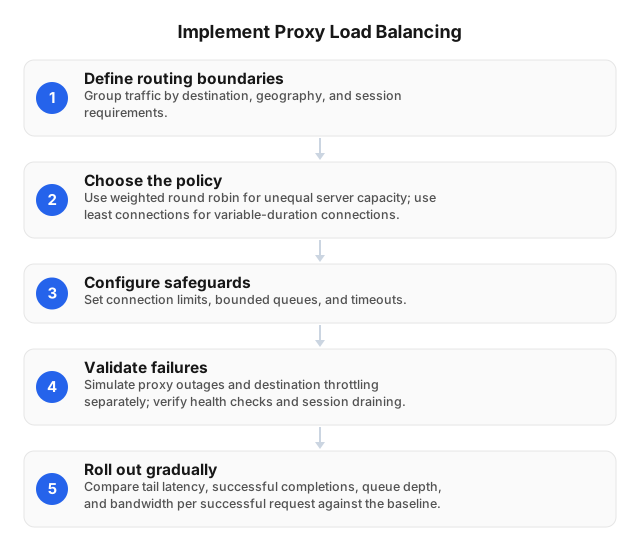
Place a balancer before your proxy pool, define which traffic each node may serve, and test failure behavior before rollout. Treat proxy health and destination throttling as separate signals. A destination rejection should usually trigger destination-specific backoff, rather than remove a healthy proxy from every workload that uses it.
- Define routing boundaries. Group traffic by destination, geography, protocol, and session needs. Pin authenticated workflows to the required exit identity.
- Choose a policy to test. Try weighted round robin for unequal capacity or least connections for variable-duration connections. Measure latency separately.
- Set limits. Configure connection caps, bounded queues, and timeouts. Retry only requests that are safe to replay, within a shared retry budget.
- Test failures separately. Simulate proxy outages and destination throttling. Check forwarding probes, session handling, and connection draining.
- Roll out gradually. Compare tail latency, successful completions, queue depth, and bandwidth per successful request against your baseline.
If you need to build the underlying pool first, follow the step-by-step proxy server setup guide. Confirm authentication and forwarding work before introducing balancing.
Implementation Scenarios: Measure Destination Success
Evaluate routing by destination-specific success, not gateway availability alone. Independent industry testing reports median success rates of 99.56% on stable endpoints and 94.30% on real-world targets. Those results do not establish a load-balancing benefit. They show why gateway health and completed requests need separate measurements. The scenarios below are illustrative, not measured customer case studies.
Stateless collection: isolate destination failures
For authorized public-data collection, test weighted least-connections routing across eligible proxy gateways. This can account for unequal capacity and active connection counts, but it still needs destination-level limits. Track failures by target so one site's rate limit does not remove a gateway that continues to serve other destinations successfully.
Apply backoff to the affected destination. Software load balancers and API gateways can support routing and enforcement, depending on their configuration.
Authenticated workflows: preserve session affinity
For localization tests involving shopping carts, keep each session on a stable proxy route and exit identity. Drain gateways before maintenance instead of moving active tunnels. Test application recovery separately: a replacement connection may reach a healthy proxy without preserving the login, cart, or exit IP used by the original session.
Redistributing every request can break application state even when all proxy nodes remain healthy. Define whether failed sessions should restart, reauthenticate, or stop for review.
Tools and Software for Load Balancing
Choose software that supports your traffic path, health checks, and session rules. TCP forwarding support matters for tunnels; HTTP reverse-proxy support alone is not enough. Monitor proxy forwarding separately from destination response time. The benchmark medians of 0.93s and 4.63s describe different test environments, not expected results from any tool below.
| Tool | Practical fit | Configuration caveat |
|---|---|---|
| HAProxy | TCP balancing across forward-proxy gateways, including least-connections routing | A TCP reachability check does not prove upstream forwarding works |
| NGINX Open Source | TCP stream distribution across proxy endpoints | Verify stream-module availability and which features your build supports |
| Envoy | Upstream balancing, circuit breakers, and outlier detection | Avoid treating destination failures as proof that a gateway is unhealthy |
| Prometheus and Grafana | Monitoring connection counts, queue pressure, and request outcomes | Avoid per-IP labels that create excessive numbers of metric series |
For sticky sessions, test connection reuse and backend draining before deployment. For SOCKS5 traffic, verify end-to-end TCP forwarding and authentication behavior rather than relying on an HTTP feature list.
Troubleshooting Common Load Balancing Issues
Separate overloaded nodes, failed gateways, broken affinity, and destination throttling before changing routing weights. Record queue time, upstream connection time, and destination response time along the same request path. Fleet-wide averages can hide a failing destination or exit. A healthy gateway does not prove that every route through it works.
- Trace the failure. Log the request ID, selected node, destination, status, and timing. Redact credentials and distinguish proxy authentication failures from destination denials.
- Check uneven use. Compare active connections with queue depth and bandwidth. Persistent tunnels can skew round robin; test least connections before changing the whole pool.
- Validate affinity and health. Check both the selected gateway and exit identity. Probe authenticated forwarding, not merely an open port.
- Contain retry growth. Honor destination throttling and
Retry-After. Cap retries and avoid automatically replaying requests that could repeat a purchase or other state change.
Use proxy-blocking diagnostics when failures cluster by destination. Adding proxy capacity will not fix a target-side access restriction.
Related reading
Use setup guidance to validate forwarding first, then study rotation as a separate routing control. This order makes failures easier to isolate: authentication and protocol errors belong to setup, while exit changes belong to rotation policy. Neither guide replaces workload testing for queues, persistent tunnels, or session recovery.
FAQ
Choose a policy by testing connection behavior, session persistence, and failure handling together. The answers below separate capacity balancing from exit rotation and destination performance. Before deployment, confirm what your balancer actually distributes: a request, a new connection, or a session key that keeps related traffic on one route.
What is proxy server load balancing?
Proxy server load balancing distributes client requests or connections across proxy instances to reduce bottlenecks. Routing may operate at the connection layer or inspect application traffic where the architecture permits. Balancing instances does not automatically rotate residential exits; exit selection and session persistence need separate configuration.
How does load balancing improve proxy performance?
Load balancing can improve proxy performance by sending new work to available capacity and avoiding unhealthy instances. Forwarding checks help distinguish a working proxy from one that merely accepts connections. Track queue time and tail latency alongside CPU usage, because slow upstream connections can exhaust slots without using much CPU.
What are the best techniques for load balancing?
Use round robin as a simple baseline, then test least connections, weighted routing, or consistent hashing against your workload. Least connections can help with uneven durations; weights can reflect unequal capacity. Consistent hashing can preserve affinity, but frequently used session keys may concentrate traffic.
| Technique | Workload to test | Main trade-off |
|---|---|---|
| Least connections | Variable-duration connections or tunnels | Connection count does not measure throughput |
| Weighted round robin | Servers with different capacities | Static weights cannot react to sudden slowdowns |
| Consistent hashing | Sessions needing a stable route | Frequently used keys can concentrate traffic |
| Latency-aware routing | Pools with variable response times | Noisy measurements can cause unstable routing |
How do I implement load balancing on my proxy server?
Place a load balancer before a proxy pool, then configure routing, forwarding checks, connection limits, and graceful draining. Group proxies by protocol, capacity, and permitted destinations before testing failure and recovery. Validate session behavior under realistic traffic, because failover cannot preserve an established tunnel or guarantee the same exit IP.
What tools are available for proxy load balancing?
HAProxy, NGINX Open Source, and Envoy are options for proxy load balancing; Prometheus and Grafana support monitoring. Verify TCP forwarding, CONNECT tunnel behavior, or SOCKS5 compatibility for your actual deployment. Require forwarding health checks and graceful draining, restrict administrative access, and keep proxy credentials out of logs.
This article was written by the EProxies team and reviewed against our editorial quality standards before publishing.