
How to Create Your Own Proxy Server in 2026
TL;DR: To create your own proxy server in 2026, deploy maintained forward-proxy software on a private host or cloud VM, restrict access through a VPN and explicit allow rules, then test HTTPS forwarding and resource usage before expanding access.
For IT professionals and tech enthusiasts supporting personal projects or small-business teams, the first decision is architectural: a forward proxy handles outbound client requests, while a reverse proxy sits in front of an application. The guide separates HTTPS tunneling from client-to-proxy encryption, explains how to prevent an open proxy, and shows which measurements should drive capacity upgrades—not guesswork.
Introduction to Proxy Servers
A proxy server is an intermediary that receives a client’s requests, forwards them to internet destinations, and returns the responses. For personal or small-business use, a proxy centralizes outbound access policies and can improve privacy by presenting its outbound IP address instead of the client’s. A proxy changes the traffic path; it does not automatically encrypt traffic or make users anonymous.
The basic architecture is:
Client → Proxy → Destination server
For this project, the relevant model is a forward proxy, which represents clients accessing external services—not a reverse proxy protecting an application.
Define the trust boundary before choosing software: identify authorized clients, permitted destinations, and who can read request logs. Destination sites may see the proxy’s IP, but accounts, cookies, and browser signals can still identify users.
Choosing the Right Tools and Technologies for 2026
Proxy server tooling for 2026 should match the traffic direction: choose Squid for an explicit forward proxy, or Nginx for a reverse proxy protecting applications you host. Prioritize maintained software with access controls and supported TLS capabilities, rather than selecting a package solely because its installation is short.
For personal browsing or small-office outbound access, verify client support for HTTP CONNECT. CONNECT tunnels HTTPS traffic; it does not require decrypting users’ sessions. Encrypting the client-to-proxy connection is a separate requirement—check support before sending credentials across an untrusted network.
Choose a supported Linux distribution and a package source that delivers security updates. Containers simplify repeatable deployment, but do not replace patching. Before adopting either deployment model, check whether configuration, credentials, and logs can be managed separately; that separation makes later replication safer.
Setting Up Your Environment
Proxy server environment setup requires a maintained host, predictable network addressing, working DNS, and restricted administrative access before software installation. Careful configuration prevents unreachable listeners, unintended public access, and inconsistent outbound routing. Keep the proxy private during setup, and document client-to-proxy and proxy-to-destination paths separately so firewall rules match the intended traffic flow.
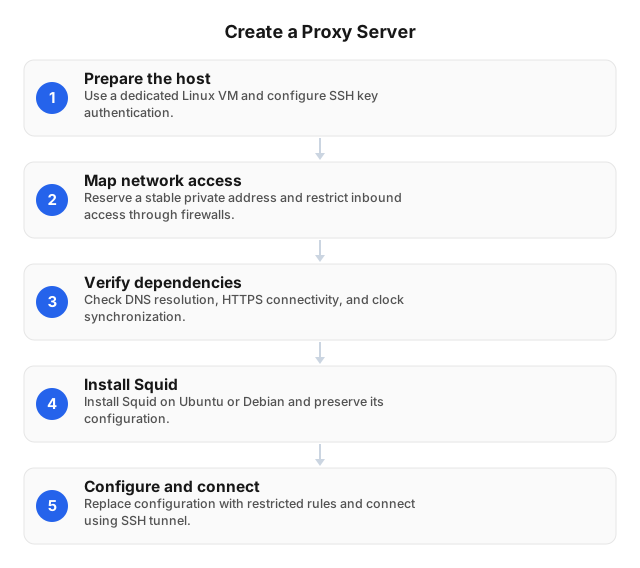
- Prepare the host. Use a dedicated Linux VM or isolated local machine. Apply operating-system updates and configure SSH key authentication before exposing remote administration.
- Map network access. Reserve a stable private address. For cloud deployments, restrict inbound access through both the cloud firewall and host firewall; leave the future proxy listener closed.
- Verify dependencies. Check DNS resolution, outbound HTTPS connectivity, and clock synchronization. Record interface names, allowed client networks, and log storage locations before installing proxy software.
Installing and Configuring the Proxy Server Software
Squid installation on Ubuntu or Debian starts with the distribution package, followed by explicit access rules and a protected client connection. For a personal or small-business deployment, keep the proxy listener private and require authenticated, encrypted access. The configuration below uses an SSH tunnel rather than exposing proxy credentials or an unauthenticated listener to the internet.
- Install Squid and preserve its configuration.
sudo apt update && sudo apt install squid sudo cp /etc/squid/squid.conf /etc/squid/squid.conf.bak - Replace
/etc/squid/squid.confwith restricted rules.http_port 127.0.0.1:3128 acl local_client src 127.0.0.1/32 acl allowed_ports port 80 443 acl CONNECT method CONNECT acl tls_port port 443 http_access deny !allowed_ports http_access deny CONNECT !tls_port http_access allow local_client http_access deny all - Validate, activate, and connect.
sudo squid -k parse && sudo systemctl restart squid
From your client, use key-authenticated SSH:ssh -N -L 3128:127.0.0.1:3128 user@server
Configure the browser’s HTTP/HTTPS proxy as127.0.0.1:3128. HTTPS uses CONNECT without TLS interception.
Ensuring Security and Privacy
Proxy server security starts with denying unauthorized connections: restrict the listening interface, allow only trusted client networks, and require authentication. Protect remote access with a VPN or a TLS-protected proxy connection; an HTTPS destination alone does not encrypt the client’s connection to a plain HTTP proxy. Never expose an unrestricted forward proxy to the public internet.
For Squid, place explicit access rules before the final deny rule. Restrict CONNECT to approved destination ports, and block access to loopback, private networks, and cloud metadata endpoints unless explicitly required.
Keep credentials outside shared configuration repositories. Minimize access-log retention and restrict log permissions: destination hostnames can reveal browsing activity even without decrypted content.
As traffic grows, preserve identical access policies across proxy instances. Apply connection limits so increased demand cannot exhaust sockets or overwhelm authentication services.
Testing and Troubleshooting Your Proxy Server
Proxy server testing should verify outbound routing, HTTPS tunneling, authentication, and failure behavior before production use. Compare direct and proxied requests against an endpoint you control, then repeat from an unauthorized client. A successful request is insufficient: unauthorized requests must also fail. Record latency and errors separately to distinguish proxy faults from destination failures.
- Compare routes. Set
$TEST_URLto your HTTPS endpoint and$PROXY_URLto your proxy address:curl --noproxy '*' "$TEST_URL" curl --noproxy "" --proxy "$PROXY_URL" "$TEST_URL"
Confirm the source address in destination logs. - Test access controls. Repeat without credentials and from outside your allowlist. Investigate unexpected access before deployment.
- Isolate failures. Check listener bindings and firewall rules for connection failures; inspect proxy-side DNS for resolution errors. For HTTPS failures, inspect CONNECT permissions and certificate trust rather than disabling verification.
Scaling Your Proxy Server for Increased Traffic
Proxy server scaling starts with identifying whether CPU, memory, file descriptors, or outbound bandwidth limits throughput under representative traffic. Add capacity at the measured bottleneck, not by default. Track concurrent connections, connection failures, and tail latency before choosing a larger host or additional proxy instances.
Increase file-descriptor limits only after checking available memory; accepting more connections can otherwise exhaust the host. For horizontal scaling, place a TCP load balancer before identically configured proxy nodes. Existing HTTPS CONNECT tunnels remain bound to their original node, so drain connections before maintenance rather than terminating active sessions.
Keep authentication, destination restrictions, and configuration synchronized across nodes. Enforce per-user connection limits to prevent a single client from consuming shared capacity.
Budget for outbound transfer, load-balancer charges, and duplicated logging—not just instance rental. Test node failure before expanding production traffic.
Related reading
FAQ
What is the easiest way to create a proxy server?
Installing Squid on a Linux server is a straightforward starting point for a personal or small-business forward proxy. Configure its listening interface and allowed client addresses, deny other traffic, and test from an authorized device before enabling remote access. For remote users, keep the proxy behind a VPN rather than exposing its listening port to the public internet.
How can I ensure my proxy server is secure?
Restrict access at both the firewall and proxy layers, require authentication where appropriate, and keep the operating system and proxy software patched. HTTPS destination traffic does not automatically encrypt the connection carrying proxy authentication; protect remote client-to-proxy connections with a VPN or supported TLS configuration. Test that unauthorized clients are rejected, and limit log retention because destination records can expose sensitive browsing activity.
What tools are best for building a proxy server in 2026?
Squid fits outbound HTTP proxying, while Nginx fits reverse proxying for applications you host. Squid supports forwarding policies and caching; Nginx sits in front of application servers to route incoming requests and terminate TLS. For personal browsing or shared business internet access, choose a forward proxy—configuring a reverse proxy does not make it an outbound proxy for client devices.
How do I troubleshoot common proxy server issues?
Trace a failed request through the client, proxy, DNS resolver, and destination, checking logs at each stage. First verify direct connectivity from the proxy host, then compare a proxied request to the same destination. Authentication failures point toward credentials or access rules; resolution errors suggest DNS trouble. If HTTP works but HTTPS fails, check CONNECT permissions and certificate trust before changing TLS settings.
Can I scale my proxy server for more users?
Yes—you can scale a proxy server by increasing host capacity or distributing clients across additional proxy instances. Measure concurrent connections, CPU, memory, bandwidth, and connection errors before choosing either approach; adding CPU will not fix an exhausted network link. Keep authentication and access policies consistent across instances, and drain existing connections during maintenance because restarting a proxy interrupts active HTTPS tunnels.
This article was written by the EProxies team and reviewed against our editorial quality standards before publishing.