
Mobile Proxy Networks: A Comprehensive Study for 2026
TL;DR: Mobile proxies use cellular carrier IPs; residential proxies typically use home broadband IPs. Choose mobile proxies for carrier-specific testing, not as an automatic upgrade for scraping. Compare both using cost per valid record, session continuity, and location accuracy on targets you have permission to access.
For data teams, the useful measure is usable data per dollar. A low bandwidth price means little if responses contain missing fields or the wrong regional content. Test network performance and data quality together before choosing an exit type.
How Mobile Proxy Networks Work
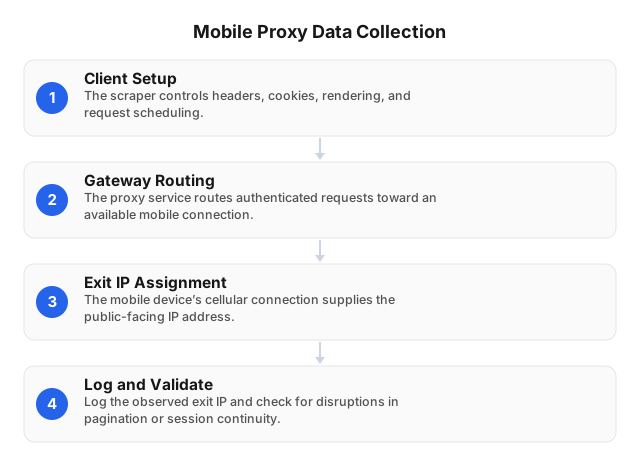
A mobile proxy sends requests through a cellular connection with a carrier-assigned exit IP. That network origin defines the proxy type, not the device running your scraper. A desktop client can use a mobile proxy, but the connection alone does not reproduce a smartphone’s browser, cookies, or location permissions.
Separate the connection into three parts:
- Client: Controls headers, cookies, page rendering, and request timing.
- Gateway: Routes authenticated proxy requests to an available connection.
- Exit: Supplies the carrier-associated public IP seen by the destination.
Log the observed exit IP with each collection result. If it changes during pagination, check for lost session state or inconsistent regional content. Collect only data you are authorized to access.
Evaluating Mobile Proxy Technology in 2026
For a 2026 deployment, assess radio technology and collection controls separately. Mobile proxies can use 4G or 5G connections, but that label does not establish target-site speed or data quality. Scheduling controls can help manage a workload; they do not establish response speed, session stability, or permission to collect data.
Treat AI-assisted scheduling as an implementation choice, not a feature every provider supplies. A controller can classify failures, lower concurrency when latency rises, and pause when access requires authorization.
Verify connection behavior directly:
- Does reconnecting change the exit IP?
- Can a session expire before pagination finishes?
- Can you record carrier, session ID, latency, and field completeness together?
Without those logs, a network change can look like a change in the source data.
Where Mobile Proxies Add Value
The clearest benefit is a carrier-specific view of a target, rather than anonymity or automatic acceptance. Mobile carrier networks can share public IP addresses among users, making an address less useful for identifying one client. That sharing does not prevent tracking through cookies, browser fingerprints, accounts, or provider logs.
Use matched requests to test whether carrier origin matters. Keep headers, cookies, location settings, and collection timing consistent. Compare content completeness, challenge frequency, and session continuity across exit types.
A carrier exit does not reproduce a handset’s screen, browser, or location permissions. Record those client settings separately when testing mobile experiences.
Use Cases for Mobile Proxies
Use mobile traffic when the research requires a cellular-network viewpoint, such as carrier-specific content checks or mobile-service testing. For regional price research, a residential connection may answer the same question. Establish which network property matters before paying for a mobile exit or treating its results as more representative.
Practical uses include:
- Carrier-specific testing: Compare permitted content or service behavior across carrier exits.
- Regional research: Check public product availability while holding language, cookies, and timing constant.
- Dataset validation: Label observations by carrier and region to investigate gaps in coverage.
- Research IP separation: Route destination requests through a proxy rather than your direct connection, while reviewing provider logging and retention policies.
Do not use a proxy to bypass authentication or contractual access controls. For app-related work, review the mobile app data scraping compliance guide.
Comparing Proxy Providers and Costs
Compare providers by cost per validated record, then test coverage and session behavior on the same permitted targets. Advertised bandwidth rates cannot show how much usable data a plan will deliver. A lower traffic rate can become more expensive after retries, missing fields, and sessions that fail before collection finishes.
| Criterion | Evidence to request | Selection rule |
|---|---|---|
| Cost | Per-GB rate, minimum spend, retry billing, data expiry | Include failed requests in collection costs. |
| Speed | Target-specific latency at matched concurrency | Compare workflow completion times, not endpoint tests alone. |
| Reliability | Valid-record yield, disconnect logs, SLA exclusions | Separate connection success from usable data. |
| Coverage | Country-level pool depth, available carrier ASNs, locations | Verify the requested location and network during a trial. |
| Session control | Sticky-session limits and rotation behavior | Test multi-request workflows before scaling. |
Keep payloads, targets, concurrency, and validation rules identical across trials.
EProxies as a Residential Baseline
EProxies offers 72M+ residential IPs across 195+ countries, with HTTP(S) and SOCKS5 support. Its published uptime is 98.2%, backed by a 99.9% uptime SLA. These are provider-level figures, not measurements of your target workflow; review the SLA’s coverage and exclusions separately from observed collection performance.
Global pool size does not establish country-level availability. Request current pool depth for each country you need, along with targeting availability; the supplied facts do not include country-specific counts.
Published pricing includes:
| Offering | Advertised pricing |
|---|---|
| Pay-as-you-go residential | From $0.25/GB |
| Tiered residential | Approximately $0.73/GB at 300GB |
| ISP SOCKS5 | From $0.95/IP |
| Unlimited plans | From $79/month |
Treat the residential prices as separate advertised offers, not a single descending price schedule. Confirm eligibility, included traffic, expiry, and applicable terms before estimating workload costs. These residential and ISP prices are not mobile-proxy quotes.
A Controlled Configuration Walkthrough
Start with a permitted target and a fixed validation rule, then compare residential and mobile exits without changing the client configuration. This is a proposed test procedure, not a report of measured results. Its purpose is to distinguish connection failures from session problems, regional mismatches, and parser errors before you scale traffic.
- Configure the connection. Enter the provider-issued hostname, port, credentials, and supported protocol in your HTTP client or browser automation tool. Keep credentials out of source code and logs.
- Verify the exit. Use an approved IP-check endpoint to record the observed IP and reported network location. Treat geolocation as a signal to cross-check, not proof of precise physical location.
- Set session behavior. If the provider supports sticky sessions, use its documented session parameter for related requests. Do not assume the same parameter works across providers.
- Run a complete workflow. Fetch an authorized page and follow its pagination with unchanged cookies, headers, and session settings. Record exit IP, response status, latency, and required-field completeness.
- Check reconnect behavior. Reconnect and repeat the workflow. Watch for exit changes, login resets, duplicate records, and regional content shifts.
- Compare validated output. Divide billed traffic cost by records that pass your validation rules. Report failed requests and incomplete workflows separately.
A response containing a challenge page can still have a successful HTTP status. Validate expected fields before counting it as a usable record.
Integrating AI with Proxy Workflows
Use AI to propose bounded scheduling changes from request logs, not to decide access permissions. Useful tasks include classifying failures, suggesting concurrency adjustments, and identifying incomplete responses. Keep spending caps and stop conditions outside model control. A successful HTTP response may still contain a challenge page or irrelevant content.
Give the controller structured inputs:
- Carrier, region, and session ID
- Latency and response status
- Required-field completeness
- Retry count and estimated cost
Separate network failures from parser failures. Changing an IP will not repair a broken selector.
Treat fetched pages as untrusted data, never as instructions for an AI agent. Compare adaptive scheduling against a fixed policy using equivalent targets and collection windows. Track geographic coverage so lower costs do not hide missing regions.
Challenges and Purchasing Checks
Mobile connections can fluctuate because of network congestion or changes in carrier IP assignments. Costs, throughput, and session controls may also limit a particular plan, so verify them rather than assuming universal limits. Measure performance on your actual targets; residential timing figures do not establish how mobile exits will perform.
Test pagination, reconnects, and retries before committing traffic. Check whether a sticky session retains the same exit IP and what happens when the underlying connection drops.
Before buying, confirm:
- Carrier and geographic availability
- Country-level pool depth for the locations you need
- Concurrency and bandwidth limits
- Data expiry and retry billing
- Session duration and forced rotation
- Documented IP sourcing
- Provider logging and retention terms
Cap automated retries. Flag changes to page structure separately from connection failures, and define retention limits for collected personal data.
Related Reading
Start with the legal rules for your data source and the sampling requirements of your research before selecting an exit network. Proxy routing cannot grant access permission or correct geographic sampling bias. These guides address app-data permissions and market-research workflows, including decisions that should precede a paid proxy trial.
- Is Mobile App Data Scraping Legal? 2026 Compliance Guide
- Web Scraping for Market Research in 2026: Analyst Guide
FAQ
Choose between mobile and residential exits based on the network origin your task requires, then validate that choice with a controlled trial. The answers below distinguish carrier access from device behavior and explain what to test before scaling. Keep target permissions, client settings, and validation rules consistent throughout that trial.
What are mobile proxy networks?
Mobile proxy networks route requests through cellular connections, giving them exit IPs associated with mobile carriers. The client still controls browser settings, cookies, and request timing. A mobile exit changes the request’s network origin; it does not make a desktop scraper behave like a smartphone.
How do mobile proxies differ from residential proxies?
Mobile proxies use cellular carrier connections, while residential proxies typically use household broadband connections. Choose mobile exits when carrier origin matters, such as carrier-specific content testing. For other tasks, compare both options using location accuracy, session continuity, and cost per valid record on permitted targets.
What are the benefits of using mobile proxies?
Mobile proxies provide a carrier-specific network viewpoint for localization checks and mobile-network testing. They do not ensure target acceptance or prevent tracking through other identifiers. Verify any benefit by comparing complete records, challenge frequency, and session continuity against a residential baseline under matched client settings.
How are mobile proxies used in web scraping?
Mobile proxies forward a scraping client’s requests through cellular-network exits for authorized data collection. Configure the proxy connection, keep related requests in a consistent session, and rotate between independent tasks when appropriate. Validate returned fields and regional content rather than counting HTTP success alone, and follow applicable laws and target-site terms.
What challenges do mobile proxy networks face?
Mobile proxy networks can face unstable connections, carrier IP changes, and provider-specific limits on bandwidth or session control. Congestion or address reassignment may disrupt a multi-request workflow. Test pagination and reconnects, then confirm carrier coverage, retry billing, and data expiry before committing traffic to a plan.
This article was written by the EProxies team and reviewed against our editorial quality standards before publishing.