
Custom Headers for Web Scraping: 2026 Guide
TL;DR: Custom headers improve scraping by requesting the right representation—HTML versus JSON, language, authentication state, or cached content—before parsing begins. Use the smallest truthful header profile, align it with cookies, URL locale, client capabilities, and proxy location, then troubleshoot with a captured outbound request and one-variable A/B tests.
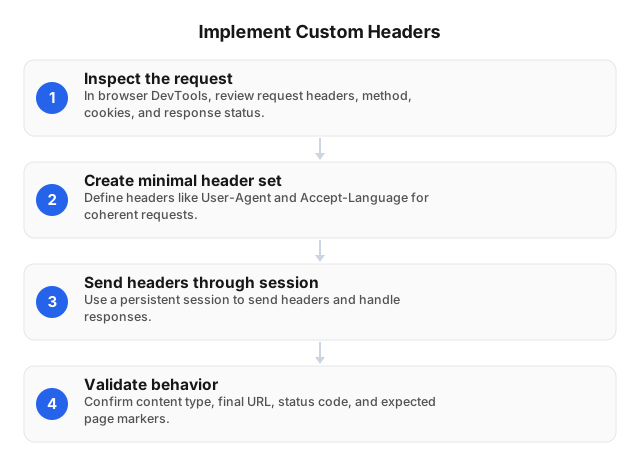
How Custom Headers Improve Scraping
Headers let a scraper negotiate a response that matches its parser and collection target. They can reduce parsing failures, prevent unnecessary downloads, preserve authorized sessions, and keep localized results consistent.
Four mechanisms deliver most of the value:
- Representation selection:
Accept: application/jsoncan return structured data instead of HTML when an authorized endpoint supports both. - Locale control:
Accept-Language: de-DE,de;q=0.9helps request German text, provided the URL, cookies, account settings, and proxy region agree. - Conditional retrieval:
If-None-MatchorIf-Modified-Sincelets unchanged pages return304 Not Modifiedwithout retransmitting the body. - Authorized access:
Authorizationidentifies an approved API or account session without embedding credentials in the URL.
Headers do not change the source IP, execute JavaScript, grant access, or reproduce browser behavior. Proxies determine network origin, cookies carry session state, and a browser runtime supplies rendering, storage APIs, client hints, and JavaScript execution.
Example: reducing unnecessary transfers
Suppose a monitored page has a 500 KB response and changes once across 24 hourly checks. Without validation, the scraper downloads approximately 12 MB per day; if the server returns 304 for the 23 unchanged checks, it transfers the full body only once, plus small response headers.
The workflow is URL- and variant-specific:
ETag: "catalog-de-v42"
Vary: Accept-Language
Store that validator with the German representation, then send:
Accept-Language: de-DE,de;q=0.9
If-None-Match: "catalog-de-v42"
Do not reuse the ETag for another URL, language, encoding, or authenticated account. The Vary response header identifies request fields that can produce a different representation.
What Each Header Controls
| Header | Use it for | Validate | Common failure |
|---|---|---|---|
User-Agent | Stable, truthful client identification | Value actually sent after middleware | Claiming browser capabilities the client lacks |
Accept | Selecting HTML, JSON, XML, or another supported format | Response Content-Type | Sending JSON to a parser after receiving an HTML login page |
Accept-Language | Requesting a language or regional variant | Text, currency, units, and final URL | Conflicting URL, cookie, account, or IP locale |
Authorization | Accessing an approved API or account | Token scope, expiry, and redirect host | Logging a token or forwarding it across domains |
If-None-Match | Revalidating an exact cached representation | ETag, Vary, and 304 handling | Sharing one validator across variants |
If-Modified-Since | Revalidating when only modification time is available | Server timestamp precision | Missing changes made within the timestamp resolution |
Referer | Reproducing a legitimate navigation flow | Redirect and origin behavior | Inventing navigation context to evade controls |
X-Request-ID | Correlating permitted requests with internal logs | Uniqueness and log propagation | Including credentials or personal data |
Let the HTTP library calculate Host, Content-Length, HTTP/2 pseudo-headers, and connection-specific fields. A manually fixed Content-Length becomes wrong as soon as the request body changes.
Build a Reliable Header Profile
1. Capture the permitted baseline
Use API documentation, the browser Network panel, or a controlled test client to record:
- HTTP method and exact URL.
- Request body and
Content-Type. - Redirect chain, including cross-host redirects.
- Request headers that affect the representation.
- Response status,
Content-Type,Content-Language,Vary, and validators. - Cookies or authorization required by the approved workflow.
- Whether JavaScript creates state that a direct HTTP client cannot reproduce.
Capture at least one known-good response and its parser output. A baseline without expected markers—such as currency, language, product count, or schema version—cannot distinguish transport success from correct content.
2. Start with the minimum viable set
headers = {
    "User-Agent": "ExampleResearchBot/1.0 (+https://example.org/bot)",
    "Accept": "text/html,application/xhtml+xml",
    "Accept-Language": "en-US,en;q=0.9",
}
Add one field only when endpoint documentation requires it or an A/B test demonstrates a response difference. Copying a browser’s entire header block can introduce stale cookies, unsupported compression, version-specific client hints, and navigation metadata that contradict the actual client.
3. Keep related state together
import requests

session = requests.Session()
session.headers.update(headers)

response = session.get(
    "https://example.com/public-page",
    timeout=(5, 20),
    allow_redirects=True,
)
response.raise_for_status()
Use one named profile for each meaningful combination, such as de-DE-desktop, en-US-mobile, or authorized-api-v2. Each profile should bind its headers, cookie jar, URL pattern, parser, and—where geography affects output—sticky proxy session.
Do not randomize headers independently on every request. A mobile User-Agent combined with desktop client hints or a German language header combined with a persistent US-region cookie creates variants that are difficult to reproduce.
4. Verify the request that left the client
Application code does not always match the transmitted request. Session defaults, redirect handlers, browser frameworks, SDK middleware, and proxy gateways can remove or replace fields.
With Python Requests, inspect the prepared request:
request = requests.Request(
    "GET",
    "https://example.com/public-page",
    headers=headers,
)
prepared = session.prepare_request(request)

for name, value in prepared.headers.items():
    print(f"{name}: {value}")
For redirect issues, log response.history and inspect each hop. Many clients deliberately remove Authorization when a redirect crosses hosts; retain that safety behavior unless both destinations are controlled and explicitly trusted.
5. Validate before parsing
content_type = response.headers.get("Content-Type", "")
final_url = response.url

if "text/html" not in content_type:
    raise ValueError(
        f"Expected HTML, received {content_type} from {final_url}"
    )

if "expected-page-marker" not in response.text:
    raise ValueError(
        f"Unexpected representation from {final_url}"
    )
A 200 OK response can contain a login screen, consent page, empty shell, regional notice, or HTML error document. Record transport success and content success separately.
Locale Profiles: Headers, Cookies, and Proxy Location
For German-language, Germany-based collection, align these inputs:
Accept-Language: de-DE,de;q=0.9
- German URL or regional route.
- German account or preference setting.
- Clean cookie jar created for that locale.
- German proxy endpoint.
- Parser checks for expected language, currency, tax treatment, and units.
A controlled 100-page retail test illustrates the diagnostic method. Holding the URL, interval, cookies, and German proxy session constant while changing only Accept-Language corrected German product titles on 91 pages, but 38 pages still displayed US dollars; clearing the persistent US-region cookie corrected the currency, while additional IP rotation produced no change.
The resulting de-DE profile stored the language header, German route, clean regional cookie jar, sticky German proxy session, and expected EUR marker. This made each mismatch attributable to a named configuration rather than an untraceable combination of randomized headers and IPs.
Troubleshooting Custom Header Issues
Run a one-variable comparison
Create a control request and a test request that differ by exactly one header. Keep the method, URL, body, cookies, proxy session, timeout, interval, and parser version unchanged.
Compare these fields for both responses:
| Signal | What a difference indicates |
|---|---|
| Status code | Authentication, negotiation, rate, or policy behavior changed |
| Final URL and redirects | The header triggered a locale, login, or canonical route |
Content-Type | The server selected another representation |
Content-Language | Language negotiation changed |
| Encoded and decoded bytes | Compression or response body changed |
| Expected content markers | The requested page variant was actually returned |
| Parser success and record count | The change improved or broke extraction |
Run multiple samples rather than relying on one request. For a 100-URL test, report results such as “JSON content type increased from 0/100 to 96/100” or “German currency accuracy stayed at 62/100,” not merely “the header worked.”
Diagnose by status code
304 Not Modified: The validator matched; no body is expected. Load the previously stored representation instead of sending the empty response to the parser.400 Bad Request: Check malformed syntax, duplicate fields, oversized cookies, and invalid header characters.401 Unauthorized: Confirm token presence, scheme, scope, and expiry.403 Forbidden: Check permissions and site policy before changing network settings; the cause is not necessarily the proxy.406 Not Acceptable: BroadenAcceptto a format the endpoint supports.415 Unsupported Media Type: Correct the request-bodyContent-Type; changing response headers will not fix it.429 Too Many Requests: Reduce concurrency and request frequency, then honorRetry-After.
Do not use header changes to bypass access controls. If an approved endpoint returns 401 or 403, verify credentials and permissions with the endpoint owner.
Diagnose the wrong representation
If a JSON parser receives <html>, inspect Content-Type, the first 200 response bytes, final URL, and redirect history. Typical causes are an ignored Accept preference, expired authentication, a redirect to login, or an HTML error returned with status 200.
If localization is wrong, test in this order:
- URL route or country parameter.
- Account and cookie preferences.
Accept-Language.- Proxy country or city.
- Cached response and CDN variation.
Changing all five at once may fix the symptom but removes the evidence needed to identify the responsible layer.
Diagnose garbled content
Advertise only compression formats the client can decode. If Accept-Encoding includes br, confirm Brotli support; otherwise let the HTTP library generate the field.
After decompression, compare:
- Charset in
Content-Type. - HTML
<meta charset>declaration. - Byte-order mark, if present.
- Raw response bytes.
- Decoder selected by the client.
A server can incorrectly label UTF-8 as ISO-8859-1, so preserve the raw bytes when encoding errors affect extracted names or addresses.
Production Measurement
Track header-profile performance separately from proxy performance:
- HTTP success rate by status class.
- Correct
Content-Typerate. - Expected-locale and currency accuracy.
- Redirects per request.
304rate for conditional requests.- Encoded and decoded response bytes.
- Parser success and extracted record count.
- Retries and
Retry-Aftercompliance. - Final host and cross-host authorization stripping.
Fix the proxy session while testing content negotiation. Then freeze the header profile and cookies while testing geography or rotation; IP Rotation for Web Scraping: A Practical 2026 Guide covers the network-side controls.
For structured endpoints, schema validation and API versioning often matter more than browser-like headers; see API-Driven Web Scraping for Industry Reports in 2026. JavaScript-generated state requires a rendering workflow rather than a larger static header dictionary, as detailed in Web Scraping with AI for Dynamic Websites in 2026.
Security and Operational Rules
- Keep credentials outside code. Load tokens from a secret manager or environment-specific credential store.
- Redact sensitive values. Log header names and hashes or final four characters, not complete tokens or session cookies.
- Restrict redirect forwarding. Never send authorization automatically to an unrelated host.
- Separate profiles. Use distinct sessions for public, authenticated, mobile, desktop, and regional collection.
- Bound header size. Large cookie blocks can trigger
400or431 Request Header Fields Too Large; remove obsolete cookies instead of retrying unchanged. - Respect endpoint rules. Follow applicable law, contracts, robots directives, permissions, and rate limits.
- Version configurations. Store a profile version with every result so a parser regression can be separated from a request-profile change.
EProxies supplies 72M+ residential IPs across 195+ countries through HTTP(S) and SOCKS5, with 98.2% uptime backed by a 99.9% uptime SLA. Options include pay-as-you-go residential traffic from $0.25/GB, tiered plans at approximately $0.73/GB for 300GB, ISP SOCKS5 from $0.95/IP, and unlimited plans from $79 per month.
FAQ
How to troubleshoot custom header issues?
Capture the final outbound request, then compare it with a known-good baseline because middleware, redirects, and proxy gateways may alter headers after application code runs. Change one header at a time while holding the URL, cookies, proxy session, body, interval, and parser constant; compare status, redirects, Content-Type, response bytes, expected markers, and parse success. For failures, map 401 to credentials, 406 to content negotiation, 415 to the request-body format, 429 to request rate, and 304 to a successful cache validation.
How do custom headers improve web scraping?
Custom headers request a representation the scraper can process, such as JSON instead of HTML, German instead of English, or an unchanged-page 304 instead of another full download. They also carry authorized credentials and keep session or locale behavior consistent when aligned with cookies, URL routes, and proxy geography. The measurable gains are higher parser success, better locale accuracy, fewer transferred bytes, and fewer responses routed to login or error pages.
What are best practices for custom headers?
Send the smallest truthful header set and let the HTTP library generate transport-dependent fields such as Host and Content-Length. Keep headers consistent with the URL, cookies, client capabilities, account, and proxy location, then version each profile and evaluate it with content-level metrics.
What are custom headers in web scraping?
Custom headers are HTTP request fields set or overridden by the scraper. They identify the client, request a supported format or language, authenticate an approved session, and validate a previously cached representation.
Which headers should a scraper send?
A public-page request commonly needs a truthful User-Agent, an Accept value matching the parser, and Accept-Language when localization matters. Add authorization, cache validators, or workflow-specific fields only when the endpoint requires them.
Can custom headers replace residential proxies?
No. Headers describe request preferences and session metadata, while a proxy changes the network origin and route. Regional collection may require an aligned locale profile plus a residential proxy in the required country or city.
Should every request copy a browser’s complete header set?
No. Browser headers depend on the browser version, operating system, protocol, navigation context, and current session. Use a minimal direct-client profile, or let browser automation generate its own internally consistent headers when JavaScript execution is required.
Is changing the User-Agent enough to reproduce browser behavior?
No. Browsers also expose TLS behavior, HTTP protocol settings, client hints, cookie policies, JavaScript APIs, storage, and rendering capabilities. A static User-Agent changes one field without changing the underlying client.
Are conditional headers useful for frequently checked pages?
Yes. Store ETag or Last-Modified with the exact URL and representation, then send If-None-Match or If-Modified-Since on later checks. Treat 304 Not Modified as a valid unchanged result and load the previously stored body instead of passing an empty response to the parser.
This article was written by the EProxies team and reviewed against our editorial quality standards before publishing.