
Understanding Proxy Cost-Benefit: 2026 IT Guide
TL;DR: Start with data center proxies for tolerant, bandwidth-heavy targets. Escalate specific jobs to residential proxies when consumer-network identity or location improves validated results; use ISP proxies for persistent sessions and mobile proxies for carrier-dependent responses. Compare routes by cost per validated record, retry rate, p95 latency, geographic accuracy, and session completion—not headline pool size.
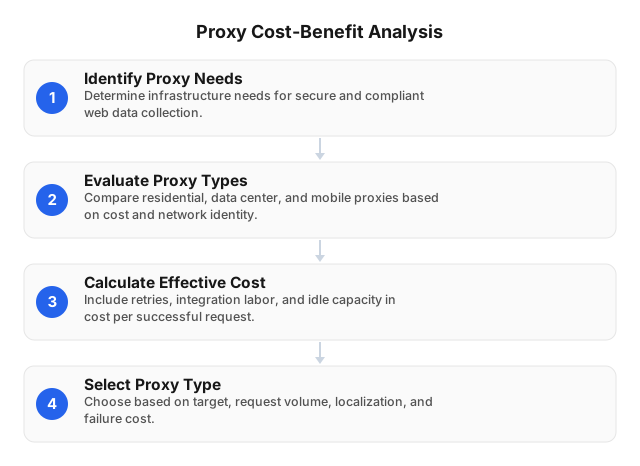
Choose the IP Source and Session Model Separately
A proxy forwards traffic through another endpoint, so the destination sees the proxy IP rather than the client’s normal egress IP. HTTP intermediary behavior is specified in RFC 9110, while RFC 1928 defines SOCKS5.
Proxy selection involves two independent choices:
- IP source: Data center, residential, ISP, or mobile.
- Session model: Rotate the IP between independent requests or retain it throughout a workflow.
| Proxy type | Network identity | Practical uses | Main trade-off |
|---|---|---|---|
| Data center | Hosting or cloud network | Permitted APIs, static files, tolerant public sites, large downloads | Some targets restrict hosting ranges |
| Residential | Consumer ISP range | Local prices, regional search results, inventory, localized public pages | Usually metered by traffic |
| ISP | ISP-classified IP hosted on server infrastructure | Logins, pagination, checkout QA, persistent localized sessions | Dedicated IPs can sit idle |
| Mobile | Cellular carrier network | Mobile-app QA, carrier-specific pages, cellular ad verification | Regional and carrier capacity can be expensive |
| Forward proxy | Client-side gateway that sends requests outward | Access control, traffic routing, scraping infrastructure | Requires client configuration |
| Reverse proxy | Server-side gateway in front of an application | Load balancing, caching, TLS termination | Protects servers rather than changing a scraper’s source IP |
Residential, ISP, mobile, and data center describe the IP’s network source. Forward and reverse describe where the proxy sits in the connection. HTTP(S) and SOCKS5 describe the protocol used to communicate with it.
No proxy type ensures that a target will accept a request. Authorization, privacy obligations, rate limits, robots directives where applicable, and website terms still govern collection. The Proxy Type Selection by Task: 2026 SEO & Scraping Guide provides a broader task matrix.
Use a Measured Selection Ladder
With those dimensions separated, choose the IP source by testing each target with the least costly viable option. The cheapest advertised route is not necessarily the lowest-cost route, but the most expensive network identity should not be the default either. Classify invalid responses and escalate only the affected traffic.
1. Establish a Data Center Baseline
Data center proxies often provide predictable capacity for public pages that accept hosting-network traffic. Start here for permitted APIs, documentation, static assets, development tests, and downloads whose content does not change by user location.
Do not classify success by HTTP status alone. A response can return 200 OK while containing a consent page, empty product grid, wrong currency, JavaScript challenge, or login redirect. Validate required fields, locale, canonical URL, record count, and known block-page markers.
2. Escalate Location-Sensitive Targets to Residential
Residential routes are appropriate when the destination uses country, city, or ISP context to select content. Concrete examples include a retailer returning GBP rather than USD, a marketplace exposing city-level inventory, or a search page changing local results.
Move only the targets that benefit. If 8 of 10 domains produce valid data through data center routes, sending all 10 through metered residential traffic increases cost without improving those eight. Larger deployments can apply adaptive proxy selection by routing on domain, region, validation failure, and retry history.
3. Use ISP Proxies for Persistent State
ISP proxies combine an ISP-classified address with server-hosted stability. They fit workflows in which the same IP, cookies, and server-side session must persist through several steps: authentication where authorized, pagination, delivery checks, or checkout testing.
Compare per-IP cost with utilization. Twenty reserved IPs used for one hour per day provide 600 IP-hours of monthly work but remain allocated for the rest of the billing period. Sticky residential sessions may cost less when workflows are short or demand fluctuates.
4. Reserve Mobile Routes for Carrier-Dependent Results
Mobile proxies make sense when cellular identity changes the response: carrier billing tests, mobile-app localization, mobile ad placement, or content available only through a cellular network. Residential rotation is normally a better first test when the requirement is merely to distribute independent requests.
Mobile supply, pricing, and carrier coverage differ by country. The mobile proxy cost and benefits analysis examines those regional constraints.
Match Rotation to Request State
Choosing the IP source is only half of the routing decision. Rotate between independent records such as product detail pages or public search results that share no server-side state. Rotation distributes requests across available addresses, but it cannot repair invalid selectors, expired credentials, or a target outage.
Use a sticky session when several requests must retain one identity. Keep the IP, cookie jar, locale, and relevant headers together throughout the sequence; changing the IP during pagination or a basket flow can produce inconsistent localization or invalidate the session.
Test persistence rather than trusting the word “sticky.” Check the observed IP at 1, 5, 15, and 30 minutes—or at the actual workflow intervals—and record an unexpected change as a session failure. Expire the IP and cookies after the job instead of linking unrelated workflows through reused identifiers.
Calculate Cost per Validated Record
Once the route and session model are defined, compare their effective cost. Price per GB omits invalid pages, retries, duplicate downloads, idle dedicated IPs, and integration work. A more useful equation is:
effective cost = (proxy spend + retry processing + engineering cost) ÷ validated records
Anonymized Implementation Review
In one implementation review, a pilot sent 1,000,000 requests and produced 920,000 responses that passed field, locale, and block-template validation. Proxy charges were $100, making the proxy component approximately $0.109 per 1,000 validated responses. After adding $150 of measured integration and monitoring work, effective cost rose to about $0.272 per 1,000 validated responses.
The review exposed why status-code success was misleading: responses were rejected when required fields were absent or localization was wrong, even if the server returned 200 OK. Recording invalid-result categories separately made it possible to distinguish routing problems from parser defects instead of retrying both.
Payload size also changes the calculation. A 2 MB rendered page consumes ten times as much traffic as a 200 KB HTML or API response. Block images, video, fonts, analytics, and unrelated XHR calls unless the validation rule depends on them.
Pricing units are not interchangeable, so model the intended protocol, commitment, targeting, traffic volume, IP utilization, and plan conditions before comparing totals.
Run a Production-Shaped Pilot
Because effective cost depends on target behavior, test routes under production-like conditions. A generic speed test does not reproduce target-side filtering, regional content, response size, or session behavior. Use the same URLs, concurrency, headers, timeout, retry policy, and validation code for every route being compared.
1. Define a Valid Response
Specify acceptance rules before testing:
- Required fields and minimum record count
- Expected country, city, language, and currency
- Canonical URL or page type
- Absence of block, challenge, login, and consent templates
- Correct session state for multi-step workflows
This prevents a candidate from appearing successful because it returned fast but unusable pages.
2. Build a Representative Sample
Include each required country, both difficult and permissive domains, small and large payloads, and at least one stateful workflow if production uses sessions. A 10,000-request pilot spread across ten targets reveals target-specific failures that 10,000 requests to one easy page will miss.
3. Test Protocol and DNS Behavior
EProxies supports HTTP(S) and SOCKS5. Verify authentication, DNS resolution, connection reuse, rotation controls, timeout handling, and sticky duration in the actual client library.
SOCKS5 does not itself determine where hostname resolution occurs; the client configuration does. Confirm whether DNS is resolved locally or through the proxy, especially when local resolution could return the wrong regional endpoint or expose destination lookups.
4. Record Target-Level Metrics
Measure:
- Validated responses per 1,000 requests
- Timeout, block-page, malformed-page, and wrong-region rates
- Median and p95 latency
- Bytes transferred per validated record
- Sticky-workflow completion rate
- Requested versus observed country, city, and ASN
- Unique observed IPs
- Engineering hours and unused reserved capacity
Use the proxy provider evaluation scorecard to keep scoring consistent. For example, a route with 95% validated responses and 800 ms p95 latency can be cheaper operationally than one with a lower nominal GB price but only 80% validated responses.
5. Limit Retries by Error Class
A transient connection timeout may justify two retries with exponential backoff. A persistent wrong-region response should replace the route or fail the job; repeatedly downloading from the same mislocated session wastes traffic.
Do not retry parser failures through another IP until the raw response has been inspected. A selector broken by a site redesign will fail across every proxy type.
Interpret Coverage, Targeting, and Uptime Correctly
Pilot results also provide the context needed to evaluate provider specifications. EProxies publishes a residential network specification of 72M+ IPs across 195+ countries.1 Separately, EProxies publishes city- and ASN-level targeting capabilities.2 These specifications should not be read as proof that every advertised IP is simultaneously online or that every location has equal capacity.
Validate coverage in the markets the workload actually uses. Record unique observed IPs, requested-versus-returned geography, ASN accuracy, and successful concurrency for each country rather than extrapolating from the global pool figure.
EProxies reports 98.2% uptime as an operating metric and backs the service with a 99.9% uptime SLA.3 The operating metric describes reported service performance; the SLA is a contractual commitment subject to its measurement window, covered components, exclusions, reporting process, and service-credit terms. Neither figure is equivalent to a scraper’s validated-response rate, which also depends on the target, regional route, client configuration, and parsing logic.
Whatever the measured route quality, secure access operationally. Separate development, production, and contractor credentials. Apply IP allowlisting where practical, create bandwidth and spend alerts, rotate exposed secrets, and retain authentication logs. HTTPS provides TLS encryption for HTTP traffic; merely connecting through a proxy does not encrypt arbitrary application data.
FAQ
What are the different types of proxies?
The main IP-source types are data center, residential, ISP, and mobile proxies. Proxies can also be classified by architecture—forward or reverse—by session behavior—rotating or sticky—and by protocol, including HTTP(S) and SOCKS5. These categories overlap: a residential proxy can use SOCKS5 and maintain either a rotating or sticky session.
How do residential proxies compare to data center proxies?
Residential proxies use consumer ISP ranges and are better suited to location-sensitive targets or sites that treat hosting-network traffic differently. Data center proxies often provide lower-cost, predictable capacity for tolerant sites, permitted APIs, static resources, and large downloads. Compare them on validated-response rate and cost per completed record because residential traffic is not automatically more accurate or economical.
Which proxy type is best for web scraping?
Use data center proxies as the baseline for permissive targets and bandwidth-heavy downloads. Move location-sensitive or repeatedly rejected jobs to residential routes, use ISP proxies for persistent sessions, and reserve mobile proxies for responses that depend on cellular carrier identity. The correct choice is the route with the lowest cost per validated record at the required latency and geographic accuracy.
How much do residential proxies cost?
EProxies publishes pay-as-you-go residential traffic from $0.25/GB and tiered residential pricing down to approximately $0.73/GB at 300GB.4 Its broader pricing structure also includes ISP SOCKS5 proxies from $0.95/IP and unlimited plans from $79 per month, so compare commitment, traffic rules, targeting, and utilization rather than treating every offer as a per-GB equivalent.
Are residential proxies always better for web scraping?
No. Data center proxies can be more economical for permitted APIs, static resources, tolerant public pages, and bandwidth-heavy downloads. Residential routes justify their additional cost only when they measurably reduce invalid responses, incorrect localization, or target rejection.
Should a scraper use rotating or sticky sessions?
Use rotating sessions for independent URLs and sticky sessions when several requests must retain the same IP and cookie state. Set the sticky duration to the workflow: a ten-minute pagination job does not need a day-long identity. Measure unexpected IP changes as session failures.
Does a proxy encrypt traffic?
Not automatically. HTTPS uses TLS to encrypt HTTP traffic, while SOCKS5 provides proxy transport and optional authentication without independently encrypting application data. Keep certificate validation enabled and verify whether DNS resolution occurs locally or through the proxy.
How should pool size and uptime claims be verified?
Measure observed IP diversity, requested-versus-returned location, ASN accuracy, p95 latency, validated-response rate, and session persistence on production targets. Review uptime operating metrics separately from contractual SLA terms, including measurement windows, exclusions, covered services, incident reporting, and credit procedures.
Footnotes
- S1: EProxies published residential network specification: 72M+ residential IPs across 195+ countries. ↩
- S7: EProxies published targeting specification: city- and ASN-level targeting. ↩
- S3: EProxies published service specification and SLA: 98.2% reported operating uptime, backed by a contractual 99.9% uptime SLA. ↩
- S4: EProxies published pricing: pay-as-you-go residential from $0.25/GB, tiered residential pricing down to approximately $0.73/GB at 300GB, ISP SOCKS5 from $0.95/IP, and unlimited plans from $79/month. ↩
This article was written by the EProxies team and reviewed against our editorial quality standards before publishing.