
Proxy Type Selection by Task: 2026 SEO & Scraping Guide
TL;DR: Match the proxy to the failure you need to prevent: rotating residential proxies for compliant public scraping, local SEO, price monitoring, and ad verification; sticky residential or ISP SOCKS5 for carts, dashboards, forms, and other multi-step sessions; datacenter proxies for tolerant uptime checks and internal QA. EProxies publishes 72M+ residential IPs across 195+ countries, HTTP(S) and SOCKS5 support, 98.2% uptime, a separate 99.9% uptime SLA, pay-as-you-go residential traffic from $0.25/GB, residential volume pricing down to about $0.73/GB at the 300GB tier, ISP SOCKS5 from $0.95/IP, and unlimited plans from $79/month.
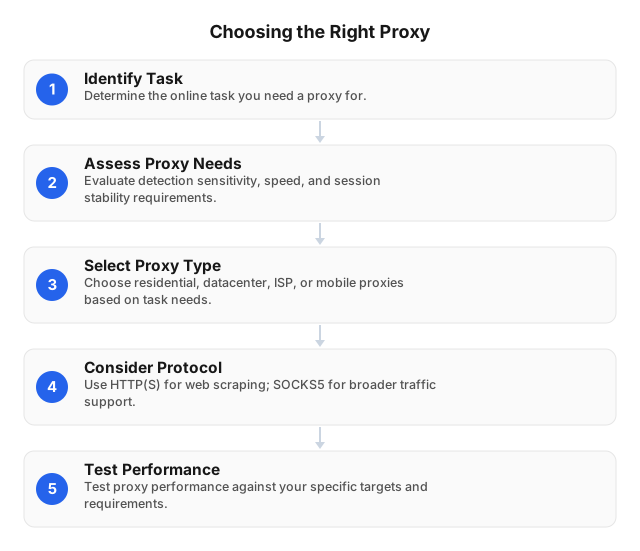
Choose by Failure Mode, Not by Proxy Label
A proxy should fix a measurable problem: wrong location, datacenter IP blocks, broken login continuity, unstable automation, or excessive retry cost. A fast proxy that returns the wrong city’s search results is bad for local SEO. A rotating proxy that changes IP mid-checkout is bad for QA. A cheap proxy that doubles retries can cost more than a higher-quality pool.
| Failure you see | Better proxy choice | Session setting | What to measure |
|---|---|---|---|
| SERPs or ads show the wrong region | Residential | Rotate by query batch; keep target location fixed | Country/city match, clean SERP rate |
| Product pages return blocks or partial HTML | Rotating residential | Rotate per request or small batch | 200 rate, parser success, cost per clean page |
| Cart, form, or dashboard tests fail mid-flow | Sticky residential or ISP SOCKS5 | Keep one IP for the full workflow | Completed flow rate, step-level failures |
| Uptime checks need low latency | Datacenter or ISP | Static or sticky | p95 latency, timeout rate |
| Mobile page behavior differs from desktop | Mobile proxy | Sticky where possible | Mobile layout, carrier-specific behavior |
HTTP(S) fits browsers, scraping libraries, SEO platforms, ad verification tools, and monitoring systems. SOCKS5 fits applications that need socket-level routing or non-HTTP traffic handling. For a deeper speed/privacy comparison, see Comparing Proxy Types: Speed vs. Privacy.
Best Proxy for Common Online Tasks
Public Web Scraping
Use rotating residential proxies when each request can stand alone: product pages, category pages, public listings, search results, reviews, and availability checks. Rotation spreads load across ISP-origin IPs and reduces repeated-request pressure on one address.
Run a pilot before scaling:
- Pick 100–500 real URLs across the target domains.
- Use production headers, browser mode, JavaScript settings, and request cadence.
- Log status code, timeout, challenge page, response size, parse result, proxy country, session mode, and bytes consumed.
- Calculate cost per successful page, not only price per GB.
- Scale only after two collection windows show stable clean-page rates.
EProxies’ residential network spans 72M+ IPs across 195+ countries. For city-level, carrier-level, or ASN-sensitive projects, confirm inventory for the exact market before scheduling volume; global pool size does not guarantee equal depth in every city.
Legal review stays separate from routing. Proxies do not bypass obligations around site terms, access controls, robots.txt analysis, privacy law, rate limits, or data retention. EU teams should review Legal Guidelines for Web Scraping in the EU 2026 before collecting regulated or personal data.
Local SEO and SERP Tracking
Search results vary by country, city, language, device profile, and network context. A national proxy may be enough for broad visibility checks. City-level reporting needs tighter targeting; “plumber Dallas” and “plumber Austin” can produce different map packs, ads, and organic results even when both requests return HTTP 200.
Use residential IPs for location-sensitive SERP collection. Rotate between query batches to avoid overusing one IP, but keep the country or city fixed for the report. For repeat checks in one market, use a sticky-style session so cookies and region signals do not reset on every request.
Price Monitoring and E-Commerce Research
Product monitoring usually works best with rotating residential proxies because each URL can be fetched independently. Track three failure types separately: blocked response, incomplete HTML, and parser breakage after a template change. Each requires a different fix.
For heavier e-commerce systems, route selection should live in the application layer. Assign proxy pools by domain, market, and page type; set conservative request rates; and label every retry with the proxy type and location used. See Integrating Rotating Proxies in E-commerce: 2026 Guide.
Ad Verification
Ad verification depends on matching the campaign conditions: country, city, device, language, schedule, landing URL, and sometimes ISP context. A proxy in the wrong market can produce a false negative even when the ad is live.
Use residential proxies for market-specific ad checks. Use sticky sessions for repeated verification in the same market, especially when cookies, frequency caps, or landing-page personalization affect what appears.
QA, Dashboards, and Multi-Step Flows
Logged-in dashboards, carts, forms, and account-adjacent workflows need continuity. Do not rotate every request. Bind one browser profile, one cookie jar, and one proxy session to the full test case, then rotate only after the workflow ends.
For automated browser testing, log the proxy country, session ID, browser profile, test-case ID, and failed step together. That makes a broken checkout reproducible instead of leaving engineers to guess whether the app or the proxy changed state. See Leveraging Proxies for Automated Online Testing.
Selection Criteria That Predict Proxy Performance
1. IP Type
Residential proxies fit geo-sensitive scraping, SEO, ad verification, and price monitoring. ISP proxies fit workflows that need stable ISP-origin routing. Datacenter proxies fit tolerant APIs, uptime checks, synthetic monitoring, and internal systems where speed matters more than residential origin.
Free or open proxies are a poor fit for production because you cannot reliably control origin, logging, abuse history, uptime, or data handling. If budget is the constraint, compare controlled paid plans against retry cost instead of using unknown relays; see Comparing Free vs Paid Proxy Servers: Pros and Cons and Exploring Open Proxy Risks and Security.
2. Location Precision
Use country targeting for national monitoring. Use city targeting for local SEO, regional ads, localized pricing, or marketplace checks. If ASN matters, confirm availability in the exact market and test against the actual target site before committing volume.
3. Session Control
Use rotation when requests are independent. Use sticky or static-style routing when the target expects one visitor across several steps: login-adjacent checks, checkout QA, forms, dashboards, and long audits.
Do not assume every country, proxy type, or plan has the same session behavior. Before a multi-hour job, confirm the available session model, maximum session duration, and rotation controls for the selected EProxies product and location.
4. Protocol and Authentication
Choose HTTP(S) for standard web traffic, headless browsers, SEO tools, scraping frameworks, and monitoring platforms. Choose SOCKS5 when the application needs lower-level routing or handles traffic beyond normal HTTP requests.
Use username/password credentials for distributed workers, IP whitelisting for fixed servers, and API-based routing when jobs need to change country, city, or session setting programmatically. Keep credentials per environment so staging failures do not burn production limits.
5. Reliability and SLA
EProxies publishes 98.2% uptime and separately offers a 99.9% uptime SLA. Treat both as provider-level indicators, then run target-specific benchmarks because a reachable proxy can still perform poorly against one domain.
Track timeout rate, p95 response time, challenge rate, response size anomalies, and parse success. For QA flows, track completed workflows rather than individual HTTP 200 responses; a test that reaches step three and fails after an IP change is still a failed run.
6. Cost per Successful Result
Per-GB pricing is an input, not the outcome. EProxies lists residential pay-as-you-go traffic from $0.25/GB, residential volume pricing down to about $0.73/GB at the 300GB tier, ISP SOCKS5 from $0.95/IP, and unlimited plans from $79/month.
Model cost this way:
- Scraping: proxy spend ÷ clean parsed pages.
- SEO: proxy spend ÷ valid SERP snapshots.
- Ad verification: proxy spend ÷ verified market impressions.
- QA: proxy spend ÷ completed workflows.
Heavy JavaScript pages, images, retries, and browser rendering can make a low per-GB rate more expensive than expected. Benchmark with real targets, not sample pages.
Common Proxy Selection Mistakes
Buying Cheap Traffic Before Testing
Cheap traffic becomes expensive when retry rates rise, HTML is incomplete, or the parser receives challenge pages. Test 100–500 production-like URLs before buying larger capacity.
Rotating During a Session
Rotation breaks workflows that depend on continuity. Keep one sticky residential or ISP SOCKS5 route for carts, forms, dashboards, and login-adjacent tests, then rotate between workflows.
Treating Pool Size as Quality
A large worldwide pool helps only if it contains the countries, cities, ASNs, and session controls your job needs. A five-city local SEO campaign needs verified local depth more than generic global coverage.
Ignoring Legal and Site Limits
A proxy changes network routing; it does not grant permission. Document target domains, request rates, data fields, legal basis, access restrictions, and retention rules before collection starts.
Mixing Proxy Types Without Labels
Hybrid setups work well when logs identify proxy type, country, ASN, session mode, and target domain. They fail when every error looks identical. Label traffic at the job level so you can separate site blocks, proxy issues, parser failures, and application bugs.
FAQ
What is the best proxy for web scraping?
Rotating residential proxies are the best default for compliant public web scraping because they distribute independent requests across ISP-origin IPs and support location-specific collection. Use sticky residential or ISP SOCKS5 for carts, dashboards, forms, or any workflow where the same visitor identity must persist across steps.
How do residential proxies differ from datacenter proxies?
Residential proxies use ISP-assigned residential IPs. Datacenter proxies use server-hosted IP ranges. Residential proxies fit geo-sensitive scraping, SEO monitoring, ad verification, and price tracking; datacenter proxies fit tolerant APIs, uptime monitoring, and internal speed checks.
What are rotating proxies best for?
Rotating proxies work best when requests are independent: SERP collection, product-page scraping, public listing monitoring, review tracking, and market research. Avoid rotation during logged-in sessions, checkout flows, dashboards, and forms because mid-session IP changes can create false failures.
How can AI-powered proxies enhance security?
AI-powered proxy systems can analyze traffic patterns, flag abnormal request spikes, detect suspicious destinations, and isolate risky sessions before they affect other workloads. They can also improve routing decisions by moving traffic away from degraded or high-risk exits. AI does not replace access control, encryption, logging, or legal review; it adds faster anomaly detection and adaptive policy enforcement.
What factors should I consider when choosing a proxy?
Start with the task: scraping, SEO, ads, QA, streaming, or monitoring each needs different IP types and session behavior. Check IP origin, country/city targeting, ASN availability, HTTP(S) or SOCKS5 support, rotation and sticky-session controls, uptime data, SLA terms, authentication options, and cost per successful result. Always pilot with real targets before scaling because target-specific challenge rates matter more than generic speed tests.
Are proxies legal for SEO and marketing research?
Proxies are legal tools, but the workflow must follow applicable law, site terms, privacy rules, and access restrictions. Use them for responsible public data collection, localization testing, ad verification, and QA; avoid restricted areas, prohibited personal data collection, and aggressive request rates.
This article was written by the EProxies team and reviewed against our editorial quality standards before publishing.